1. บทนำ
Welcome to the user manual for your new Alienware m15 R4 Gaming Laptop. This powerful machine is designed to deliver an immersive gaming experience with its high-performance components. Featuring an Intel Core i7-10870H processor, NVIDIA GeForce RTX 3070 graphics, a 15.6-inch Full HD 300Hz display, and a 1TB PCIe SSD, this laptop is built for speed and responsiveness. This manual provides essential information on setting up, operating, maintaining, and troubleshooting your device to ensure optimal performance and longevity.
2. อะไรอยู่ในกล่อง
Upon unboxing your Alienware m15 R4, please verify that all the following items are included:
- Alienware m15 R4 Notebook
- สายไฟ
- อะแดปเตอร์แปลงไฟ
- คู่มือการใช้งาน (เอกสารนี้)
3. สินค้าหมดview
Familiarize yourself with the key features and components of your Alienware m15 R4 gaming laptop.
3.1 ด้านหน้า View
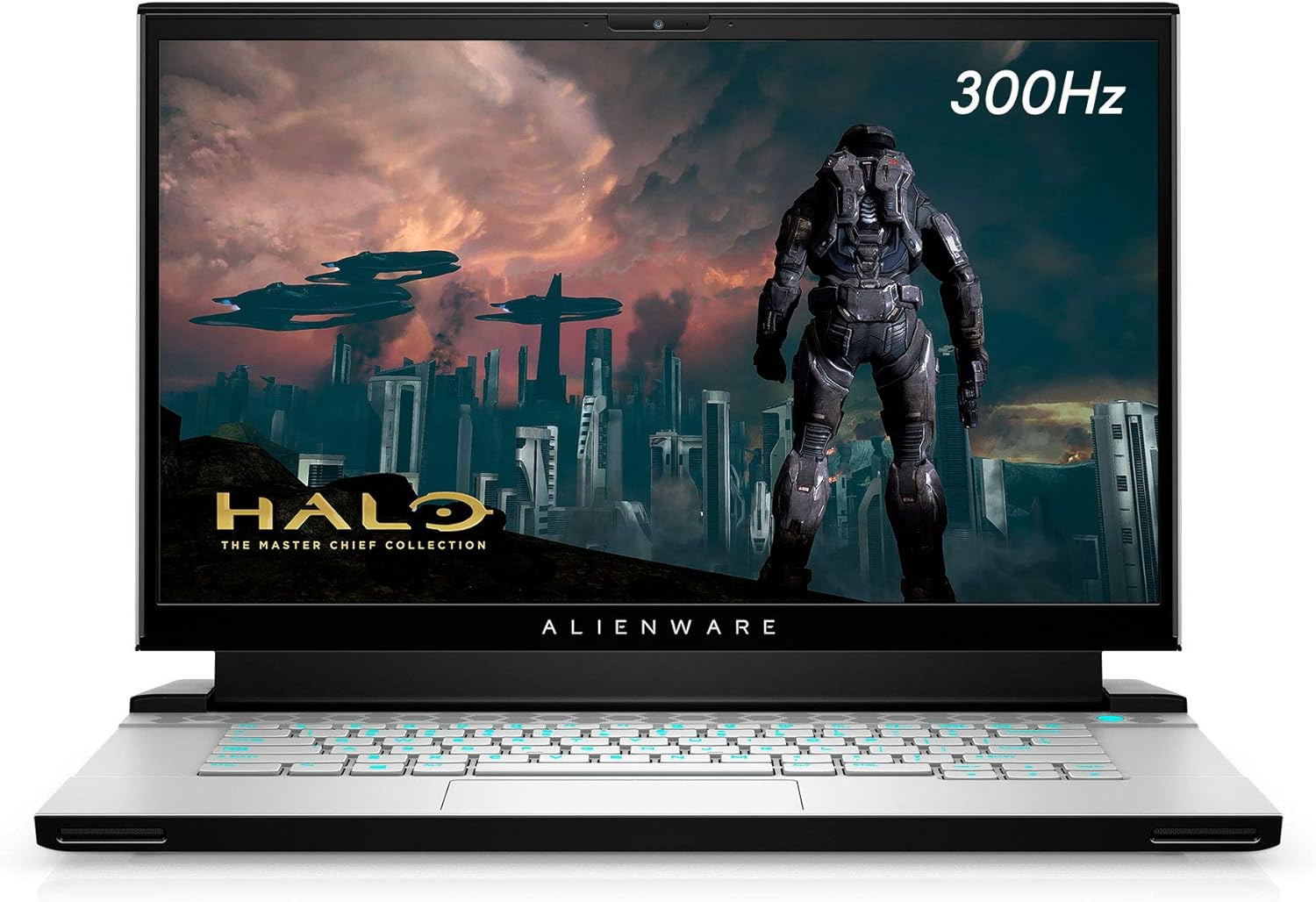
รูปที่ 3.1: ด้านหน้า view of the Alienware m15 R4 laptop, showcasing the 15.6-inch Full HD display with a 300Hz refresh rate, ideal for immersive gaming. The Alienware logo is visible below the screen.
3.2 พอร์ตด้านซ้าย

รูปที่ 3.2: Left side of the laptop, featuring a USB 3.0 Type-A port, an Ethernet port for wired network connectivity, and a 3.5mm audio jack for headphones or headsets.
3.3 พอร์ตด้านขวา

รูปที่ 3.3: Right side of the laptop, equipped with two USB 3.0 Type-A ports and an SD card reader for convenient data transfer from memory cards.
3.4 Rear Ports and Cooling

รูปที่ 3.4: หลัง view of the laptop, highlighting the robust cooling vents and essential ports including HDMI, Mini-DisplayPort, Thunderbolt 3 (USB-C), and the power adapter input. This design optimizes airflow and connectivity.
3.5 คีย์บอร์ดและทัชแพด

รูปที่ 3.5: จากบนลงล่าง view of the Alienware m15 R4's keyboard and touchpad. The keyboard features per-key RGB lighting and a comfortable layout for gaming and typing. The precision touchpad offers smooth navigation.
3.6 Laptop Back and Alienware Logo

รูปที่ 3.6: The back of the Alienware m15 R4 laptop, featuring the iconic illuminated Alienware head logo. The sleek design and Lunar Light finish are prominent.
3.7 คุณสมบัติหลัก
- แสดง: 15.6-inch FHD (1920 x 1080) 300Hz 3ms 300-nits 100% sRGB color gamut for fluid visuals.
- โปรเซสเซอร์: 10th Generation Intel Core i7-10870H (8-Core, 16MB Cache, up to 5.0GHz Max Turbo Frequency).
- หน่วยความจำ: 16GB 2933MHz DDR4 RAM (Note: RAM is soldered and not user-upgradeable on some configurations).
- พื้นที่จัดเก็บ: 1TB PCIe SSD for fast boot times and game loading.
- กราฟิก: NVIDIA GeForce RTX 3070 8GB GDDR6 for high-fidelity gaming.
- การเชื่อมต่อ: Killer Wi-Fi 6 AX1650i 802.11ax 2x2 Wireless LAN + Bluetooth 5.1.
- ระบบปฏิบัติการ: Windows 10 Home (upgradeable to Windows 11).
4. คู่มือการติดตั้ง
Follow these steps to set up your Alienware m15 R4 for the first time.
- เชื่อมต่อพลังงาน: Plug the power adapter into the laptop's power input port (located at the rear) and then into a wall outlet.
- การบูตครั้งแรก: Open the laptop lid and press the power button (located on the top right of the keyboard deck). The Alienware logo will illuminate, and the system will begin its initial boot sequence.
- การตั้งค่า Windows: Follow the on-screen instructions to complete the Windows 10 Home setup. This includes selecting your region, language, creating a user account, and connecting to a Wi-Fi network.
- การอัปเดตไดรเวอร์: After Windows setup, it is recommended to connect to the internet and allow Windows Update to download and install the latest drivers and security patches. You can also visit the official Alienware support website for the latest specific drivers for your model.
- Alienware Command Center: Explore the pre-installed Alienware Command Center software to customize lighting, power profiles, and monitor system performance.
5. คู่มือการใช้งาน
This section covers basic operation and usage tips for your Alienware m15 R4.
5.1 การจัดการพลังงาน
- เปิด/ปิดเครื่อง: Press the power button to turn on the laptop. To turn off, go to Start > Power > Shut down in Windows.
- โหมดสลีป: Close the lid or select Sleep from the Start > Power menu to put the laptop into a low-power state.
- เริ่มต้นใหม่อีกครั้ง: Select Restart from the Start > Power menu to reboot the system.
5.2 คีย์บอร์ดและทัชแพด
- การส่องสว่างคีย์บอร์ด: Customize the per-key RGB lighting effects using the Alienware Command Center.
- ปุ่มฟังก์ชัน: ใช้ Fn key in combination with the F1-F12 keys for quick access to features like volume control, screen brightness, and external display switching.
- ท่าทางทัชแพด: The precision touchpad supports multi-touch gestures for scrolling, zooming, and switching applications. Refer to Windows settings for customization.
5.3 ประสิทธิภาพการเล่นเกม
- โหมดเกม: Windows 10 includes a Game Mode feature that optimizes system resources for gaming. Enable it via Windows Settings > Gaming > Game Mode.
- Alienware Command Center: Utilize the Command Center to create custom performance profiles for your games, manage fan speeds, and monitor temperatures.
- จอแสดงผลภายนอก: For an enhanced gaming experience, connect to an external high-refresh-rate monitor using the HDMI or Mini-DisplayPort.
6. การบำรุงรักษา
Regular maintenance helps ensure the longevity and optimal performance of your laptop.
- การทำความสะอาด:
- ใช้ผ้าเนื้อนุ่มที่ไม่เป็นขุยเช็ดทำความสะอาดหน้าจอและภายนอก หลีกเลี่ยงสารเคมีรุนแรง
- Use compressed air to clear dust from cooling vents periodically to maintain airflow.
- การอัปเดตซอฟต์แวร์:
- Regularly check for Windows Updates to ensure your operating system is secure and up-to-date.
- Update graphics drivers (NVIDIA GeForce Experience) and other system drivers (Alienware Update or Dell SupportAssist) for best performance.
- การดูแลแบตเตอรี่
- หลีกเลี่ยงการปล่อยแบตเตอรี่จนหมดบ่อยครั้ง
- หากจะเก็บแล็ปท็อปไว้เป็นเวลานาน ควรตรวจสอบให้แน่ใจว่าแบตเตอรี่มีประจุอยู่ประมาณ 50-80%
- การจัดการพื้นที่เก็บข้อมูล: ทำความสะอาดสิ่งที่ไม่จำเป็นเป็นระยะๆ files and uninstall unused programs to free up disk space and maintain system speed.
7 การแก้ไขปัญหา
This section addresses common issues you might encounter with your Alienware m15 R4.
7.1 Performance Issues (Lag, Slowdowns)
- Check Background Processes: Open Task Manager (Ctrl+Shift+Esc) to identify and close resource-intensive applications.
- อัปเดตไดรเวอร์: Ensure your graphics drivers and chipset drivers are up-to-date.
- การระบายความร้อน: Ensure cooling vents are not obstructed. Excessive heat can lead to performance throttling. Consider using Alienware Command Center to adjust fan profiles.
- โหมดพลังงาน: Ensure the laptop is set to a "High Performance" or "Balanced" power plan, especially when gaming.
7.2 ความร้อนสูงเกินไป
- การระบายอากาศ : Ensure the laptop is on a hard, flat surface to allow proper airflow. Avoid using it on soft surfaces like beds or couches.
- ช่องระบายอากาศที่สะอาด: Use compressed air to clear dust from the intake and exhaust vents.
- ความเร็วพัดลม: Adjust fan curves in Alienware Command Center to increase cooling during intense workloads.
7.3 ปัญหาการแสดงผล (ไม่มีภาพ กะพริบ)
- จอภาพภายนอก: ลองต่อจอภาพภายนอกเพื่อตรวจสอบว่าปัญหาเกิดจากหน้าจอของแล็ปท็อปหรือการ์ดจอ
- การติดตั้งไดรเวอร์ใหม่: Reinstall graphics drivers.
- ความสว่าง: Ensure display brightness is not set to minimum.
7.4 Keyboard/Touchpad Unresponsive
- เริ่มต้นใหม่อีกครั้ง: A simple restart can often resolve temporary unresponsiveness.
- การตรวจสอบไดรเวอร์: Ensure keyboard and touchpad drivers are correctly installed and up-to-date in Device Manager.
- อุปกรณ์ภายนอก: Disconnect any external keyboards or mice to rule out conflicts.
8. ข้อมูลจำเพาะ
Detailed technical specifications for the Alienware m15 R4 (Model: AWM15R4-7689WHT-PUS).
| คุณสมบัติ | ข้อมูลจำเพาะ |
|---|---|
| ยี่ห้อ | เอเลี่ยนแวร์ |
| ชื่อรุ่น | เอเลี่ยนแวร์ m15 R4 |
| หมายเลขรุ่นสินค้า | AWM15R4-7689WHT-PUS |
| ขนาดหน้าจอ | 15.6 นิ้ว |
| ความละเอียดหน้าจอ | 1920 x 1080 พิกเซล (FHD) |
| อัตราการรีเฟรชการแสดงผล | 300เฮิรตซ์ |
| โปรเซสเซอร์ | Intel Core i7-10870H (8-Core, up to 5.0GHz) |
| แรม | 16GB DDR4 (2933 เมกะเฮิรตซ์) |
| ฮาร์ดไดรฟ์ | 1 TB PCIe SSD |
| โคโปรเซสเซอร์กราฟิก | การ์ดจอ NVIDIA GeForce RTX 3070 |
| ขนาดแรมการ์ดจอ | แรม 8GB GDDR6 |
| ระบบปฏิบัติการ | วินโดวส์ 10 โฮม |
| ประเภทไร้สาย | Killer Wi-Fi 6 AX1650i 802.11ax, Bluetooth 5.1 |
| พอร์ต USB 3.0 | 3 |
| น้ำหนักสินค้า | 5.5 ปอนด์ |
| ขนาดสินค้า (กxยxส) | 14.19 x 10.86 x 0.78 นิ้ว |
| สี | Lunar Light (White) |
| แบตเตอรี่ | แบตเตอรี่ลิเธียมไอออน 1 ก้อน (รวมอยู่ด้วย) |
9. การรับประกันและการสนับสนุน
Your Alienware m15 R4 laptop comes with a standard manufacturer's warranty. For detailed information regarding warranty coverage, terms, and conditions, please refer to the warranty documentation included with your purchase or visit the official Dell/Alienware support webเว็บไซต์.
การสนับสนุนด้านเทคนิค:
- For technical assistance, driver downloads, and troubleshooting guides, please visit the ฝ่ายสนับสนุนของ Dell webเว็บไซต์.
- You can also contact Alienware customer support directly through their webเว็บไซต์สำหรับการช่วยเหลือเฉพาะบุคคล
Please have your service tag or express service code ready when contacting support, as this will help expedite the process.


