1. บทนำ
This manual provides instructions for the Sharp Digital Alarm Clock, Model SPC547AJAMZ. This device features an easy-to-read LED display, a high-speed USB charging port, and essential alarm functions. Please read this manual thoroughly before use to ensure proper operation and to maximize the product's lifespan.

Figure 1: Sharp Digital Alarm Clock (Model SPC547AJAMZ) front view.
2. คุณสมบัติของผลิตภัณฑ์
The Sharp Digital Alarm Clock offers the following key features:
- จอแสดงผลที่อ่านง่าย: Large, clear green LED digits for visibility from a distance.
- High-Speed USB Charging Port: เอ 2 AMP USB port for rapid charging of compatible devices such as smartphones and tablets.
- ระดับเสียงปลุกที่ปรับได้: Select between high and low alarm volume settings.
- การดำเนินการที่เรียบง่าย: Intuitive button controls for setting time and alarm.
- แบตเตอรี่สำรอง: Maintains time and alarm settings during power outages (requires 2 AAA batteries, not included). The display will be blank during battery backup mode, but the internal clock will continue to run, and the alarm will sound at the set time.

Figure 2: Alarm clock with a smartphone connected to the USB charging port.
3. เนื้อหาบรรจุภัณฑ์
ตรวจสอบว่ามีรายการทั้งหมดอยู่ในแพ็คเกจ:
- Sharp Digital Alarm Clock (Model SPC547AJAMZ)
- อะแดปเตอร์ AC
- คู่มือการใช้งาน (เอกสารนี้)
Note: 2 AAA batteries for backup are not included and must be purchased separately.
4. ข้อมูลด้านความปลอดภัย
โปรดปฏิบัติตามข้อควรระวังด้านความปลอดภัยดังต่อไปนี้:
- อย่าให้เครื่องโดนน้ำหรือความชื้นมากเกินไป
- หลีกเลี่ยงการวางเครื่องไว้ใกล้แหล่งความร้อนหรือโดนแสงแดดโดยตรง
- Use only the provided AC power adapter.
- อย่าพยายามถอดประกอบหรือปรับเปลี่ยนหน่วย
- เก็บให้พ้นจากมือเด็ก
- ตรวจสอบให้แน่ใจว่ามีการระบายอากาศที่เหมาะสมรอบๆ ตัวเครื่อง
5. การตั้งค่า
5.1 การเชื่อมต่อสายไฟ
- Plug the AC power adapter into the DC IN jack located on the back of the alarm clock.
- เสียบปลายอีกด้านของอะแดปเตอร์แปลงไฟ AC เข้ากับเต้ารับไฟฟ้ามาตรฐาน (120V AC, 60Hz)
- The display will illuminate, and the clock will be ready for time setting.
5.2 การติดตั้งระบบสำรองไฟด้วยแบตเตอรี่
เพื่อให้มั่นใจว่าเวลาและการตั้งค่านาฬิกาปลุกจะยังคงอยู่แม้ในกรณีไฟดับtage:
- หาช่องใส่แบตเตอรี่ที่อยู่ด้านล่างของตัวเครื่อง
- เปิดฝาช่องใส่แบตเตอรี่
- Insert two (2) new AAA batteries, observing the correct polarity (+ and -) as indicated inside the compartment.
- ปิดฝาช่องใส่แบตเตอรี่ให้แน่น
Note: Batteries are for backup only. The clock display will not be lit during a power outage when operating on battery backup, but the internal clock will continue to run, and the alarm will sound at the set time.
6. คู่มือการใช้งาน
Familiarize yourself with the control buttons located on the top of the unit:
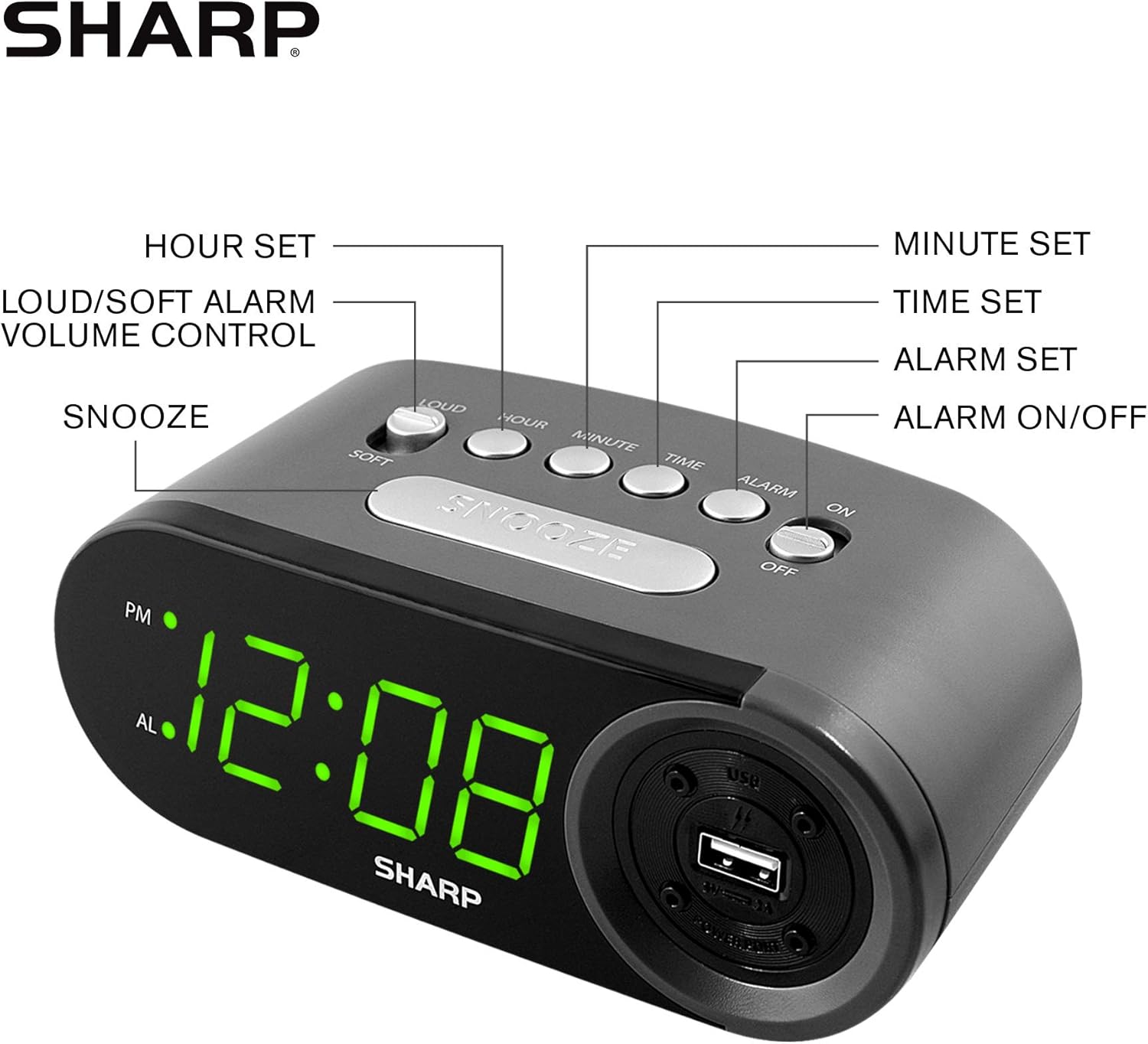
Figure 3: Top panel controls and their functions.
6.1 การตั้งเวลาปัจจุบัน
- กดปุ่มค้างไว้ เวลา button until the display begins to flash.
- กดปุ่ม ชั่วโมง button repeatedly to set the hour. Observe the PM indicator for afternoon hours.
- กดปุ่ม นาที button repeatedly to set the minutes.
- เมื่อตั้งเวลาที่ต้องการแล้ว ให้กดปุ่ม เวลา กดปุ่มอีกครั้งเพื่อยืนยันและออกจากโหมดตั้งเวลา
6.2 การตั้งเวลาปลุก
- กดปุ่มค้างไว้ เตือน button until the alarm time display begins to flash. The "AL" indicator will also flash.
- กดปุ่ม ชั่วโมง button repeatedly to set the alarm hour. Observe the PM indicator.
- กดปุ่ม นาที button repeatedly to set the alarm minutes.
- เมื่อตั้งเวลาปลุกที่ต้องการแล้ว ให้กดปุ่ม เตือน กดปุ่มอีกครั้งเพื่อยืนยันและออกจากโหมดตั้งค่าสัญญาณเตือน
6.3 การเปิด/ปิดระบบเตือนภัย
- เพื่อปิดเสียงเตือน ON, เลื่อน เปิด / ปิดนาฬิกาปลุก switch to the "ON" position. The "AL" indicator will appear on the display.
- เพื่อปิดเสียงเตือน ปิด, เลื่อน เปิด / ปิดนาฬิกาปลุก switch to the "OFF" position. The "AL" indicator will disappear.
6.4 ฟังก์ชั่นเลื่อนซ้ำ
เมื่อเสียงสัญญาณเตือนดังขึ้น ให้กดปุ่มขนาดใหญ่ เลื่อน กดปุ่มนี้ สัญญาณเตือนจะหยุดชั่วคราวและจะดังอีกครั้งหลังจากประมาณ 9 นาที
6.5 Stopping the Alarm
To stop the alarm completely after it sounds (without using snooze), slide the เปิด / ปิดนาฬิกาปลุก switch to the "OFF" position. The alarm will reset for the next day if the switch is moved back to "ON".
6.6 การปรับระดับเสียงเตือน
กดปุ่ม LOUD/SOFT button to toggle between high and low alarm volume settings.
6.7 การใช้พอร์ตชาร์จ USB
2 ครั้งที่ AMP USB charging port is located on the right side of the unit.
- Connect your device's USB charging cable (not included) to the USB port on the alarm clock.
- Connect the other end of the cable to your smartphone, tablet, or other compatible USB-powered device.
- Ensure the alarm clock is connected to AC power for the USB port to function.
Note: Charging speed may vary depending on your device and cable.
7. การบำรุงรักษา
To keep your alarm clock in optimal condition:
- การทำความสะอาด: เช็ดตัวเครื่องด้วยผ้านุ่มและแห้ง ห้ามใช้น้ำยาทำความสะอาดที่มีฤทธิ์กัดกร่อนหรือตัวทำละลาย
- การเปลี่ยนแบตเตอรี่: Replace AAA backup batteries annually or when the battery low indicator (if present) appears, to ensure reliable backup functionality.
- พื้นที่จัดเก็บ: If storing the unit for an extended period, remove the backup batteries to prevent leakage.
8 การแก้ไขปัญหา
| ปัญหา | สาเหตุที่เป็นไปได้ | สารละลาย |
|---|---|---|
| หน้าจอแสดงผลนาฬิกาว่างเปล่า | No AC power; power outage; unit unplugged. | Ensure AC adapter is securely plugged into the unit and a working wall outlet. Check for power outagใช่ |
| สัญญาณเตือนภัยไม่ดัง | Alarm is not activated; alarm time is incorrect; volume is too low. | Slide ALARM ON/OFF switch to "ON". Verify alarm time is set correctly. Adjust alarm volume using the LOUD/SOFT button. |
| พอร์ตชาร์จ USB ไม่ทำงาน | Clock not connected to AC power; device not compatible; faulty cable. | Ensure the clock is plugged into AC power. Try a different USB cable or device to confirm compatibility. |
| การตั้งค่าเวลา/นาฬิกาปลุกจะหายไปหลังจากไฟดับtage. | แบตเตอรี่สำรองหมดหรือไม่ได้ติดตั้ง | Install two fresh AAA batteries in the battery compartment, ensuring correct polarity. |
9. ข้อมูลจำเพาะ
- ยี่ห้อ: คม
- แบบอย่าง: SPC547AJAMZ
- ประเภทจอภาพ: Digital LED (Green)
- แหล่งพลังงาน: Corded Electric (AC 120V, 60Hz)
- แบตเตอรี่สำรอง: แบตเตอรี่ AAA 2 ก้อน (ไม่รวม)
- พอร์ตชาร์จ USB: 2 AMP (5V)
- ขนาดสินค้า : ขนาดโดยประมาณ กว้าง 6.2 นิ้ว x สูง 2.3 นิ้ว x ลึก 3.25 นิ้ว
- น้ำหนักสินค้า: ประมาณ 9.6 ออนซ์
- วัสดุ: พลาสติก
- ยูพีซี: 049353006000

รูปที่ 4: ขนาดผลิตภัณฑ์
10. การรับประกันและการสนับสนุน
10.1 ข้อมูลการรับประกัน
This Sharp product is covered by a limited manufacturer's warranty. For specific warranty terms and conditions, please refer to the warranty card included with your purchase or visit the official Sharp webไซต์ โปรดเก็บใบเสร็จรับเงินไว้เป็นหลักฐานการซื้อ
10.2 การสนับสนุนลูกค้า
If you have any questions, require assistance, or need to report an issue with your Sharp Digital Alarm Clock, please contact Sharp customer support. Contact details can typically be found on the official Sharp webไซต์หรือบนบรรจุภัณฑ์ผลิตภัณฑ์
หากต้องการข้อมูลเพิ่มเติม โปรดเยี่ยมชม ร้าน Sharp บน Amazon.


