การแนะนำ
Thank you for choosing the ttec AirBeat Free True Wireless Earphones. This manual provides essential information for setting up, operating, and maintaining your earphones to ensure optimal performance and longevity. Please read this manual thoroughly before using the product.
เนื้อหาแพ็คเกจ
ตรวจสอบให้แน่ใจว่ามีสินค้าทั้งหมดอยู่ในแพ็คเกจของคุณ:
- ttec AirBeat Free True Wireless Earphones (Left and Right)
- เคสชาร์จไฟ
- สายชาร์จ USB
- แผ่นรองหูฟัง
- คู่มือการใช้งาน (เอกสารนี้)
สินค้าเกินview
Familiarize yourself with the components of your ttec AirBeat Free earphones and charging case.

Figure 1: The compact ttec AirBeat Free charging case, shown held in a hand, highlighting its portable design.
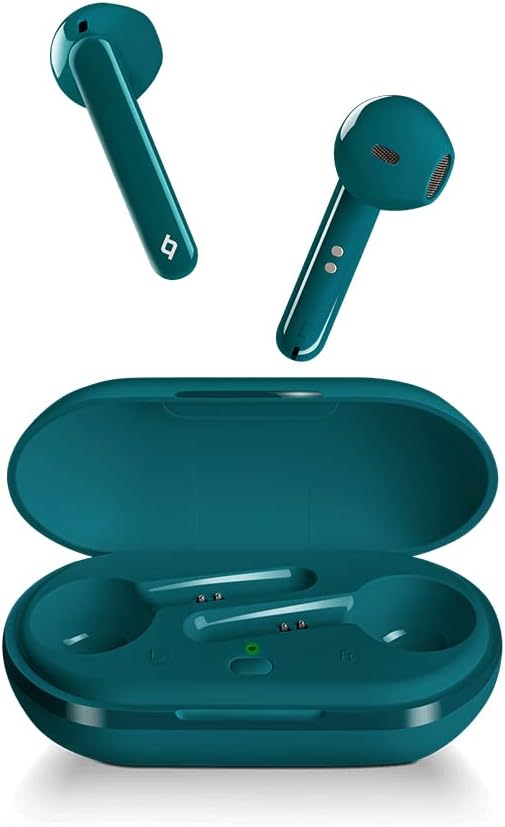
Figure 2: The ttec AirBeat Free earbuds displayed alongside their open charging case, showing the earbuds' design and the charging slots.

Figure 3: A single ttec AirBeat Free earbud positioned next to its open charging case, illustrating the earbud's form factor and the case's interior.
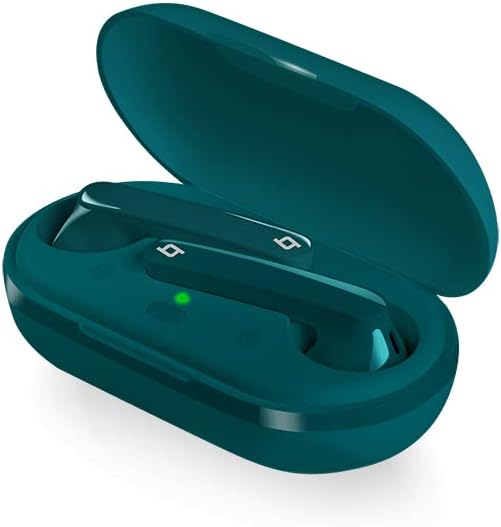
รูปที่ 4: มุมเอียง view of the ttec AirBeat Free earbuds securely placed within their open charging case, showing the charging indicators.
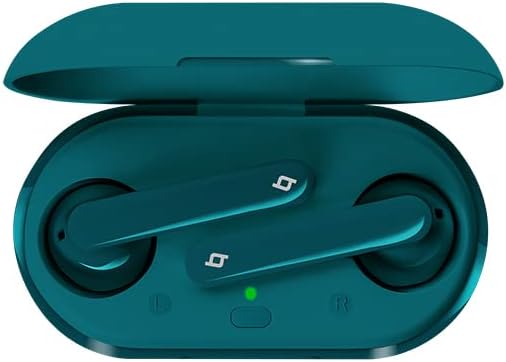
รูปที่ 5: มุมมองจากบนลงล่าง view of the ttec AirBeat Free earbuds nestled in their open charging case, clearly showing the left and right earbud positions and the charging status light.
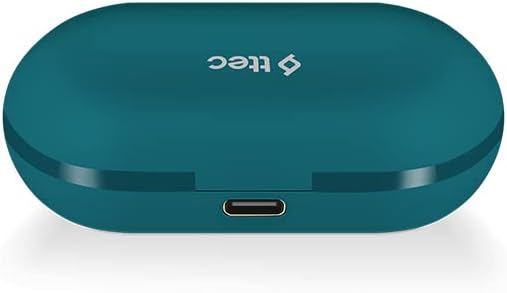
Figure 6: The closed ttec AirBeat Free charging case, viewed from the back, highlighting the USB-C charging port.
การตั้งค่า
1. การชาร์จหูฟังและเคส
ก่อนใช้งานครั้งแรก ควรชาร์จหูฟังและเคสชาร์จให้เต็ม
- ใส่หูฟังทั้งสองข้างในกล่องชาร์จ
- Connect the USB charging cable to the charging port on the back of the case (refer to Figure 6) and plug the other end into a USB power source.
- The indicator light on the charging case will show charging status. A full charge provides up to 30 hours of extra battery life with the case, and up to 4 hours for the earphones on a single charge.
- การ Charge & Go feature allows 1 hour of use with only 15 minutes of charging.
2. การจับคู่บลูทู ธ
Pair your ttec AirBeat Free earphones with your Bluetooth-enabled device.
- ตรวจสอบให้แน่ใจว่าหูฟังได้รับการชาร์จและอยู่ในกล่องชาร์จ
- เปิดฝาเคสชาร์จ หูฟังจะเข้าสู่โหมดจับคู่โดยอัตโนมัติ
- บนอุปกรณ์ของคุณ (สมาร์ทโฟน แท็บเล็ต ฯลฯ) ไปที่การตั้งค่าบลูทูธ แล้วเปิดใช้งานบลูทูธ
- ค้นหา อุปกรณ์ที่ใช้งานได้ เลือก "ttec AirBeat Free" จากรายการ
- เมื่อเชื่อมต่อแล้ว คุณจะได้ยินเสียงยืนยัน และไฟแสดงสถานะบนหูฟังอาจเปลี่ยนแปลง
- การ MonoSmart technology allows either earbud to be used independently. To use a single earbud, simply remove one from the case while the other remains inside or is turned off.
คำแนะนำการใช้งาน
The ttec AirBeat Free earphones feature touch sensors for easy control of music and calls.
การควบคุมเพลง
- เล่น/หยุดชั่วคราว: Single tap on either earbud's touch sensor.
- เพลงถัดไป: Double tap on the right earbud's touch sensor.
- แทร็กก่อนหน้า: Double tap on the left earbud's touch sensor.
- ปรับระดับเสียงขึ้น: Triple tap on the right earbud's touch sensor.
- ลดเสียงลง: Triple tap on the left earbud's touch sensor.
การควบคุมการโทร
- รับ/วางสาย: Single tap on either earbud's touch sensor.
- ปฏิเสธสาย: Press and hold either earbud's touch sensor for 2 seconds.
- เปิดใช้งาน Voice Assistant: Press and hold either earbud's touch sensor for 3 seconds (e.g., Siri, Google Assistant).
เปิด/ปิดเครื่อง
- เปิดเครื่อง: Open the charging case lid, or press and hold the touch sensor for 3 seconds if out of case.
- หมดแรง: Place earphones back into the charging case and close the lid, or press and hold the touch sensor for 5 seconds.
การบำรุงรักษาและการดูแล
Proper care will extend the life of your earphones.
- การทำความสะอาด: ใช้ผ้านุ่ม แห้ง และไม่เป็นขุยทำความสะอาดหูฟังและกล่องชาร์จ ห้ามใช้สารเคมีรุนแรงหรือวัสดุที่มีฤทธิ์กัดกร่อน
- ความต้านทานน้ำ: The earphones have an IPX4 water and dust proof rating, meaning they are resistant to splashing water from any direction. Do not submerge them in water or expose them to heavy rain. Dry them thoroughly if they get wet.
- พื้นที่จัดเก็บ: เมื่อไม่ใช้งาน ให้เก็บหูฟังไว้ในกล่องชาร์จเพื่อปกป้องหูฟังและรักษาระดับพลังงานให้คงที่ เก็บในที่แห้งและเย็น ห่างจากอุณหภูมิที่สูงหรือต่ำเกินไป
- อายุการใช้งานแบตเตอรี่: To preserve battery life, charge the earphones and case regularly, even if not used for extended periods.
การแก้ไขปัญหา
If you encounter issues with your ttec AirBeat Free earphones, try the following solutions:
| ปัญหา | วิธีแก้ปัญหาที่เป็นไปได้ |
|---|---|
| หูฟังไม่เชื่อมต่อ/จับคู่ |
|
| มีหูฟังใช้งานได้แค่ข้างเดียว |
|
| ระดับเสียงต่ำหรือคุณภาพเสียงไม่ดี |
|
| เคสชาร์จไม่ชาร์จ |
|
ข้อมูลจำเพาะ
Key technical specifications for the ttec AirBeat Free True Wireless Earphones:
- ชื่อรุ่น : AirBeat ฟรี
- หมายเลขรุ่น: 2KM133T
- เวอร์ชันบลูทูธ: 5.0
- Water and Dust Proof Rate: IPX4
- น้ำหนักของเอียร์บัด: 3.6 กรัม (อันละ)
- น้ำหนักเคสชาร์จ: 37 กรัม
- Earphone Battery Life (single charge): นานถึง 4 ชั่วโมง
- อายุการใช้งานแบตเตอรี่ทั้งหมด (พร้อมกล่องชาร์จ): นานถึง 30 ชั่วโมง
- ชาร์จเร็ว: 15 minutes charge for 1 hour playback (Charge & Go)
- การควบคุมเสียงรบกวน: ระบบตัดเสียงรบกวนแบบแอคทีฟ
- เทคโนโลยีการเชื่อมต่อ: ไร้สาย (Bluetooth)
- Headphones Ear Placement: ในหู
- ส่วนประกอบที่รวมอยู่: แผ่นรองหูฟัง
- สี: สีฟ้าอมเขียว
การรับประกันและการสนับสนุน
For warranty information and customer support, please refer to the official ttec webไซต์หรือติดต่อผู้ค้าปลีกในพื้นที่ของคุณ
ผู้ผลิต: เทค
วันที่เข้าใช้งานครั้งแรก: 9 กุมภาพันธ์ 2021
If you experience issues not covered in the troubleshooting section, please contact ttec customer service for further assistance.


