1. บทนำ
The Waveshare 1.28inch Round LCD Display Module is a compact, high-resolution display designed for various embedded applications. It features a 240x240 pixel resolution with 65K RGB colors, providing a clear and vibrant visual experience. The module utilizes an SPI interface, minimizing the number of required I/O pins for connection to microcontrollers and single-board computers. It is embedded with the GC9A01 driver and is compatible with popular development boards such as Raspberry Pi, Jetson Nano, Arduino, and STM32.
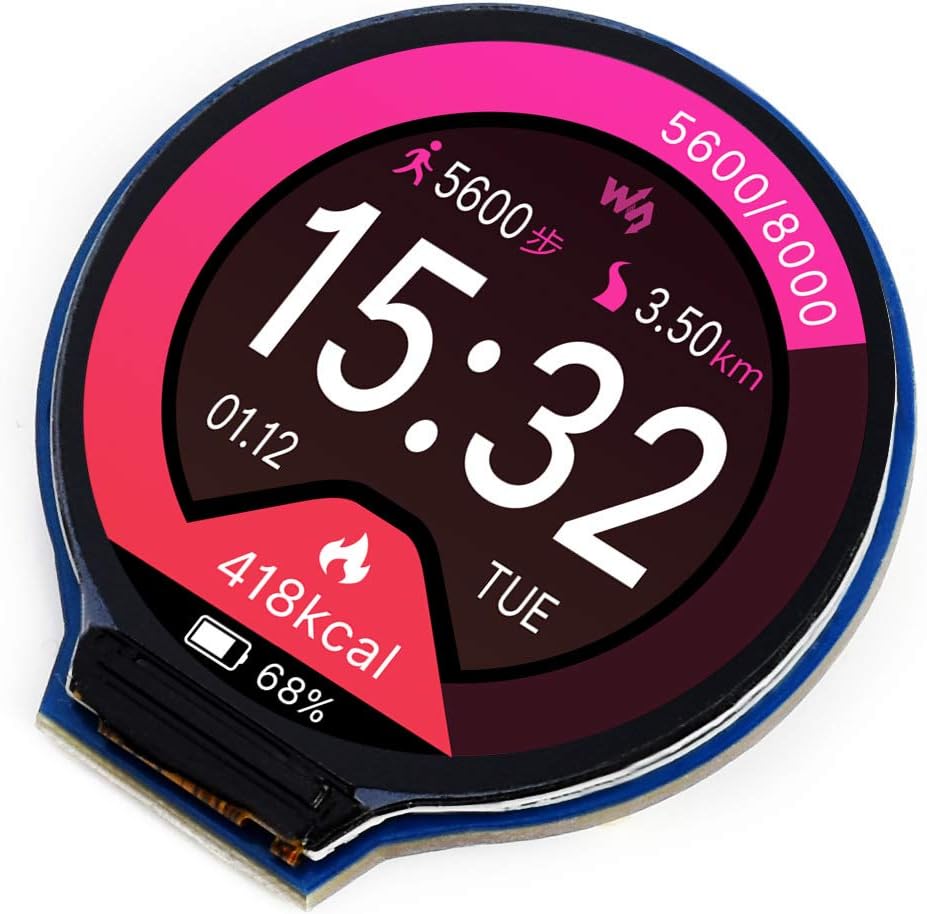
รูปที่ 1: ด้านหน้า view of the Waveshare 1.28inch Round LCD Display Module displaying a watch face with time, date, steps, distance, and calorie information.
2. คุณสมบัติหลัก
- ปณิธาน: 240x240 pixels, offering clear and detailed visuals.
- ความลึกของสี: 65K RGB colors for rich and vibrant display effects.
- อินเทอร์เฟซ: SPI (Serial Peripheral Interface) for efficient data transfer and reduced pin count.
- ไดรเวอร์: Embedded GC9A01 display driver.
- ความเข้ากันได้: Supports various controller boards including Raspberry Pi, Jetson Nano, Arduino, and STM32.
- Development Resources: Comes with example code and documentation for Raspberry Pi, Arduino, and STM32.

รูปที่ 2: เกินview of the 1.28inch Round LCD Display Module highlighting its main features and specifications.
3. เนื้อหาบรรจุภัณฑ์
เมื่อเปิดบรรจุภัณฑ์คุณควรพบรายการดังต่อไปนี้:
- 1x Waveshare 1.28inch Round LCD Display Module
- 1x PH2.0 8PIN 20cm cable

รูปที่ 3: สิ่งของที่บรรจุอยู่ในบรรจุภัณฑ์ของผลิตภัณฑ์
4. การติดตั้งและการเชื่อมต่อฮาร์ดแวร์
This section details the physical connection of the 1.28inch Round LCD Display Module to compatible development boards. The module uses an SPI interface for communication.
4.1 คำอธิบายพินเอาต์

รูปที่ 4: กลับ view of the display module showing the 8-pin connector and pin labels.
| ปักหมุดป้าย | คำอธิบาย |
|---|---|
| วีซีซี | Power supply (3.3V / 5V input) |
| ก.ย.ด. | พื้น |
| ดิน | SPI data input (MOSI) |
| ซีแอลเค | SPI clock input (SCK) |
| CS | การเลือกชิป แอคทีฟต่ำ |
| DC | การเลือกข้อมูล/คำสั่ง (สูงสำหรับข้อมูล ต่ำสำหรับคำสั่ง) |
| ร.ส.ท. | รีเซ็ต ใช้งานน้อย |
| BL | ควบคุมแสงไฟ |
4.2 Connecting with Raspberry Pi
Follow the diagram below to connect the display module to a Raspberry Pi board. Ensure correct pin mapping for VCC, GND, DIN (MOSI), CLK (SCK), CS, DC, RST, and BL.

รูปที่ 5: Hardware connection diagram for Raspberry Pi.
4.3 Connecting with Arduino Board
Refer to the diagram for connecting the display module to an Arduino board. Pay attention to the specific digital and analog pins used for SPI communication and control signals.

รูปที่ 6: Hardware connection diagram for Arduino.
For other compatible boards like Jetson Nano or STM32, consult the respective board's documentation and the Waveshare product wiki for specific wiring instructions and exampรหัส
5. การดำเนินการและการเขียนโปรแกรม
The Waveshare 1.28inch Round LCD Display Module requires programming to display content. Waveshare provides comprehensive development resources, including example code and libraries, for various platforms.
5.1 การตั้งค่าซอฟต์แวร์
- Obtain Resources: Visit the official Waveshare product wiki page for the 1.28inch Round LCD Display Module to download the latest development resources, including drivers, libraries, and example code for Raspberry Pi, Arduino, and STM32.
- ติดตั้งไลบรารี: Follow the instructions provided in the downloaded resources to install the necessary libraries for your chosen development environment (e.g., Arduino IDE, Python for Raspberry Pi).
- โหลดตัวอย่างampรหัส: Open and compile the provided example code to verify the display's functionality and understand basic operations.
5.2 Basic Display Control
The display is controlled via the SPI protocol. Key functions typically include:
- การเริ่มต้น: Sending a sequence of commands to the GC9A01 driver to configure the display.
- Drawing Pixels/Shapes: Writing pixel data to the display memory.
- การแสดงข้อความ: Using fonts to render text on the screen.
- การแสดงภาพ: Loading and displaying bitmap images.
- การควบคุมแบ็คไลท์: Adjusting the brightness of the display backlight via the BL pin.
อ้างถึงตัวอย่างที่ให้มาample code for detailed implementation of these functions.
6. การบำรุงรักษาและการดูแล
To ensure the longevity and optimal performance of your Waveshare 1.28inch Round LCD Display Module, follow these general maintenance guidelines:
- การจัดการ: Handle the module by its edges to avoid touching the display surface or electronic components.
- การทำความสะอาด: ใช้ผ้านุ่มไม่เป็นขุยเช็ดเบาๆampened with water or a mild screen cleaner, to gently wipe the display surface. Avoid abrasive materials or harsh chemicals.
- พื้นที่จัดเก็บ: Store the module in a dry, dust-free environment, away from direct sunlight and extreme temperatures.
- แหล่งจ่ายไฟ: ตรวจสอบแหล่งจ่ายไฟ voltage is within the specified range (3.3V / 5V) to prevent damage.
- ไฟฟ้าสถิต: โปรดใช้ความระมัดระวังป้องกันการเกิดประจุไฟฟ้าสถิต (ESD) เมื่อทำการเคลื่อนย้ายโมดูล เนื่องจากชิ้นส่วนอิเล็กทรอนิกส์มีความไวต่อไฟฟ้าสถิต
7 การแก้ไขปัญหา
If you encounter issues with your display module, consider the following troubleshooting steps:
- ไม่มีจอแสดงผล/หน้าจอว่าง:
- Verify all connections (VCC, GND, DIN, CLK, CS, DC, RST, BL) are secure and correctly wired according to the diagrams.
- Check the power supply to the module and the host board.
- Ensure the backlight (BL) pin is correctly controlled and receiving power.
- Confirm that the initialization code for the GC9A01 driver is correctly executed in your program.
- Incorrect or Garbled Display:
- Double-check your SPI communication settings (mode, clock speed).
- Ensure the data format and command sequences sent to the GC9A01 driver match the specifications.
- Verify that the display buffer is being updated correctly in your code.
- อัตราการรีเฟรชช้า:
- SPI communication speed can impact refresh rates. Ensure your host board is configured for the fastest stable SPI clock speed.
- Optimize your drawing routines to minimize the amount of data sent over SPI.
- Module Gets Warm:
- Some heat generation is normal, especially with continuous operation. Ensure adequate ventilation.
- ตรวจสอบว่าปริมาณอินพุตtage ไม่เกิน 5V
- ปัญหาความเข้ากันได้:
- While compatible with many boards, specific libraries or pin mappings might be required. Consult Waveshare's documentation for your exact host board. (Note: Some users reported issues with Teensy 4, while it worked with Arduino Nano/Teensy 3.2/3.5).
8. ข้อมูลจำเพาะทางเทคนิค
| คุณสมบัติ | ข้อมูลจำเพาะ |
|---|---|
| ขนาดจอแสดงผล | 1.28 นิ้ว (กลม) |
| ปณิธาน | 240 x 240 พิกเซล |
| ความลึกของสี | 65K RGB colors |
| IC ไดร์เวอร์ | GC9A01 |
| อินเทอร์เฟซ | SPI 4 สาย |
| ปฏิบัติการฉบับที่tage | 3.3โวลต์/5โวลต์ |
| ขนาด | 40.4 x 37.5mm (overall), φ32.4mm (display area) |
| ขนาดพิกเซล | 0.135 x 0.135มม. |
| น้ำหนักสินค้า | 0.704 ออนซ์ |
| ผู้ผลิต | เวฟแชร์ |

รูปที่ 7: Detailed technical specifications and pin descriptions.
9. การสนับสนุนและทรัพยากร
For further assistance, detailed documentation, and the latest development resources, please visit the official Waveshare website or product wiki page for this module. You can typically find:
- Detailed tutorials and guides.
- Exampโค้ดสำหรับภาษาโปรแกรมและแพลตฟอร์มต่างๆ
- Datasheets for the GC9A01 driver IC.
- Community forums or contact information for technical support.
ผู้ผลิต: เวฟแชร์
เป็นทางการ Webเว็บไซต์: www.waveshare.com
For specific product support, search for "1.28inch Round LCD Display Module" on the Waveshare wiki.


