1. บทนำ
Thank you for choosing the Ctronics 5X Optical Zoom WiFi Outdoor Security Camera. This manual provides detailed instructions for the installation, operation, and maintenance of your camera. Please read this manual thoroughly before use to ensure proper functionality and safety. This camera is designed for outdoor surveillance, offering advanced features such as 5X optical zoom, human detection, auto-tracking, color night vision, and two-way audio.

รูปที่ 1.1: Ctronics 5X Optical Zoom WiFi Outdoor Security Camera. This image shows the main unit of the camera with its dual antennas and lens array.
2. ข้อมูลด้านความปลอดภัย
โปรดปฏิบัติตามข้อควรระวังด้านความปลอดภัยต่อไปนี้ เพื่อป้องกันความเสียหายต่อผลิตภัณฑ์ หรือการบาดเจ็บต่อตัวคุณเองและผู้อื่น:
- Ensure the power supply is stable and matches the camera's voltagข้อกำหนด e (12 โวลต์)
- อย่าให้กล้องอยู่ในที่ที่มีอุณหภูมิหรือความชื้นสูงเกินกว่าช่วงการทำงานที่กำหนด
- Avoid direct exposure of the lens to strong light sources, which may damage the sensor.
- อย่าพยายามถอดประกอบหรือดัดแปลงกล้อง โปรดติดต่อช่างผู้ชำนาญเพื่อขอรับบริการทั้งหมด
- เก็บกล้องและอุปกรณ์เสริมให้พ้นมือเด็ก
- Ensure proper mounting to prevent the camera from falling.
3. เนื้อหาบรรจุภัณฑ์
Please check the package contents upon opening. If any items are missing or damaged, contact your retailer or Ctronics support.
- Ctronics 5X Optical Zoom WiFi Outdoor Security Camera
- อะแดปเตอร์แปลงไฟ
- สกรูยึดและปลั๊กผนัง
- ชุดอุปกรณ์กันน้ำสำหรับสายเคเบิลเครือข่าย (ถ้ามี)
- คู่มือเริ่มต้นอย่างรวดเร็ว
4. การตั้งค่า
4.1 การติดตั้งทางกายภาพ
- เลือกตำแหน่ง: Select a suitable outdoor location with a clear view of the area you wish to monitor. Ensure the location has access to a power outlet.
- การติดตั้ง: Use the provided mounting template (if included) to mark drill holes on the wall or ceiling. Drill the holes, insert wall plugs, and secure the camera bracket using the screws.
- การเชื่อมต่อไฟฟ้า: Connect the power adapter to the camera's power input and plug it into a power outlet.
4.2 การเชื่อมต่อเครือข่าย
The camera supports 2.4GHz Wi-Fi networks.
- ดาวน์โหลดแอป: Download the "Ctronics" app from your smartphone's app store (iOS/Android). For PC users, download the HiP2P software for MAC/Windows.
- ตั้งค่าเริ่มต้น: ทำตามคำแนะนำในแอปเพื่อเพิ่มกล้องของคุณ ซึ่งโดยทั่วไปจะเกี่ยวข้องกับการสแกนคิวอาร์โค้ดบนกล้องหรือป้อนรหัสประจำตัวด้วยตนเอง
- การกำหนดค่า Wi-Fi: เชื่อมต่อกล้องเข้ากับเครือข่าย Wi-Fi 2.4GHz ผ่านแอปพลิเคชัน

รูปที่ 4.1: Broad Compatibility. This image illustrates the camera's compatibility with various devices and operating systems, including iOS, Android, Windows, and Mac OS, through the Ctronics Pro app and HiP2P Client software.
4.3 การติดตั้งการ์ด Micro SD (ไม่บังคับ)
The camera supports a micro SD card up to 64GB for local storage of recordings.
- Locate the SD card slot on the camera (refer to the camera diagram in the quick start guide).
- Carefully insert the micro SD card into the slot until it clicks into place.
- Format the SD card via the camera's settings in the Ctronics app for optimal performance.
5. การใช้งานกล้อง
5.1 การหมุน การเอียง และการซูม (PTZ)
The camera features motorized pan (355° horizontally) and tilt (90° vertically) functions, along with 5X optical zoom.
- ควบคุม: Use the Ctronics app to remotely control the camera's pan and tilt movements by swiping on the live view หน้าจอ.
- ซูมออปติคอล: Pinch-to-zoom on the live view to activate the 5X optical zoom. The camera will auto-focus for clear detailed images.
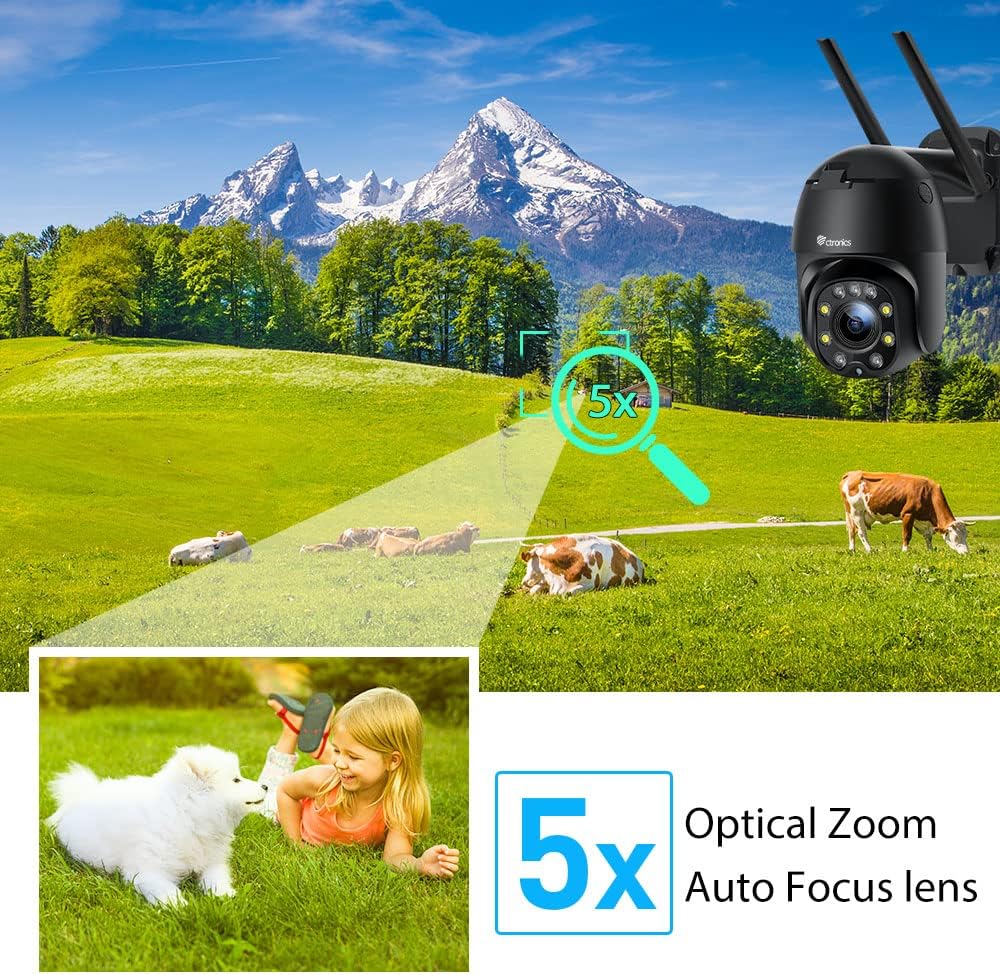
รูปที่ 5.1: 5X Optical Zoom. This image demonstrates the camera's 5X optical zoom capability, allowing for detailed viewing of distant objects with auto-focus functionality.
5.2 Human Detection and Auto-Tracking
The camera utilizes AI algorithms to distinguish human movement from other triggers, reducing false alarms by up to 95%.
- การตรวจจับ: When a human is detected, the camera will automatically track their movement within its field of view.
- การแจ้งเตือน: You will receive instant notifications via the app, FTP, or email.
- การบันทึก: Detected events are recorded to the installed SD card.

รูปที่ 5.2: Human Detection. This image illustrates how the camera's human detection feature accurately identifies people while ignoring non-human movements like pets, significantly reducing false alarms.

รูปที่ 5.3: Auto Tracking. This image demonstrates the camera's auto-tracking capability, showing how it follows a detected subject's movement within its 355° horizontal and 90° vertical range.
5.3 HD 1080P & Night Vision
The camera provides 1920x1080P resolution for clear images and offers two night vision modes.
- การมองเห็นสีกลางคืน: With 4 spotlights and 5 infrared lights, the camera can display vivid color images in total darkness up to 25 meters.
- อินฟราเรดคืนวิสัยทัศน์: Standard black and white infrared vision is also available.

รูปที่ 5.4: Color Night Vision. This image illustrates the camera's ability to provide full-color video surveillance even in low-light or nighttime conditions.
5.4 เสียงสองทาง
สื่อสารกับผู้มาเยือนหรือป้องกันผู้บุกรุกโดยใช้ไมโครโฟนและลำโพงในตัว
- Real-time Conversation: Use the Ctronics app to engage in real-time conversations.
- การลดเสียงรบกวน: The camera features ambient noise reduction technology for clearer sound quality.

รูปที่ 5.5: Two-Way Audio. This image depicts the camera's two-way audio functionality, allowing users to communicate with individuals near the camera via their smartphone.
5.5 การเข้าถึงระยะไกล
View อยู่ footage and recordings from anywhere at any time using the Ctronics app or HiP2P software.
- Ensure your camera is connected to the internet.
- Log in to your Ctronics app or HiP2P software account to access your camera feed.
6. การบำรุงรักษา
การบำรุงรักษาอย่างสม่ำเสมอจะช่วยให้กล้องของคุณมีอายุการใช้งานยาวนานและทำงานได้อย่างมีประสิทธิภาพสูงสุด
- การทำความสะอาด: ค่อยๆ เช็ดเลนส์และตัวกล้องด้วยผ้าเนื้อนุ่มและแห้งamp ผ้า. อย่าใช้สารเคมีที่รุนแรงหรือน้ำยาทำความสะอาดที่มีฤทธิ์กัดกร่อน
- อัพเดตเฟิร์มแวร์: Check the Ctronics app periodically for available firmware updates. Keeping the firmware updated ensures you have the latest features and security enhancements.
- วงจรไฟฟ้า: If the camera experiences minor issues, try power cycling it by unplugging and replugging the power adapter.
7 การแก้ไขปัญหา
หัวข้อนี้จะกล่าวถึงปัญหาทั่วไปที่คุณอาจพบเจอ
| ปัญหา | สาเหตุที่เป็นไปได้ | สารละลาย |
|---|---|---|
| กล้องออฟไลน์ | No power; Wi-Fi disconnected; Router issue | Check power connection; Reconnect Wi-Fi in app; Restart router |
| คุณภาพของภาพไม่ดี | Dirty lens; Network bandwidth; Low light | Clean lens; Check internet speed; Ensure sufficient lighting or use night vision |
| สัญญาณเตือนที่ผิดพลาด | Sensitivity too high; Non-human movement | Adjust detection sensitivity in app; Ensure human detection is enabled |
| การ์ด SD ไม่บันทึก | SD card full/corrupted; Not formatted; Incorrect settings | Format SD card in app; Check recording settings; Replace SD card if faulty |
8. ข้อมูลจำเพาะ
Detailed technical specifications for the Ctronics CTIPC-285C-Z4B camera:
| คุณสมบัติ | ข้อมูลจำเพาะ |
|---|---|
| หมายเลขรุ่น | CTIPC-285C-Z4B |
| ขนาด (กว้าง x ยาว x สูง) | 11 x 17 x 30 ซม. |
| น้ำหนัก | 940 กรัม |
| วัสดุ | อะคริโลไนไตรล์ บิวทาไดอีน สไตรีน (ABS) |
| ประเภทพลังงาน | สายไฟฟ้า |
| เล่มที่tage | 12 โวลต์ |
| การใช้พลังงาน | 6 วัตต์ |
| ปณิธาน | 1920x1080P |
| ซูมออปติคอล | 5X |
| ช่วงแพน | 355° |
| ช่วงความเอียง | 90° |
| ระยะการมองเห็นกลางคืน | ประมาณ 25 เมตร |
| ระดับการกันน้ำ | IP66 |
| ประเภทการ์ดหน่วยความจำ | ไมโคร SD |
| ความจุหน่วยความจำสูงสุด | 64GB |
| อุปกรณ์ที่รองรับ | Smartphone (iOS/Android), PC (MAC/Windows) |
9. การรับประกันและการสนับสนุน
Ctronics products come with a standard warranty. For specific warranty terms and conditions, please refer to the warranty card included with your product or visit the official Ctronics website. If you encounter any issues not covered in this manual or require further assistance, please contact Ctronics customer support:
- Webเว็บไซต์: www.ctronics.com
- อีเมล: ดูที่บรรจุภัณฑ์ผลิตภัณฑ์ของคุณหรือ webไซต์สำหรับการสนับสนุนอีเมล
- โทรศัพท์: ดูที่บรรจุภัณฑ์ผลิตภัณฑ์ของคุณหรือ webเว็บไซต์สำหรับหมายเลขโทรศัพท์ฝ่ายสนับสนุน
Please have your model number (CTIPC-285C-Z4B) and purchase information ready when contacting support.


