การแนะนำ
This manual provides instructions for the operation and maintenance of your WIITHINK Portable CD Boombox, model WTB771. This device features multiple audio playback options including CD, FM radio, Bluetooth, USB, and AUX input, designed for versatile use.

ภาพ: ด้านหน้า view of the WIITHINK Portable CD Boombox WTB771, black color, showing the display, control buttons, speakers, and handle.
เนื้อหาแพ็คเกจ
- 1 x WIITHINK Portable CD Radio Boombox (WTB771)
- สายไฟ 1 เส้น
- สาย AUX 1 เส้น
- 1 x คู่มือผู้ใช้
- 1 x รีโมทคอนโทรล
การตั้งค่า
แหล่งจ่ายไฟ
เครื่องเล่นเพลงพกพานี้สามารถใช้ไฟจากไฟบ้านหรือแบตเตอรี่ก็ได้
- ไฟฟ้ากระแสสลับ: Connect the provided power cable to the AC port on the back of the unit and plug it into a standard wall outlet (AC voltage: 220V / 50Hz, 110V / 60Hz).
- พลังงานแบตเตอรี่: For portable use, insert 4 C-sized batteries (not included) into the battery compartment located on the bottom of the unit. Ensure correct polarity.
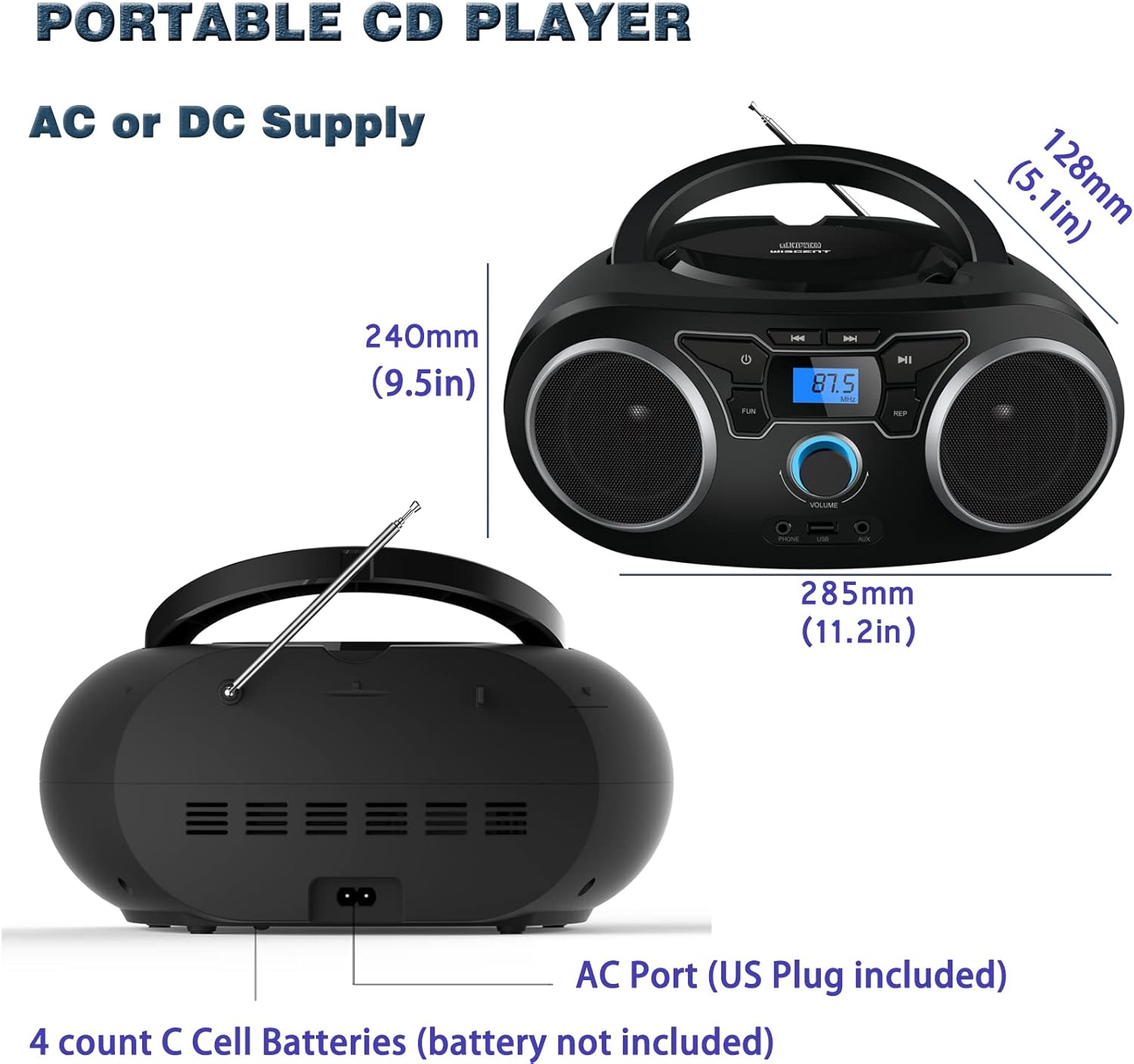
ภาพ: ด้านหลัง view of the boombox, highlighting the AC power port and the battery compartment for 4 C-sized batteries.
คำแนะนำการใช้งาน
การควบคุมทั่วไป
The unit features a digital LCD screen and various control buttons and knobs. The main volume control is a rotary knob on the front. A remote control is also included for convenient operation.

ภาพ: จากบนลงล่าง view of the boombox, showing the CD compartment, control buttons, and volume knob.
1. การเล่นซีดี
- เปิดฝาช่องใส่ซีดีที่อยู่ด้านบนของเครื่อง
- Place a CD (CD, CD-R, CD-RW, MP3-CD) onto the spindle with the label side facing up.
- ปิดฝาช่องใส่ซีดี
- กดปุ่ม โหมด ปุ่มเพื่อเลือกโหมดซีดี
- กดปุ่ม เล่น/หยุดชั่วคราว ปุ่มเพื่อเริ่มเล่น
- ใช้ ข้าม/ค้นหา ปุ่มสำหรับนำทางระหว่างแทร็ก
- การ ทำซ้ำ button allows for repeating a single track or all tracks.
- การ โปรแกรม function allows you to create a custom playback order for tracks.
The boombox supports MP3 and WMA audio formats on compatible discs.
2. การใช้งานวิทยุ FM
- ยืดเสาอากาศแบบยืดหดได้ออกเพื่อให้รับสัญญาณได้ดีที่สุด
- กดปุ่ม โหมด ปุ่มสำหรับเลือกโหมดวิทยุ FM
- หากต้องการสแกนและบันทึกสถานีโดยอัตโนมัติ ให้กดปุ่มค้างไว้ สแกน button. The unit will automatically search for and store up to 30 FM stations.
- หากต้องการจูนด้วยตนเอง ให้ใช้ การปรับแต่ง ลูกบิดหรือ ข้าม/ค้นหา buttons to find desired frequencies.
- ใช้ พรีเซ็ต ปุ่มเพื่อนำทางผ่านสถานีที่บันทึกไว้
Video: A user demonstrating the FM radio tuning function on the WIITHINK Portable CD Boombox WTB771, showing the digital display changing frequencies.
3. การเชื่อมต่อบลูทูธ
- กดปุ่ม โหมด button to select Bluetooth mode. The display will indicate "BT" and the unit will enter pairing mode.
- On your Bluetooth-enabled device (e.g., smartphone, tablet), search for available devices and select "WTB771".
- เมื่อจับคู่แล้ว คุณสามารถสตรีมเสียงแบบไร้สายจากอุปกรณ์ของคุณไปยังบูมบ็อกซ์ได้
วิดีโอ: บทนำสั้น ๆview demonstrating Bluetooth connectivity, showing a smartphone wirelessly connected to the boombox.
4. การเล่นผ่าน USB
- ใส่แฟลชไดรฟ์ USB ที่มี MP3 fileเข้ากับพอร์ต USB ที่ด้านหน้าของตัวเครื่อง
- กดปุ่ม โหมด ปุ่มเพื่อเลือกโหมด USB
- เครื่องจะตรวจจับและเริ่มเล่นไฟล์ MP3 โดยอัตโนมัติ fileจากไดรฟ์ USB
- Use the playback controls (PLAY/PAUSE, SKIP/SEARCH) to manage your music.
5. อินพุต AUX
- Connect an external audio device (e.g., MP3 player, laptop) to the AUX input jack on the front of the unit using the provided 3.5mm AUX cable.
- กดปุ่ม โหมด ปุ่มเพื่อเลือกโหมด AUX
- ตอนนี้เสียงจากอุปกรณ์ที่เชื่อมต่อจะเล่นผ่านลำโพงบูมบ็อกซ์ ควบคุมการเล่นจากอุปกรณ์ภายนอกของคุณ
การควบคุมและพอร์ตผ่านview
| คุณสมบัติ | คำอธิบาย |
|---|---|
| ปุ่มเปิดปิด | เปิด/ปิดเครื่อง |
| ปุ่มโหมด | Switches between CD, FM, Bluetooth, USB, and AUX modes. |
| ปุ่มปรับระดับเสียง | Adjusts the audio output level (up to 32 levels). |
| ปุ่มเล่น/หยุดชั่วคราว | Starts or pauses playback in CD, USB, and Bluetooth modes. |
| ปุ่มข้าม/ค้นหา | Navigates tracks in CD/USB mode; tunes frequencies in FM mode. |
| ปุ่ม REPEAT | Repeats current track or all tracks in CD/USB mode. |
| ปุ่มโปรแกรม | Sets a custom playback order for CD/USB tracks. |
| เสาอากาศเอฟเอ็ม | เสาอากาศแบบยืดหดได้สำหรับรับสัญญาณวิทยุ FM |
| พอร์ต USB | Connects USB flash drives for MP3 playback. |
| แจ็คอินพุต AUX | ช่องต่อขนาด 3.5 มม. สำหรับเชื่อมต่ออุปกรณ์เสียงภายนอก |
| แจ็คหูฟัง | เอาต์พุต 3.5 มม. เพื่อการฟังแบบส่วนตัว |
| รีโมทคอนโทรล | Provides wireless control over all functions. |

Image: Close-up of the front panel, showing the USB port, AUX input, and headphone jack.
การซ่อมบำรุง
- ทำความสะอาดตัวเครื่องด้วยผ้าแห้งเนื้อนุ่ม ห้ามใช้สารทำความสะอาดที่มีฤทธิ์กัดกร่อนหรือตัวทำละลาย
- รักษาช่องใส่ซีดีให้สะอาดและปราศจากฝุ่น
- หลีกเลี่ยงการให้เครื่องสัมผัสกับอุณหภูมิที่สูงหรือความชื้นสูงหรือแสงแดดโดยตรง
- When not in use for extended periods, remove batteries and unplug the AC power cable.
การแก้ไขปัญหา
| ปัญหา | สารละลาย |
|---|---|
| ไม่มีไฟฟ้า |
|
| ไม่มีเสียง |
|
| แผ่นซีดีเล่นสะดุด/ไม่เล่น |
|
| Poor FM Reception |
|
| ปัญหาการจับคู่บลูทูธ |
|
ข้อมูลจำเพาะ
- แบบอย่าง: WTB771
- ขนาดสินค้า : 7 x 10 x 4.8 นิ้ว (17.8 x 25.4 x 12.2 ซม.)
- น้ำหนักสินค้า: 2.64 ปอนด์ (1.2 กก.)
- กำลังขับ: 2x2วัตต์อาร์เอ็มเอส
- การเชื่อมต่อ: อุปกรณ์เสริม, บลูทูธ, USB
- ประเภทลำโพง: บิวท์อิน
- แหล่งจ่ายไฟ: AC (220V/50Hz, 110V/60Hz) or 4 x C batteries (not included)
- ประเภทดิสก์ที่รองรับ: ซีดี, ซีดี-อาร์, ซีดี-อาร์ดับบลิว, เอ็มพี3-ซีดี
- รูปแบบเสียงที่รองรับ: MP3, WMA
- FM Radio Presets: สูงสุด 30 สถานี
การรับประกันและการสนับสนุน
WIITHINK offers an 18-month after-sales service for this product. For any inquiries or technical support, please contact WIITHINK customer service through your purchase platform. Lifetime technical support is provided.
For further assistance, you may refer to the "Your Orders" section on Amazon, locate your order, and contact "WIITHINK Direct".

Image: Graphic illustrating WIITHINK's customer support, including 18-month replacement and lifetime technical support.
