1. บทนำ
This user manual provides comprehensive instructions for the LVWIT Smart Light Bulb, Model LV-5.3WB10-E12-ZF. This smart candelabra LED bulb features color changing capabilities, dimmable functions, and seamless integration with voice assistants like Alexa and Google Home. It operates on a 2.4 GHz Wi-Fi network and requires no additional hub.
Please read this manual thoroughly before installation and operation to ensure proper use and to maximize the product's features.
2. ข้อมูลด้านความปลอดภัย
- ความปลอดภัยทางไฟฟ้า: Ensure power is turned off at the switch before installing or removing the bulb.
- สำหรับใช้ภายในอาคารเท่านั้น: หลอดไฟนี้ออกแบบมาสำหรับใช้ภายในอาคารในที่แห้ง
- เล่มที่tagความเข้ากันได้: Use only with 100-120V, 60Hz power supply.
- สวิตช์หรี่ไฟ: Do not use with traditional dimmer switches. The bulb is dimmable via the app or voice control.
- การระบายอากาศ : Ensure adequate ventilation around the bulb. Do not enclose in fixtures that restrict airflow.
- การกำจัด: กำจัดขยะอิเล็กทรอนิกส์อย่างถูกวิธีตามกฎระเบียบของท้องถิ่น
3. เนื้อหาบรรจุภัณฑ์
The package for the LVWIT Smart Light Bulb (Model LV-5.3WB10-E12-ZF) typically includes:
- LVWIT Smart Light Bulb(s) (B11-4.9w, 2 Count)
- คู่มือการใช้งาน (เอกสารนี้)

Figure 3.1: LVWIT Smart Light Bulbs (2-pack).
4. คู่มือการติดตั้ง
4.1 การติดตั้งทางกายภาพ
- Ensure the power to the light fixture is turned off at the wall switch before installation.
- Carefully screw the LVWIT Smart Light Bulb into a standard E12 candelabra base socket.
- Turn on the power to the light fixture. The bulb should flash rapidly, indicating it is in pairing mode. If not, turn the bulb off and on 3 times until it flashes.
4.2 การติดตั้งแอปและการเชื่อมต่อ Wi-Fi
The LVWIT Smart Light Bulb works with the Tuya Smart or Smart Life app.
- Download the "Tuya Smart" or "Smart Life" app from the Apple App Store or Google Play Store.
- ลงทะเบียนหรือเข้าสู่ระบบบัญชีของคุณ
- ตรวจสอบให้แน่ใจว่าอุปกรณ์มือถือของคุณเชื่อมต่อกับ เครือข่าย Wi-Fi 2.4 GHz. The bulb does not support 5 GHz Wi-Fi.
- ในแอป แตะไอคอน "+" ที่มุมขวาบนเพื่อเพิ่มอุปกรณ์
- Select "Lighting" > "Light Source (Wi-Fi)".
- Confirm that the bulb is flashing rapidly. If it is not, turn the bulb off and on 3 times until it flashes rapidly.
- Enter your 2.4 GHz Wi-Fi network password and confirm.
- The app will begin connecting to the bulb. Once connected, you can rename the bulb for easier control.
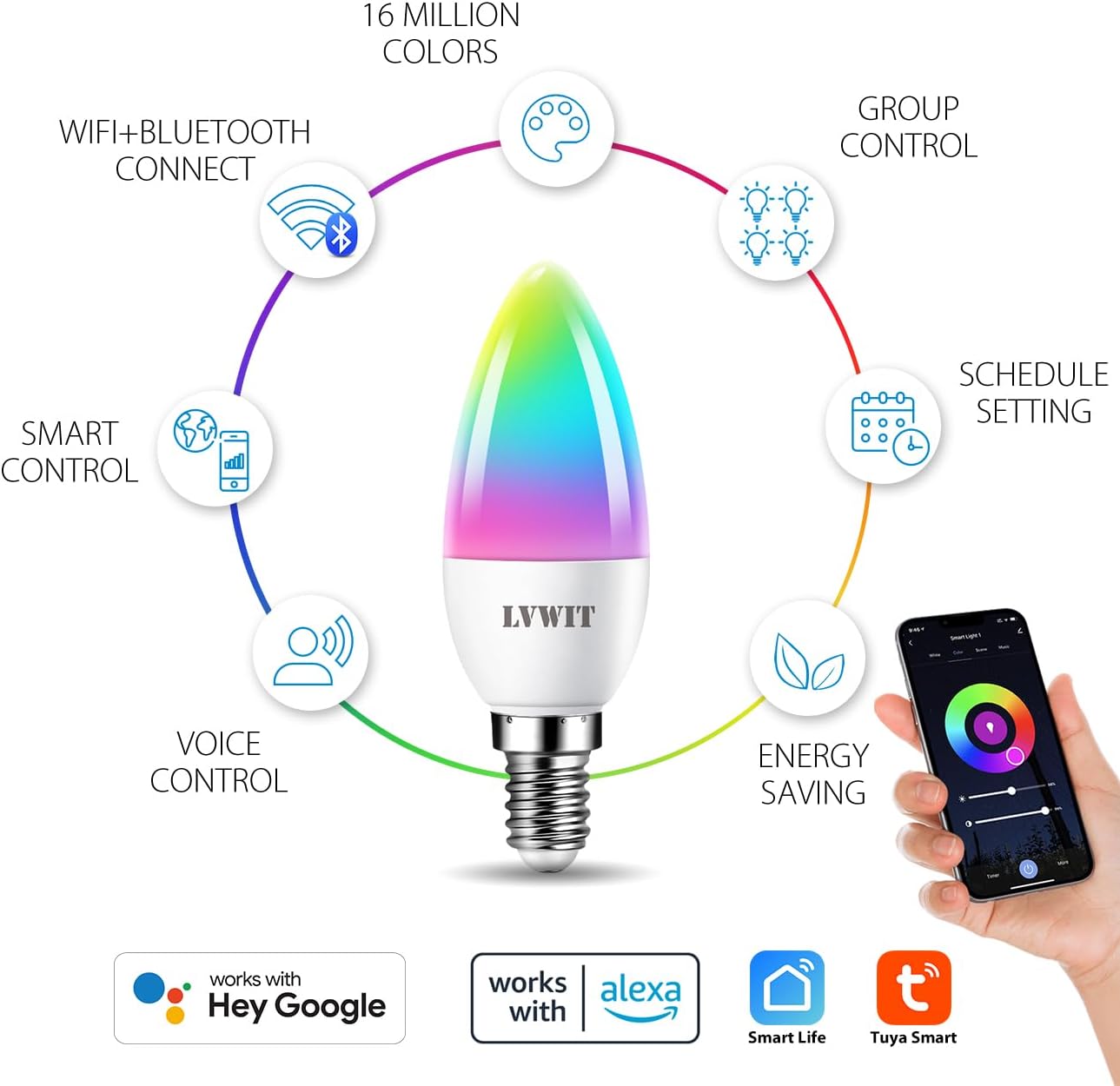
รูปที่ 4.1: เกินview of smart bulb features and app compatibility.
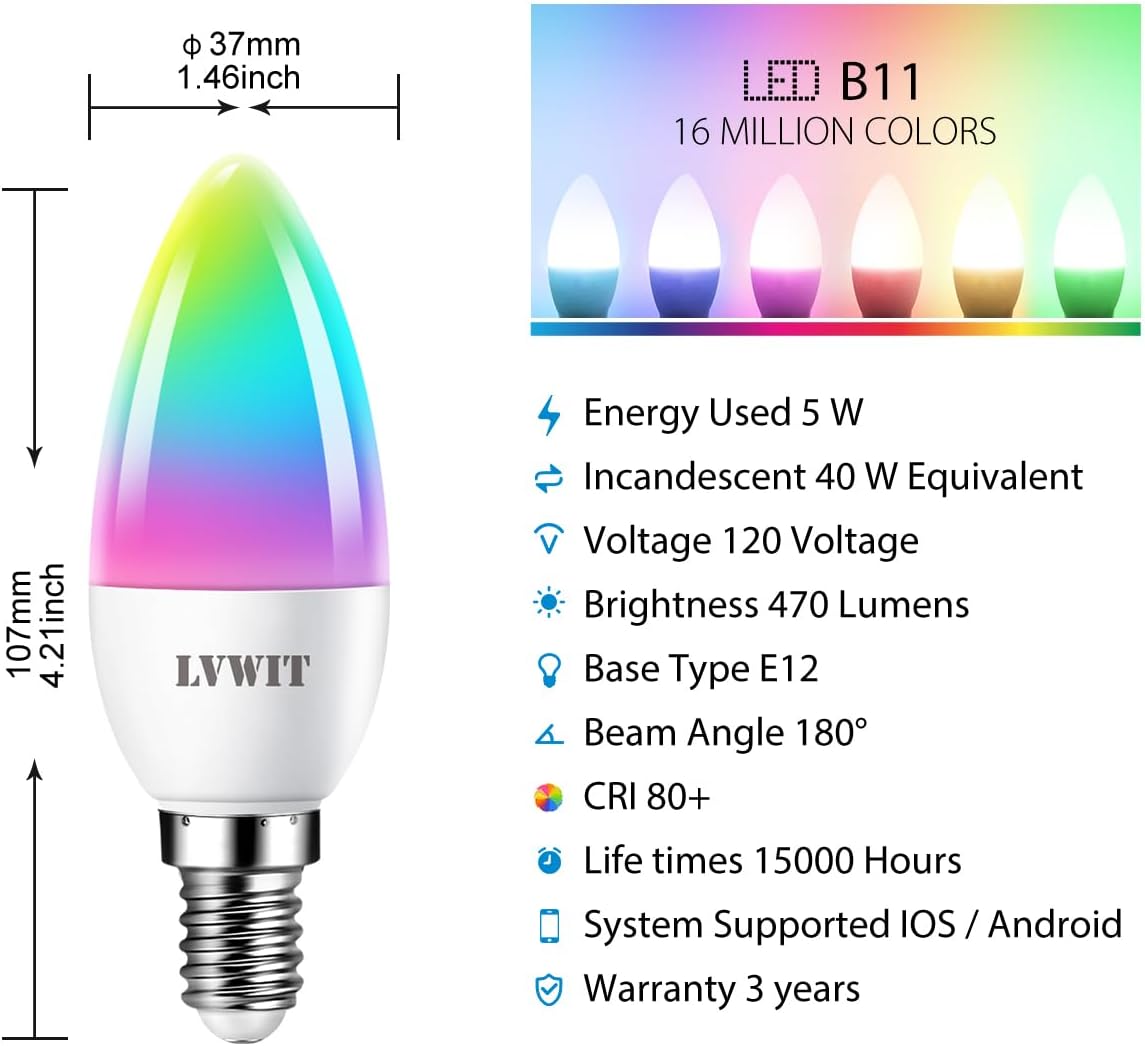
Figure 4.2: Detailed specifications and dimensions of the smart bulb.
4.3 การบูรณาการผู้ช่วยเสียง (Alexa/Google Home)
To control your LVWIT Smart Light Bulb with voice commands, link your Smart Life/Tuya Smart account to your Amazon Alexa or Google Home app.
สำหรับอเมซอนอเล็กซ่า:
- เปิดแอป Alexa
- Tap "More" (hamburger menu) > "Skills & Games".
- ค้นหา "ชีวิตที่ชาญฉลาด"
- Select "Smart Life" and tap "ENABLE TO USE".
- Enter your Smart Life account credentials (email/phone and password) and select your region. Tap "Link Now".
- Once linked, tap "DISCOVER DEVICES". Alexa will find your smart bulb(s).
- You can now control your bulb(s) with voice commands (e.g., "Alexa, turn on [Bulb Name]", "Alexa, set [Bulb Name] to pink").
สำหรับหน้าแรกของ Google:
- เปิดแอป Google Home
- แตะ "+" > "ตั้งค่าอุปกรณ์" > "ใช้งานร่วมกับ Google"
- ค้นหา "ชีวิตที่ชาญฉลาด"
- Select "Smart Life" and link your account using your Smart Life credentials.
- Assign your bulb(s) to a room for easier control.
- You can now control your bulb(s) with voice commands (e.g., "Hey Google, turn on [Bulb Name]", "Hey Google, change [Bulb Name] to blue").

Figure 4.3: Voice control with smart home hubs.
Video 4.1: Demonstration of voice control for the smart light bulb, showing how to change light color and brightness using voice commands.
5. คู่มือการใช้งาน
5.1 Basic Control (On/Off, Brightness, Color Temperature)
Once connected, you can control your smart bulb directly from the Tuya Smart or Smart Life app:
- เปิด/ปิด: แตะไอคอนพลังงานในแอปเพื่อเปิดหรือปิดหลอดไฟ
- ความสว่าง: Adjust the brightness slider to dim or brighten the light.
- อุณหภูมิสี: Change the color temperature from 2700K (warm white) to 6500K (daylight white) using the dedicated slider or preset options.
5.2 Color Changing (RGB)
The bulb offers 16 million colors. In the app, navigate to the "Color" tab to select your desired hue from the color wheel or choose from predefined color scenes.
5.3 การควบคุมกลุ่ม
If you have multiple LVWIT Smart Light Bulbs, you can group them together in the app to control them simultaneously.
- In the app, select one of the bulbs you wish to group.
- Tap the "..." or "Settings" icon (usually top right).
- Look for "Create Group" or "Group Management".
- Select the bulbs you want to include in the group and confirm.
- You can now control the entire group (e.g., turn on/off, change color, adjust brightness) with a single command.

Figure 5.1: Grouping smart bulbs for unified control across different areas.
5.4 การกำหนดตารางเวลาและตัวจับเวลา
Set schedules for your bulbs to turn on/off or change settings automatically at specific times.
- In the app, select the bulb or group you want to schedule.
- มองหาตัวเลือก "กำหนดการ" หรือ "ตัวจับเวลา"
- Set the desired time, action (on/off, color, brightness), and repetition (daily, specific days).
- บันทึกตารางเวลาไว้

Figure 5.2: Setting automated schedules for your smart light bulbs.
โหมดฉาก 5.5 โหมด
The app provides various preset scene modes (e.g., Working, Leisure, Soft, Colorful, Dazzling) to instantly change the ambiance of your room. You can also create custom scenes.

Figure 5.3: Exploring and applying multi-access scene modes.
6. การบำรุงรักษา
- การทำความสะอาด: ตรวจสอบให้แน่ใจว่าหลอดไฟปิดอยู่และเย็นลงก่อนทำความสะอาด เช็ดด้วยผ้านุ่มและแห้ง ห้ามใช้น้ำยาทำความสะอาดหรือวัสดุขัดถู
- พื้นที่จัดเก็บ: หากเก็บหลอดไฟเป็นเวลานาน ควรเก็บไว้ในที่แห้งและเย็น หลีกเลี่ยงแสงแดดโดยตรง
- อัพเดตเฟิร์มแวร์: Periodically check the Smart Life/Tuya Smart app for firmware updates to ensure optimal performance and security.
7 การแก้ไขปัญหา
| ปัญหา | สาเหตุที่เป็นไปได้ | สารละลาย |
|---|---|---|
| Bulb not connecting to Wi-Fi / App cannot find bulb. |
|
|
| Bulb is unresponsive to voice commands (Alexa/Google Home). |
|
|
| Bulb does not dim or change color. |
|
|
8. ข้อมูลจำเพาะผลิตภัณฑ์
| คุณสมบัติ | รายละเอียด |
|---|---|
| ยี่ห้อ | แอลวีวิท |
| หมายเลขรุ่น | LV-5.3WB10-E12-ZF |
| ประเภทไฟ | นำ |
| ขนาดรูปร่างหลอดไฟ | B11 (เทียน) |
| ฐานหลอดไฟ | E12 |
| วัดtage | 4.9 วัตต์ (5 วัตต์) |
| เทียบเท่าหลอดไส้ | 40 วัตต์ |
| ความสว่าง | 470 ลูเมน |
| อุณหภูมิสี | 2700K - 6500K (Warm White to Daylight) |
| ตัวเลือกสี | 16 ล้านสี (RGB) |
| เล่มที่tage | 100-120 โวลต์ 60 เฮิรตซ์ |
| เทคโนโลยีการเชื่อมต่อ | Wi-Fi (2.4 GHz เท่านั้น) |
| ประเภทตัวควบคุม | App (Tuya Smart/Smart Life), Google Assistant, Amazon Alexa |
| คุณสมบัติพิเศษ | Dimmable, Color Changing, Group Control, Scheduling |
| ชีวิตเฉลี่ย | 15,000 ชั่วโมง |
| วัสดุ | พลาสติก |
| ขนาดสินค้า | กว้าง 0.01 นิ้ว x สูง 4.41 นิ้ว |
| น้ำหนักสินค้า | 3.2 ออนซ์ (0.09 กิโลกรัม) |
9. การรับประกันและการสนับสนุน
9.1 ข้อมูลการรับประกัน
The LVWIT Smart Light Bulb (Model LV-5.3WB10-E12-ZF) comes with a รับประกัน 3 ปี นับจากวันที่ซื้อสินค้า การรับประกันนี้ครอบคลุมถึงข้อบกพร่องในวัสดุและฝีมือการผลิตภายใต้การใช้งานปกติ ไม่ครอบคลุมถึงความเสียหายที่เกิดจากการใช้งานผิดวิธี อุบัติเหตุ การดัดแปลงโดยไม่ได้รับอนุญาต หรือการติดตั้งที่ไม่ถูกต้อง
โปรดเก็บหลักฐานการซื้อของคุณไว้เพื่อเรียกร้องการรับประกัน
9.2 การสนับสนุนลูกค้า
For technical assistance, troubleshooting, or warranty inquiries, please contact LVWIT customer support. You can typically find contact information on the product packaging, the official LVWIT webสามารถซื้อผลิตภัณฑ์ได้จากเว็บไซต์ หรือจากร้านค้าปลีกที่ซื้อผลิตภัณฑ์นั้นมา
LVWIT aims to provide outstanding products and services. For technical or service support, they typically reply within 24 hours.
For more information, visit the official LVWIT store: LVWIT Store on Amazon


