1. บทนำและเรื่องอื่นๆview
The Pro'skit MT-1820 is a 3 5/6 digit, 5999 count multifunction digital multimeter designed for precise electrical measurements. It features a dual display with an analog bargraph, automatic and manual ranging capabilities, and a USB interface for computer connectivity. This manual provides essential information for the safe and effective operation, maintenance, and troubleshooting of your MT-1820 multimeter.
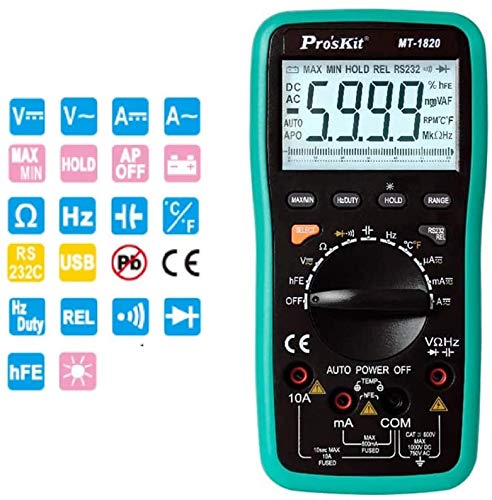
รูปที่ 1 : ด้านหน้า view of the Pro'skit MT-1820 Digital Multimeter, showing the display, rotary switch, and input jacks.
2. ข้อมูลด้านความปลอดภัย
Always adhere to safety precautions when using any electrical testing equipment. Failure to do so may result in injury or damage to the device. This multimeter complies with EN61010-1 security specifications CAT II and CAT III, with CAT II rated for 1000V.
- ห้ามป้อนค่าเกินขีดจำกัดสูงสุดสำหรับฟังก์ชันใดๆ
- Ensure the test leads are properly connected and the function switch is set to the correct range before making measurements.
- Never use the multimeter if it appears damaged or if the battery cover is not securely closed.
- ใช้ความระมัดระวังอย่างยิ่งเมื่อทำงานกับ voltagสูงกว่า 60V DC หรือ 30V AC RMS
- ควรเปลี่ยนแบตเตอรี่ทันทีเมื่อไฟแสดงสถานะแบตเตอรี่ต่ำปรากฏขึ้น
- ถอดสายทดสอบออกจากวงจรก่อนเปลี่ยนฟังก์ชัน
3. คุณสมบัติของผลิตภัณฑ์
The Pro'skit MT-1820 multimeter offers a range of features for versatile electrical testing:
- แสดง: 3 5/6 digits, 5999 counts with LCD backlight and 61-segment analog bargraph.
- ความแม่นยำ: 0.5% best accuracy.
- ตั้งแต่: Automatic and manual range selection.
- ฟังก์ชั่นการวัด: DC/AC โวลต์tage, DC/AC Current, Resistance, Frequency, Capacitance, Temperature, Diode Test, Continuity Test, Transistor (hFE) Test.
- ฟังก์ชั่นพิเศษ: Data Hold, Maximum/Minimum measurement, Relative value measurement, Duty Cycle measurement.
- การเชื่อมต่อ: USB PC Link for data transfer and monitoring.
- ความปลอดภัย: Anti-burning protection, input warning, automatic shutdown, low battery indication.
4. เนื้อหาบรรจุภัณฑ์
ตรวจสอบว่ามีรายการทั้งหมดอยู่ในแพ็คเกจของคุณ:
- Pro'skit MT-1820 Digital Multimeter Unit
- สายทดสอบ (สีแดงและสีดำ)
- สาย USB
- ซีดีซอฟแวร์
- คู่มือการใช้งาน
- หัววัดอุณหภูมิ
- คลิปจระเข้
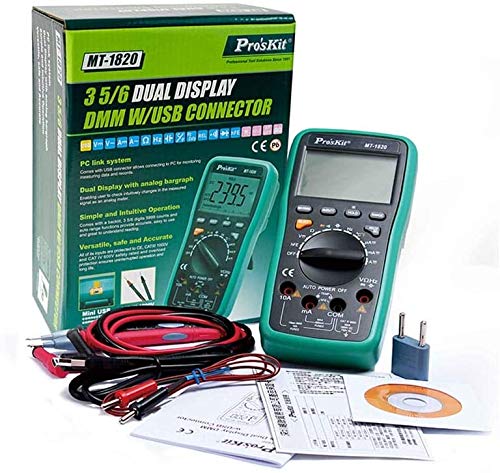
Figure 2: The MT-1820 multimeter shown with its standard accessories, including test leads, USB cable, and software CD.
5. การตั้งค่า
5.1 การติดตั้งแบตเตอรี่
- ตรวจสอบให้แน่ใจว่ามัลติมิเตอร์ปิดอยู่และถอดสายวัดออกแล้ว
- หาช่องใส่แบตเตอรี่ที่ด้านหลังของตัวเครื่อง
- คลายสกรูยึดออก แล้วถอดฝาครอบแบตเตอรี่ออก
- ใส่แบตเตอรี่ AAA ขนาด 1.5 โวลต์ สองก้อน โดยสังเกตขั้วให้ถูกต้อง
- ปิดฝาครอบแบตเตอรี่และขันสกรูให้แน่น
5.2 การเชื่อมต่อสายทดสอบ
For most measurements, connect the black test lead to the 'COM' jack and the red test lead to the 'VΩHz' jack. For current measurements, refer to the specific instructions in the operating section.
5.3 USB PC Link
To connect the multimeter to a computer for data logging or real-time monitoring, use the provided USB cable. Install the software from the included CD onto your computer before connecting the device.
6. คู่มือการใช้งาน
Turn the rotary switch to the desired measurement function. The multimeter will automatically select the appropriate range unless manual ranging is activated.

Figure 3: Visual guide demonstrating common measurement types such as DC Voltage, AC ฉบับที่tage, Continuity, Temperature, and Capacitance.
6.1 DC ฉบับที่tagการวัด (V---)
- Connect the black lead to 'COM' and the red lead to 'VΩHz'.
- Set the rotary switch to the 'V---' position.
- ต่อสายทดสอบแบบขนานเข้ากับแรงดันไฟฟ้ากระแสตรงtagแหล่งที่มา
6.2 AC โวลtage การวัด (V~)
- Connect the black lead to 'COM' and the red lead to 'VΩHz'.
- ตั้งสวิตช์แบบหมุนไปที่ตำแหน่ง 'V~'
- ต่อสายทดสอบแบบขนานเข้ากับแรงดันไฟฟ้ากระแสสลับtagแหล่งที่มา
6.3 Current Measurement (A--- / A~)
- For mA/µA: Connect the black lead to 'COM' and the red lead to 'mA'.
- สำหรับข้อ 10A: Connect the black lead to 'COM' and the red lead to '10A'.
- Set the rotary switch to the desired 'A---' (DC) or 'A~' (AC) range.
- ต่อมัลติมิเตอร์แบบอนุกรมเข้ากับวงจร
- คำเตือน: Do not exceed the maximum current rating for the selected input jack.
6.4 การวัดค่าความต้านทาน (โอห์ม)
- Connect the black lead to 'COM' and the red lead to 'VΩHz'.
- ตั้งสวิตช์แบบหมุนไปที่ตำแหน่ง 'Ω'
- ตรวจสอบให้แน่ใจว่าวงจรถูกตัดพลังงานก่อนที่จะวัดความต้านทาน
- เชื่อมต่อสายทดสอบข้ามส่วนประกอบที่ต้องการวัด
6.5 การทดสอบความต่อเนื่อง
- Connect the black lead to 'COM' and the red lead to 'VΩHz'.
- Set the rotary switch to the continuity symbol (often shared with diode test).
- Touch the test leads across the circuit or component. A continuous beep indicates a low resistance path.
6.6 การทดสอบไดโอด
- Connect the black lead to 'COM' and the red lead to 'VΩHz'.
- Set the rotary switch to the diode symbol (often shared with continuity test).
- ต่อสายสีแดงเข้ากับขั้วบวกและสายสีดำเข้ากับขั้วลบของไดโอด หน้าจอจะแสดงแรงดันไฟฟ้าไปข้างหน้าtage drop. สลับขั้วสายไฟ หน้าจอควรแสดง 'OL' (Open Loop) สำหรับไดโอดที่ดี
6.7 การวัดค่าความจุ (F)
- Connect the black lead to 'COM' and the red lead to 'VΩHz'.
- Set the rotary switch to the 'F' position.
- ตรวจสอบให้แน่ใจว่าตัวเก็บประจุถูกปล่อยประจุจนหมดก่อนทำการวัด
- ต่อสายวัดทดสอบเข้ากับขั้วของตัวเก็บประจุ
6.8 การวัดอุณหภูมิ (°C/°F)
- Connect the temperature probe to the appropriate input jacks (refer to the multimeter's markings, typically 'VΩHz' and 'COM' or dedicated temperature jacks).
- Set the rotary switch to the 'TEMP' position.
- วางหัววัดไว้บนหรือใกล้กับวัตถุที่ต้องการวัดอุณหภูมิ
6.9 ฟังก์ชั่นอื่น ๆ
- ถือ: Press the 'HOLD' button to freeze the current display reading. Press again to release.
- สูงสุด/นาที: Press the 'MAX/MIN' button to record the maximum and minimum readings. Press again to cycle through MAX, MIN, and current readings.
- REL (การวัดเชิงสัมพัทธ์): Press 'REL' to store the current reading as a reference. Subsequent readings will be displayed as a deviation from this reference.
- รอบการทำงาน: Available in certain frequency modes, press the 'Hz/DUTY' button to display the duty cycle percentage.
7. การบำรุงรักษา
7.1 การทำความสะอาด
เช็ดมัลติมิเตอร์ casinจีกับโฆษณาamp ใช้ผ้าและผงซักฟอกอ่อนๆ เช็ดทำความสะอาด ห้ามใช้สารขัดถูหรือตัวทำละลาย ตรวจสอบให้แน่ใจว่าอุปกรณ์แห้งสนิทก่อนใช้งาน
7.2 การเปลี่ยนแบตเตอรี่
Replace batteries as described in Section 5.1 when the low battery indicator appears on the display.
7.3 การเปลี่ยนฟิวส์
If the current measurement function fails, the fuse may need replacement. Refer to the device markings for fuse specifications (e.g., 10A FUSED). Fuse replacement should only be performed by qualified personnel.
8 การแก้ไขปัญหา
- ไม่มีจอแสดงผล: ตรวจสอบการติดตั้งแบตเตอรี่และการชาร์จ เปลี่ยนแบตเตอรี่หากจำเป็น
- การอ่านไม่ถูกต้อง: Ensure test leads are properly connected, the function switch is set correctly, and the circuit is within the multimeter's measurement range.
- การวัดกระแสไฟฟ้าล้มเหลว: ตรวจสอบฟิวส์ เปลี่ยนฟิวส์หากขาด (ดูหัวข้อ 7.3)
- 'OL' จัดแสดง: Indicates an open circuit or a reading exceeding the selected range.
9. ข้อมูลจำเพาะ
| พารามิเตอร์ | ข้อมูลจำเพาะ |
|---|---|
| Maximum Read Value | 5999 |
| บิตการแสดงผล | 3 5/6 หลัก |
| ขนาดจอ LCD | 70 x 50mm, word height 33mm |
| ไฟแบ็คไลท์ LCD | ใช่ |
| กราฟแท่งอนาล็อก | 61 ส่วน |
| การกำหนดช่วง | อัตโนมัติ / แมนนวล |
| DC ฉบับที่tagอี (วี) | 600mV/6V/60V/600V (0.5%+4d), 1000V (1.0%+6d) |
| ฉบับ ACtagอี (วี) | 6/60/600V (0.8%+10d), 750V (1.0%+10d) |
| กระแสไฟฟ้าตรง (A) | 600µA/6000µA (1.0%+10d), 60/600mA (1.0%+10d), 6A/10A (1.2%+10d) |
| กระแสไฟ AC (A) | 600µA/6000µA (1.5%+10d), 60/600mA (1.5%+10d), 6A/10A (2.0%+15d) |
| ความต้านทาน (Ω) | 600Ω (0.8%+5d), 6/60/600KΩ/6MΩ (0.8%+4d), 60MΩ (1.2%+10d) |
| ความถี่ (เฮิรตซ์) | 100/1000Hz (0.5%+4d), 10K/100KHz (0.5%+4d), 1M/30MHz (0.5%+4d) |
| ความจุ (F) | 40nF (5%+30d), 400nF/4µF/40µF (3.5%+8d), 200µF (5.0%+10d) |
| อุณหภูมิ (°C) | -20°C~400°C (1.0%+50d), 400°C~1000°C (1.5%+15d) |
| อุณหภูมิ (°F) | 0°F~750°F (1.0%+5d), 750°F~1832°F (1.5%+5d) |
| การทดสอบ Diode | ใช่ |
| การทดสอบทรานซิสเตอร์ (hFE) | ใช่ |
| การเก็บรักษาข้อมูล | ใช่ |
| Max / Min Measurement | ใช่ |
| การวัดค่าสัมพัทธ์ | ใช่ |
| การวัดรอบการทำงาน | 0.1%~99.9% |
| ลิงค์พีซี | ยูเอสบี |
| ปิดเครื่องอัตโนมัติ | ใช่ |
| แบตเตอรี่ต่ำ Voltage บ่งชี้ | ใช่ |
| คำเตือนการป้อนข้อมูล | ใช่ |
| ข้อกำหนดด้านความปลอดภัย | EN61010-1 CAT II / CAT III, CAT II 1000V |
| ประเภทแบตเตอรี่ | 1.5V AA x 2 |
| ขนาด (D x W x H) | 192 x 95 x 48 มม. |
| น้ำหนัก | 390กรัม |
| ยูพีซี | 765083464186 |
10. การรับประกันและการสนับสนุน
For warranty information and technical support, please contact the retailer or the manufacturer, StarNY. Keep your purchase receipt as proof of purchase. Specific warranty terms may vary by region and retailer.


