การแนะนำ
ขอบคุณสำหรับการซื้อasing the IPEGA Wireless Switch Controller. This manual provides detailed instructions on how to set up, operate, and maintain your new gamepad. Please read this manual thoroughly before use to ensure optimal performance and longevity of your device.

Figure 1: IPEGA Wireless Switch Controller in use with a tablet device, showcasing its telescopic design.
คุณสมบัติผลิตภัณฑ์
- ความเข้ากันได้กับหลายแพลตฟอร์ม: Designed for N-Switch, P3, Android devices, and PC (Win 7/8/10). Note: Does not support MediaTek chips.
- ประสบการณ์การเล่นเกมที่ได้รับการปรับปรุง: Features six-axis gyroscope function for precise motion control and dual motor vibration for immersive feedback.
- การออกแบบตามหลักสรีรศาสตร์: Full ergonomic structure provides a comfortable hand feeling during extended gaming sessions.
- วงเล็บยืดไสลด์: Integrated lever telescopic bracket with a super long telescopic function, adjustable from 130mm to 280mm (approximately 5.1 to 11 inches), suitable for various devices including N-Switch host and tablets.
- อายุการใช้งานแบตเตอรี่ยาวนาน: Built-in 300mAh high-performance lithium battery offers over 10 hours of continuous use and up to 30 days of standby time on a full charge.
- การควบคุมที่สะดวก: Equipped with a screen capture button and multimedia buttons (volume+, -, last, next, Play/Pause) for Android devices.

Figure 2: The controller's telescopic design, suitable for various devices.
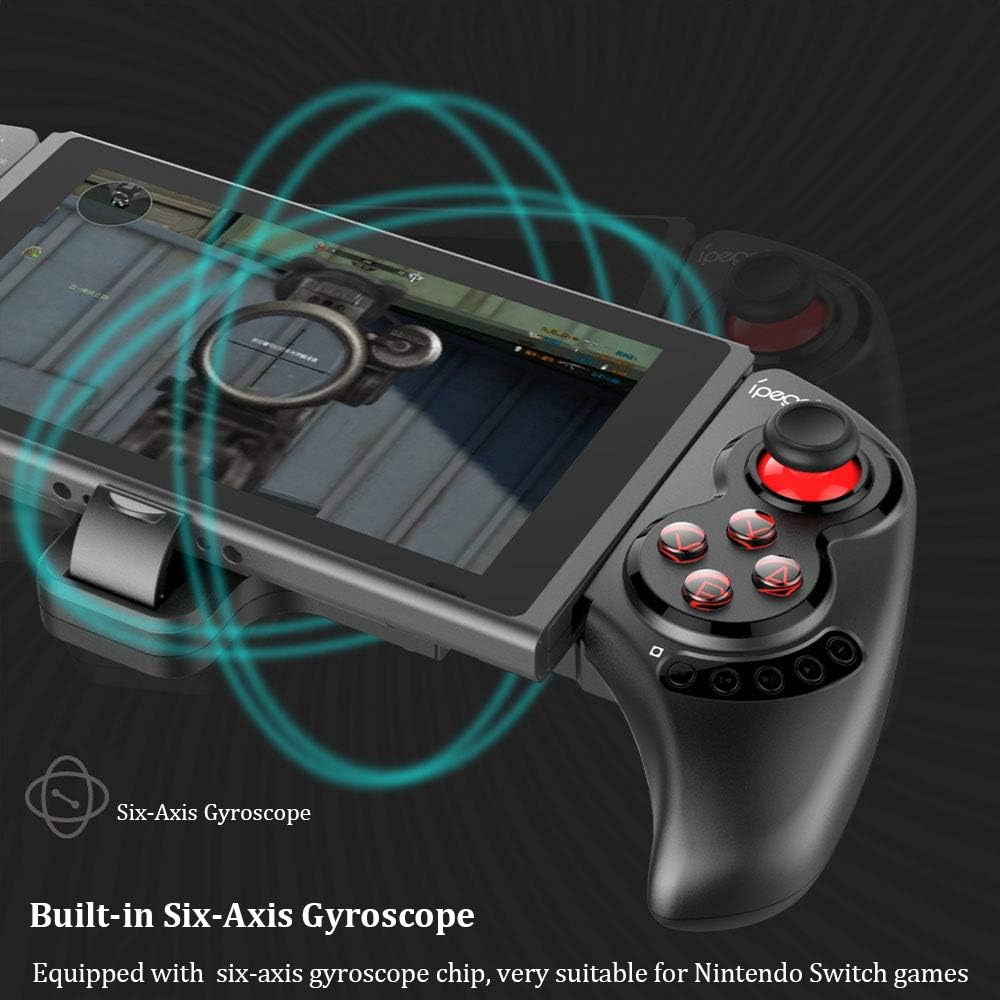
Figure 3: Illustration highlighting the built-in six-axis gyroscope for motion control.

Figure 4: Illustration demonstrating the dual motor vibration feature for haptic feedback.

Figure 5: The telescopic rod's adjustable range (130-280mm) and compatibility with Switch Mobile Device, Android Phone, and PC Tablet.

Figure 6: Detail of the controller's ergonomic structure designed for comfortable hand feeling.
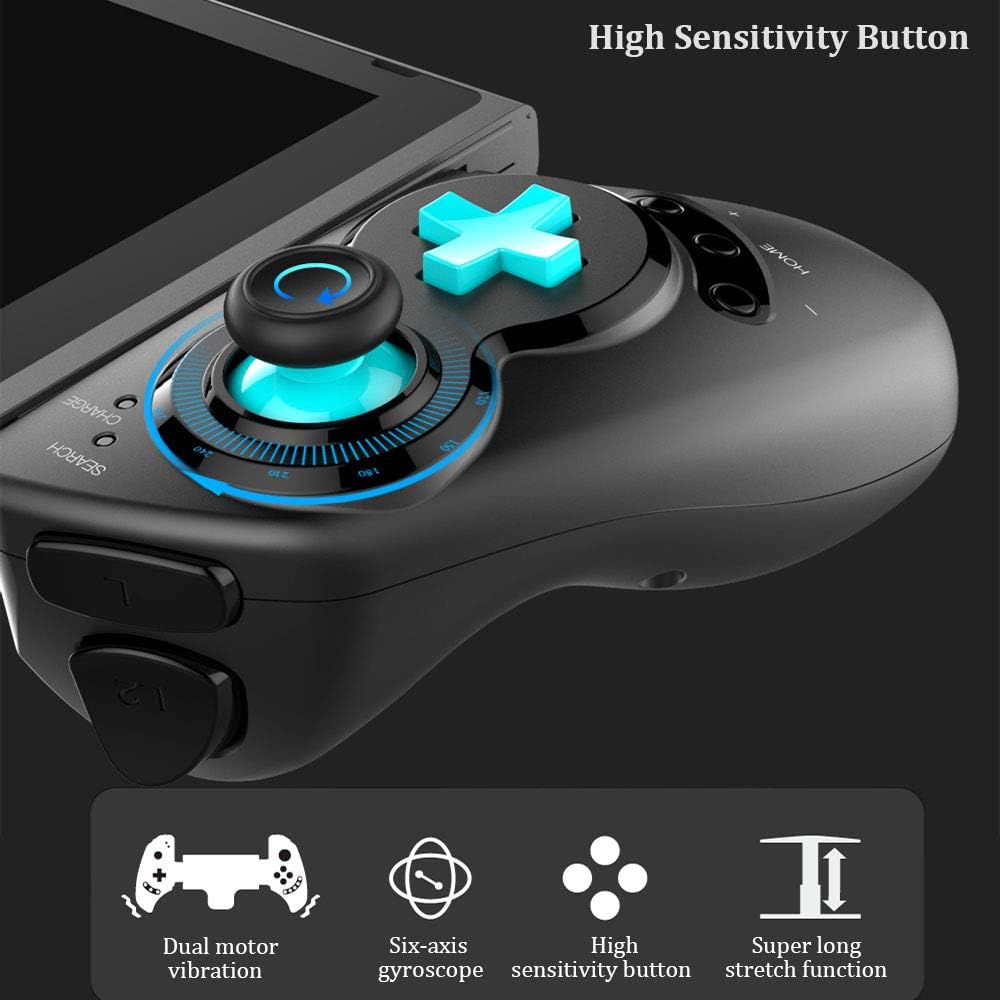
Figure 7: Highlighting the high sensitivity buttons and other key features like dual motor vibration, six-axis gyroscope, and super long stretch function.
การตั้งค่า
Before using your IPEGA Wireless Switch Controller, ensure it is adequately charged. Connect the included USB cable to the controller's charging port and to a USB power source (e.g., computer, USB wall adapter). The charge indicator will show charging status.
โหมดการทำงาน
N-Switch Connection Mode
- การจับคู่ครั้งแรก:
- Turn on your Nintendo Switch Console.
- จากเมนูหน้าหลัก ให้ไปที่ ตัวควบคุมแล้วเลือก เปลี่ยน Grip และ Order.
- On the IPEGA controller, press and hold down the "B" + "บ้าน" buttons simultaneously for 2 seconds. The SEARCH indicators on the controller will flash quickly.
- Once successfully paired, the indicators will turn on solid. Press "A" on the controller when prompted to confirm.
- การจับคู่ใหม่:
- กดค้างไว้ "บ้าน" กดปุ่มค้างไว้ 2 วินาทีเพื่อเปิดใช้งานตัวควบคุม
- The SEARCH indicator will flash slowly, indicating it's in re-pair mode. The controller will automatically attempt to connect to the previously paired console.
- เมื่อเชื่อมต่อแล้วให้กด "A" when you're ready to play.
- ตัวควบคุมการปลุก:
- If the controller is in sleep mode, press the "บ้าน" ปุ่มเพื่อปลุก
- It will automatically connect to the console.
- กด "A" when you're ready.
โหมด Android
- กดค้างไว้ "Y" + "บ้าน" buttons simultaneously for 2 seconds to turn on the controller. The SEARCH indicators will flash quickly.
- On your Android device, enable Bluetooth and search for available devices. Select "PG-SW029" การจับคู่
- Once successfully paired, the SEARCH indicator on the controller will turn on solid, indicating it has entered Android Mode.
- The controller supports standard Android HID games.
P3 Mode (PlayStation 3)
- กดค้างไว้ "เอ" + "บ้าน" buttons simultaneously for 2 seconds to turn on the controller. The SEARCH indicators will flash quickly.
- Connect the controller to your P3 console using the provided USB cable. Press the "บ้าน" ปุ่มเพื่อเริ่มการจับคู่
- Once paired successfully, the corresponding SEARCH indicator will turn on solid, indicating the gamepad has entered P3 mode.
- You can then unplug the USB cable, and the controller will operate in wireless connection mode.
การซ่อมบำรุง
- Keep the controller away from extreme temperatures, direct sunlight, and humid environments.
- หลีกเลี่ยงการทำตกหรือให้ตัวควบคุมได้รับแรงกระแทกรุนแรง
- Clean the controller with a soft, dry cloth. Do not use chemical solvents or abrasive cleaners.
- เมื่อไม่ได้ใช้งานเป็นเวลานาน ควรเก็บตัวควบคุมไว้ในที่แห้งและเย็น
- ห้ามถอดประกอบหรือดัดแปลงตัวควบคุมโดยเด็ดขาด เพราะจะทำให้การรับประกันเป็นโมฆะและอาจทำให้เกิดความเสียหายได้
การแก้ไขปัญหา
| ปัญหา | วิธีแก้ปัญหาที่เป็นไปได้ |
|---|---|
| ตัวควบคุมไม่เปิดใช้งาน | ตรวจสอบให้แน่ใจว่าคอนโทรลเลอร์ชาร์จแบตเตอรี่เต็มแล้ว เชื่อมต่อกับแหล่งจ่ายไฟโดยใช้สาย USB |
| ตัวควบคุมไม่สามารถเชื่อมต่อกับอุปกรณ์ได้ |
|
| อาการหน่วงของอินพุตหรือการตัดการเชื่อมต่อระหว่างการเล่นเกม |
|
| ปุ่มกดหรือจอยสติ๊กไม่ตอบสนอง |
|
ข้อมูลจำเพาะ
| คุณสมบัติ | รายละเอียด |
|---|---|
| หมายเลขรุ่น | PG-SW029 |
| ยี่ห้อ | ipega |
| การเชื่อมต่อ | ไร้สาย (Bluetooth) |
| ระยะการส่งข้อมูล | ≤ 26ft (8 meters) |
| ความจุของแบตเตอรี่ | แบตเตอรี่ลิเธียม 300mAh |
| เวลาใช้งานต่อเนื่อง | > 10 ชั่วโมง |
| เวลาสแตนด์บาย | นานถึง 30 วัน |
| กล้องโทรทรรศน์แบบปรับได้ | 130mm - 280mm (approx. 5.1 - 11 inches) |
| ขนาดสินค้า | 23.7 x 12.5 x 5.99 ซม. (9.33 x 4.92 x 2.36 นิ้ว) |
| ความเข้ากันได้ | Nintendo Switch, PlayStation 3, Android Phones/Tablets, PC (Win 7/8/10) |

Figure 8: Detailed dimensions of the controller and its retail packaging.
รายการแพ็กเกจ
รายการต่อไปนี้รวมอยู่ในแพ็คเกจผลิตภัณฑ์ของคุณ:
- Wireless Gamepad x1
- คู่มือผู้ใช้ x1 (เอกสารฉบับนี้)
- สาย USB x1
การรับประกันและการสนับสนุน
For warranty information and technical support, please refer to the contact details provided by your retailer or visit the official IPEGA webไซต์ โปรดเก็บใบเสร็จรับเงินไว้เป็นหลักฐานการซื้อสำหรับการเรียกร้องการรับประกัน
หากคุณพบปัญหาใดๆ ที่ไม่ได้กล่าวถึงในคู่มือนี้ โปรดติดต่อฝ่ายบริการลูกค้าเพื่อขอความช่วยเหลือ


