การแนะนำ
The Mi Electric Toothbrush T100 is designed to provide an efficient and superior cleaning experience compared to traditional manual toothbrushes. It incorporates advanced features such as high-frequency vibrations, multiple brushing modes, and a smart timer to enhance your daily oral hygiene routine. This manual provides essential information for the proper use, maintenance, and care of your device.

รูปที่ 1: Mi Electric Toothbrush T100 and packaging.
คุณสมบัติหลัก:
- Ultra Soft Bristles: Designed for effective yet gentle cleaning.
- การสั่นสะเทือนความถี่สูง: Up to 18,000 vibrations per minute for thorough cleaning.
- Dual Pro Brush Modes: Two distinct modes to suit individual preferences.
- EquiClean Auto Timer: Ensures optimal brushing duration for each quadrant of your mouth.
- การออกแบบกันน้ำ IPX7: Allows for safe use and easy cleaning under running water.
- แบตเตอรี่ใช้งานได้ยาวนาน: Up to 30 days of usage on a single charge.
- การชาร์จ USB รวดเร็ว: ชาร์จไฟสะดวกและรวดเร็ว
- ไฟแสดงสถานะ LED: Provides battery status alerts.
- การทำงานที่มีเสียงรบกวนต่ำ: ทำงานที่ระดับเสียงประมาณ 60 เดซิเบล
- การออกแบบป้องกันการลื่น: Ensures a secure grip during use.
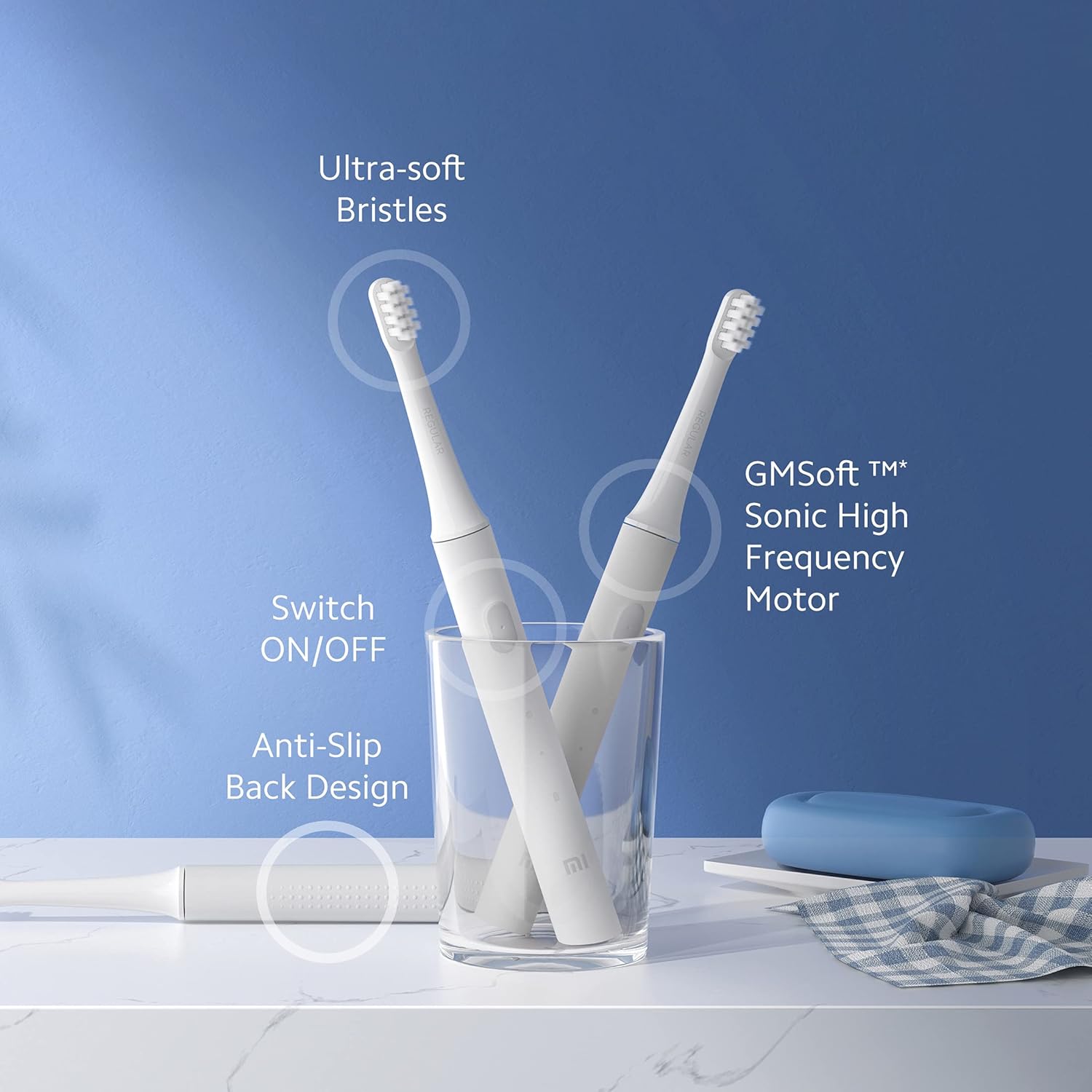
รูปที่ 2: เกินview of Mi Electric Toothbrush T100 features.
เนื้อหาแพ็คเกจ
ก่อนดำเนินการติดตั้ง โปรดตรวจสอบให้แน่ใจว่ามีอุปกรณ์ครบถ้วนในบรรจุภัณฑ์:
- Mi Electric Toothbrush T100 Handle
- Brush Head (Ultra Soft Bristles)
- สายชาร์จ USB
- คู่มือการใช้งาน (เอกสารนี้)
การตั้งค่า
1. การชาร์จครั้งแรก
Before first use, fully charge the toothbrush. The device is equipped with a rechargeable Lithium-Ion battery.
- Locate the USB charging port at the bottom of the toothbrush handle.
- เปิดฝาครอบป้องกันของช่องเสียบชาร์จ
- Connect the provided USB charging cable to the toothbrush and a compatible USB power adapter (not included).
- Plug the adapter into a power outlet. The LED indicator on the handle will illuminate to show charging status.
- Allow the toothbrush to charge until the LED indicator shows a full charge (refer to the LED indicator section for details). A full charge typically provides up to 30 days of usage.

รูปที่ 3: USB fast charging port.
2. การติดตั้งหัวแปรง
Align the brush head with the metal shaft on the toothbrush handle and push it down firmly until it clicks into place. Ensure it is securely attached before use.
คำแนะนำการใช้งาน
1. การแปรงฟัน
- ทำให้ขนแปรงเปียกและบีบยาสีฟันออกมาเล็กน้อย
- วางหัวแปรงแนบกับฟันของคุณในมุมเล็กน้อยไปทางแนวเหงือก
- กดปุ่มเพาเวอร์เพื่อเปิดแปรงสีฟัน
- Gently move the brush head slowly across each tooth, allowing the high-frequency vibrations to clean. Avoid scrubbing vigorously.
- การ EquiClean Auto Timer will pause briefly every 30 seconds to indicate when to move to the next quadrant of your mouth. After 2 minutes, the toothbrush will automatically turn off, signaling the completion of the recommended brushing time.
- หลังจากแปรงฟันเสร็จแล้ว ให้กดปุ่มเปิด/ปิดอีกครั้งเพื่อปิดแปรงสีฟัน หากเครื่องยังไม่ปิด
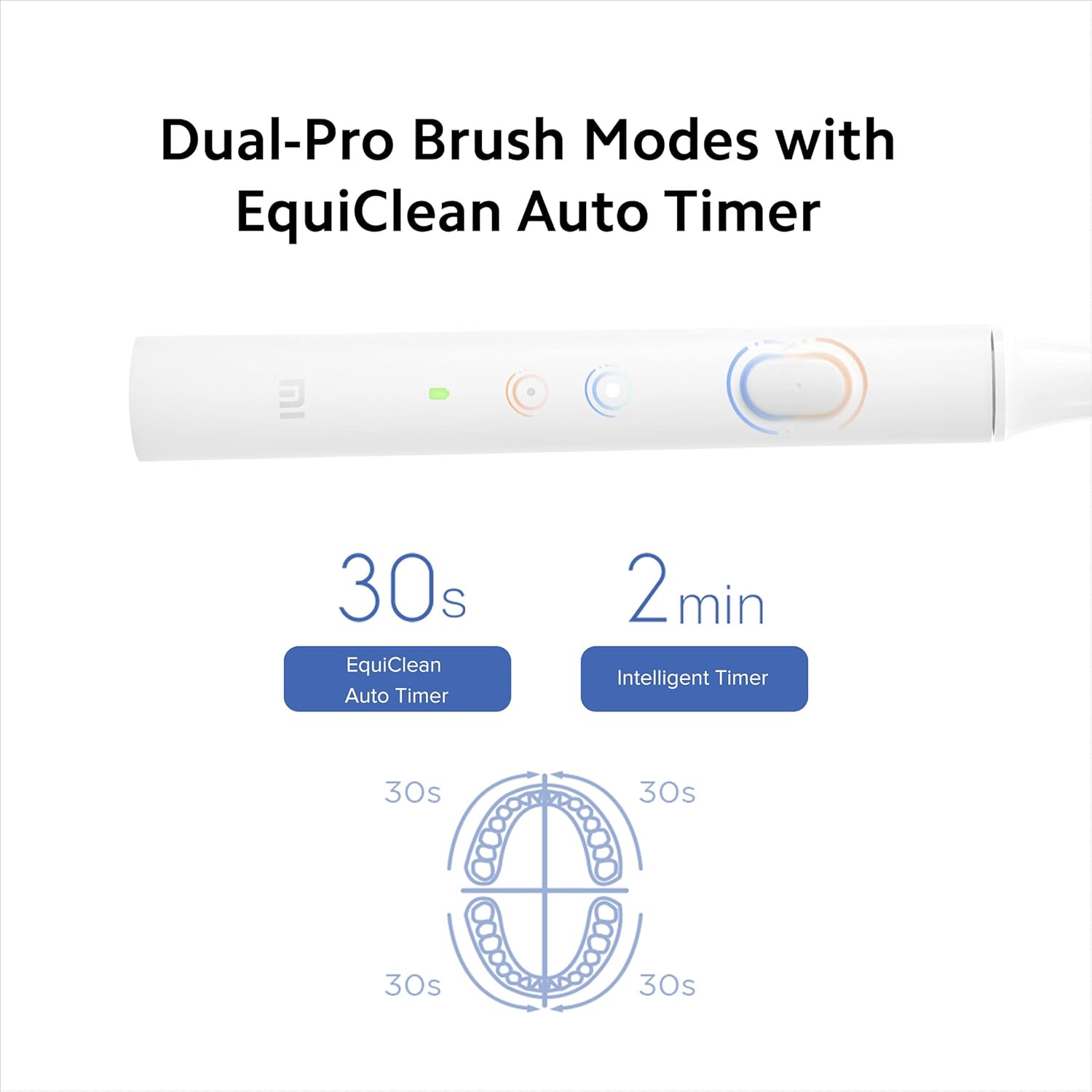
รูปที่ 4: Dual-Pro Brush Modes and EquiClean Auto Timer.
2. Dual Pro Brush Modes
The Mi T100 offers two brushing modes. Press the power button repeatedly to cycle through the modes:
- โหมดมาตรฐาน: สำหรับใช้ทำความสะอาดประจำวัน
- โหมดอ่อนโยน: For sensitive teeth and gums.

รูปที่ 5: GMSoft Sonic High Frequency Motor for multi-dimensional cleaning.
การซ่อมบำรุง
1. การทำความสะอาดแปรงสีฟัน
Regular cleaning ensures hygiene and extends the lifespan of your toothbrush.
- หลังการใช้งานแต่ละครั้ง ให้ล้างหัวแปรงให้สะอาดด้วยน้ำไหลผ่านขณะที่แปรงสีฟันยังติดอยู่ เพื่อขจัดคราบยาสีฟันหรือเศษอาหารที่ตกค้างออกให้หมด
- ปิดแปรงสีฟันและถอดหัวแปรงออก
- Rinse both the brush head and the handle separately under running water. Pay attention to the junction area between the head and the handle to prevent accumulation of residue.
- เช็ดด้ามจับให้แห้งด้วยผ้านุ่ม
- The toothbrush is IPX7 waterproof, allowing it to be safely rinsed under water.

รูปที่ 6: IPX7 Waterproof design for easy cleaning.
2. การเปลี่ยนหัวแปรง
It is recommended to replace the brush head every three months, or sooner if the bristles become frayed or worn. Worn bristles are less effective at cleaning and can irritate gums.
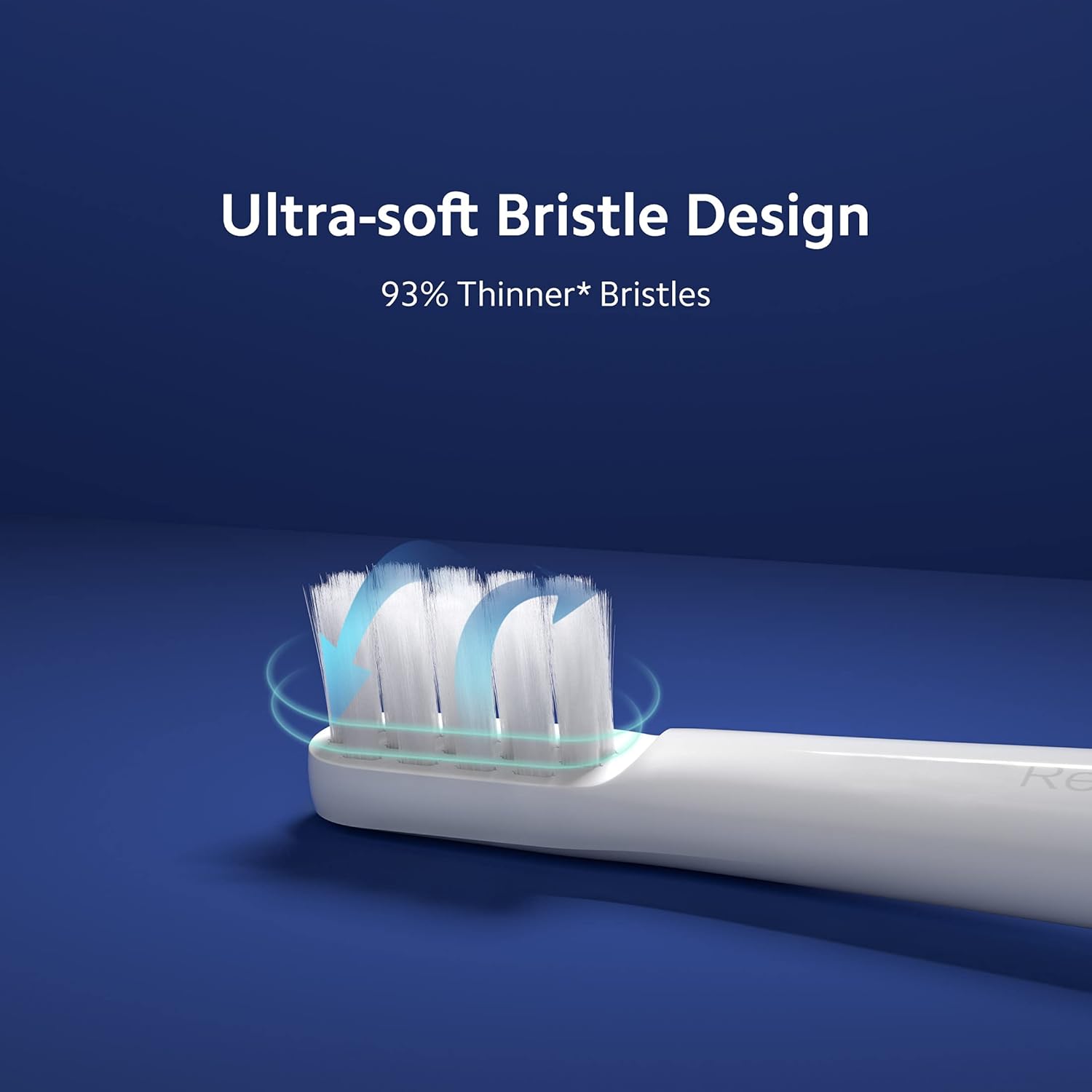
รูปที่ 7: Ultra-soft bristle design.
3. การดูแลแบตเตอรี่
To maintain optimal battery performance, avoid fully discharging the battery frequently. Recharge the toothbrush when the LED indicator signals low battery.
การแก้ไขปัญหา
If you encounter issues with your Mi Electric Toothbrush T100, refer to the following common problems and solutions:
| ปัญหา | สาเหตุที่เป็นไปได้ | สารละลาย |
|---|---|---|
| แปรงสีฟันไม่เปิดใช้งาน | แบตเตอรี่ต่ำหรือหมด | Charge the toothbrush fully using the provided USB cable. |
| Reduced vibration intensity. | แบตเตอรี่อ่อนหรือหัวแปรงสึกหรอ | Recharge the battery. Replace the brush head if it is old or worn. |
| Toothbrush stops unexpectedly during use. | Battery protection mechanism or residue accumulation. | Ensure the battery is sufficiently charged. Clean the junction between the brush head and handle thoroughly to remove any dried toothpaste or water residue. |
| ไฟแสดงสถานะการชาร์จไม่ทำงาน | สายไฟหรือแหล่งจ่ายไฟชำรุด | Try a different USB cable or power adapter. Ensure the charging port is clean and free of debris. |
ข้อมูลจำเพาะ
| คุณสมบัติ | รายละเอียด |
|---|---|
| แบบอย่าง | T100 (หมายเลขรุ่นสินค้า: 26283) |
| ขนาด (กxยxส) | 21.9 x 2.1 x 2 ซม. |
| น้ำหนัก | 46 กรัม |
| ความถี่การสั่นสะเทือน | สูงสุด 18,000 รอบต่อนาที |
| อายุการใช้งานแบตเตอรี่ | ใช้งานได้นานสูงสุด 30 วัน (ขึ้นอยู่กับการใช้งานโดยทั่วไป) |
| ระดับการกันน้ำ | IPX7 |
| ประเภทของขน | อัลตร้าซอฟท์ |
| แหล่งพลังงาน | ใช้พลังงานจากแบตเตอรี่ (ลิเธียมไอออนแบบชาร์จไฟได้) |
| ระดับเสียง | ประมาณ 60 เดซิเบล |
| สี | สีขาว |
| คุณสมบัติของวัสดุ | สามารถนำกลับมาใช้ใหม่ได้ |
| ช่วงอายุที่แนะนำ | 15 ถึง 65 ปี |
| ผู้ผลิต | Wuxi Qinghe Xiaobei Technolody Co. Ltd. |
| ผู้นำเข้า | Xiaomi Technology India Pvt. Ltd. |

รูปที่ 8: Low noise design for comfortable use.

รูปที่ 9: ดีไซน์กันลื่นเพื่อการจับที่มั่นคง
การรับประกันและการสนับสนุน
ข้อมูลการรับประกัน
The Mi Electric Toothbrush T100 comes with a One Year Pan-India Warranty covering all manufacturing defects. Please retain your purchase receipt for warranty claims.
ข้อมูลด้านความปลอดภัย
- ผลิตภัณฑ์นี้มีวัตถุประสงค์เพื่อใช้โดยผู้ใหญ่
- Recommended for individuals 18 years and older.
- Do not use if you have severe oral conditions or have recently undergone oral surgery without consulting a dentist.
การสนับสนุนลูกค้า
For further assistance, technical support, or warranty inquiries, please contact Xiaomi Technology India Pvt. Ltd. customer service. Refer to the official MI webเว็บไซต์หรือเอกสารการซื้อของคุณสำหรับรายละเอียดการติดต่อ