1. บทนำ
The Lepro PR902103-US Smart Table Lamp offers versatile lighting solutions for your home. This LED touch lamp features RGB color changing capabilities, tunable warm to cool white light, and dimmable brightness. It is designed for seamless integration with smart home ecosystems, supporting both Amazon Alexa and Google Assistant for voice control, as well as control via a dedicated mobile application. This manual provides comprehensive instructions for setup, operation, and maintenance.

Figure 1: Lepro Smart Table Lamp แสดงasing its app control interface.
2. อะไรอยู่ในกล่อง
โปรดตรวจสอบให้แน่ใจว่ามีส่วนประกอบทั้งหมดครบถ้วนในบรรจุภัณฑ์:
- 1 x Lepro Smart Table Lamp (Model: PR902103-US)
- 1 x 4.9 ft USB Cable
- อะแดปเตอร์ไฟฟ้า 1 ตัว
- 1 x คู่มือผู้ใช้ (เอกสารนี้)
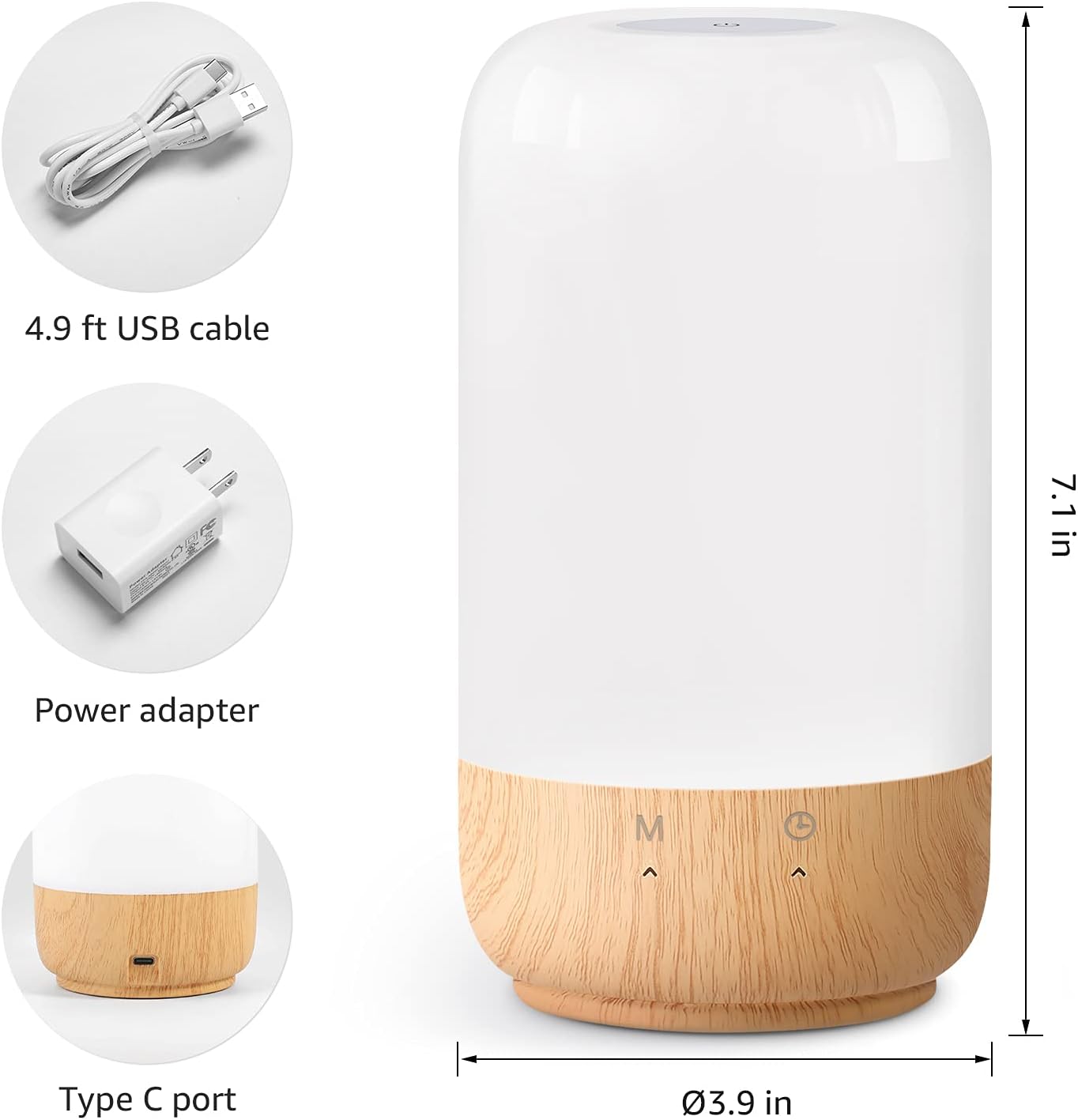
รูปที่ 2: ส่วนประกอบที่รวมอยู่และขนาดของผลิตภัณฑ์
3. การตั้งค่า
Follow these steps to set up your Lepro Smart Table Lamp:
- การเชื่อมต่อไฟฟ้า: เชื่อมต่อสาย USB ที่ให้มาเข้ากับ lamp's Type-C port and the power adapter. Plug the power adapter into a standard wall outlet. The lamp จะให้แสงสว่าง
- ดาวน์โหลดแอป: Download the 'Lepro LampUX' app from your mobile device's App Store (iOS) or Google Play Store (Android).
- การลงทะเบียนบัญชี: Open the 'Lepro LampUX' app and register a new account or log in if you already have one.
- การจับคู่อุปกรณ์:
- ในแอป ให้แตะ 'เพิ่มอุปกรณ์' หรือไอคอน '+'
- Select 'Table Lamp' from the lighting category.
- ให้แน่ใจว่าลamp is powered on. Long press the timer button on the lamp's base for at least 5 seconds until the indicator light blinks rapidly.
- ตรวจสอบว่าไฟแสดงสถานะกำลังกะพริบอย่างรวดเร็วในแอปและดำเนินการต่อ
- Select your 2.4 GHz Wi-Fi network and enter the password. (Note: The lamp only supports 2.4 GHz Wi-Fi networks. If your router is 5 GHz, please set it to 2.4 GHz during setup.)
- The app will begin adding the device. Once successfully added, you can rename your lamp เพื่อการระบุตัวตนที่ง่ายขึ้น
Video 1: Detailed steps on how to set up your Lepro Smart Lamp โดยใช้แอปพลิเคชันบนมือถือ
4. คู่มือการใช้งาน
The Lepro Smart Table Lamp can be controlled via touch, the mobile app, or voice commands.
4.1. การควบคุมแบบสัมผัส
- เปิด/ปิดเครื่อง: Short press the power button (marked 'M') on the lampฐานของ
- การปรับความสว่าง: Slide your finger along the left side of the lamp's base to adjust brightness.
- Color Change (RGB): Slide your finger along the right side of the lamp's base to cycle through RGB colors.
- สวิตช์โหมด: Short press the timer button (clock icon) to switch between white light modes (warm white, cool white) and RGB color mode.
4.2. Mobile App Controls
The 'Lepro LampUX' app provides comprehensive control over your lamp:
- Brightness & Color Temperature: Adjust the brightness level and select color temperatures from 2700K (warm white) to 5700K (cool white).
- RGB Color Selection: เลือกสีได้กว่า 16 ล้านสีโดยใช้วงล้อสีในแอป
- ฉาก: Select from pre-set scenes like 'Night', 'Read', 'Meeting', 'Leisure', or customize your own scenes with specific colors and effects.
- Timer & Wake-up: กำหนดตารางเวลาสำหรับ lamp to turn on/off automatically. Utilize the 'Sunrise Simulation' feature to gradually increase light for a gentle wake-up.

Figure 3: Mobile application interface for controlling lamp การตั้งค่า.

รูปที่ 4: ลamp's timer and wake-up functions in use.
4.3. การควบคุมด้วยเสียง
The Lepro Smart Table Lamp is compatible with Amazon Alexa and Google Assistant. To enable voice control:
- ตรวจสอบให้แน่ใจว่าแอลของคุณamp is successfully paired with the 'Lepro LampUX' app.
- เปิดแอป Amazon Alexa หรือ Google Home
- ไปที่ส่วน 'ทักษะและเกม' (Alexa) หรือ 'ทำงานร่วมกับ Google' (Google Home)
- ค้นหา and enable the 'Lepro LampUX' skill/service.
- Link your 'Lepro LampUX' account with your Alexa/Google account.
- เมื่อเชื่อมโยงแล้ว คุณสามารถใช้คำสั่งเสียง เช่น:
- "Alexa, turn on [Lamp Name]."
- "Hey Google, set [Lamp Name] to warm white."
- "Alexa, change [Lamp Name] to blue."
- "Hey Google, dim [Lamp Name] to 50%."

Figure 5: Voice control integration with Amazon Alexa.
Video 2: Demonstration of the Lepro Smart Table Lamp working with Alexa and Google Home.
5. การบำรุงรักษา
To ensure the longevity and optimal performance of your Lepro Smart Table Lamp, please follow these maintenance guidelines:
- การทำความสะอาด: ถอดปลั๊กไฟก่อนทำความสะอาด ใช้ผ้าแห้งนุ่มๆ เช็ดทำความสะอาดamp's surface. Avoid using abrasive cleaners, solvents, or harsh chemicals, as these may damage the finish or electronic components.
- พื้นที่จัดเก็บ: ถ้าจะเก็บลamp หากต้องการเก็บรักษาเป็นเวลานาน ควรตรวจสอบให้แน่ใจว่าสะอาดและแห้ง เก็บไว้ในที่แห้งและเย็น หลีกเลี่ยงแสงแดดโดยตรงและอุณหภูมิที่สูงหรือต่ำเกินไป
- การจัดการ: จัดการกับตัวแอลamp with care. Avoid dropping it or subjecting it to strong impacts.
6 การแก้ไขปัญหา
If you encounter issues with your Lepro Smart Table Lamp, อ้างอิงถึงปัญหาทั่วไปและวิธีแก้ไขต่อไปนี้:
| ปัญหา | สาเหตุที่เป็นไปได้ | สารละลาย |
|---|---|---|
| Lamp ไม่เปิด | ไม่มีแหล่งจ่ายไฟ | Check if the power adapter is securely plugged into the lamp and the wall outlet. Ensure the outlet is functional. |
| ไม่สามารถเชื่อมต่อ Wi-Fi ได้ | Incorrect Wi-Fi band (5 GHz). รหัสผ่านผิดพลาด. สัญญาณ Wi-Fi อ่อน | Ensure your Wi-Fi network is 2.4 GHz. Verify the Wi-Fi password. Move the lamp closer to your router. |
| การควบคุมด้วยเสียงไม่ทำงาน | Skill not enabled/linked. ชื่ออุปกรณ์ไม่ถูกต้อง | Ensure the 'Lepro LampUX' skill is enabled and linked in your Alexa/Google Home app. Use the exact device name configured in the app. |
| Lamp ไม่ตอบสนอง | ซอฟต์แวร์มีปัญหาชั่วคราว | ถอดปลั๊กลamp from the power outlet for 10 seconds, then plug it back in to perform a soft reset. |
7. ข้อมูลจำเพาะ
| คุณสมบัติ | รายละเอียด |
|---|---|
| ยี่ห้อ | โรคเรื้อน |
| หมายเลขรุ่น | PR902103-US |
| ขนาดสินค้า | ลึก 3.9 นิ้ว x กว้าง 3.9 นิ้ว x สูง 7.1 นิ้ว |
| น้ำหนักสินค้า | 1.19 ปอนด์ |
| วัสดุ | พลาสติก, ไม้ |
| ประเภทแหล่งกำเนิดแสง | นำ |
| วัดtage | 7 วัตต์ |
| ความสว่าง | 350 ลูเมน |
| สีอ่อน | RGB + CCT (Tunable White 2700-5700K) |
| วิธีการควบคุม | App, Touch, Voice (Alexa, Google Assistant) |
| การเชื่อมต่อ | เฉพาะ WiFi 2.4 GHz |
| การใช้งานภายใน/ภายนอกอาคาร | ในร่ม |
8. การรับประกันและการสนับสนุน
Lepro products are designed and manufactured to the highest quality standards. For warranty information and technical support, please refer to the contact details provided on the product packaging or visit the official Lepro webไซต์ โปรดเก็บใบเสร็จรับเงินไว้เป็นหลักฐานการซื้อสำหรับการเรียกร้องการรับประกัน


