1. บทนำ
Thank you for choosing the Hama 186369 Weather Forecast Center. This device provides comprehensive weather data, including satellite-based forecasts, indoor and outdoor temperature/humidity, and more. This manual will guide you through the setup, operation, and maintenance of your weather station to ensure optimal performance.
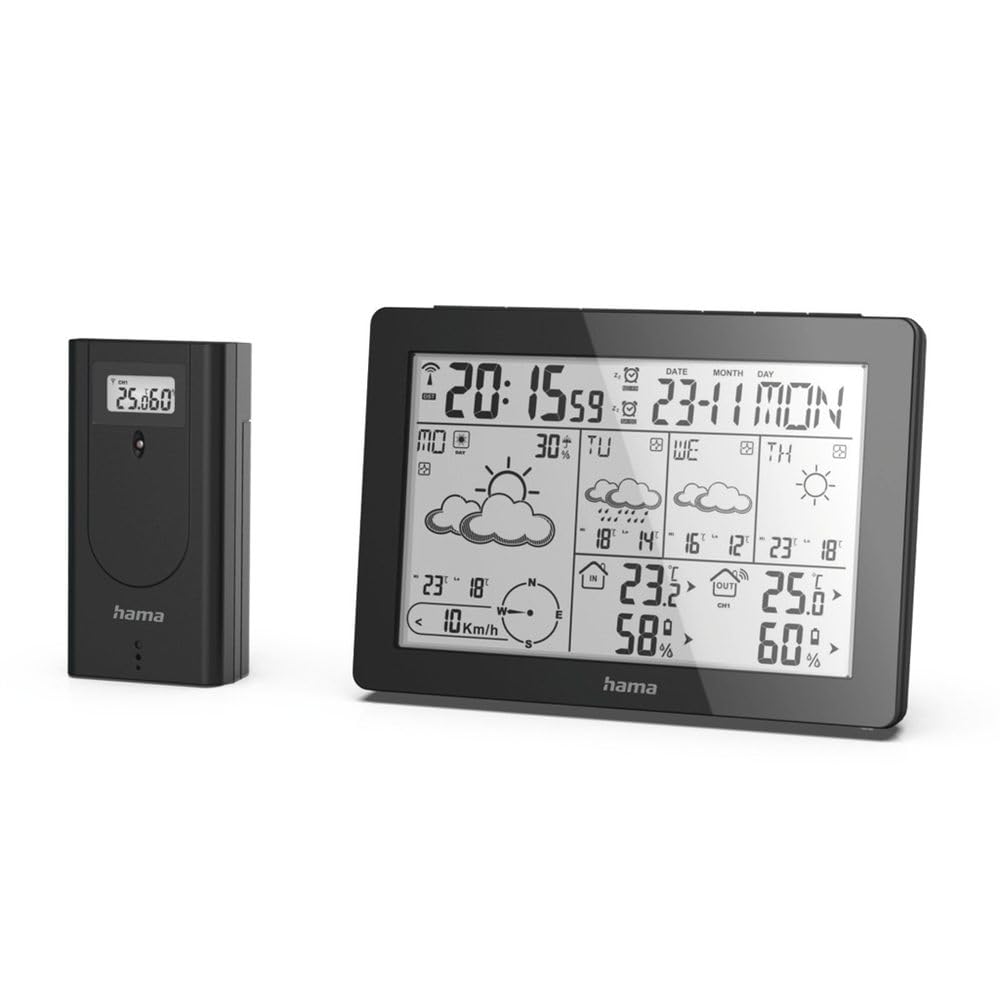
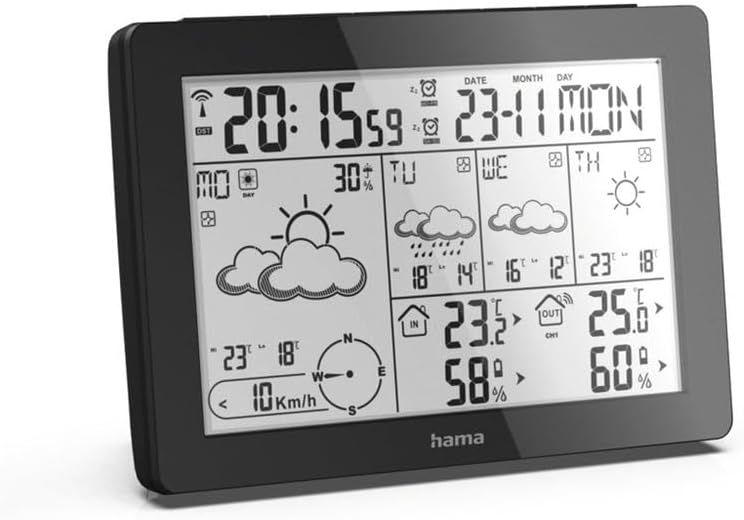
The Hama 186369 Weather Forecast Center main unit, showcasing its digital display with various weather parameters.
2. เนื้อหาบรรจุภัณฑ์
Please check that all items listed below are present and in good condition:
- Hama 186369 Weather Forecast Center (Base Station)
- เซ็นเซอร์ไร้สายกลางแจ้ง
- 4 x AA Batteries (for both units)
- คู่มือการใช้งานเล่มนี้

The complete set, including the base station and the wireless outdoor sensor.
3. คำแนะนำด้านความปลอดภัย
- Do not open the device. Improper repair can lead to considerable hazards for the user.
- อย่านำผลิตภัณฑ์ไปวางในที่ที่มีแสงแดดส่องโดยตรง อุณหภูมิสูงหรือต่ำเกินไป หรือความชื้นสูง
- เก็บผลิตภัณฑ์นี้ให้พ้นมือเด็ก เช่นเดียวกับผลิตภัณฑ์ไฟฟ้าทั้งหมด
- ปกป้องผลิตภัณฑ์จากสิ่งสกปรก ความชื้น และความร้อนสูงเกินไป
- ใช้ผลิตภัณฑ์ตามจุดประสงค์ที่ต้องการเท่านั้น
- ห้ามใช้ผลิตภัณฑ์ในพื้นที่ที่ไม่อนุญาตให้ใช้ผลิตภัณฑ์อิเล็กทรอนิกส์
- When inserting batteries, note the correct polarity (+ and - markings) and insert the batteries accordingly. Otherwise, the batteries could leak or explode.
- Replace all batteries of a set at the same time. Do not mix old and new batteries or batteries of different types.
4. การตั้งค่า
4.1 การใส่แบตเตอรี่
The Hama 186369 Weather Forecast Center and its outdoor sensor require AA batteries for operation.
- Open the battery compartment cover on the back of both the base station and the outdoor sensor.
- Insert the AA batteries, ensuring correct polarity (+ and -). The base station requires 2x AA batteries, and the outdoor sensor requires 2x AA batteries.
- ปิดฝาช่องใส่แบตเตอรี่ให้แน่น
Inserting batteries into the base station. Ensure correct polarity.

The wireless outdoor sensor, which also requires batteries.
4.2 Initial Operation and Signal Reception
After inserting the batteries, the base station will automatically search for the DCF-77 signal and connect to the outdoor sensor.
- Place the base station and the outdoor sensor close to each other during initial setup.
- The DCF-77 radio signal for time and date synchronization will be automatically received. This process may take several minutes.
- The outdoor sensor will transmit temperature and humidity data to the base station. Ensure they are within range (up to 30 meters in open areas).

เกินview of the weather station's features and components, including the outdoor sensor and base station display.
5. Operating the Weather Forecast Center
5.1 แสดงผลเกินview
The main display shows various information at a glance:
- เวลาและวันที่: Synchronized via DCF-77 signal.
- อุณหภูมิและความชื้นภายในอาคาร: Measured by the base station.
- อุณหภูมิและความชื้นภายนอกอาคาร: Received from the wireless outdoor sensor.
- พยากรณ์อากาศ: Satellite-based 4-day forecast for 60 regions/30 regions in Europe, updated daily.
- Rain Probability: Indication of precipitation likelihood.
- ความเร็วและทิศทางลม: Displayed graphically.
- สัญญาณเตือนน้ำค้างแข็ง: Activates when temperatures drop to a critical level.
5.2 ฟังก์ชันปุ่ม
The buttons on the top of the base station allow you to adjust settings and view different information.

สูงสุด view of the base station showing the control buttons.
- เส้นทาง: Switches between display modes (e.g., time, alarm setting).
- ช่อง: Selects different outdoor sensor channels if multiple sensors are used.
- DAY/NIGHT/SNOOZE+LIGHT: Activates backlight, snooze function for alarm, or switches between day/night display.
- ทดสอบ: Initiates a test of the sensor connection.
- ขึ้นลง: Adjusts values during settings or navigates through forecast data.
5.3 Setting Time and Date (Manual Adjustment)
While the time and date are usually set automatically via the DCF-77 signal, you can manually adjust them if needed.
- กดปุ่มค้างไว้ โหมด กดปุ่มค้างไว้จนกว่าหน้าจอแสดงเวลาจะเริ่มกระพริบ
- ใช้ UP และ ลง กดปุ่มเพื่อปรับเวลา จากนั้นกด โหมด เพื่อยืนยันและดำเนินการต่อในส่วนของรายงานการประชุม
- ทำซ้ำขั้นตอนนี้สำหรับนาที ปี เดือน และวัน
- กด โหมด อีกครั้งเพื่อออกจากโหมดการตั้งค่า
5.4 ฟังก์ชั่นปลุก
The weather station includes an alarm function.
- กดปุ่ม โหมด button repeatedly until the alarm time is displayed.
- กดค้างไว้ โหมด เพื่อเข้าสู่โหมดการตั้งค่าการเตือน
- ใช้ UP และ ลง เพื่อตั้งเวลาปลุกที่ต้องการ
- กด โหมด เพื่อยืนยันการตั้งค่าแต่ละรายการ
- หากต้องการเปิด/ปิดสัญญาณเตือน ให้กดปุ่ม UP button when the alarm time is displayed. An alarm icon will appear/disappear.
6. การบำรุงรักษา
6.1 การทำความสะอาด
- ทำความสะอาดผลิตภัณฑ์นี้ด้วยผ้าชุบน้ำหมาดๆ เท่านั้นampผ้าที่ไม่เป็นขุยและห้ามใช้สารทำความสะอาดที่มีฤทธิ์กัดกร่อน
- Ensure that no water gets into the device.
6.2 การเปลี่ยนแบตเตอรี่
When the battery indicator appears on the display, replace all batteries in the respective unit (base station or outdoor sensor).
- Follow the steps in section 4.1 "Inserting Batteries".
- ทิ้งแบตเตอรี่ที่ใช้แล้วตามระเบียบข้อบังคับของท้องถิ่น
7 การแก้ไขปัญหา
| ปัญหา | สาเหตุที่เป็นไปได้ | สารละลาย |
|---|---|---|
| No display / Weak display | Batteries are empty or incorrectly inserted. | เปลี่ยนแบตเตอรี่โดยตรวจสอบให้แน่ใจว่าใส่ขั้วถูกต้อง |
| ไม่มีการวัดอุณหภูมิ/ความชื้นภายนอก | Outdoor sensor not connected or out of range. |
|
| เวลา/วันที่ไม่ถูกต้อง | DCF-77 signal not received or interference. |
|
| พยากรณ์อากาศที่ไม่ถูกต้อง | Incorrect region setting or temporary signal issue. |
|
8. ข้อมูลจำเพาะ
| คุณสมบัติ | รายละเอียด |
|---|---|
| หมายเลขรุ่น | 186369 |
| Dimensions (Base Station) | 3 x 15.3 x 10.5 ซม. |
| น้ำหนัก | 510 กรัม |
| วัสดุ | อะครีลิค |
| แหล่งพลังงาน | Battery-powered (4 AA batteries required, included) |
| การเชื่อมต่อ | Wireless (for outdoor sensor) |
| คุณสมบัติพิเศษ | Alarm, Wireless Outdoor Sensor, Frost Alarm, DCF-77 Radio Clock |
| พยากรณ์อากาศ | Satellite-based 4-day forecast for 60 regions/30 regions in Europe, daily updated data for 611 locations. |
| ข้อแนะนำการใช้ | Temperature measurement, hobby, private, business. |
9. การรับประกันและการสนับสนุน
Hama GmbH & Co KG ไม่มีส่วนรับผิดและไม่ให้การรับประกันความเสียหายที่เกิดจากการติดตั้ง/การติดตั้งที่ไม่เหมาะสม การใช้ผลิตภัณฑ์อย่างไม่เหมาะสม หรือจากการไม่ปฏิบัติตามคำแนะนำในการใช้งานและ/หรือหมายเหตุด้านความปลอดภัย
For technical support or warranty claims, please contact your retailer or visit the official Hama webเว็บไซต์เพื่อขอความช่วยเหลือเพิ่มเติม

Hama: Experience and competence since 1923.


