การแนะนำ
Thank you for choosing TUINYO Bluetooth Headphones. This manual provides essential information for setting up, operating, and maintaining your new headphones. Designed for superior immersive HIFI sound quality and lasting comfort, these headphones offer versatile connectivity and long battery life for an enhanced audio experience.
มีอะไรอยู่ในกล่อง
- TUINYO Bluetooth Headphones (Model: TP 19)
- สายสัญญาณเสียงขนาด 3.5 มม.
- สายชาร์จ USB
- เคสป้องกัน
- คู่มือการใช้งาน
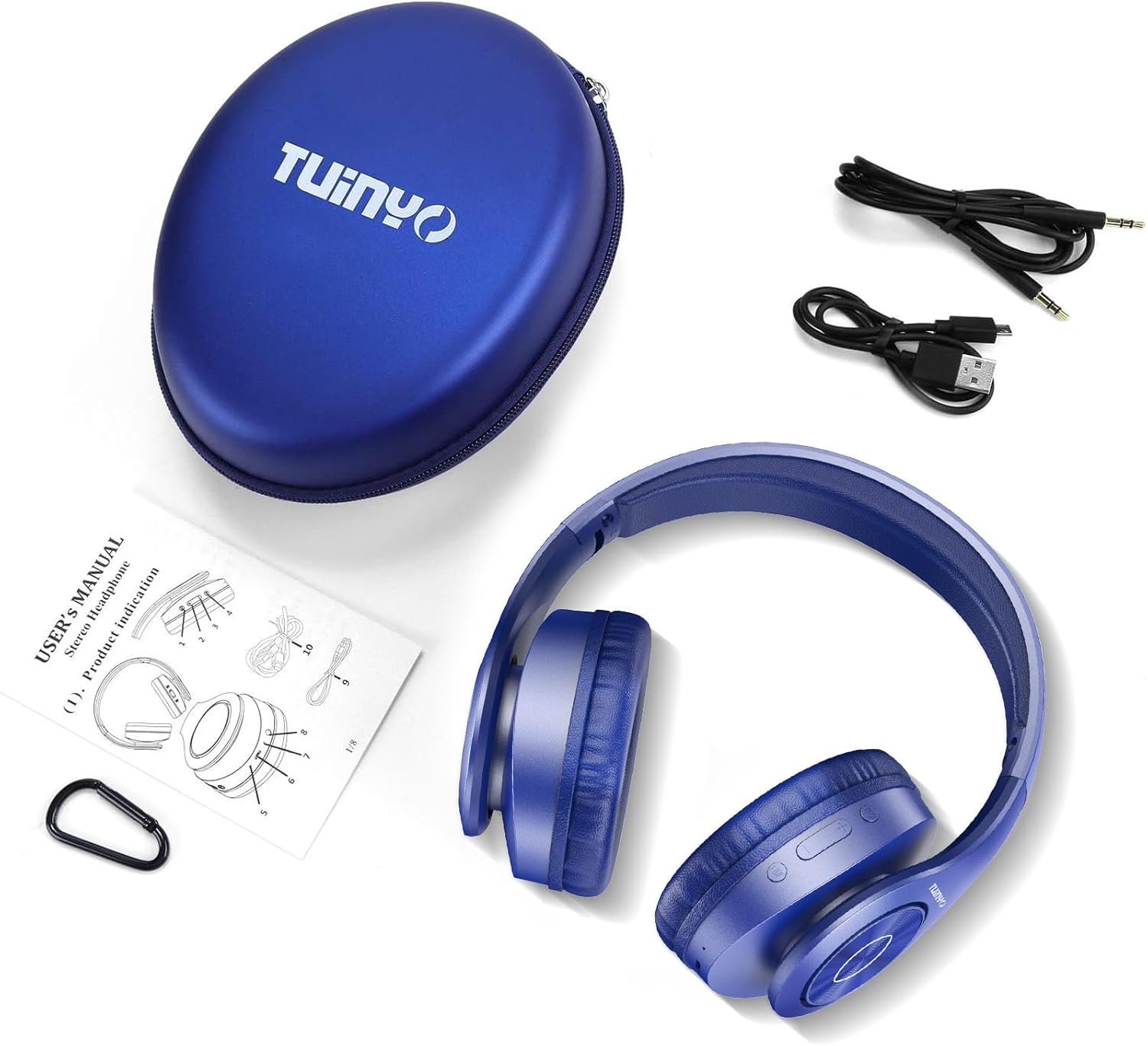
Figure 1: Included accessories with the TUINYO TP 19 headphones.
สินค้าเกินview
The TUINYO TP 19 headphones feature a robust yet comfortable design, with intuitive controls for seamless audio management.

รูปที่ 2 : ด้านหน้า view of the TUINYO TP 19 headphones, showcasing the over-ear design and metallic accents.

รูปที่ 3: ด้านข้าง view highlighting the control buttons (power, volume, multi-function) and ports on the earcup.

Figure 4: Detail of the soft memory-protein earmuffs, designed for extended comfort.
วิดีโอ 1: จบแล้วview of the TUINYO Bluetooth Wireless Headphones, demonstrating key features and design.
การตั้งค่า
1. การชาร์จหูฟัง
Before first use, fully charge your headphones. Connect the provided USB charging cable to the charging port on the headphone earcup and the other end to a USB power source (e.g., computer, wall adapter). The LED indicator will show charging status and turn off when fully charged. A full charge takes approximately 2-2.5 hours and provides up to 40 hours of music playtime.
2. การเปิด/ปิดเครื่อง
- เปิดเครื่อง: Long press the Power button on the earcup until the LED indicator lights up.
- หมดแรง: Long press the Power button again until the LED indicator turns off.
3. การจับคู่บลูทู ธ
- ตรวจสอบให้แน่ใจว่าหูฟังปิดอยู่
- Long press the Power button until the LED indicator flashes blue and red alternately, indicating pairing mode.
- บนอุปกรณ์ของคุณ (สมาร์ทโฟน แท็บเล็ต แล็ปท็อป) เปิดใช้งาน Bluetooth และค้นหาอุปกรณ์ที่มีอยู่
- Select "TP 19" from the list of devices.
- เมื่อเชื่อมต่อแล้ว ไฟ LED จะเปลี่ยนเป็นสีน้ำเงินทึบหรือกะพริบสีน้ำเงินช้าๆ
Note: The headphones are compatible with all Bluetooth-enabled devices. For TVs without built-in Bluetooth, a Bluetooth transmitter is required.
4. การเชื่อมต่อแบบใช้สาย
If the battery is depleted or you prefer a wired connection, use the provided 3.5mm audio cable. Plug one end into the headphone's 3.5mm jack and the other end into your audio device's 3.5mm port. The headphones will automatically switch to wired mode.
คำแนะนำการใช้งาน
การเล่นเพลง
- เล่น/หยุดชั่วคราว: กดปุ่มมัลติฟังก์ชั่นหนึ่งครั้ง
- เพลงถัดไป: Long press the '+' (Volume Up) button.
- แทร็กก่อนหน้า: Long press the '-' (Volume Down) button.
- ปรับระดับเสียงขึ้น: Short press the '+' (Volume Up) button.
- ลดเสียงลง: Short press the '-' (Volume Down) button.
การจัดการการโทร
- รับ/วางสาย: กดปุ่มมัลติฟังก์ชั่นหนึ่งครั้ง
- ปฏิเสธสาย: กดปุ่มมัลติฟังก์ชั่นค้างไว้
- โทรซ้ำหมายเลขล่าสุด: กดปุ่มมัลติฟังก์ชั่นสองครั้ง
ผู้ช่วยเสียง
Press the Voice Control button (often labeled 'M' or a microphone icon) to activate your device's voice assistant (e.g., Siri, Google Assistant). This allows for quick access to information and hands-free control depending on your device's operating system.
การซ่อมบำรุง
- การทำความสะอาด: ใช้ผ้านุ่มและแห้งเช็ดทำความสะอาดหูฟัง ห้ามใช้สารเคมีรุนแรงหรือวัสดุที่มีฤทธิ์กัดกร่อน
- พื้นที่จัดเก็บ: เมื่อไม่ใช้งาน ควรเก็บหูฟังไว้ในกล่องป้องกันเพื่อป้องกันความเสียหาย หลีกเลี่ยงการสัมผัสกับอุณหภูมิหรือความชื้นสูง
- การดูแลแบตเตอรี่ เพื่อยืดอายุการใช้งานแบตเตอรี่ ควรหลีกเลี่ยงการใช้หูฟังจนหมดบ่อย ชาร์จหูฟังเป็นประจำ แม้จะไม่ได้ใช้งานบ่อยก็ตาม
การแก้ไขปัญหา
| ปัญหา | สารละลาย |
|---|---|
| หูฟังไม่สามารถเปิดได้ | ตรวจสอบให้แน่ใจว่าหูฟังชาร์จเต็มแล้ว |
| ไม่สามารถจับคู่กับอุปกรณ์ได้ |
|
| ไม่มีเสียงในโหมดบลูทูธ |
|
| ความผิดเพี้ยนของเสียง |
|
ข้อมูลจำเพาะ
| คุณสมบัติ | รายละเอียด |
|---|---|
| ชื่อรุ่น | ทีพี 19 |
| เทคโนโลยีการเชื่อมต่อ | Bluetooth, Wired (3.5mm Jack) |
| เทคโนโลยีการสื่อสารไร้สาย | บลูทูธ 5.1 |
| ช่วงบลูทูธ | สูงสุด 15 เมตร |
| ขนาดไดร์เวอร์เสียง | 40 มิลลิเมตร |
| การตอบสนองความถี่ | 20 เฮิรตซ์ - 20,000 เฮิรตซ์ |
| อิมพีแดนซ์ | 32 โอห์ม |
| อายุการใช้งานแบตเตอรี่ | สูงสุด 40 ชั่วโมง (เวลาเล่นเพลง) |
| เวลาในการชาร์จ | 2-2.5 ชั่วโมง |
| ความจุของแบตเตอรี่ | 800mAh ลิเธียมโพลิเมอร์ |
| รูปทรงของหูฟัง | ครอบหู |
| วัสดุ | Stainless Steel, Leather |
| น้ำหนักสินค้า | 259 กรัม (9.1 ออนซ์) |
| ขนาดสินค้า | 7.09 x 6.3 x 3.54 นิ้ว |
| ประเภทการควบคุม | การควบคุมด้วยเสียง, การสัมผัส |
การรับประกันและการสนับสนุน
TUINYO headphones come with a รับประกันหนึ่งปี from the date of purchase. We also offer a นโยบายการคืนสินค้าแบบไม่ยุ่งยากภายใน 30 วัน. For any product-related inquiries, technical support, or warranty claims, please contact our customer service team. We provide 24/7 prompt and friendly customer service.
หากต้องการความช่วยเหลือเพิ่มเติม โปรดไปที่ ร้าน TUINYO บน Amazon or refer to the official User Manual (PDF) available for download.


