1. สินค้าหมดview
The CUBOT Note 7 is a 4G unlocked smartphone running Android 10. It features a 5.5-inch Dewdrop screen, 2GB RAM, 16GB internal storage (expandable up to 128GB via TF card), a 13MP rear camera, and an 8MP front camera. The device supports dual Nano SIM cards and includes a 3100mAh battery.

Figure 1: CUBOT Note 7 Smartphone (Green)
คุณสมบัติหลัก:
- 5.5-inch Waterdrop Incell Fullview หน้าจอ
- Android 10 GO Operating System
- RAM 2GB + ROM 16GB (สามารถเพิ่มหน่วยความจำได้สูงสุด 128GB ด้วยการ์ด TF)
- 13MP Rear Main Camera + 2 sub cameras with 1A LED flashlight
- กล้องหน้า 8MP
- แบตเตอรี่ 3100mAh
- ช่องใส่ซิมการ์ดนาโนคู่
- Face ID Unlock
- 2.4G Wi-Fi Support, Bluetooth 4.2
- Micro USB port, 3.5mm Headphone Jack
2. คู่มือการติดตั้ง
2.1 การแกะกล่องและการตรวจสอบเบื้องต้น
Upon opening the box, ensure all components are present. The package typically includes the CUBOT Note 7 smartphone, a USB cable, and a power adapter. Before first use, verify that the insulating film on the battery has been removed. This film is present for transportation safety and must be removed for the phone to power on.
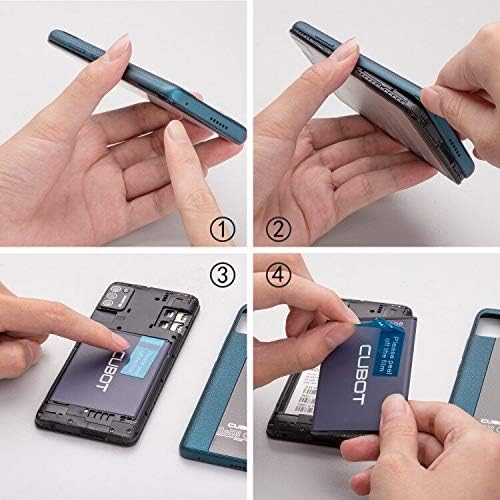
Figure 2: Battery Insulating Film Removal
Detailed description: This image illustrates the process of removing the insulating film from the CUBOT Note 7 battery. Step 1 shows the phone with its back cover. Step 2 shows the back cover being gently pried open. Step 3 reveals the battery compartment. Step 4 shows a hand peeling off a blue insulating film from the battery, which is labeled 'CUBOT'.
2.2 การติดตั้งซิมการ์ดและการ์ด TF
The CUBOT Note 7 supports two Nano SIM cards and one TF (MicroSD) card for expandable storage. To install them:
- ค่อยๆ ถอดฝาหลังของโทรศัพท์ออก
- Locate the battery compartment and the SIM/TF card slots.
- Insert your Nano SIM cards into the designated SIM slots.
- Insert the TF card (up to 128GB) into its dedicated slot.
- Ensure the battery is correctly seated and replace the back cover.

รูปที่ 3: ช่องเสียบซิมการ์ดและช่องเสียบการ์ด TF
Detailed description: This image displays the rear of the CUBOT Note 7, highlighting the slots for two Nano SIM cards and one Micro-SD (TF) card. The 3100mAh detachable battery is also visible, indicating its position relative to the card slots.
2.3 การเปิดเครื่อง
Press and hold the Power button located on the side of the device until the CUBOT logo appears on the screen. Follow the on-screen prompts to complete the initial setup, including language selection, Wi-Fi connection, and Google account setup.
3. คู่มือการใช้งาน
3.1 Navigating Android 10 GO
The CUBOT Note 7 runs on Android 10 GO, a streamlined version of Android optimized for entry-level devices. The interface is designed for simplicity and efficiency. Swipe up from the bottom of the screen to access the app drawer. Swipe down from the top to access quick settings and notifications.

Figure 4: Android 10 GO Interface
Detailed description: This image shows the CUBOT Note 7 displaying various screens of the Stock Android 10 interface, including the home screen, settings menu, a cleaner app, and battery optimization options. This illustrates the simpler and smarter operation experience provided by the system.
3.2 Face ID Unlock
The device supports Face ID for convenient unlocking. To set up Face ID:
- ไปที่ การตั้งค่า > ความปลอดภัย > การปลดล็อคด้วยใบหน้า.
- ปฏิบัติตามคำแนะนำบนหน้าจอเพื่อลงทะเบียนใบหน้าของคุณ
- Ensure you are in a well-lit environment during registration for optimal performance.
3.3 การใช้งานกล้อง
The CUBOT Note 7 is equipped with a 13MP rear camera and an 8MP front camera. Open the Camera app to capture photos and videos. Tap the screen to focus, and press the shutter button to take a picture. Switch between front and rear cameras using the camera toggle icon.

Figure 5: Front and Rear Cameras
Detailed description: This image highlights the camera capabilities of the CUBOT Note 7, showing a sample photo taken with the 8MP front camera (a person smiling on a beach) and a sample photo taken with the 13MP AI rear camera (a scenic beach with umbrellas and a distant tower).
4. การบำรุงรักษาและการดูแล
4.1 การดูแลแบตเตอรี่
To prolong battery life, avoid exposing the phone to extreme temperatures. Charge the device using the provided charger and cable. If the phone does not turn on, ensure the battery's insulating film has been removed and the battery is properly seated.
4.2 การอัปเดตซอฟต์แวร์
ตรวจสอบการอัปเดตซอฟต์แวร์เป็นระยะเพื่อให้มั่นใจถึงประสิทธิภาพและความปลอดภัยที่เหมาะสมที่สุด ไปที่ การตั้งค่า > ระบบ > การอัพเดทระบบ. If an update fails, try turning off Wi-Fi and mobile data, then attempt the update again. If issues persist, skip the update and proceed with normal phone usage.
4.3 การทำความสะอาด
ใช้ผ้าเนื้อนุ่มที่ไม่เป็นขุยเช็ดทำความสะอาดหน้าจอและตัวเครื่องโทรศัพท์ หลีกเลี่ยงการใช้สารเคมีรุนแรงหรือวัสดุที่มีฤทธิ์กัดกร่อนซึ่งอาจทำให้เครื่องเสียหายได้
5 การแก้ไขปัญหา
5.1 โทรศัพท์เปิดไม่ติด
- Ensure the battery's insulating film has been removed.
- ตรวจสอบว่าติดตั้งแบตเตอรี่ถูกต้องและชาร์จไฟเรียบร้อยแล้ว
- Connect the phone to its charger and wait a few minutes before attempting to power on again.
5.2 ปัญหาการเชื่อมต่อเครือข่าย
The CUBOT Note 7 is compatible with GSM carriers such as AT&T, T-Mobile, Metro PCS, and Cricket Wireless. It is NOT compatible with CDMA carriers like Verizon, Sprint, Boost Mobile, Straight Talk, or U.S. Cellular. If you experience network issues:
- Check if your carrier is supported.
- ตรวจสอบให้แน่ใจว่าคุณใส่ซิมการ์ดอย่างถูกต้อง
- รีสตาร์ทโทรศัพท์
- Check network settings under การตั้งค่า > เครือข่ายและอินเตอร์เน็ต.

Figure 6: Supported Network Bands
Detailed description: This image shows the CUBOT Note 7 with an overlay detailing its network compatibility: 4G FDD (B2/4/5/7/12/17/28A+B), 3G (B2/4/5), and 2G (B2/3/5/8). This visual aid helps users understand the specific bands supported by the device.
5.3 ความหน่วงในการทำงาน
As an entry-level smartphone, performance may vary with demanding applications. To optimize performance:
- ปิดแอปพลิเคชันที่ไม่ได้ใช้งานซึ่งทำงานอยู่เบื้องหลัง
- ล้างแคชสำหรับแอปที่ใช้บ่อย
- Avoid running multiple heavy applications simultaneously.
6. ข้อมูลจำเพาะ
| คุณสมบัติ | ข้อมูลจำเพาะ |
|---|---|
| หมายเลขรุ่น | 867 |
| ระบบปฏิบัติการ | Android 10 GO |
| แสดง | 5.5-inch Waterdrop Incell Fullview หน้าจอ |
| ปณิธาน | 1280 x 720 |
| แรม | 2GB |
| หน่วยความจำภายใน (ROM) | 16GB |
| พื้นที่เก็บข้อมูลแบบขยายได้ | รองรับความจุสูงสุด 128GB ผ่านการ์ด TF |
| กล้องหลัง | 13MP Main + 2 Sub Cameras |
| กล้องหน้า | 8MP |
| ความจุของแบตเตอรี่ | 3100 mAh ลิเธียมไอออน |
| การรองรับซิมการ์ด | ซิมนาโนคู่ |
| ความเข้ากันได้ของเครือข่าย | 4G FDD (B2/4/5/7/12/17/28A+B), 3G (B2/4/5), 2G GSM |
| ไวไฟ | 2.4G Wi-Fi |
| บลูทูธ | 4.2 |
| การเชื่อมต่อ | Micro USB, 3.5mm Headphone Jack |
| ขนาด | 5.31 x 2.48 x 0.43 นิ้ว |
| น้ำหนัก | 5.3 ออนซ์ (150 กรัม) |

Figure 7: CUBOT Note 7 Dimensions
Detailed description: This image provides a visual representation of the CUBOT Note 7's dimensions, showing its length (5.31 inches), width (2.48 inches), and thickness (0.43 inches). It also indicates the weight as 5.07 oz (which is approximately 144 grams, aligning with the 150 grams from specifications).
7. การรับประกันและการสนับสนุน
7.1 ข้อมูลการรับประกัน
Please refer to the warranty card included in your product packaging for detailed warranty terms and conditions. Keep your proof of purchase for warranty claims.
7.2 การสนับสนุนลูกค้า
For technical assistance, troubleshooting, or other inquiries, please contact CUBOT customer support through their official webไซต์หรือข้อมูลการติดต่อที่ระบุไว้ในเอกสารผลิตภัณฑ์ของคุณ


