1. บทนำ
This manual provides comprehensive instructions for the installation, operation, and maintenance of your Aigo Warrior AK700 Max 700W Power Supply. Designed for high-performance desktop computers, this power supply unit (PSU) delivers stable and efficient power to your system components. Please read this manual thoroughly before installation and use to ensure proper functionality and safety.
2. ข้อมูลด้านความปลอดภัย
Always observe the following safety precautions to prevent injury or damage to the product and other components:
- Ensure the power supply is disconnected from the main power outlet before installation or handling.
- ห้ามเปิดแหล่งจ่ายไฟ casinก. ปริมาตรสูงtages are present inside, even when disconnected, and can cause electric shock.
- ติดตั้งแหล่งจ่ายไฟในบริเวณที่มีอากาศถ่ายเทได้ดีเพื่อป้องกันความร้อนสูงเกินไป
- ใช้เฉพาะสายเคเบิลที่ให้มาพร้อมกับแหล่งจ่ายไฟเท่านั้น
- หลีกเลี่ยงการให้เครื่องสัมผัสกับความชื้นหรืออุณหภูมิที่สูงหรือสูงเกินไป
- ผลิตภัณฑ์นี้ได้รับการออกแบบสำหรับใช้ภายในอาคารเท่านั้น
3. เนื้อหาบรรจุภัณฑ์
ตรวจสอบว่ามีรายการทั้งหมดอยู่ในแพ็คเกจของคุณ:
- Aigo Warrior AK700 Max 700W Power Supply Unit
- สายไฟ AC
- Modular Cables (if applicable, otherwise fixed cables)
- สกรูยึด
- คู่มือการใช้งาน (เอกสารนี้)
4. สินค้าหมดview
The Aigo Warrior AK700 Max is a 700-watt power supply designed to meet the demands of modern gaming and high-performance computing systems. It features an energy-efficient design with a silent 12cm hydraulic bearing fan for optimal cooling and quiet operation. The unit incorporates a built-in Power Factor Correction (PFC) and a dual magnetic ring magnetic amplifier circuit, along with high-frequency low-resistance filter capacitors, to ensure a pure and stable current output. Multiple protection circuits are integrated to safeguard against overvoltage, overcurrent, overload, undervoltage และไฟฟ้าลัดวงจร
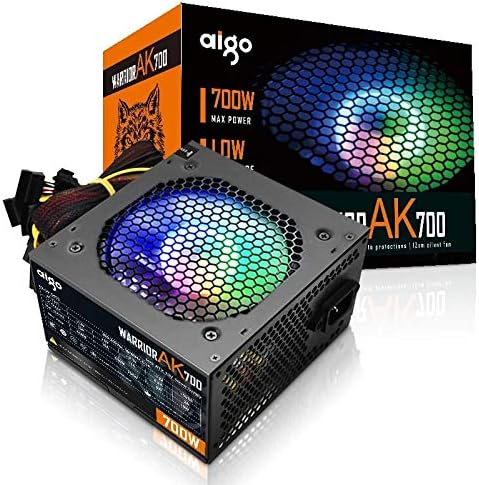
Figure 4.1: The Aigo Warrior AK700 Max 700W Power Supply, showcasing its RGB fan and retail packaging.
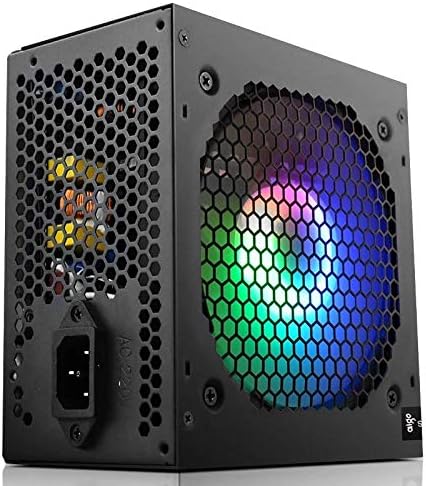
รูปที่ 4.2: ด้านข้าง view of the power supply, highlighting the 12cm RGB cooling fan and honeycomb grille.

รูปที่ 4.3: ด้านหลัง view of the power supply, illustrating the exhaust grille and AC power input socket.
5. การตั้งค่าและการติดตั้ง
Follow these steps to properly install the Aigo Warrior AK700 Max power supply into your computer system:
- การตระเตรียม: ตรวจสอบให้แน่ใจว่าคอมพิวเตอร์ของคุณปิดเครื่องสนิทแล้ว และถอดปลั๊กออกจากเต้ารับที่ผนัง เปิดเคสคอมพิวเตอร์ของคุณ
- ถอด PSU เก่าออก (ถ้ามี): ถอดสายไฟทั้งหมดออกจากแหล่งจ่ายไฟเก่าของคุณ และถอดสกรูยึดออก ค่อยๆ เลื่อนออกจากเคส
- ติดตั้ง PSU ใหม่: Gently slide the Aigo Warrior AK700 Max into the power supply bay of your computer case. Ensure the fan is oriented correctly for optimal airflow (usually facing down or up, depending on your case design).
- PSU ที่ปลอดภัย: Align the screw holes on the power supply with those on your case. Secure the power supply using the provided mounting screws.
- เชื่อมต่อสายเคเบิล:
- 24-pin ATX Motherboard Connector: Connect the main 24-pin cable to your motherboard.
- CPU Power Connector (4+4 pin or 8-pin EPS): Connect the CPU power cable to the appropriate socket on your motherboard.
- PCIe Power Connectors (6+2 pin): Connect these to your graphics card(s) if required.
- ขั้วต่อไฟ SATA: Connect to your storage drives (HDDs, SSDs) and optical drives.
- Peripheral (Molex) Connectors: Connect to other peripherals as needed.
- การจัดการสายเคเบิล: เดินสายเคเบิลอย่างเรียบร้อยเพื่อปรับปรุงการไหลเวียนของอากาศและความสวยงามภายในเคสของคุณ
- ปิดคดี: เมื่อทำการเชื่อมต่อและตรวจสอบทั้งหมดเสร็จแล้ว ให้ปิดเคสคอมพิวเตอร์ของคุณ
- เชื่อมต่อไฟ AC: เสียบสายไฟ AC เข้ากับแหล่งจ่ายไฟแล้วเสียบเข้ากับเต้ารับที่ผนัง
6. คู่มือการใช้งาน
After successful installation, follow these steps to operate your computer system with the Aigo Warrior AK700 Max power supply:
- เปิดเครื่อง: Ensure the power switch on the back of the PSU is in the 'ON' (I) position. Press the power button on your computer case.
- บูตระบบ: Your computer should now power on and begin its boot sequence. The RGB fan on the power supply will illuminate.
- หมดแรง: To turn off your computer, use the operating system's shutdown function. For a complete power cycle, switch the PSU to the 'OFF' (O) position after shutting down the computer.
The intelligent temperature control design automatically adjusts the fan speed to maintain optimal cooling and extend the lifespan of the unit, ensuring quiet operation under various loads.
7. การบำรุงรักษา
การบำรุงรักษาอย่างถูกต้องจะช่วยให้แหล่งจ่ายไฟของคุณมีอายุการใช้งานยาวนานและมีประสิทธิภาพเหมาะสมที่สุด:
- การทำความสะอาดฝุ่น: Periodically clean dust from the power supply's fan and vents using compressed air. Ensure the computer is powered off and unplugged before cleaning.
- การไหลเวียนของอากาศ: Ensure that the power supply's intake and exhaust vents are not obstructed by cables or other components within the computer case.
- สภาพแวดล้อม : Operate the power supply in a clean, dry environment with adequate ventilation.
- ห้ามถอดประกอบ: Never attempt to open the power supply unit. There are no user-serviceable parts inside, and doing so will void your warranty and poses a risk of electric shock.
8 การแก้ไขปัญหา
If you encounter issues with your Aigo Warrior AK700 Max power supply, refer to the following common problems and solutions:
| ปัญหา | สาเหตุที่เป็นไปได้ | สารละลาย |
|---|---|---|
| คอมพิวเตอร์ไม่สามารถเปิดเครื่องได้ |
|
|
| ระบบเปิดอยู่แต่ปิดลงทันที |
|
|
| Fan is not spinning or is excessively loud. |
|
|
If the problem persists after attempting these solutions, please contact Aigo customer support for further assistance.
9. ข้อมูลจำเพาะ
Detailed technical specifications for the Aigo Warrior AK700 Max 700W Power Supply:
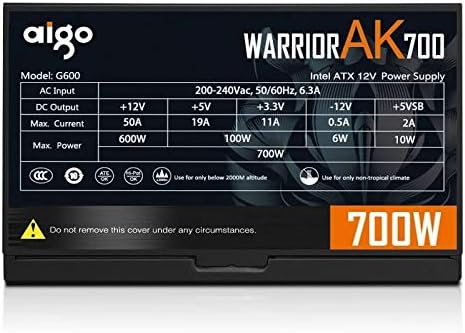
Figure 9.1: The specifications label found on the Aigo Warrior AK700 Max Power Supply.
| คุณสมบัติ | รายละเอียด |
|---|---|
| แบบอย่าง | AK700 Max |
| วัดtage | 700 วัตต์ |
| ฟอร์มแฟกเตอร์ | ATX, ATX12V |
| อินพุต Voltage | 220V (Minimum 220V, Maximum 220V) |
| วิธีการทำความเย็น | ระบบระบายความร้อนด้วยอากาศ |
| ขนาดพัดลม | 120 Millimeters (Hydraulic Bearing) |
| อุปกรณ์ที่รองรับ | เครื่องคอมพิวเตอร์ส่วนบุคคล |
| ประเภทขั้วต่อ | SATA, PCIe (6+2 pin), ATX 24-pin, EPS 4+4 pin |
| คุณสมบัติการป้องกัน | โอเวอร์โวลtage, Overcurrent, Overload, Undervoltage, Short Circuit, Light Protection |
| น้ำหนักสินค้า | 1.9 กิโลกรัม |
| ขนาดแพ็คเกจ | 5 x 5 x 5 ซม. (โดยประมาณ) |
10. การรับประกันและการสนับสนุน
For warranty information and technical support, please refer to the official Aigo webหรือติดต่อตัวแทนจำหน่ายในพื้นที่ของคุณ เก็บหลักฐานการซื้อไว้เพื่อใช้ในการเคลมประกัน
Aigo Official Webเว็บไซต์: www.aigocorp.com (หมายเหตุ: นี่คือตัวแทน URL เนื่องจากไม่มีเจ้าหน้าที่อย่างเป็นทางการ website was provided in the product data. Please refer to actual product documentation for correct contact information.)


