1. บทนำ
This manual provides detailed instructions for the installation, operation, and maintenance of your YESKAMO Wireless Security Camera System. This system includes 3MP wireless cameras and an 8-channel NVR with a pre-installed 1TB HDD, designed for reliable outdoor and indoor surveillance.

ภาพ: เหนือview of the YESKAMO Wireless Security Camera System, showing two cameras, the NVR, and a 1TB hard drive.
2. เนื้อหาบรรจุภัณฑ์
โปรดตรวจสอบว่ารายการทั้งหมดที่ระบุไว้ด้านล่างมีอยู่ในแพ็คเกจของคุณหรือไม่:
- 2 x Wireless Security Cameras (3MP)
- 1 x Wireless NVR (8-channel, 5MP compatible) with 1TB HDD pre-installed
- 2 x 12V1A Power Adapters for Cameras
- อะแดปเตอร์แปลงไฟ 12V2A สำหรับ NVR จำนวน 1 ชิ้น
- 1 x USB Mouse
- 1 x 1m LAN Cable
- 2 x Security Stickers
- 1 x Quick Start Guide (Japanese)
- 1 x Detailed User Manual (Japanese)
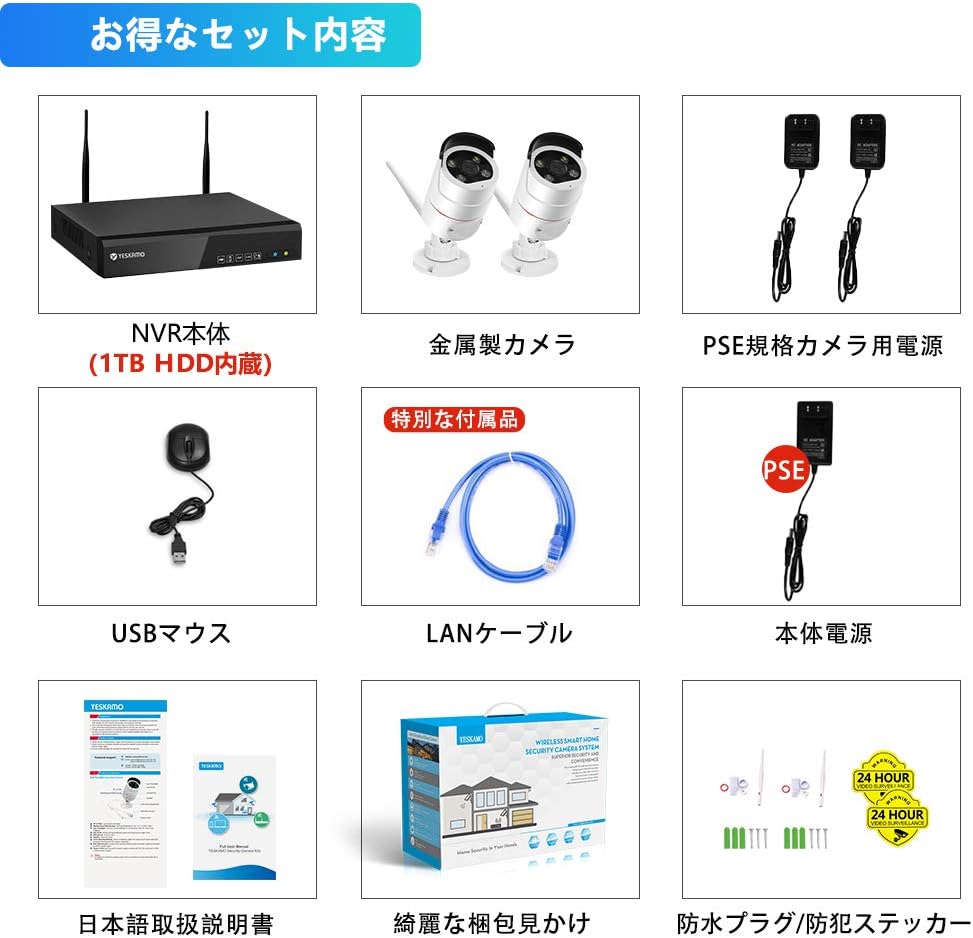
Image: Illustration of the complete package contents, including NVR, cameras, power adapters, mouse, LAN cable, and manuals.
3. สินค้าหมดview
3.1 คุณสมบัติกล้อง
- 3MP High-Resolution Sensor with HISILICON chip
- เลนส์มุมกว้าง 100°
- IP66 Waterproof and Dustproof Metal Casing
- Built-in Microphone and Speaker for Two-Way Audio
- AI Human Detection with Sensor Light and Siren Alarm
- ไฟ LED อินฟราเรดสำหรับการมองเห็นตอนกลางคืน
- Adjustable 3DB Antennas
3.2 NVR Features
- 8-Channel Recorder, compatible with up to 5MP cameras
- Pre-installed 1TB HDD for continuous recording
- H.265 Video Compression for efficient storage
- VGA and HDMI outputs for monitor connection
- LAN port for network connection and remote access
- USB ports for mouse and backup
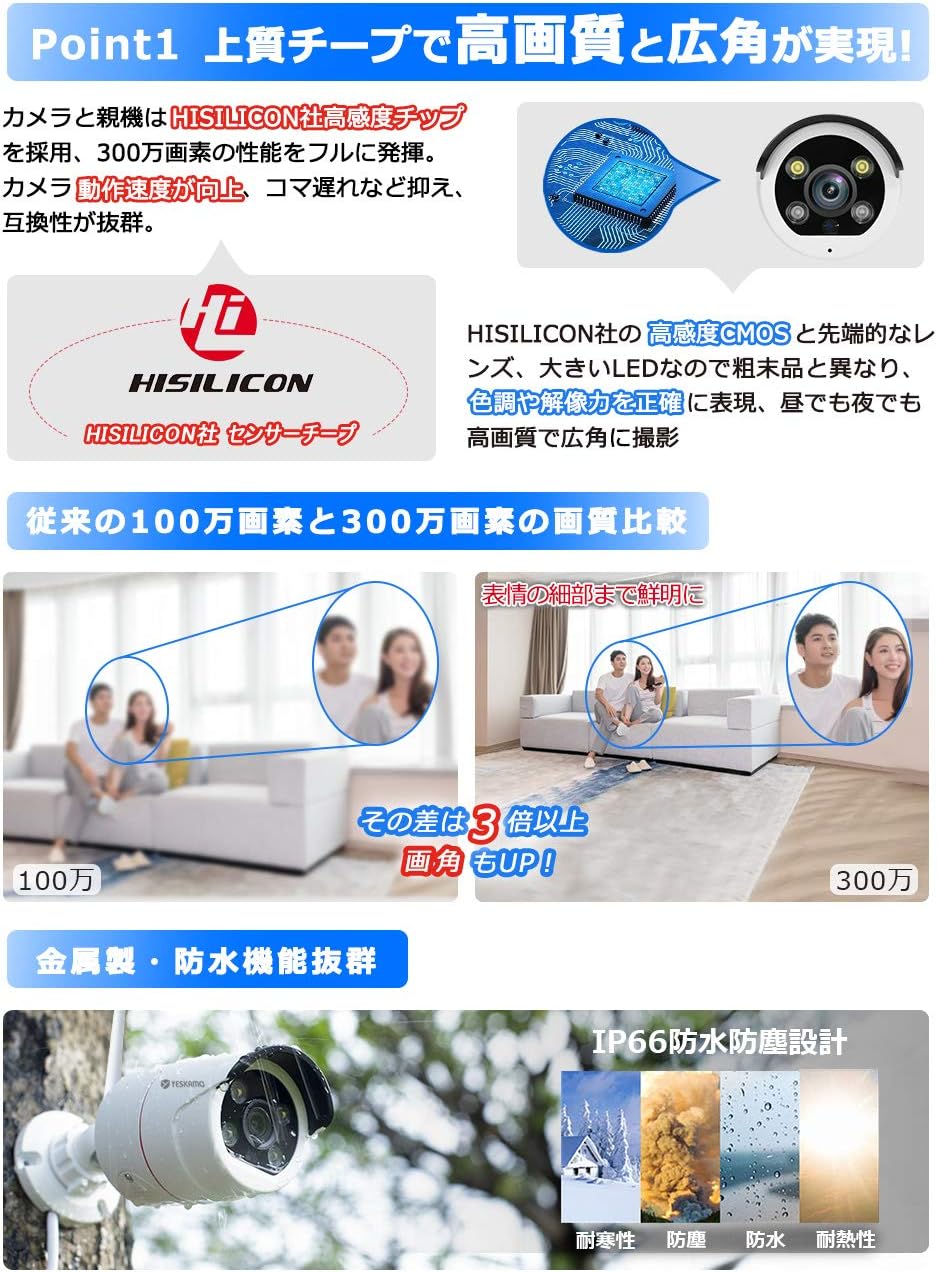
ภาพ: รายละเอียด view of the camera's high-sensitivity chip and lens, alongside a comparison demonstrating the superior clarity of 3MP resolution over 1MP.
4. คู่มือการติดตั้ง
Follow these steps for initial system setup:
- เชื่อมต่อกล้อง: Plug the 12V1A power adapters into each camera and then into a power outlet. The cameras will power on.
- เชื่อมต่อ NVR:
- Connect the NVR to a monitor (VGA or HDMI) with a resolution of 1024x1280 or higher.
- เชื่อมต่อเมาส์ USB เข้ากับพอร์ต USB ของเครื่องบันทึกวิดีโอเครือข่าย (NVR)
- Plug the 12V2A power adapter into the NVR and then into a power outlet. The NVR will power on and automatically detect the cameras within seconds.
- ท้องถิ่น Viewการลง: Once powered on, the system will automatically begin recording. You can view อยู่ footage and playback recordings directly on the connected monitor without an internet connection.
- ระยะไกล Viewing (Optional): สำหรับรีโมท viewing via mobile app or PC, connect the NVR to your home router using the provided LAN cable. Ensure your router has an active internet connection.
Image: Visual guide for connecting the camera power, NVR power, and NVR to a monitor.
5. คู่มือการใช้งาน
5.1 โหมดการบันทึก
ระบบรองรับโหมดการบันทึกหลากหลายรูปแบบ:
- การบันทึกต่อเนื่อง: Records 24/7. The 1TB HDD allows for extended recording periods. Older files are automatically overwritten when the disk is full.
- การบันทึกตามกำหนดเวลา: Set specific times for recording, such as during weekdays, nights, or holidays.
- การบันทึกการตรวจจับความเคลื่อนไหว: Records only when motion is detected. This conserves storage space and makes reviewing events easier.
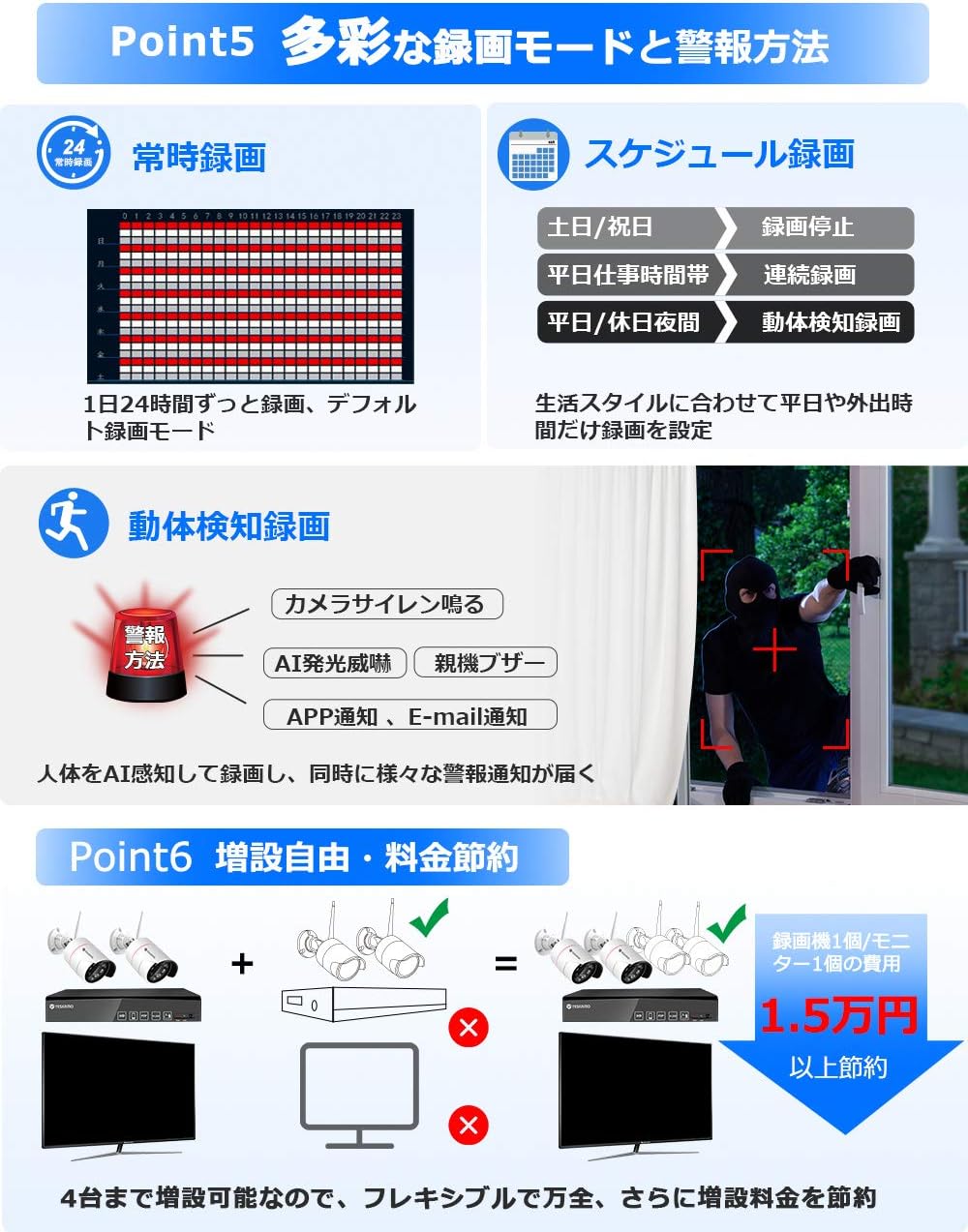
Image: Visual representation of different recording options including continuous, scheduled, and motion detection, along with various alarm methods.
5.2 AI Human Detection and Alarms
The system features advanced AI human detection to minimize false alarms caused by light changes or heat. When a human is detected:
- สัญญาณเตือนภัยไซเรน: The camera can emit a siren sound to deter intruders.
- เซ็นเซอร์แสง: In dark conditions, the camera's sensor lights will illuminate, providing a color image and acting as a deterrent. This feature can be enabled/disabled.
- การแจ้งเตือนทางมือถือ: รับการแจ้งเตือนทันทีบนสมาร์ทโฟนของคุณ
- การแจ้งเตือนทางอีเมล: Get email alerts with snapshots of the event.
- NVR Buzzer: The NVR can emit an audible alarm.

Image: Illustration of AI human detection triggering a siren and sensor light, showing color night vision capabilities and different night vision modes.
5.3 เสียงสองทาง
Equipped with a high-sensitivity microphone and speaker, the cameras support two-way audio communication. You can:
- Listen to audio from the camera's location (up to 8m range).
- Speak through the camera to communicate with visitors or deter intruders.

Image: Depiction of two-way audio functionality, showing a user speaking through a smartphone to someone at the camera's location, and audio recording exampเลส.
5.4 การเข้าถึงระยะไกล
Access your camera system remotely using the YESKAMO app on your smartphone or client software on your PC. Ensure the NVR is connected to your router via LAN cable for this functionality.

Image: Steps for connecting the NVR to a router and accessing the system via the YESKAMO app on a smartphone or PC, illustrating live view และการเล่น
6. การบำรุงรักษา
- การทำความสะอาด: ควรเช็ดเลนส์กล้องด้วยผ้าแห้งเนื้อนุ่มเป็นประจำ เพื่อให้ได้ภาพที่คมชัด ห้ามใช้สารเคมีรุนแรง
- การป้องกันสภาพอากาศ: The cameras are IP66 rated for outdoor use, providing protection against dust and strong jets of water. However, avoid submerging them in water.
- การจัดการสายเคเบิล: Ensure all cables are securely connected and protected from environmental damage. Use waterproof plugs for exposed connections.
- อัพเดตเฟิร์มแวร์: Check the official YESKAMO webไซต์อัปเดตเฟิร์มแวร์เป็นระยะเพื่อให้มั่นใจถึงประสิทธิภาพและความปลอดภัยที่เหมาะสมที่สุด
7 การแก้ไขปัญหา
7.1 No Image Display
- Check if the NVR and cameras are properly powered on.
- Ensure the monitor is correctly connected to the NVR via VGA or HDMI.
- Verify that the monitor input source is set correctly.
7.2 Unstable Wi-Fi Signal
If the wireless signal between the cameras and NVR is unstable, consider the following solutions:
- ฟังก์ชันการทวนสัญญาณ: Utilize the NVR's repeater function to extend the Wi-Fi range.
- การเชื่อมต่อแบบมีสาย: Connect cameras to the NVR directly via an Ethernet cable for a more stable connection.
- External Repeater: Use a separate Wi-Fi repeater or range extender (sold separately).
- Extended Antenna: Connect an external Wi-Fi extension antenna (sold separately) to the cameras.
7.3 ปัญหาการบันทึก
- Ensure the 1TB HDD is properly installed and recognized by the NVR.
- Check recording settings (continuous, scheduled, motion detection) to ensure they are configured as desired.
- If the HDD is full, the system will automatically overwrite the oldest files. To retain more footage, consider upgrading the HDD to a maximum of 6TB.
8. ข้อมูลจำเพาะ
| คุณสมบัติ | ข้อมูลจำเพาะ |
|---|---|
| ยี่ห้อ | เยสกาโม |
| หมายเลขรุ่น | B08PP2CFBP |
| เทคโนโลยีการสื่อสารไร้สาย | ไวไฟ |
| วัสดุ | Metal (Camera Body) |
| ขนาดสินค้า (กxยxส) | 31.5 x 15.5 x 28.5 ซม. |
| ระดับความต้านทานต่อน้ำ | กันน้ำระดับ IP66 |
| น้ำหนักผลิตภัณฑ์ | 3.1 กิโลกรัม |
| คุณสมบัติพิเศษ | AI Human Detection, Human Sensor Light, Night Vision, Recording, Two-Way Talk |
| ความละเอียดในการจับภาพวิดีโอ | 1296P (3MP) |
| แหล่งพลังงาน | อะแดปเตอร์ DC |
| ประเภทการติดตั้ง | การติดตั้งบนเพดาน |
| ส่วนประกอบที่รวมอยู่ | 2 Wireless Cameras, Wireless NVR, 2 Camera Power Adapters, 1 NVR Power Adapter, Mouse, 1m LAN Cable, 2 Security Stickers, Manuals |
| ความจุฮาร์ดดิสก์ | 1TB (expandable up to 6TB) |
9. การรับประกันและการสนับสนุน
YESKAMO provides comprehensive support for its products:
- การรับประกัน: ผลิตภัณฑ์นี้มาพร้อมกับการรับประกัน 3 ปี
- นโยบายการคืนสินค้า: รับประกันคืนเงินภายใน 60 วัน
- นโยบายการแลกเปลี่ยน: Free exchange within 1 year.
- การสนับสนุนด้านเทคนิค:
- Telephone support available during business hours.
- Email inquiries are responded to promptly, typically within 24 hours.
- For any questions or assistance, please contact YESKAMO customer support.


