1. บทนำ
Thank you for choosing the GEARSTONE CS-07 2-in-1 Foldable Treadmill. This manual provides essential information for the safe assembly, operation, and maintenance of your new fitness equipment. Please read this manual thoroughly before use and retain it for future reference.
The GEARSTONE CS-07 is designed for home use, offering both walking and running modes with a powerful 2 HP motor and a speed range of 1-15 km/h. Its foldable design allows for convenient storage, making it ideal for various living spaces.
2. คำแนะนำด้านความปลอดภัยที่สำคัญ
To reduce the risk of serious injury, read all instructions before using the GEARSTONE CS-07 treadmill. Keep these instructions in a safe place for future reference.
- ควรวางลู่วิ่งบนพื้นราบเสมอ
- ตรวจสอบให้แน่ใจว่ามีพื้นที่ว่างเปล่าเพียงพอรอบลู่วิ่ง (อย่างน้อย 2 เมตรด้านหลังและ 0.6 เมตรในแต่ละด้าน)
- ให้เด็กและสัตว์เลี้ยงอยู่ห่างจากลู่วิ่งไฟฟ้าระหว่างการใช้งาน
- Always attach the safety key clip to your clothing before starting the treadmill. The treadmill will stop if the safety key is disengaged.
- ห้ามใช้งานลู่วิ่งหากสายไฟหรือปลั๊กชำรุด หรือหากทำงานไม่ถูกต้อง
- สวมใส่รองเท้าและเสื้อผ้ากีฬาที่เหมาะสม
- Maximum user weight capacity is 120 kg.
- ปรึกษาแพทย์ก่อนเริ่มโปรแกรมการออกกำลังกาย
3. การติดตั้งและการประกอบ
The GEARSTONE CS-07 treadmill comes largely pre-assembled. Follow these steps for final setup:
- การแกะกล่อง: Carefully remove the treadmill from its packaging. Retain packaging materials for potential future transport or storage.
- การวางตำแหน่ง: Place the treadmill on a flat, stable surface. Ensure there is sufficient space around the unit for safe operation.
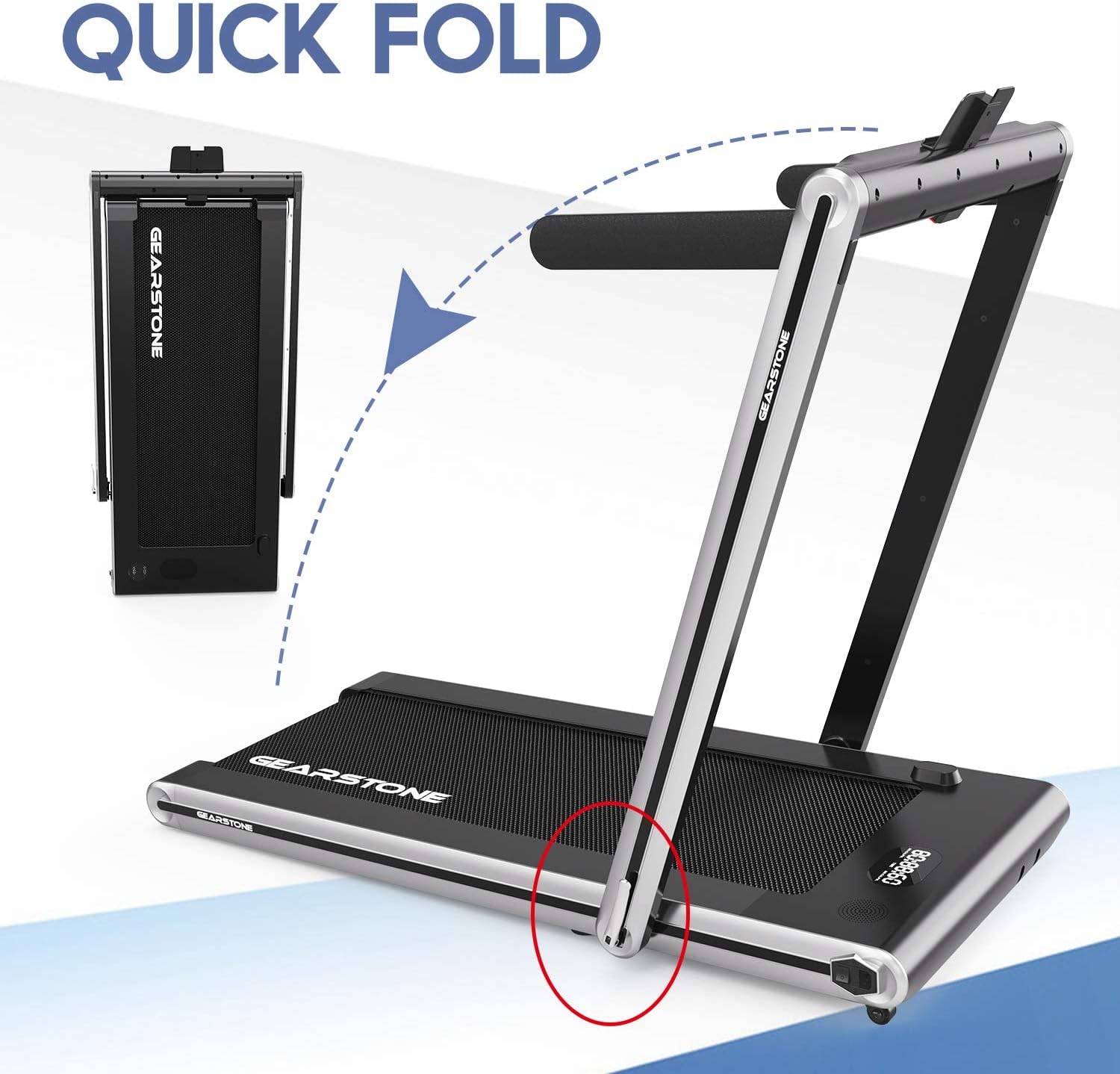
- การคลี่ออก (ถ้ามี): If the treadmill is in its folded state, gently lower the running deck until it locks into position. Raise the handlebar assembly if it is folded down.
- ชุดประกอบแฮนด์บาร์: Secure the handlebar supports and tighten any pre-installed screws as indicated in the diagram.
- การเชื่อมต่อไฟฟ้า: เสียบสายไฟเข้ากับเต้ารับไฟฟ้าที่มีสายดิน

4. คู่มือการใช้งาน
4.1 แผงควบคุมโอเวอร์view
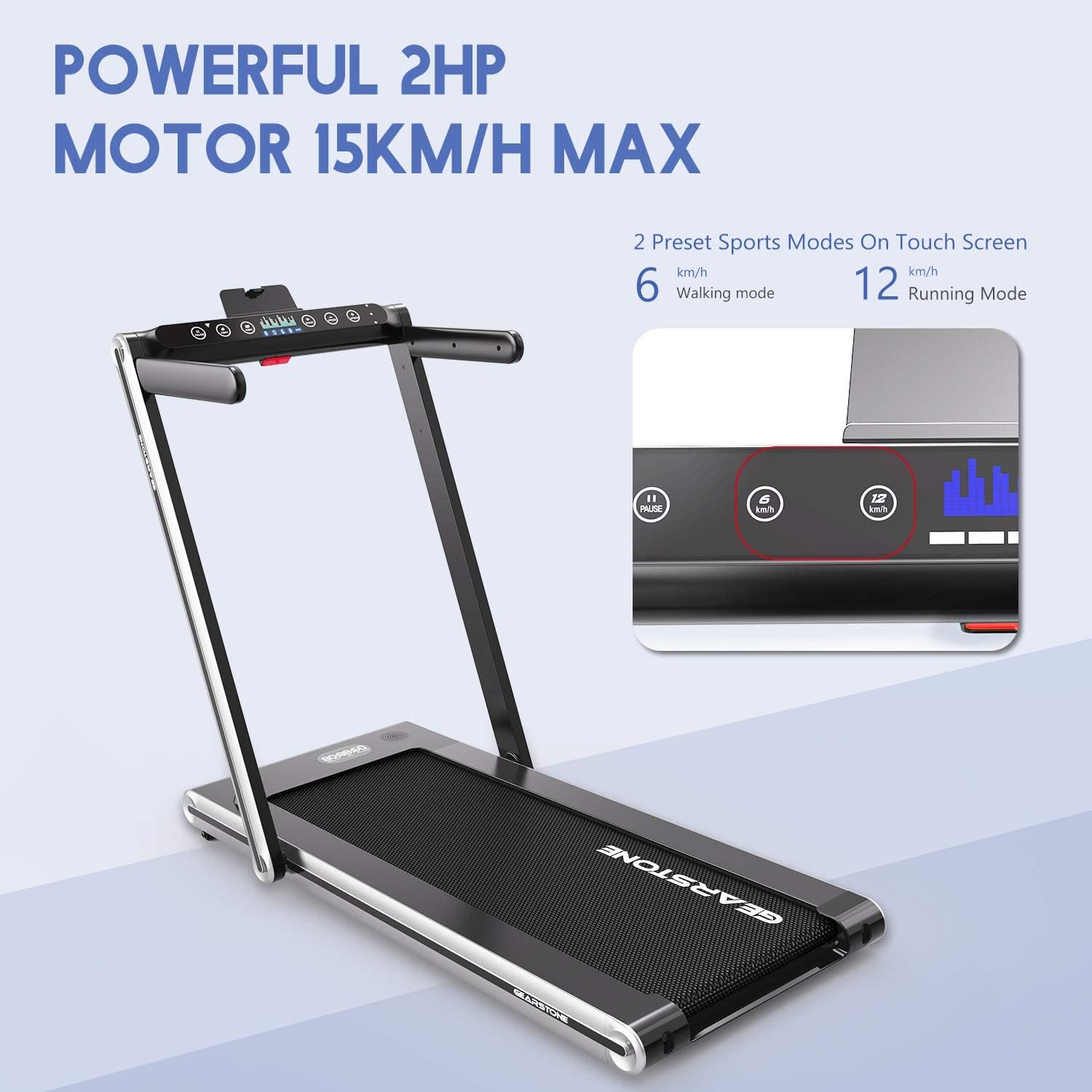
The control panel features a double screen display and touch controls for easy operation.
4.2 Starting an Exercise Session
- รหัสความปลอดภัย: Ensure the safety key is properly inserted into the console and the clip is attached to your clothing. The treadmill will not start without the safety key.
- เปิดเครื่อง: Press the power button on the control panel. The display will illuminate.
- เลือกโหมด:
- โหมดการเดิน: With the handlebars folded down, the treadmill operates in walking mode (1-4 km/h).
- โหมดการทำงาน: With the handlebars raised, the treadmill operates in running mode (1-15 km/h).
- ปรับความเร็ว: Use the speed adjustment buttons (usually '+' and '-') to increase or decrease the belt speed. You can also use the preset speed buttons (e.g., 6 km/h for walking, 12 km/h for running) for quick adjustments.
- Begin Exercise: ขึ้นไปยืนบนสายพานวิ่งและเริ่มออกกำลังกายได้เลย

4.3 การหยุดเครื่องวิ่ง
- Press the 'STOP' button on the control panel.
- Alternatively, pull the safety key from the console to initiate an emergency stop.

4.4 การเชื่อมต่อบลูทูธ
The treadmill features integrated Bluetooth for connecting to compatible devices, allowing for music playback or app integration (if supported by the manufacturer).
- เปิดใช้งาน Bluetooth บนสมาร์ทโฟนหรือแท็บเล็ตของคุณ
- ค้นหา available devices and select "GEARSTONE CS-07" (or similar name).
- Once paired, you can stream audio through the treadmill's speakers (if equipped) or connect to fitness apps.

5. การบำรุงรักษา
การบำรุงรักษาอย่างสม่ำเสมอจะช่วยให้ลู่วิ่งของคุณใช้งานได้ยาวนานและปลอดภัย
5.1 การทำความสะอาด
- ควรถอดปลั๊กลู่วิ่งออกทุกครั้งก่อนทำความสะอาด
- เช็ดทำความสะอาดคอนโซลและพื้นผิวภายนอกด้วยน้ำยาทำความสะอาดamp ผ้า หลีกเลี่ยงน้ำยาทำความสะอาดหรือตัวทำละลายที่มีฤทธิ์กัดกร่อน
- Vacuum underneath the treadmill regularly to prevent dust and debris buildup.
5.2 การหล่อลื่นสายพาน
The running belt requires periodic lubrication to reduce friction and extend its lifespan. Refer to the specific instructions provided with your lubricant or contact customer support for guidance. Typically, lubrication is recommended every 3-6 months depending on usage.
5.3 การปรับสายพาน
If the running belt becomes off-center or slips, it may require adjustment. Use the provided Allen wrench to turn the rear roller bolts in small increments (quarter turns) until the belt is centered and tensioned correctly. Refer to the detailed diagrams in the full manual for precise adjustment points.
6 การแก้ไขปัญหา
| ปัญหา | สาเหตุที่เป็นไปได้ | สารละลาย |
|---|---|---|
| เครื่องวิ่งไฟฟ้าไม่ทำงาน | Power cord not plugged in; Safety key not inserted; Power switch off. | Check power connection; Ensure safety key is fully inserted; Turn on the power switch. |
| สายพานวิ่งหลุด | Belt tension too loose; Belt requires lubrication. | Adjust belt tension (refer to Section 5.3); Lubricate the running belt (refer to Section 5.2). |
| เสียงรบกวนที่ผิดปกติระหว่างการทำงาน | Loose components; Belt friction; Motor issue. | Check and tighten all visible bolts and screws; Lubricate the belt; If noise persists, contact customer support. |
| Error Code E-07. | Safety key not connected. | Ensure the red magnetic safety key is properly connected to the console. |
| Error Code E-05. | Overload or motor protection activated. | Reduce user weight if exceeding 120kg; Allow treadmill to cool down; If persistent, contact customer support. |
7. ข้อมูลจำเพาะผลิตภัณฑ์
- แบบอย่าง: GEARSTONE CS-07
- กำลังมอเตอร์: 2 HP (Horsepower)
- ช่วงความเร็ว: 1-15 กม./ชม.
- โหมดที่ตั้งไว้ล่วงหน้า: 2 (Walking, Running)
- ประเภทจอภาพ: LCD, Double Screen
- ควบคุม: การควบคุมแบบสัมผัส
- การเชื่อมต่อ: บลูทูธแบบบูรณาการ
- วัสดุกรอบ: เหล็กอัลลอยด์
- ความจุน้ำหนักสูงสุด: 120 กก.
- คุณสมบัติ: Foldable, Shock Absorption, Wear-Resistant, Non-Slip, Quiet Glide Technology
- แหล่งพลังงาน: สายไฟฟ้า
- ส่วนประกอบที่รวมอยู่: ลู่วิ่ง
- ขนาด (แพ็คเกจ): 120 x 80 x 20 ซม.
- น้ำหนัก (แพ็คเกจ): 21 กก.
8. การรับประกันและการสนับสนุน
GEARSTONE products are manufactured to high-quality standards. For warranty information, technical support, or to purchase replacement parts, please refer to the warranty card included with your product or visit the official GEARSTONE website. Please have your model number (CS-07) and purchase date available when contacting support.
ข้อมูลติดต่อ: Please refer to your purchase documentation or the manufacturer's webเว็บไซต์นี้มีข้อมูลติดต่อฝ่ายบริการลูกค้าล่าสุด


