การแนะนำ
This manual provides essential instructions for the safe and efficient operation, installation, and maintenance of your Candy Smart Inverter CBDO485TWME/1-S integrated front-load washer dryer. Please read all instructions carefully before using the appliance and retain this manual for future reference.

รูปที่ 1: ด้านหน้า view of the Candy Smart Inverter CBDO485TWME/1-S integrated washer dryer. This image displays the appliance's overall design, including the control panel, detergent drawer, and main door.
ข้อมูลด้านความปลอดภัย
ปฏิบัติตามข้อควรระวังด้านความปลอดภัยขั้นพื้นฐานเสมอเมื่อใช้เครื่องใช้ไฟฟ้า เพื่อลดความเสี่ยงต่อการเกิดไฟไหม้ ไฟฟ้าช็อต และการบาดเจ็บต่อบุคคล
- ตรวจสอบให้แน่ใจว่าอุปกรณ์ต่อสายดินอย่างถูกต้อง
- ห้ามใช้งานเครื่องหากได้รับความเสียหาย
- เก็บเด็กและสัตว์เลี้ยงให้ห่างจากเครื่องระหว่างการใช้งาน
- ห้ามสัมผัสอุปกรณ์ขณะที่มือเปียก
- ถอดปลั๊กเครื่องก่อนดำเนินการบำรุงรักษาหรือทำความสะอาด
- ใช้เฉพาะผงซักฟอกและสารเติมแต่งที่เหมาะสำหรับเครื่องซักผ้าอัตโนมัติเท่านั้น
การติดตั้งและการตั้งค่า
1. การแกะกล่อง
Carefully remove all packaging materials. The appliance weighs approximately 66 kilograms, so it is recommended to have assistance during unpacking and positioning to prevent injury. Inspect the appliance for any damage incurred during transit.
2 การวาง
This is an integrated front-load washer dryer designed to fit into cabinetry. Ensure the installation area is level, stable, and has adequate ventilation. Do not install the appliance in areas where the temperature may fall below freezing.

รูปที่ 2: The washer dryer shown integrated within a kitchen or utility room cabinet. This illustrates the appliance's intended installation as a built-in unit.
3. การเชื่อมต่อท่อน้ำและท่อระบายน้ำ
- ต่อท่อน้ำเข้าเข้ากับก๊อกน้ำเย็น ตรวจสอบให้แน่ใจว่าข้อต่อแน่นเพื่อป้องกันการรั่วซึม
- Position the drain hose into a standpipe or secure it over a sink, ensuring it is not kinked.
4. การเชื่อมต่อไฟฟ้า
Connect the power cord to a properly grounded 220 Volt electrical outlet. Do not use extension cords or adapters.
5. Initial Check-up
Before the first wash, it is recommended to run a short cycle without laundry and detergent to clean the drum and check for proper operation.
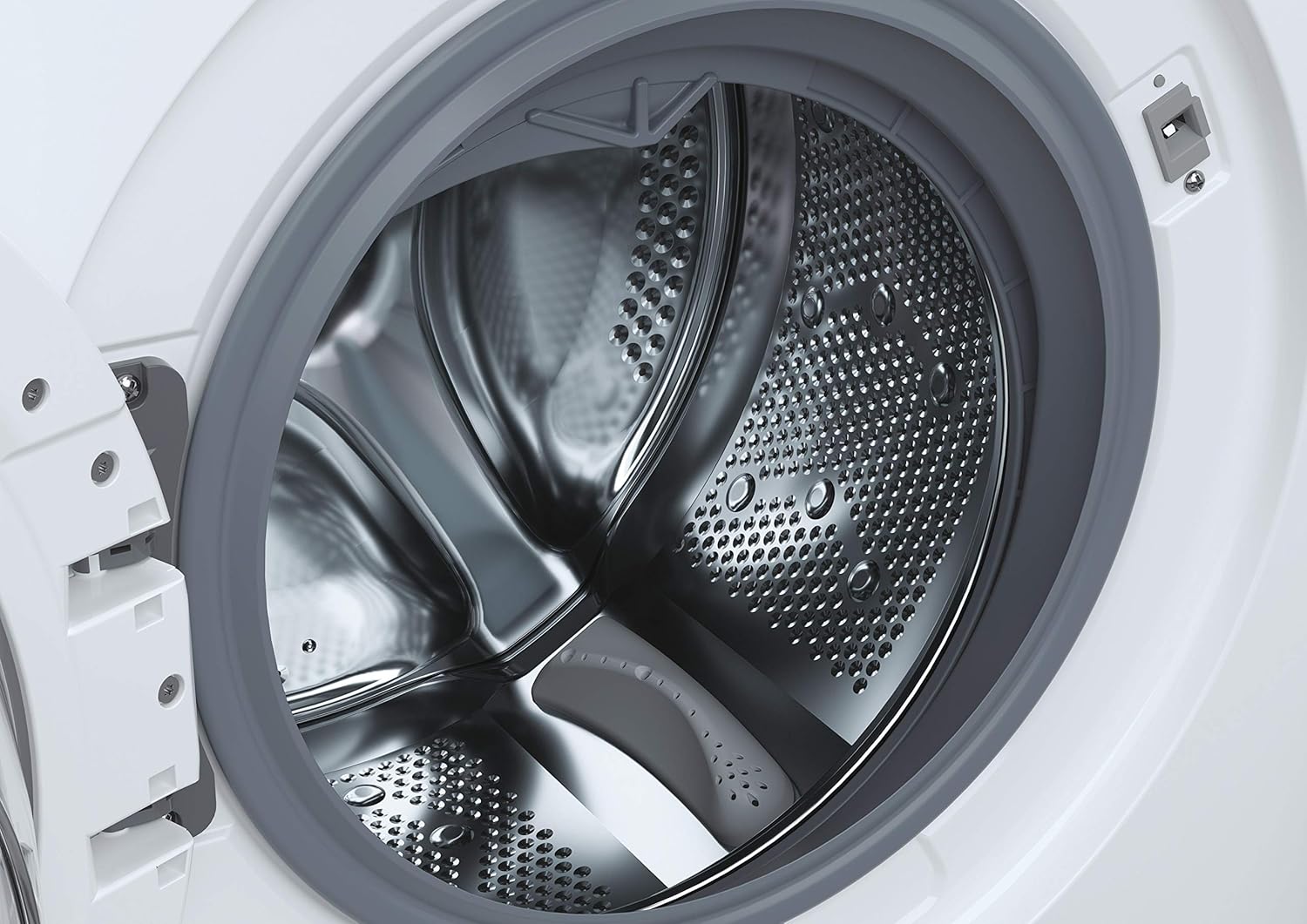
รูปที่ 3: รายละเอียด view of the stainless steel drum inside the washer dryer. This shows the internal structure where laundry is placed for washing and drying.
6. Smart Fi+ Connectivity
The Candy Smart Inverter CBDO485TWME/1-S features Smart Fi+ for remote control and monitoring via the Simply-Fi app. Download the app from your device's app store.
- สำหรับอุปกรณ์ Android: Follow the in-app instructions for pairing.
- For iOS (iPhone) devices: During the setup process, if the washing machine's Wi-Fi network does not appear, ensure that แอร์ดรอป is enabled in your iPhone's Control Center. This is crucial for the app to detect and connect to the appliance's network. Once connected, you can complete the registration and use the Smart Fi features.
คำแนะนำการใช้งาน
1. แผงควบคุมด้านบนview

รูปที่ 4: รายละเอียด view of the control panel, showing the program selection dial, digital display, and various option buttons. This panel allows users to select wash and dry cycles and customize settings.
The control panel consists of a program selection dial, a digital display, and several push buttons for additional options.
- หน้าปัดโปรแกรม: Used to select the desired wash or dry program.
- จอแสดงผลดิจิตอล: แสดงระยะเวลาของโปรแกรม รหัสข้อผิดพลาด และตัวเลือกที่เลือกไว้
- ปุ่มตัวเลือก: Allow customization of temperature, spin speed, delay start, and other functions.
2. การโหลดผ้า
Open the door and load laundry into the drum. Do not overload the machine; the maximum capacity for washing is 8 kilograms. For drying, refer to the specific program guidelines as drying capacity may differ.

รูปที่ 5: The integrated washer dryer with its door open, revealing laundry inside the drum. This image demonstrates the loading process for the appliance.
3. การเติมผงซักฟอก
Pull out the detergent drawer located on the top left of the control panel. Add appropriate amounts of detergent and fabric softener to the designated compartments.
4. การเลือกโปรแกรม
Turn the program dial to select your desired wash or dry cycle. Available options include:
- อีโค 40-60: Energy-efficient program for normally soiled cotton or mixed items.
- Quick Programs: Options like 14', 30', 44', 59' for lightly soiled items requiring a fast wash.
- รอบพิเศษ: Specific programs for different fabric types (e.g., cotton, synthetics, delicates).
- โปรแกรมการอบแห้ง: Includes Sensor Dry for automatic drying based on moisture levels, and Active Steam for refreshing clothes.
5. การปรับแต่งการตั้งค่า
After selecting a program, use the option buttons to adjust settings such as wash temperature, spin speed (up to 1200 RPM), and delay start, if available for the chosen program.
6. การเริ่มวงจร
Press the Start/Pause button to begin the cycle. The display will show the remaining time.
การซ่อมบำรุง
1. การทำความสะอาดลิ้นชักใส่ผงซักฟอก
Regularly remove and clean the detergent drawer to prevent residue buildup. Rinse it under running water and ensure all compartments are clear before reinserting.
2. การทำความสะอาดถังซัก
Run a maintenance wash cycle (e.g., a hot wash without laundry) periodically to clean the drum and remove any odors or residue.
3. การทำความสะอาดตัวกรอง
The appliance has a filter located at the bottom front (visible in Figure 1). Regularly clean this filter to ensure proper drainage and prevent blockages. Refer to the detailed instructions in the full manual for safe removal and cleaning.
4. การทำความสะอาดภายนอก
เช็ดพื้นผิวภายนอกด้วยผ้านุ่ม damp ผ้า ห้ามใช้สารทำความสะอาดที่มีฤทธิ์กัดกร่อนหรือตัวทำละลาย
การแก้ไขปัญหา
If you encounter issues with your washer dryer, consult the following common problems and solutions before contacting service.
| ปัญหา | สาเหตุที่เป็นไปได้ | สารละลาย |
|---|---|---|
| เครื่องใช้ไฟฟ้าไม่เริ่มทำงาน | ไม่มีแหล่งจ่ายไฟ; ประตูไม่ปิดสนิท; ไม่ได้เลือกโปรแกรม | Check power connection; ensure door is securely latched; select a program and press Start. |
| น้ำไม่เติม | ก๊อกน้ำปิด ท่อน้ำเข้าหักงอ แรงดันน้ำต่ำเกินไป | เปิดก๊อกน้ำ ยืดสายยาง ตรวจสอบแรงดันน้ำภายในบ้าน |
| น้ำไม่ระบายออก | Drain hose kinked or blocked; filter blocked. | Straighten/clear drain hose; clean the drain filter. |
| รหัสข้อผิดพลาด E13 | Indicates an electrical issue, potentially with the control board. | Unplug the appliance for a few minutes, then plug it back in. If the error persists, contact authorized service. |
| การสั่นสะเทือน/เสียงรบกวนมากเกินไป | Appliance not level; transport bolts not removed; unbalanced load. | Adjust leveling feet; ensure transport bolts are removed (if applicable); redistribute laundry inside the drum. |
ข้อมูลจำเพาะ
- แบบอย่าง: CBDO485TWME/1-S
- ยี่ห้อ: ลูกอม
- พิมพ์: Integrated Front-Load Washer Dryer
- ความจุซักผ้า: 8 กิโลกรัม
- สี: สีขาว
- คุณสมบัติพิเศษ: มอเตอร์อินเวอร์เตอร์
- ตัวเลือกวงจร: Eco, Sensor Dry, Active Steam, various quick wash programs
- เล่มที่tage: 220 โวลต์
- ประเภทการควบคุม: Push button and Rotary Dial
- น้ำหนักสินค้า: 66 กิโลกรัม
- ส่วนประกอบที่รวมอยู่: 1 package (appliance)
การรับประกันและการสนับสนุน
Your Candy Smart Inverter CBDO485TWME/1-S washer dryer is covered by a manufacturer's warranty. The terms and duration of the warranty may vary by region. Please retain your proof of purchase for warranty claims.
For technical assistance, warranty service, or to locate an authorized service center, please contact Candy customer support. It is advisable to verify the availability of local service centers in your area before purchase or if you require assistance.
You can typically find contact information for Candy support on their official webเว็บไซต์: www.candy-group.com


