สินค้าเกินview
The UltraPro 24hr Digital Bar Outlet Plug Timer (Model 52086) is designed to automate the ON/OFF cycles of connected devices. It features a single polarized outlet, two programmable cycles, and a 5-foot tethered override button for convenient manual control. This timer is suitable for indoor use with various appliances, including lights and fans.

รูปที่ 1: ด้านหน้า view of the UltraPro Digital Timer. This image displays the timer's digital screen, 'CLOCK', 'SET', 'ON TIME', 'OFF TIME', 'ON/OFF', and arrow buttons.
คุณสมบัติหลัก
- 5ft Tethered Push Button: Provides manual ON/OFF operation and overrides timed programs.
- ตัวจับเวลาแบบดิจิตอล: Features 1 polarized outlet for controlling plug-in lights, seasonal decor, fans, and other small appliances.
- กำหนดการที่กำหนดเอง: Offers 2 personal ON/OFF options and a 24-hour cycle for versatile daily control.
- การออกแบบประหยัดพื้นที่: Compact construction with a side-access outlet, allowing the second wall outlet to remain free.
- การใช้ภายในอาคาร: Plugs into any indoor outlet to automate LED, CFL, incandescent, and halogen lights or other small appliances.
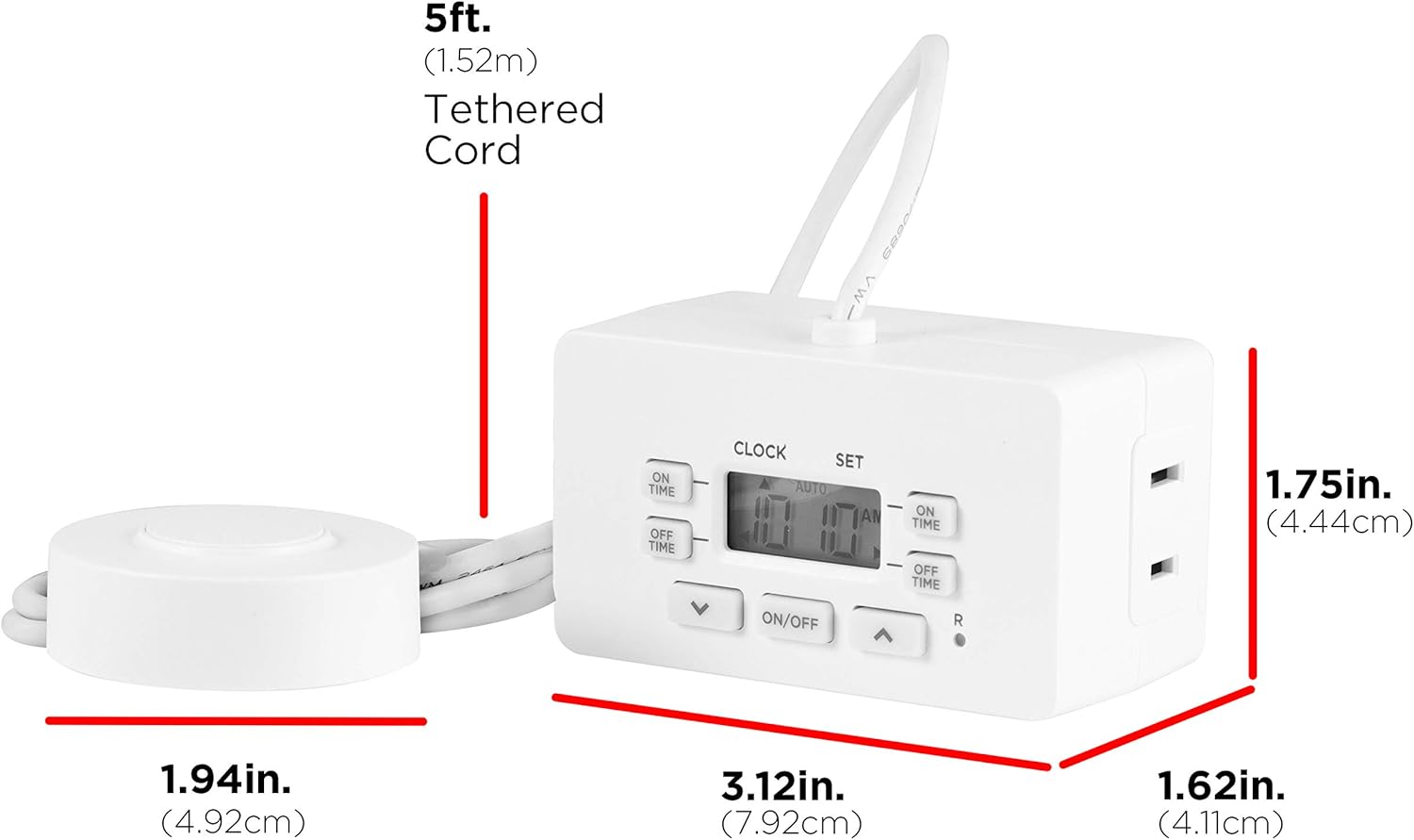
รูปที่ 2: Dimensions of the UltraPro Digital Timer and its 5ft tethered cord. The timer measures 3.12in (7.92cm) wide, 1.62in (4.11cm) high, and 1.75in (4.44cm) deep. The tethered cord is 5ft (1.52m) long, and the button is 1.94in (4.92cm) in diameter.
คำแนะนำการตั้งค่า
- เสียบปลั๊กตัวตั้งเวลา: Insert the timer into a standard indoor 120V AC wall outlet.
- ชาร์จแบตเตอรี่: Allow the timer to charge for approximately 30 minutes before initial programming or if the display is blank. This internal battery retains settings during power outagใช่
- ตั้งเวลาปัจจุบัน:
- กดปุ่ม นาฬิกา button once. The display will show '12:00 AM'.
- ใช้ ขึ้น (▲) or ลง (▼) arrow buttons to adjust the hour. Note the AM/PM indicator.
- กดปุ่ม นาฬิกา button again to set the minutes. Use the ขึ้น (▲) or ลง (▼) ปุ่มลูกศรเพื่อปรับ
- กดปุ่ม นาฬิกา button a third time to confirm and exit time setting mode.
- เชื่อมต่ออุปกรณ์: Plug the appliance you wish to control into the polarized outlet on the side of the timer. Ensure the appliance's power switch is in the ON position.
คำแนะนำการใช้งาน
เวลาเปิด/ปิดการเขียนโปรแกรม
The timer allows for two distinct ON/OFF programs. Follow these steps to set your desired schedules:
- Set Program 1 ON Time:
- กดปุ่ม ตรงเวลา button once. The display will show '1 ON'.
- ใช้ ขึ้น (▲) or ลง (▼) arrow buttons to set the desired ON hour for Program 1.
- กด ตรงเวลา again to set the minutes. Use the ขึ้น (▲) or ลง (▼) ปุ่มลูกศรเพื่อปรับ
- Set Program 1 OFF Time:
- กดปุ่ม ช่วงวันหยุดหรือไม่ไปทำงาน button once. The display will show '1 OFF'.
- ใช้ ขึ้น (▲) or ลง (▼) arrow buttons to set the desired OFF hour for Program 1.
- กด ช่วงวันหยุดหรือไม่ไปทำงาน again to set the minutes. Use the ขึ้น (▲) or ลง (▼) ปุ่มลูกศรเพื่อปรับ
- Set Program 2 (Optional): Repeat steps 1 and 2 using the ตรงเวลา และ ช่วงวันหยุดหรือไม่ไปทำงาน buttons until '2 ON' and '2 OFF' appear on the display, respectively.
- Activate Programs: After setting programs, ensure the timer is in 'AUTO' mode for the programs to run. Press the เปิด/ปิด button on the timer until 'AUTO' is displayed.
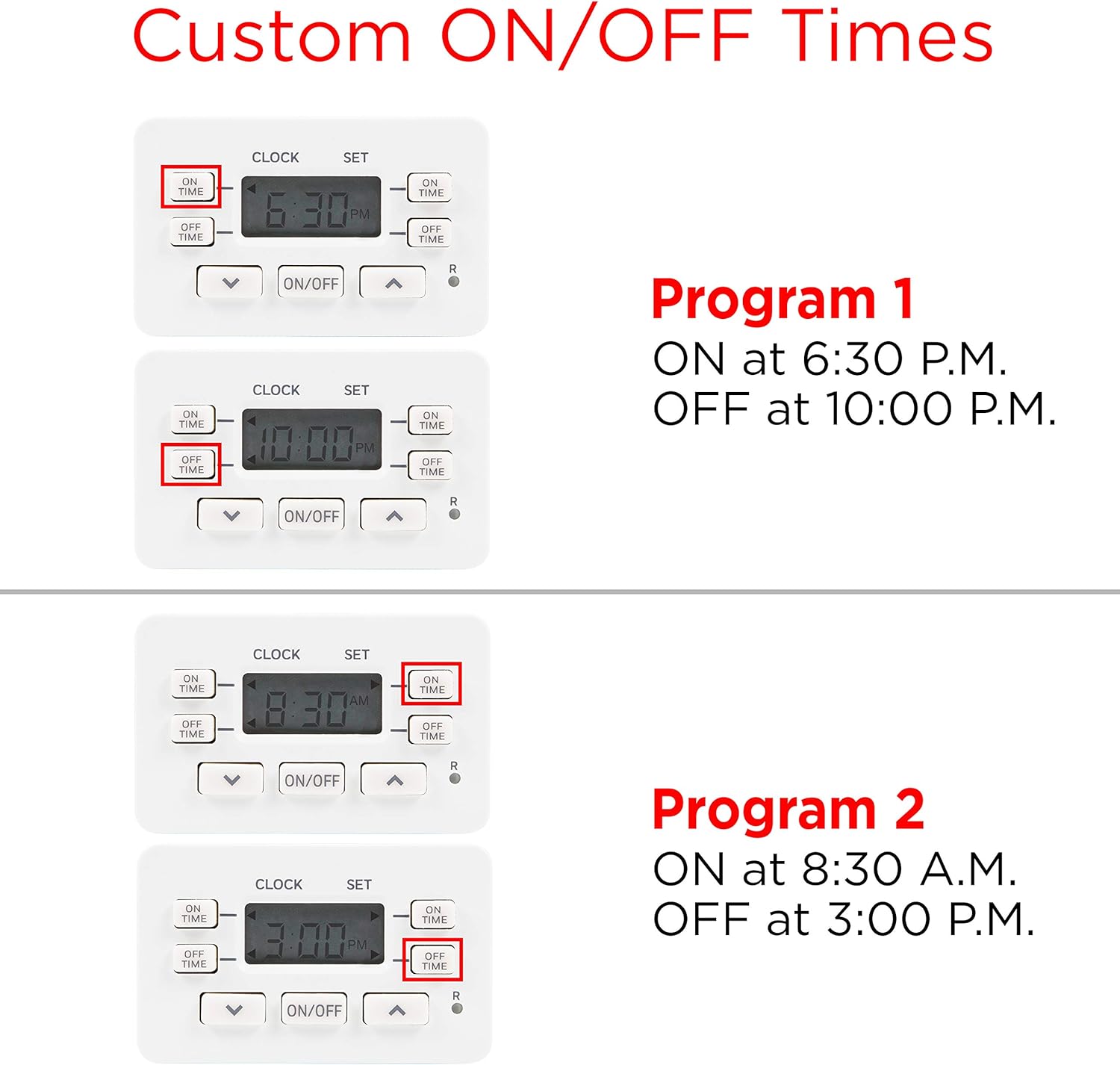
รูปที่ 3: Visual guide for setting custom ON/OFF times. Program 1 is set to ON at 6:30 P.M. and OFF at 10:00 P.M. Program 2 is set to ON at 8:30 A.M. and OFF at 3:00 P.M.
Using the Override Tether
The 5-foot tethered push button provides convenient manual control and can override current timer settings.
- เปิด/ปิดด้วยตนเอง: Press the tether button once to toggle the connected device ON or OFF.
- แทนที่ฟังก์ชัน: When the timer is running a program in 'AUTO' mode, pressing the tether button will temporarily override the current setting. For example, if the device is scheduled to be OFF but you press the tether, it will turn ON until the next scheduled program change or until you press the tether again.

รูปที่ 4: The tethered button can be used as a tabletop switch or a foot switch for easy access, demonstrating its versatility for year-round use with various applications.
การซ่อมบำรุง
To ensure optimal performance and longevity of your UltraPro Digital Timer, follow these simple maintenance guidelines:
- การทำความสะอาด: ถอดปลั๊กตัวตั้งเวลาออกจากเต้ารับก่อนทำความสะอาด เช็ดภายนอกด้วยผ้าแห้งนุ่มๆ ห้ามใช้น้ำยาทำความสะอาดหรือวัสดุที่มีฤทธิ์กัดกร่อน
- พื้นที่จัดเก็บ: If storing the timer for an extended period, ensure it is clean and dry. Store in a cool, dry place away from direct sunlight and extreme temperatures.
- แบตเตอรี่: The internal battery is designed to hold settings during power interruptions. If the display is blank, plug the timer into an outlet for at least 30 minutes to recharge the battery.
การแก้ไขปัญหา
If you encounter issues with your UltraPro Digital Timer, refer to the following common problems and solutions:
- Timer display is blank: The internal battery may be depleted. Plug the timer into a live outlet for at least 30 minutes to recharge.
- Connected device does not turn ON/OFF as programmed:
- Ensure the timer is in 'AUTO' mode. Press the เปิด/ปิด button on the timer until 'AUTO' is displayed.
- Verify that the connected appliance's power switch is in the ON position.
- Check that the ON/OFF times are set correctly, including AM/PM indicators.
- Confirm the timer is securely plugged into a working outlet.
- Tethered button does not respond: Ensure the tether cable is securely connected to the timer. If the timer is in 'AUTO' mode, the tether should override the current program.
- Timer loses settings during power outage: The internal battery may not be fully charged or may be at the end of its life. Allow the timer to charge for several hours. If the issue persists, the timer may need replacement.
ข้อมูลจำเพาะ
| ข้อมูลจำเพาะ | รายละเอียด |
|---|---|
| หมายเลขรุ่น | 52086 |
| ยี่ห้อ | อุลตร้าโปร |
| วัสดุ | พลาสติก |
| ขนาดสินค้า (ลึก x กว้าง x สูง) | 1.63" x 3.13" x 1.75" (4.14 ซม. x 7.95 ซม. x 4.45 ซม.) |
| จำนวนการตั้งค่า | 2 (โปรแกรมเปิด/ปิด) |
| Tether Cord Length | 5 ฟุต (1.52m) |
| น้ำหนักสินค้า | 6.7 ออนซ์ (190 กรัม) |
| ประเภทการติดตั้ง | ติดตั้งปลั๊กอิน |
| เปลี่ยนสไตล์ | Push Button Switch (on timer and tether) |
| แบตเตอรี่ที่จำเป็น | No (internal rechargeable battery for settings retention) |
| ยูพีซี | 030878520867 |
การรับประกันและการสนับสนุน
For warranty information or technical support regarding your UltraPro Digital Timer (Model 52086), please refer to the manufacturer's official webหรือติดต่อฝ่ายบริการลูกค้า เก็บใบเสร็จรับเงินไว้เพื่อใช้ในการเคลมประกัน
ผู้ผลิต: Jasco Products Company, LLC


