1. บทนำ
Thank you for choosing the Greadio Retro Bluetooth Speaker and FM Radio. This device combines vintage design with modern audio technology, offering versatile playback options including Bluetooth, FM radio, TF card, and AUX input. This manual provides essential information for safe and optimal use of your speaker.
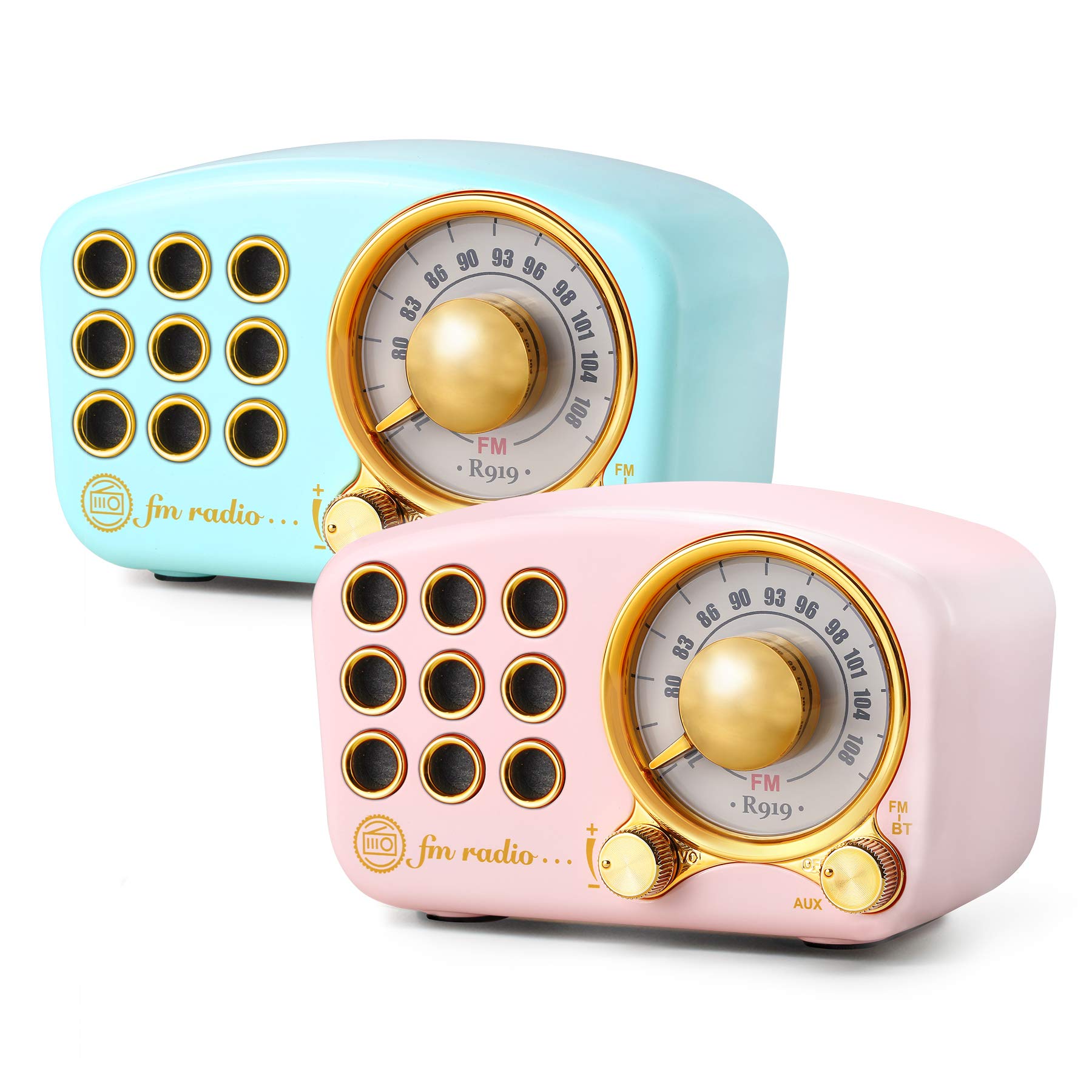
Image: The Greadio Retro Bluetooth Speaker, showcasing its compact size and retro design.
2. เนื้อหาบรรจุภัณฑ์
กรุณาตรวจสอบแพ็คเกจสำหรับรายการต่อไปนี้:
- Greadio Retro Bluetooth Speaker (Main Unit)
- สาย AUX
- คู่มือผู้ใช้ (เอกสารฉบับนี้)
3. เค้าโครงอุปกรณ์
Familiarize yourself with the buttons and ports on your speaker.

Image: Front panel of the speaker, highlighting the tuning dial, mode switch, and control buttons.
Note: Specific button functions are detailed in the "Operating Instructions" section.
4. การตั้งค่า
4.1 การชาร์จลำโพง
The speaker is equipped with a built-in 1100mAh rechargeable battery. Before first use, fully charge the speaker.
- Connect the provided charging cable (not explicitly listed as included, but implied for rechargeable battery) to the speaker's charging port.
- เชื่อมต่อปลายอีกด้านหนึ่งของสายชาร์จเข้ากับอะแดปเตอร์ไฟ USB (ไม่รวมอยู่ด้วย) หรือพอร์ต USB ของคอมพิวเตอร์
- ไฟแสดงสถานะการชาร์จจะสว่างขึ้น และจะดับลงหรือเปลี่ยนสีเมื่อชาร์จเสร็จ
A full charge typically provides up to 9 hours of playback time, depending on volume and usage.
4.2 การเปิด/ปิดเครื่อง
- To power on: Rotate the volume knob clockwise or press and hold the power button (refer to device layout for exact control).
- To power off: Rotate the volume knob counter-clockwise until it clicks, or press and hold the power button.
5. คู่มือการใช้งาน
5.1 โหมดบลูทู ธ
ลำโพงใช้บลูทูธ 4.2 สำหรับการเชื่อมต่อไร้สาย
- เปิดลำโพง ลำโพงจะเข้าสู่โหมดจับคู่บลูทูธโดยอัตโนมัติ ซึ่งจะแสดงด้วยไฟ LED กระพริบ
- บนอุปกรณ์เคลื่อนที่ของคุณ (สมาร์ทโฟน แท็บเล็ต ฯลฯ) เปิดใช้งานบลูทูธและค้นหาอุปกรณ์ที่มีอยู่
- Select "Greadio Speaker" (or similar name) from the list of devices.
- Once connected, the LED indicator will stop flashing and remain solid. You can now play audio from your device through the speaker.

Image: Speaker connected via Bluetooth to a smartphone, demonstrating wireless audio playback.
โหมดวิทยุ FM 5.2
Enjoy FM radio broadcasts with the built-in tuner.
- เปิดลำโพง
- Switch the mode selector to "FM" (or press the Mode button until FM is selected).
- Use the tuning dial to scan for radio stations. Rotate the dial slowly to find clear signals.
- ปรับระดับเสียงโดยใช้ปุ่มปรับระดับเสียง
Tip: For better FM reception, extend the antenna if available, or reposition the speaker.
5.3 การเล่นไฟล์จากการ์ด TF
เล่นเสียง MP3 files directly from a TF (MicroSD) card.
- Insert a TF card (up to 32GB, formatted to FAT32) with MP3 fileเข้าไปในช่องเสียบการ์ด TF
- Power on the speaker. The speaker should automatically switch to TF card mode or you may need to select it using the Mode button.
- Playback will begin automatically. Use the control buttons (e.g., Play/Pause, Next/Previous) to manage playback.
5.4 โหมดอินพุต AUX
Connect external audio devices using the provided AUX cord.
- Connect one end of the AUX cord to the speaker's AUX input port.
- Connect the other end of the AUX cord to the headphone jack or audio output of your external device (e.g., MP3 player, computer).
- Switch the speaker's mode selector to "AUX" (or press the Mode button until AUX is selected).
- Play audio from your external device. Adjust volume on both the speaker and the external device.
6. การบำรุงรักษา
- การทำความสะอาด: ใช้ผ้าแห้งนุ่มเช็ดทำความสะอาดพื้นผิวลำโพง ห้ามใช้สารทำความสะอาดที่มีฤทธิ์กัดกร่อน แอลกอฮอล์ หรือตัวทำละลาย
- พื้นที่จัดเก็บ: เก็บลำโพงไว้ในที่แห้งและเย็น หลีกเลี่ยงแสงแดดโดยตรงและอุณหภูมิที่สูงหรือต่ำเกินไป
- การดูแลแบตเตอรี่ เพื่อยืดอายุการใช้งานแบตเตอรี่ ควรหลีกเลี่ยงการใช้แบตเตอรี่จนหมดบ่อยๆ ควรชาร์จลำโพงเป็นประจำ แม้จะไม่ได้ใช้งานเป็นเวลานานก็ตาม
- การสัมผัสน้ำ: ลำโพงนี้ไม่กันน้ำ หลีกเลี่ยงการสัมผัสกับน้ำหรือความชื้นสูง
7 การแก้ไขปัญหา
| ปัญหา | สาเหตุที่เป็นไปได้ | สารละลาย |
|---|---|---|
| ลำโพงไม่เปิดเครื่อง | แบตเตอรี่หมด | ชาร์จลำโพงให้เต็ม |
| ไม่มีเสียง. | ระดับเสียงเบาเกินไป; เลือกโหมดไม่ถูกต้อง; อุปกรณ์ไม่ได้เชื่อมต่ออย่างถูกต้อง | Increase volume; ensure correct mode (Bluetooth, FM, TF, AUX) is selected; re-pair Bluetooth or re-connect AUX cable. |
| การเชื่อมต่อบลูทูธล้มเหลว | Speaker is too far from device; speaker not in pairing mode; interference. | Ensure speaker is within 10 meters of device; restart speaker and device; try pairing again. |
| การรับสัญญาณวิทยุ FM ไม่ดี | สัญญาณอ่อน; มีสัญญาณรบกวนจากสภาพแวดล้อม | Reposition the speaker; extend the antenna if applicable. |
8. ข้อมูลจำเพาะ
- หมายเลขรุ่น: 5acc8bb8-96b8-41bc-9445-b84cbdcaadb7
- ยี่ห้อ: Gredio
- ขนาด (ยาว x กว้าง x สูง): 4.4" x 2.7" x 2"
- การเชื่อมต่อ: Bluetooth 4.2, Auxiliary (AUX)
- คุณสมบัติพิเศษ: ชาร์จไฟได้
- เทคโนโลยีจูนเนอร์: FM
- แหล่งพลังงาน: ใช้แบตเตอรี่ (แบตเตอรี่แบบชาร์จไฟได้ในตัว 1100mAh)
- รองรับแบนด์วิทยุ: FM
- เอาต์พุตเสียง: 5 วัตต์ ampชีวิต
- เวลาเล่น: ใช้งานได้นานสูงสุด 9 ชั่วโมง (ขึ้นอยู่กับปริมาณและลักษณะการใช้งาน)
- ส่วนประกอบที่รวมอยู่: สาย AUX
9. การรับประกันและการสนับสนุน
The Greadio Retro Bluetooth Speaker comes with a 1-year money-back warranty. Greadio also provides lifetime customer service for this product (excluding wear and tear).
For technical support, warranty claims, or any inquiries, please contact Greadio customer service through the retailer's platform or the official Greadio webเว็บไซต์.


