การแนะนำ
The PlayZoom GoCam is a durable and fun waterproof action camera designed specifically for kids. It allows young adventurers to capture their exciting moments in 1080P HD video and 12MP photos, whether on land or underwater. With its robust waterproof casing, built-in microphone and speaker, and a variety of mounting options, the GoCam is ready for any adventure.

The PlayZoom GoCam, enclosed in its protective waterproof housing, ready for action.
สินค้าเกินview
Familiarize yourself with the various parts and components of your PlayZoom GoCam.

รายละเอียด view of the GoCam's buttons and ports, including the Power/Mode button, Shutter/Select button, Micro SD slot, and Micro USB port.
ส่วนประกอบของกล้อง:
- เลนส์: จับภาพและวิดีโอ
- หน้าจอ LCD ขนาด 2 นิ้ว: สำหรับ viewอิงไลฟ์ฟูtage, playback, and menu navigation.
- ปุ่มเปิด / ปิดโหมด: Turns the camera on/off and switches between video, photo, and playback modes.
- ปุ่มชัตเตอร์/เลือก: Starts/stops recording, takes photos, and confirms selections.
- ปุ่มขึ้น: Navigates menus upwards or zooms in.
- Down/Shutter Button: Navigates menus downwards or acts as an alternative shutter button.
- ไมโครโฟน: บันทึกเสียง
- ผู้บรรยาย: สำหรับการเล่นเสียง
- สล็อตไมโคร SD: For inserting a Micro SD card (up to 32GB, not included) to store recordings.
- พอร์ตไมโครยูเอสบี: For charging the camera and transferring data.
- ไฟแสดงสถานะ: Shows camera status (e.g., charging, recording).
อุปกรณ์เสริมที่รวมอยู่:
- เคสกันน้ำ: Protects the camera underwater up to 90 feet (30 meters).
- ชุดติดตั้ง: Various mounts for attaching the camera to helmets, bikes, skateboards, and more.
- สายชาร์จ USB: สำหรับชาร์จกล้อง

Key features of the GoCam, including its 2-inch LCD screen and built-in battery.
การตั้งค่า
1. การชาร์จกล้อง
Before first use, fully charge your GoCam. Connect the included USB charging cable to the camera's Micro USB port and the other end to a USB power adapter (not included) or a computer's USB port. The status indicator light will show charging progress and turn off when fully charged. A full charge provides approximately 1.5 hours of recording time.
2. Installing a Micro SD Card
The GoCam requires a Micro SD card (not included) to save photos and videos. It supports cards up to 32GB. Locate the Micro SD slot on the side of the camera. Gently insert the Micro SD card with the gold contacts facing the back of the camera until it clicks into place. To remove, push the card in again until it springs out.
3. Attaching the Waterproof Case and Mounts
For underwater adventures or added protection, place the GoCam inside its waterproof case. Ensure the case is securely latched before submersion. The included mounting kit allows you to attach the camera to various surfaces and gear.
- เปิดเคสกันน้ำโดยการปลดล็อคasinก. สลัก
- Carefully place the GoCam inside, ensuring it fits snugly.
- Close the case firmly, making sure the latch is secure.
- Attach the desired mount (e.g., helmet mount, bike mount) to the bottom of the waterproof case using the provided screws and adapters.
- Secure the mount to your gear.

Examples of how to use the mounting kit for different activities like skateboarding and biking.

The GoCam is versatile for various adventures, from roller coasters to mountain climbing.
คำแนะนำการใช้งาน
เปิด/ปิดเครื่อง
- การเปิดเครื่อง: กดค้างไว้ ปุ่มเปิด/ปิดเครื่อง for a few seconds until the screen lights up.
- วิธีปิด: กดค้างไว้ ปุ่มเปิด/ปิดเครื่อง ทำซ้ำไปเรื่อยๆ จนกว่าหน้าจอจะดับลง
โหมดการสลับ
Once the camera is on, short press the ปุ่มเปิด/ปิดเครื่อง to cycle through the different modes: Video Recording, Photo Capture, and Playback.
การบันทึกวิดีโอ
- Switch to Video Recording mode (indicated by a video camera icon on the screen).
- กดปุ่ม ปุ่มชัตเตอร์/เลือก once to start recording. A red dot or recording timer will appear on the screen.
- กดปุ่ม ปุ่มชัตเตอร์/เลือก again to stop recording. The video file จะถูกบันทึกลงในการ์ด Micro SD
การถ่ายภาพ
- Switch to Photo Capture mode (indicated by a camera icon on the screen).
- จัดกรอบภาพของคุณโดยใช้หน้าจอ LCD
- กดปุ่ม ปุ่มชัตเตอร์/เลือก once to take a photo. The image will be saved to the Micro SD card.
การเล่นซ้ำ
- Switch to Playback mode (indicated by a play icon).
- ใช้ Up และ ลง ปุ่มสำหรับเลื่อนดูวิดีโอและรูปภาพที่บันทึกไว้
- กดปุ่ม ปุ่มชัตเตอร์/เลือก to play a video or view ภาพถ่ายแบบเต็มหน้าจอ
Underwater Use
The PlayZoom GoCam is waterproof up to 90 feet (30 meters) when properly enclosed in its waterproof case. Always ensure the case is clean and securely sealed before taking it underwater. After use in saltwater, rinse the case with fresh water and let it air dry.
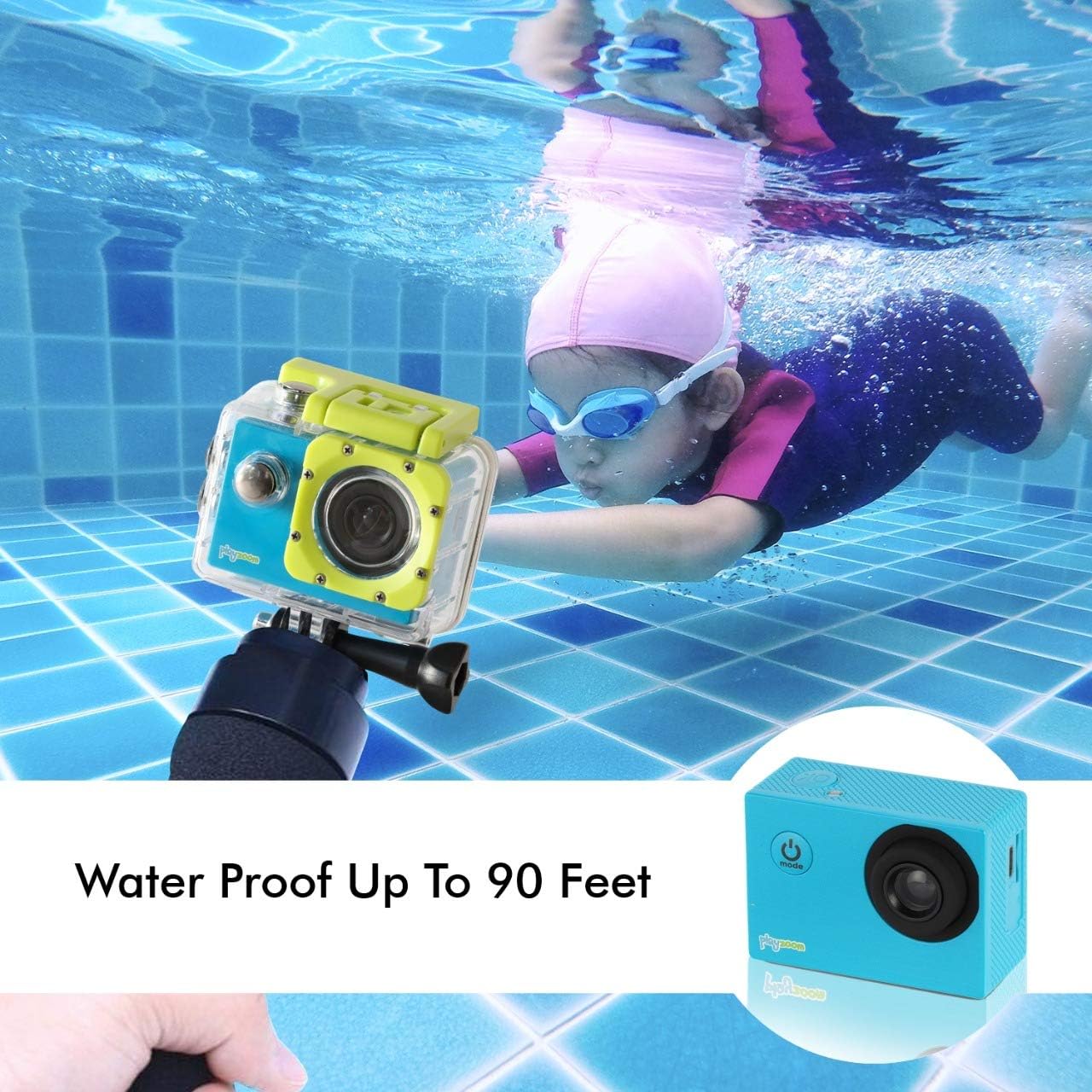
The GoCam is designed for underwater adventures, waterproof up to 90 feet.
การซ่อมบำรุง
- การทำความสะอาด: Use a soft, dry cloth to clean the camera body. For the lens, use a lens cleaning cloth. For the waterproof case, rinse with fresh water after each use, especially in saltwater, and wipe dry.
- พื้นที่จัดเก็บ: เก็บกล้องไว้ในที่แห้งและเย็น หลีกเลี่ยงแสงแดดโดยตรงและอุณหภูมิที่สูงหรือต่ำเกินไป ถอดการ์ด Micro SD ออกหากจะเก็บรักษาเป็นเวลานาน
- การดูแลแบตเตอรี่ เพื่อยืดอายุการใช้งานแบตเตอรี่ ควรหลีกเลี่ยงการปล่อยให้แบตเตอรี่หมดจนเกลี้ยงบ่อยๆ ชาร์จกล้องเป็นประจำ แม้ว่าจะไม่ได้ใช้งาน เพื่อรักษาสภาพแบตเตอรี่ให้ดีอยู่เสมอ
- Waterproof Case Seal: Periodically inspect the rubber seal of the waterproof case for any dirt, debris, or damage. A clean and intact seal is crucial for maintaining its waterproof integrity.
การแก้ไขปัญหา
| ปัญหา | สาเหตุที่เป็นไปได้ | สารละลาย |
|---|---|---|
| กล้องไม่สามารถเปิดได้ | แบตเตอรี่หมด | ชาร์จกล้องให้เต็มโดยใช้สาย USB |
| ไม่สามารถบันทึกวิดีโอหรือถ่ายภาพได้ | ไม่ได้เสียบการ์ด Micro SD หรือการ์ดเต็ม/เสียหาย | Insert a Micro SD card. If already inserted, check if it's full and delete files or format the card (this will erase all data). Try a different Micro SD card. |
| คุณภาพรูปภาพ/วิดีโอไม่ดี | Lens is dirty or lighting conditions are poor. | Clean the camera lens with a soft cloth. Ensure adequate lighting for best results. |
| กล้องหยุดนิ่งหรือไม่ตอบสนอง | ซอฟต์แวร์มีปัญหา | Press and hold the Power/Mode button for 10-15 seconds to force a shutdown. Restart the camera. |
ข้อมูลจำเพาะ
| คุณสมบัติ | รายละเอียด |
|---|---|
| ยี่ห้อ | เล่นซูม |
| ชื่อรุ่น | โกแคม |
| ความละเอียดในการจับภาพวิดีโอ | ความคมชัดระดับ HD 1080p |
| ความละเอียดของภาพนิ่งที่มีประสิทธิภาพ | 12 MP |
| ขนาดหน้าจอ | 2 นิ้ว (จอ LCD) |
| ระดับความต้านทานต่อน้ำ | Waterproof (up to 90 feet / 30 meters with case) |
| ประเภทหน่วยความจำแฟลช | ไมโคร SD (รองรับสูงสุด 32GB) |
| แบตเตอรี่ในตัว | แบตเตอรี่ลิเธียมแบบชาร์จไฟได้ 400 mAh |
| เวลาในการบันทึก | ประมาณ 1.5 ชั่วโมง |
| น้ำหนักสินค้า | 4 ออนซ์ |
| ขนาดสินค้า | 3 x 1 x 3.5 นิ้ว |
การรับประกันและการสนับสนุน
For warranty information and customer support, please refer to the contact details provided with your product packaging or visit the official PlayZoom webไซต์ โปรดเก็บใบเสร็จรับเงินของคุณไว้เป็นหลักฐานการซื้อสำหรับการเรียกร้องการรับประกันใดๆ
For additional assistance or frequently asked questions, you may visit the PlayZoom Store on Amazon.


