1. ข้อมูลด้านความปลอดภัยที่สำคัญ
Please read this entire instruction manual before installation. If you have any questions, please contact MOUNTUP customer support. Improper assembly or installation may cause damage or serious personal injury.
- ความจุน้ำหนัก: ห้ามเกินขีดจำกัดน้ำหนักสูงสุดที่สามารถรองรับได้ 77 ปอนด์ (35 กก.)
- ขนาดทีวี: This mount is designed for televisions between 26 and 60 inches.
- ประเภทผนัง: These MOUNTUP TV wall mounts are NOT FOR DRYWALL INSTALLATION. They are designed for installation into wood studs or solid concrete/brick walls. Ensure the mounting surface can safely support the combined weight of the equipment and all attached hardware.
- ฮาร์ดแวร์: Use only the hardware provided. Do not use the mount for any purpose not expressly specified by the manufacturer.
- การประกอบ: Ensure all components are securely fastened before use. If any parts are missing or defective, contact MOUNTUP for replacement.
- ความเคลื่อนไหว: Operate the mount carefully. Avoid sudden movements or excessive force when adjusting the TV position.
2. เนื้อหาบรรจุภัณฑ์
Verify that all components are present and undamaged before beginning installation. If any items are missing or damaged, please contact MOUNTUP customer support.
- 1 x MOUNTUP Full Motion TV Wall Mount (Model MU0014)
- 1 x MOUNTUP Full Motion TV Wall Mount (Model MU0009)
- 1 x Hardware Kit (various screws, washers, spacers, anchors)
- 1 x ระดับฟอง
- คู่มือการใช้งาน

ภาพที่ 2.1: จบแล้วview of the MOUNTUP TV Wall Mounts Bundle, including both MU0014 and MU0009 models and their respective hardware kits.
3. ข้อมูลจำเพาะผลิตภัณฑ์
| คุณสมบัติ | ข้อมูลจำเพาะ |
|---|---|
| หมายเลขรุ่น | MU0014, MU0009 |
| ความเข้ากันได้ของขนาดทีวี | 26 - 60 นิ้ว |
| ความจุน้ำหนัก | 77 ปอนด์ (35 กก.) |
| ความเข้ากันได้ของ VESA | ขนาดต่ำสุด: 100x100 มม., ขนาดสูงสุด: 400x400 มม. |
| ประเภทการเคลื่อนไหว | ปรับมุมได้ หมุนได้ เอียงได้ |
| Tilt Angle (MU0014) | +5° / -15° |
| Tilt Angle (MU0009) | -10° |
| Swivel Angle (MU0014) | ±45° |
| Extension (MU0014) | สูงถึง 18.9 นิ้ว |
| Retraction (MU0014) | 2.5 นิ้ว |
| Extension (MU0009) | สูงถึง 15.3 นิ้ว |
| Retraction (MU0009) | 2 นิ้ว |

Image 3.1: Compatibility and specifications for the MOUNTUP MU0009 TV mount, detailing supported TV sizes, weight, and VESA patterns.
4. การตั้งค่าและการติดตั้ง
4.1 ก่อนที่คุณจะเริ่มต้น
Gather the necessary tools and confirm your wall type and TV specifications.
- เครื่องมือที่จำเป็น: Pencil, Stud Finder, Drill, 1/2 inch (13mm) Socket Wrench, Phillips Head Screwdriver, Level (included).
- ประเภทผนัง: Identify if your wall is wood stud (minimum 2x4 inches) or solid concrete/brick. ห้ามติดตั้งบนผนังยิปซัมเพียงอย่างเดียว
- รูปแบบ VESA สำหรับทีวี: Check the four mounting holes on the back of your TV. Measure the horizontal and vertical distance (in mm) to confirm it falls within the 100x100mm to 400x400mm VESA range.
- น้ำหนักทีวี: ตรวจสอบให้แน่ใจว่าทีวีของคุณมีน้ำหนักไม่เกิน 77 ปอนด์ (35 กิโลกรัม)
4.2 การติดตั้งทีละขั้นตอน
The installation process is similar for both MU0014 and MU0009 models. Refer to the specific diagrams for each mount as needed.
- ติดตั้งขาตั้งทีวีเข้ากับทีวี: Select the appropriate screws, washers, and spacers for your TV. Secure the vertical brackets to the back of your TV, ensuring they are centered and level.
- Mark Wall Drilling Locations: Determine the desired height for your TV. Use a stud finder to locate the center of two adjacent wood studs, or mark locations for concrete anchors. Place the wall plate against the wall and mark the drilling holes. Use the included bubble level to ensure accuracy.
- เจาะรูนำ: Drill pilot holes at the marked locations. For wood studs, use a 7/32 inch (5.5mm) drill bit. For concrete/brick, use a 3/8 inch (10mm) drill bit and insert concrete anchors.
- แผ่นติดผนัง: Secure the wall plate to the wall using the lag bolts and washers. Tighten all bolts firmly but do not overtighten.
- ติดตั้งทีวีบนแผ่นยึดติดผนัง: Carefully lift the TV with the attached brackets and hook it onto the wall plate. Ensure the TV is securely seated.
- ยึดทีวีเข้ากับขาตั้งให้แน่น: Use the safety screws or locking mechanisms on the TV brackets to secure the TV to the wall plate, preventing accidental dislodgement.

ภาพที่ 4.1: รายละเอียด view of the MOUNTUP MU0014 mount components, illustrating the main parts for assembly.
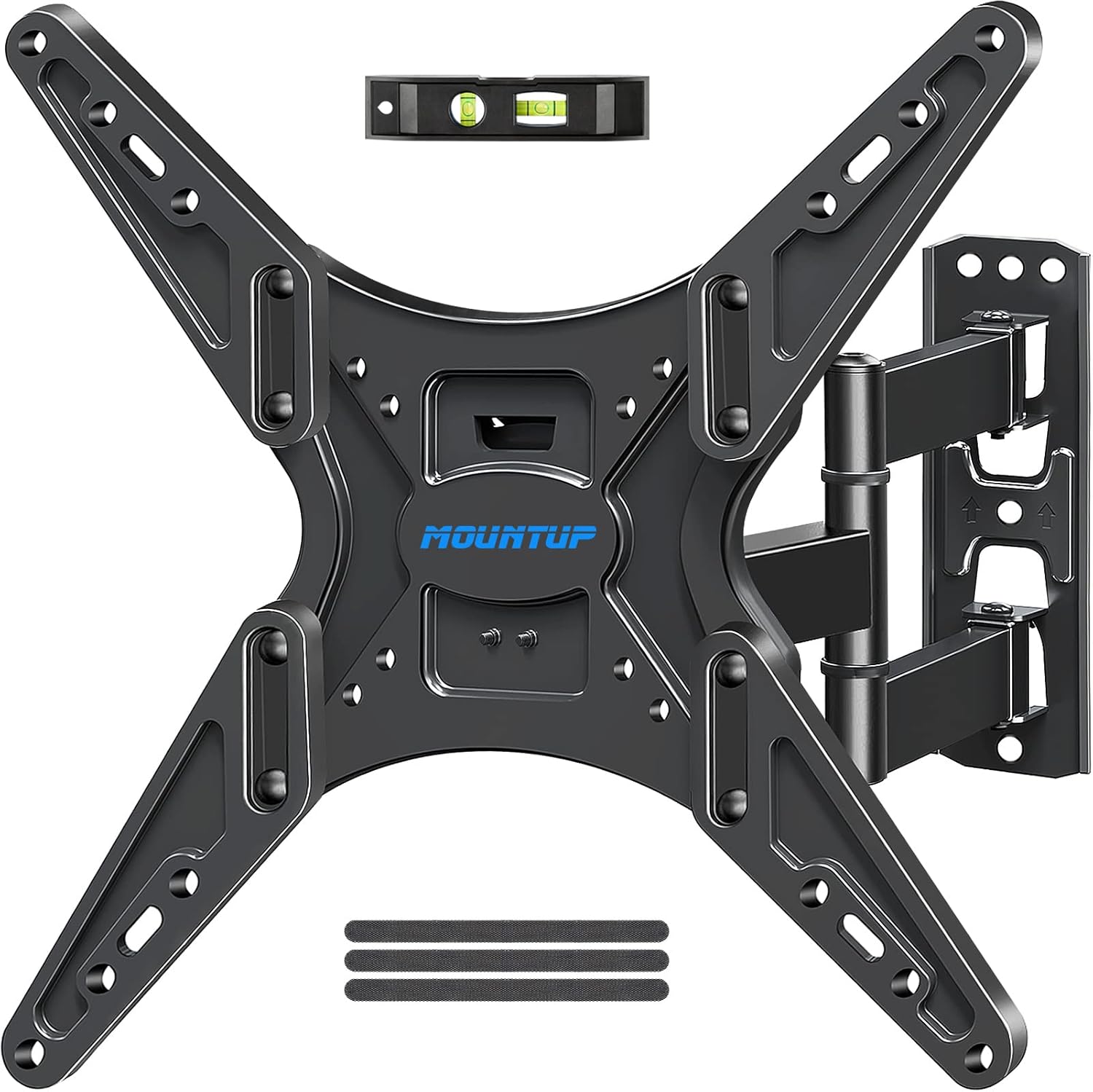
ภาพที่ 4.2: รายละเอียด view of the MOUNTUP MU0009 mount components, illustrating the main parts for assembly.
5. การใช้งานขาตั้งทีวี
Both MOUNTUP full motion mounts offer flexible viewตัวเลือกต่างๆ การปรับเปลี่ยนควรทำอย่างราบรื่นและระมัดระวัง
5.1 การปรับความเอียง
The MU0014 mount allows for a tilt range of +5° to -15°, while the MU0009 offers a tilt of -10°. Loosen the tilt adjustment knobs or bolts on the TV brackets, adjust the screen to the desired angle, and then securely tighten the knobs/bolts.
5.2 การปรับมุมหมุน
The MU0014 mount can swivel up to ±45° left or right. Gently push or pull the TV screen to the desired viewing angle. The articulating arm will move smoothly.
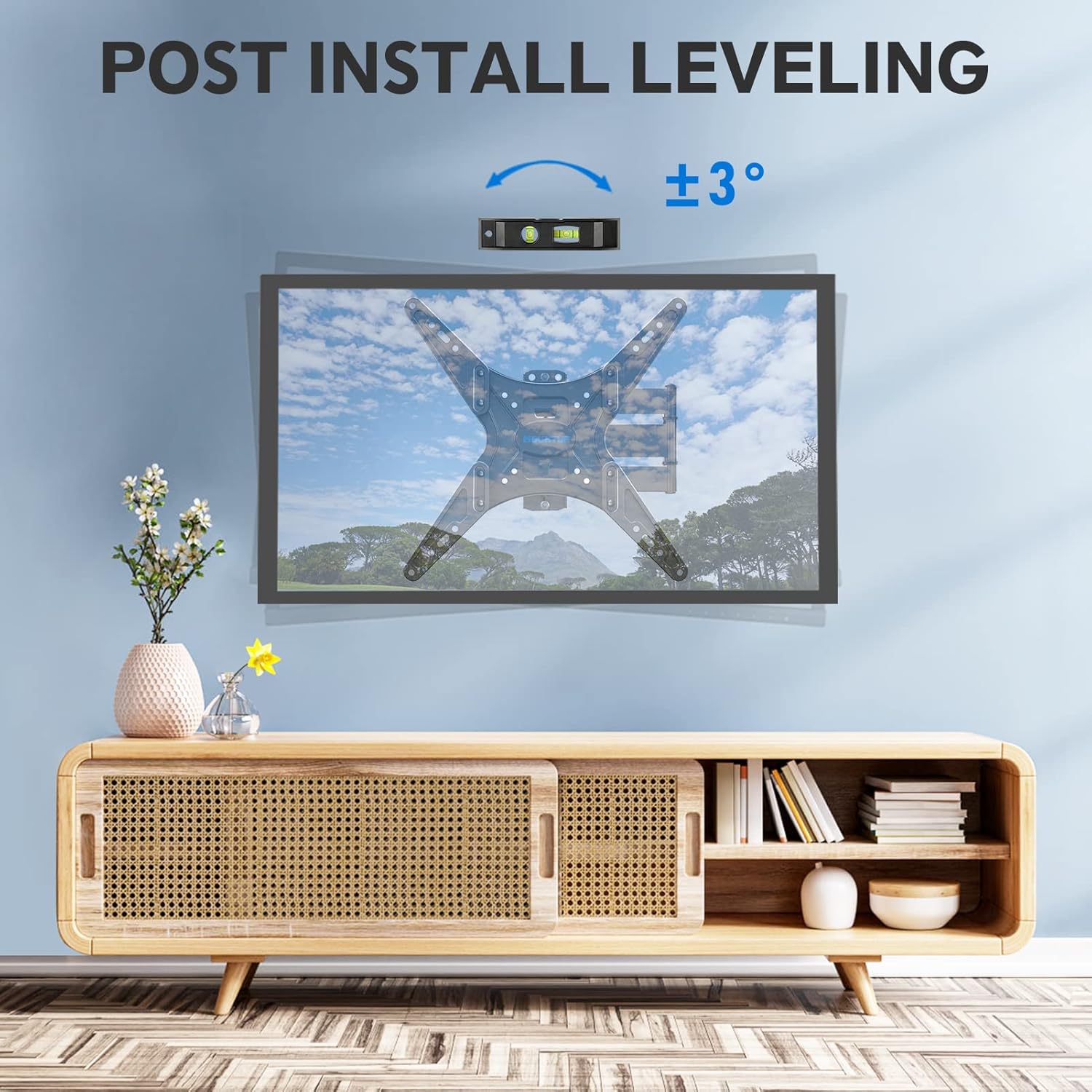
Image 5.1: Demonstrating the tilt and swivel capabilities of the MOUNTUP MU0014 mount for optimal viewไอเอ็นจีความยืดหยุ่น
5.3 การยืดและการหด
Extend the TV away from the wall for greater flexibility or retract it closer to the wall to save space. The MU0014 extends up to 18.9 inches and retracts to 2.5 inches. The MU0009 extends up to 15.3 inches and retracts to 2 inches.

Image 5.2: Illustrating the extension and retraction range of the MOUNTUP MU0014 mount.

Image 5.3: Illustrating the extension, retraction, and tilt capabilities of the MOUNTUP MU0009 mount.
5.4 Post-Installation Leveling
After installation, if your TV is slightly unlevel, you can make minor adjustments. The mount allows for a post-installation leveling adjustment of approximately ±3°. Consult the specific instructions for your mount model to perform this adjustment.

Image 5.4: Demonstrating the post-installation leveling feature for fine-tuning the TV's horizontal position.
6. การบำรุงรักษา
การบำรุงรักษาอย่างสม่ำเสมอจะช่วยให้ขาตั้งทีวีของคุณใช้งานได้ยาวนานและปลอดภัย
- ตรวจสอบการเชื่อมต่อ: Periodically (e.g., every 6 months) check all screws and bolts to ensure they remain tight. Retighten if necessary.
- การติดตั้งที่สะอาด: เช็ดฐานยึดด้วยผ้าแห้งเนื้อนุ่มเพื่อกำจัดฝุ่น หลีกเลี่ยงการใช้สารทำความสะอาดที่มีฤทธิ์กัดกร่อนหรือตัวทำละลาย
- การหล่อลื่น: The articulating joints are designed for smooth movement. If any stiffness occurs, a small amount of silicone-based lubricant can be applied to the moving parts, avoiding contact with electrical components.
7 การแก้ไขปัญหา
If you encounter issues with your MOUNTUP TV mount, refer to the following common problems and solutions.
- ทีวีไม่ตั้งตรงหลังจากติดตั้ง: Use the post-installation leveling feature (refer to Section 5.4) to make minor adjustments. Ensure the wall plate was installed level initially.
- ฐานยึดดูหลวมหรือไม่มั่นคง: Immediately remove the TV from the mount. Recheck all wall mounting bolts and TV bracket screws for tightness. Ensure the wall type is appropriate and the anchors (if used) are secure. Contact customer support if the issue persists.
- Difficulty adjusting tilt/swivel/extension: Check for any obstructions. Ensure all adjustment knobs or bolts are sufficiently loosened before attempting to move the TV, and retighten them after adjustment.
- ส่วนที่หายไป: Do not proceed with installation if parts are missing. Contact MOUNTUP customer support for replacement parts.
8. การรับประกันและการสนับสนุนลูกค้า
MOUNTUP is committed to providing high-quality products and customer satisfaction. This product comes with a manufacturer's warranty against defects in materials and workmanship. For specific warranty details, please refer to the product packaging or contact MOUNTUP directly.
If you have any questions regarding product installation, operation, or troubleshooting, please do not hesitate to contact MOUNTUP customer support. Our team is available to assist you with pre-purchase inquiries and post-installation support.
ข้อมูลติดต่อ: Please refer to the MOUNTUP official website or your purchase documentation for the most current customer support contact details.


