การแนะนำ
Welcome to the world of Bitty Boomers! This mini Bluetooth speaker combines iconic pop culture characters with powerful sound in a compact design. This manual provides essential information for setting up, operating, and maintaining your Jack Skellington Mini Bluetooth Speaker to ensure optimal performance and enjoyment.
มีอะไรอยู่ในกล่อง
- Jack Skellington Mini Bluetooth Speaker
- สายชาร์จไมโคร USB
- สายคล้องคอ/สายรัด

The Jack Skellington Bitty Boomer speaker is packaged in a black retail box, clearly displaying the character and product features.
คุณสมบัติหลัก
- การออกแบบที่พกพาสะดวกเป็นพิเศษ: Compact 2-inch tall speaker, ideal for on-the-go use.
- เทคโนโลยีบลูทูธ 5.0: Ensures stable and efficient wireless connection to all Bluetooth-enabled devices.
- ระยะไร้สายขยาย: Connects up to 30 feet away from your device.
- อายุการใช้งานแบตเตอรี่ยาวนาน: Provides over 4 hours of music playback on a single charge.
- ชาร์จไฟได้: Conveniently recharges via the included Micro USB cable.
- True Wireless Stereo (TWS) Capability: Easily connect two Bitty Boomers together for an enhanced stereo sound experience.
- Selfie Remote Function: Can be used as a remote shutter for your phone's camera.
- Included Lanyard: For securing the speaker to backpacks or bags.

ด้านหน้า view of the Jack Skellington Bitty Boomer speaker, showcasing its iconic design.
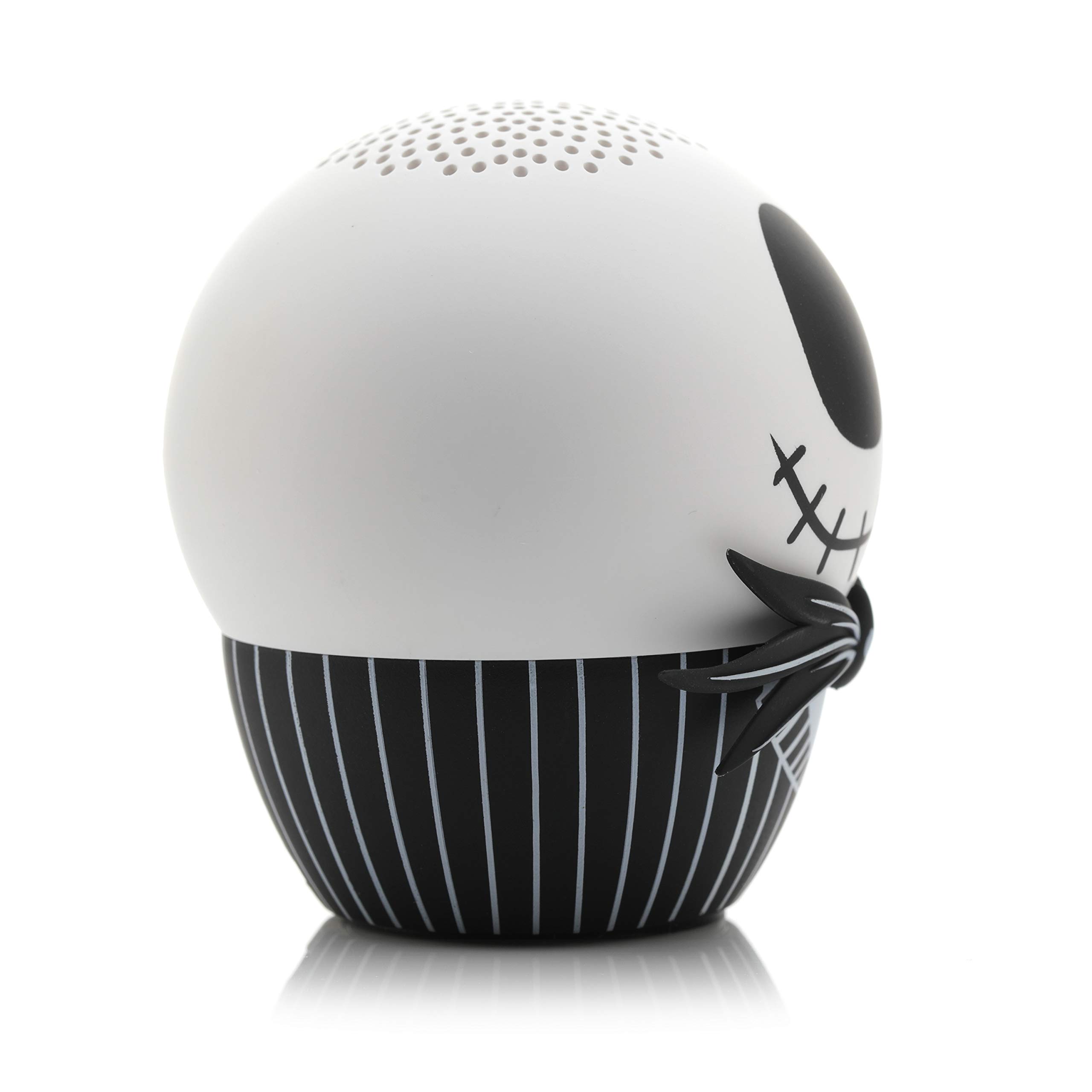
ด้านหนึ่ง view of the Jack Skellington Bitty Boomer speaker, highlighting its compact size.
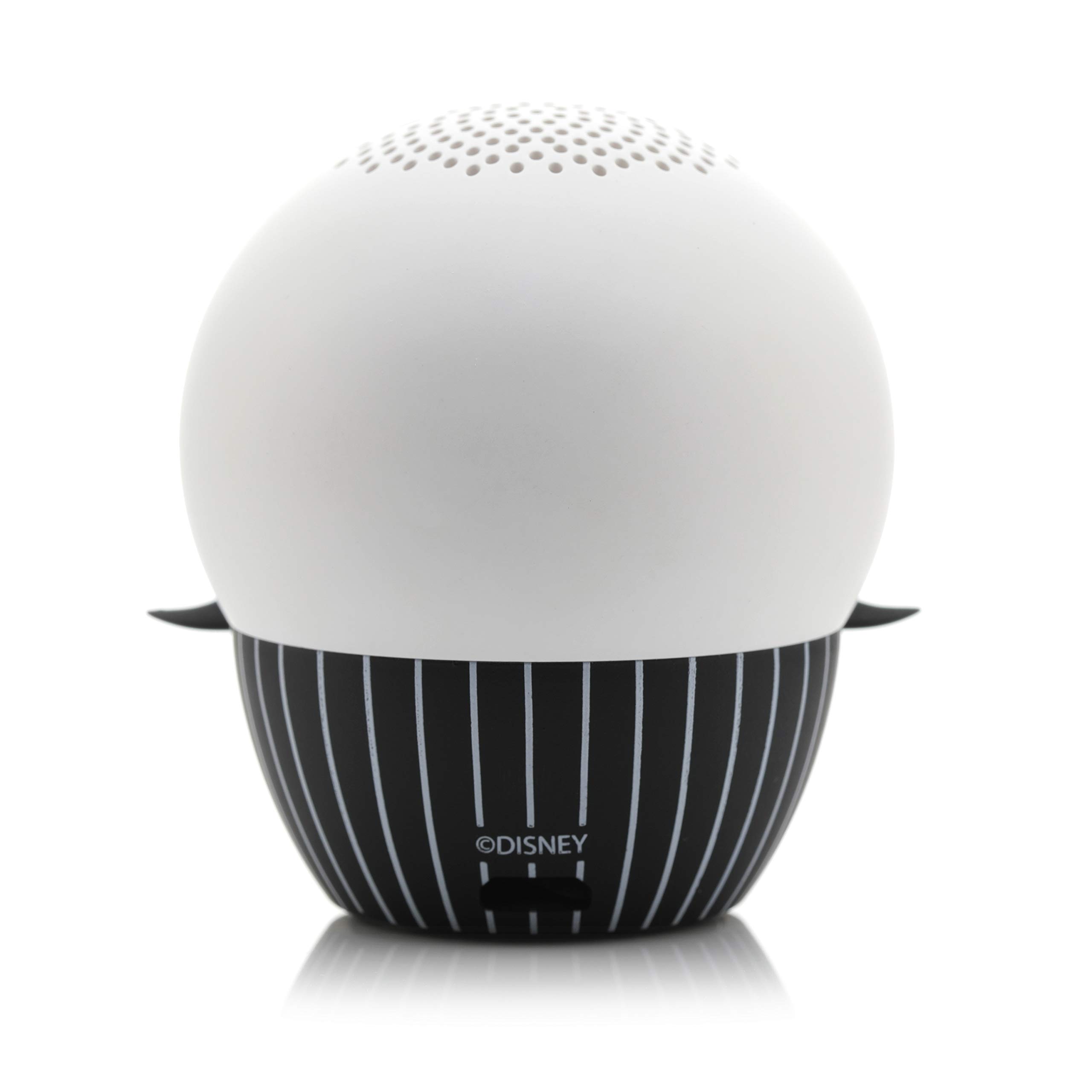
The back of the Jack Skellington Bitty Boomer speaker, showing the charging port and lanyard attachment point.

The Jack Skellington Bitty Boomer speaker held in an adult's hand, demonstrating its small, ultra-portable size.

The Jack Skellington Bitty Boomer speaker illuminated with a green glow in a dark setting, showcasing its glow-in-the-dark feature.
คำแนะนำการตั้งค่า
การชาร์จลำโพง
- Locate the Micro USB charging port on the back of the speaker.
- Connect the smaller end of the included Micro USB cable to the speaker's charging port.
- เชื่อมต่อปลายสาย USB ขนาดใหญ่เข้ากับแหล่งจ่ายไฟ USB (เช่น พอร์ต USB ของคอมพิวเตอร์ อะแดปเตอร์ติดผนัง USB)
- The LED indicator light on the speaker will illuminate during charging and turn off when fully charged.
- โดยปกติการชาร์จจนเต็มจะใช้เวลาประมาณ 1 ชั่วโมง
การจับคู่ Bluetooth เริ่มต้น
- ตรวจสอบให้แน่ใจว่าลำโพงชาร์จเต็มแล้วก่อนใช้งานครั้งแรก
- Press and hold the power button (usually located on the bottom or back of the speaker) for 2-3 seconds until you hear a power-on sound and the LED indicator light begins to flash rapidly, indicating it's in pairing mode.
- บนอุปกรณ์ที่รองรับ Bluetooth ของคุณ (สมาร์ทโฟน แท็บเล็ต คอมพิวเตอร์) ให้ไปที่การตั้งค่า Bluetooth
- ค้นหา available devices. The speaker will appear as "Bitty Boomer" or a similar name.
- เลือกลำโพงจากรายการเพื่อเริ่มการจับคู่
- Once successfully paired, you will hear a confirmation sound, and the LED indicator light will stop flashing and remain solid.
คำแนะนำการใช้งาน
เปิด/ปิดเครื่อง
- To power on: Press and hold the power button for 2-3 seconds.
- To power off: Press and hold the power button for 2-3 seconds.
การเล่นเสียง
- Once paired, simply play audio from your connected device. The sound will be routed through the Bitty Boomer speaker.
- ปรับระดับเสียงโดยตรงจากอุปกรณ์ที่เชื่อมต่อของคุณ
True Wireless Stereo (TWS) Pairing (Connecting Two Bitty Boomers)
For an enhanced stereo sound experience, you can pair two Bitty Boomers together.
- Ensure both Bitty Boomers are powered off.
- Power on both speakers simultaneously. They will automatically enter pairing mode.
- Wait a few seconds. The two speakers will automatically connect to each other. You will hear a confirmation sound.
- Once connected to each other, one speaker will act as the master and enter Bluetooth pairing mode (LED flashing).
- On your device, search for and connect to the master Bitty Boomer as described in the "Initial Bluetooth Pairing" section.
- ขณะนี้เสียงจะเล่นในระบบสเตอริโอผ่านลำโพงทั้งสองข้าง

Two Bitty Boomer speakers, Jack Skellington and Sally, are shown side-by-side, illustrating the True Wireless Stereo (TWS) capability.
Selfie Remote Function
The Bitty Boomer can also function as a remote shutter for your smartphone camera.
- Ensure the Bitty Boomer is paired with your smartphone.
- Open your phone's camera application.
- Press the power button on the Bitty Boomer once to trigger the camera shutter.
การซ่อมบำรุง
- การทำความสะอาด: ใช้ผ้านุ่มและแห้งเช็ดทำความสะอาดลำโพง ห้ามใช้น้ำยาทำความสะอาดหรือสารละลายที่มีฤทธิ์กัดกร่อน
- พื้นที่จัดเก็บ: เก็บลำโพงไว้ในที่แห้งและเย็น หลีกเลี่ยงแสงแดดโดยตรงและอุณหภูมิที่สูงหรือต่ำเกินไป
- การดูแลแบตเตอรี่ To prolong battery life, avoid fully discharging the speaker frequently. Recharge it regularly, even if not in use for extended periods.
- ความต้านทานน้ำ: ลำโพงนี้ไม่กันน้ำ โปรดหลีกเลี่ยงการสัมผัสน้ำหรือความชื้นมากเกินไป
การแก้ไขปัญหา
| ปัญหา | สาเหตุที่เป็นไปได้ | สารละลาย |
|---|---|---|
| ลำโพงไม่เปิดเครื่อง | แบตเตอรี่อ่อน | ชาร์จลำโพงโดยใช้สาย Micro USB ที่ให้มา |
| ไม่สามารถจับคู่กับอุปกรณ์ได้ | ลำโพงไม่ได้อยู่ในโหมดจับคู่ อุปกรณ์บลูทูธปิดอยู่ อยู่ห่างจากอุปกรณ์มากเกินไป | Ensure speaker LED is flashing rapidly. เปิดบลูทูธบนอุปกรณ์ของคุณ Move speaker closer to your device (within 30 ft). |
| ไม่มีเสียงหรือเสียงเบา | Volume on device is too low. ลำโพงไม่ได้เชื่อมต่อ | เพิ่มระดับเสียงบนอุปกรณ์ที่เชื่อมต่อของคุณ ตรวจสอบการเชื่อมต่อบลูทูธ |
| Cannot connect two speakers for TWS. | ลำดับการจับคู่ไม่ถูกต้อง | Ensure both speakers are off before attempting TWS pairing. Follow TWS pairing instructions carefully. |
ข้อมูลจำเพาะ
- ยี่ห้อ: บิตตี้ บูมเมอร์
- ลำโพงกำลังขับสูงสุด: 3 วัตต์
- การตอบสนองความถี่: 20 เฮิรตซ์
- เทคโนโลยีการเชื่อมต่อ: บลูทูธ, ยูเอสบี
- โหมดเอาต์พุตเสียง: โมโน (สเตอริโอเมื่อจับคู่กับหูฟัง TWS)
การรับประกันและการสนับสนุน
For warranty information and customer support, please refer to the official Bitty Boomers webหรือติดต่อฝ่ายบริการลูกค้าโดยตรง โปรดเก็บหลักฐานการซื้อไว้เพื่อใช้ในกรณีที่ต้องการเคลมประกัน
การสนับสนุนทางออนไลน์: Visit the Bitty Boomers Store on Amazon


