1. บทนำ
This manual provides instructions for the proper setup, operation, and maintenance of your Xtrike Me GH-509 Wired Stereo Gaming Headset. Please read this manual thoroughly before using the product to ensure optimal performance and longevity.
2. สินค้าหมดview
The Xtrike Me GH-509 is a wired stereo gaming headset designed for immersive audio experiences across multiple platforms. It features a comfortable design, integrated microphone, and RGB backlight.
2.1 ส่วนประกอบ
- ที่คาดผม: Self-adjusting for a comfortable fit.
- ที่ครอบหู: Soft cushioned leather earcups with closed on-ear design for sound isolation.
- ไมโครโฟน: Adjustable, omnidirectional microphone.
- การควบคุมระดับเสียง: Integrated on-ear volume control.
- การเชื่อมต่อ: 2x 3.5mm jack (audio/mic) and USB for LED power.

Figure 1: Xtrike Me GH-509 Gaming Headset. This image displays the overall design of the headset, including the earcups, microphone, and headband.

Figure 2: Integrated Volume Control. This image shows a close-up of the volume roller located on the earcup, allowing for easy audio adjustment.
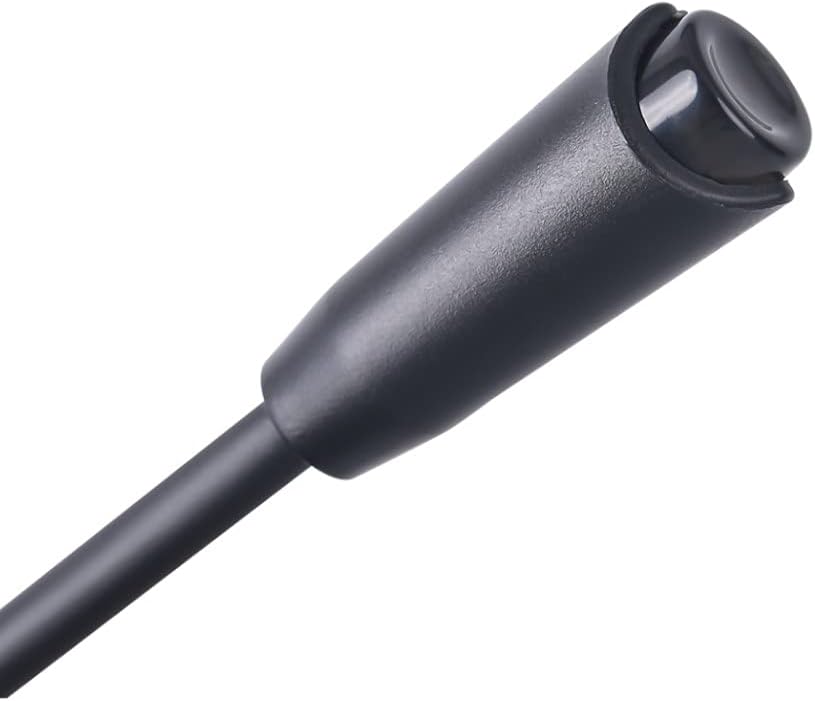
Figure 3: Adjustable Microphone. A detailed view of the flexible, omnidirectional microphone attached to the headset.
3. คำแนะนำในการตั้งค่า
The GH-509 headset offers broad compatibility with various gaming platforms and devices.
3.1 การเชื่อมต่อกับพีซี
- เชื่อมต่อ green 3.5mm jack to your PC's audio output port (headphone jack).
- เชื่อมต่อ pink 3.5mm jack to your PC's microphone input port (mic jack).
- เสียบปลั๊ก ช่องต่อ USB into an available USB port on your PC to power the RGB backlight.
- Adjust audio settings in your operating system to ensure the headset is selected as the default playback and recording device.
3.2 Connecting to PS4 / Xbox One / Smartphone
- For devices with a single 3.5mm combo jack, use the included Y-splitter adapter (if provided) to combine the audio and microphone jacks into a single 3.5mm plug.
- เสียบปลั๊ก แจ็คขนาด 3.5 มม. (or combined jack) into the controller or device's audio port.
- The USB connector is only for RGB lighting and is not required for audio/microphone functionality on these devices.
- Adjust audio settings on your console or smartphone as needed.
4. คู่มือการใช้งาน
4.1 การควบคุมระดับเสียง
Use the integrated volume roller located on the left earcup to adjust the audio output level. Roll it up to increase volume and down to decrease volume.
4.2 การใช้งานไมโครโฟน
The flexible microphone can be positioned closer to your mouth for clear voice capture. Ensure the microphone is enabled in your device's audio settings.
4.3 ไฟแบ็คไลท์ RGB
The headset features an RGB backlight on the earcups. This lighting is powered via the USB connection. There is no separate control for the RGB lighting; it activates automatically when the USB is connected.
5. การบำรุงรักษา
การดูแลรักษาอย่างถูกวิธีจะช่วยยืดอายุการใช้งานของหูฟังของคุณได้
- การทำความสะอาด: ใช้ผ้านุ่มและแห้งเช็ดทำความสะอาดหูฟัง สำหรับที่ครอบหู ให้เช็ดเบาๆamp สามารถใช้ผ้าได้ แต่ควรหลีกเลี่ยงความชื้นที่มากเกินไป ห้ามใช้สารเคมีรุนแรงหรือน้ำยาทำความสะอาดที่มีฤทธิ์กัดกร่อน
- พื้นที่จัดเก็บ: เก็บหูฟังไว้ในที่แห้งและเย็น หลีกเลี่ยงแสงแดดโดยตรงและอุณหภูมิที่สูงหรือต่ำเกินไป
- การดูแลสายเคเบิล: หลีกเลี่ยงการโค้งงอหรือดึงสายเคเบิลมากเกินไปเพื่อป้องกันความเสียหาย
6 การแก้ไขปัญหา
6.1 ไม่มีเสียงออกจากหูฟัง
- Ensure the 3.5mm audio jack is fully inserted into the correct port.
- Check the volume control on the headset and your device; ensure it is not muted or set to minimum.
- Verify that the headset is selected as the default audio output device in your computer's sound settings or console's audio options.
- ทดสอบชุดหูฟังบนอุปกรณ์อื่นเพื่อตัดปัญหาเฉพาะอุปกรณ์ออกไป
6.2 ไมโครโฟนไม่ทำงาน
- Ensure the 3.5mm microphone jack (pink) is fully inserted into the correct port.
- Check that the microphone is not muted in your device's settings or application.
- Verify that the headset microphone is selected as the default input device in your computer's sound settings or console's audio options.
- Test the microphone on another device.
6.3 RGB Backlight Not Illuminating
- ตรวจสอบให้แน่ใจว่าเสียบขั้วต่อ USB เข้ากับพอร์ต USB ที่มีไฟเลี้ยงอย่างแน่นหนาแล้ว
- ลองใช้พอร์ต USB อื่น
7. ข้อมูลจำเพาะ

Figure 4: Technical Specifications. This infographic provides a summary of the headset's key technical details.
| คุณสมบัติ | ข้อมูลจำเพาะ |
|---|---|
| เสียง | สเตอริโอ |
| การตอบสนองความถี่ | 20 เฮิรตซ์ - 20 กิโลเฮิรตซ์ |
| ขนาดลำโพง | 50 มม. |
| ความไวของลำโพง | 109เดซิเบล ± 3เดซิเบล |
| ความต้านทานของลำโพง | 21 โอห์ม |
| ประเภทไมโครโฟน | รอบทิศทาง |
| ขนาดไมโครโฟน | 4.0 x 1.5 มม. |
| ความไวของไมโครโฟน | -42เดซิเบล ± 3เดซิเบล |
| แสงไฟแบ็คไลท์ | อาร์จีบี |
| ตัวเชื่อมต่อ | 2x 3.5 mm Jack, USB (for LED light) |
| ความยาวสายเคเบิล | 2.1 เมตร |
| รองรับระบบปฏิบัติการ | Windows 7 หรือใหม่กว่า |
| น้ำหนัก | 300 กรัม |
| วัสดุ | หนัง (ที่ครอบหู) |
8. การรับประกันและการสนับสนุน
สำหรับข้อมูลการรับประกันและการสนับสนุนทางเทคนิค โปรดดูเอกสารที่แนบมากับสินค้าที่ซื้อ หรือเยี่ยมชมเว็บไซต์อย่างเป็นทางการของ Xtrike Me webไซต์นี้ โปรดเก็บหลักฐานการซื้อไว้เพื่อใช้ยืนยันการรับประกัน


