1. บทนำ
The Gustard C16 is a high-performance 10MHz clock generator designed to provide a precise and stable timing reference for audio digital source devices, such as the Gustard U16. It utilizes an Oven Controlled Crystal Oscillator (OCXO) to achieve superior accuracy and low phase noise, enhancing the overall audio fidelity of your system. This manual provides essential information for the proper setup, operation, and maintenance of your C16 unit.

รูปที่ 1 : ด้านหน้า view of the Gustard C16 10M Clock OCXO unit.
2. คุณสมบัติหลัก
- 10MHz High Performance: Provides a precise 10MHz clock signal.
- SC-cut OCXO: Features a customized SC-cut Oven Controlled Crystal Oscillator from leading manufacturers for stable quality and low jitter.
- Low Phase Noise: Engineered for true low jitter design with significantly reduced near-end phase noise, outperforming traditional SPXO femtosecond crystal oscillators.
- เอาท์พุตหลายรายการ: Equipped with six BNC interface outputs (3 isolated, 3 direct) for versatile connectivity.
- เอาต์พุตคลื่นสี่เหลี่ยม: Delivers a square wave output, which offers better compatibility with various back-end audio devices compared to sine wave outputs.
- Vivid and Gentle Modes: Selectable output characteristics to fine-tune the clock signal.
- Discrete Linear Power Supply: Incorporates a low-ripple, low-temperature drift, and fast-response discrete linear power supply.
- Toroidal Transformer: Built-in audio-dedicated toroidal transformer for clean power delivery.

รูปที่ 2: ระยะใกล้ view of the Gustard C16's internal components, highlighting the OCXO and toroidal transformer.
3. คำแนะนำในการตั้งค่า
3.1 การเชื่อมต่อสายไฟ
- Ensure the C16 unit is placed on a stable, level surface with adequate ventilation.
- Verify that the AC power supply switch on the rear panel is set to the correct voltage สำหรับภูมิภาคของคุณ (115V หรือ 230V)
- Connect the provided power cable to the AC inlet on the rear panel of the C16 and then to a suitable wall outlet.
3.2 Audio Device Connection
- Identify the clock input port on your audio digital source device (e.g., Gustard U16). This is typically a BNC connector.
- Using the included clock signal cable (or a high-quality 75-ohm BNC cable), connect one end to an output port on the C16 rear panel.
- Connect the other end of the BNC cable to the clock input port of your audio device.
- The C16 offers both 'Isolated Output' and 'Direct Output' BNC ports. Choose the output type that best suits your system's requirements.

Figure 3: Rear panel of the Gustard C16, illustrating the power input and BNC clock output connections.

Figure 4: The BNC clock signal cable included with the Gustard C16.
4. คู่มือการใช้งาน
4.1 Initial Power-On and Warm-Up
- After connecting the power and audio devices, turn on the C16 unit using the power switch on the rear panel.
- Upon power-on, the two LEDs on the front panel will flash. This indicates the unit is undergoing its warm-up phase.
- During the initial fifteen minutes of operation, the C16 will warm up to its optimal operating temperature. During this period, all clock output ports on the rear panel will not provide a signal.
- After approximately 15 minutes, the dual LEDs on the front panel will stop flashing and remain steadily illuminated. At this point, all clock outputs will automatically activate, and the unit will be ready for use.
4.2 Output Mode Selection (Vivid / Gentle)
The C16 features 'Vivid' and 'Gentle' output modes, which can be selected via the corresponding buttons on the front panel. These modes adjust the characteristics of the clock signal output.
- กดปุ่ม สดใส button to enable the Vivid output mode.
- กดปุ่ม อ่อนโยน button to enable the Gentle output mode.
- Pressing either button again will toggle the respective output mode off.
4.3 Overriding Warm-Up
If immediate clock output is required before the 15-minute warm-up period is complete, you can bypass the warm-up delay:
- During the flashing LED warm-up period, press either the สดใส or อ่อนโยน button on the front panel. This action will immediately activate the selected clock output, overriding the remaining warm-up time.
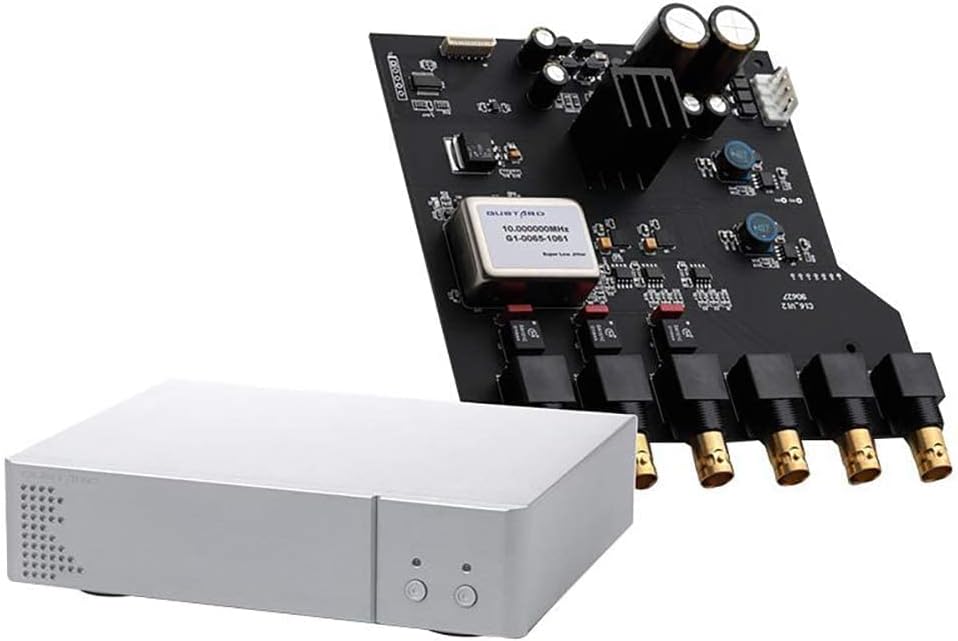
Figure 5: Front panel of the Gustard C16, highlighting the Vivid and Gentle mode selection buttons.
5. ข้อมูลจำเพาะ
| พารามิเตอร์ | ค่า |
|---|---|
| เอาท์พุต Ampความสูง | 7dBm ที่ 50 โอห์ม |
| แหล่งจ่ายไฟฟ้ากระแสสลับ | ไฟฟ้ากระแสสลับ 115V/230V 50/60Hz |
| การใช้พลังงาน | <15วัตต์ |
| Body Size (W x H x D) | ขนาด 220 มม. x 50 มม. x 170 มม. (ไม่รวมส่วนที่ยื่นออกมา) |
| Packing Size (W x H x D) | 285มม. x 85มม. x 270มม. |
| น้ำหนัก | 2.5 กิโลกรัม (รวมบรรจุภัณฑ์) |
| วัสดุ | ตัวถังโลหะ |
| สี | เงิน |
6. การบำรุงรักษา
To ensure the longevity and optimal performance of your Gustard C16, follow these general maintenance guidelines:
- การทำความสะอาด: Use a soft, dry cloth to clean the exterior of the unit. Avoid using liquid cleaners, aerosols, or abrasive materials, as these can damage the finish or internal components.
- การระบายอากาศ : Ensure that the ventilation holes on the unit are not obstructed. Proper airflow is crucial for maintaining the internal operating temperature of the OCXO.
- สิ่งแวดล้อม: Operate the C16 in a clean, dry environment, away from direct sunlight, excessive heat sources, and high humidity.
- พลัง: หากไม่ได้ใช้งานเครื่องเป็นเวลานาน ควรถอดสายไฟออกจากเต้ารับที่ผนัง
7 การแก้ไขปัญหา
This section addresses common issues you might encounter with your C16 unit.
- No Clock Output Immediately After Power-On: This is normal. The unit requires a 15-minute warm-up period, indicated by flashing LEDs on the front panel. Output will begin automatically once the LEDs are steadily illuminated.
- To Bypass Warm-Up: If immediate output is needed, press either the 'Vivid' or 'Gentle' button on the front panel during the warm-up phase.
- No Output After Warm-Up:
- Check all BNC cable connections to ensure they are secure at both the C16 and the receiving audio device.
- Verify that the receiving audio device is correctly configured to accept an external 10MHz clock signal.
- Ensure the C16's LEDs are steadily lit, indicating the warm-up is complete and output is active.
- ไฟแสดงสถานะพลังงานไม่ติด:
- Check the power cable connection to both the unit and the wall outlet.
- ตรวจสอบให้แน่ใจว่าสวิตช์ไฟบนแผงด้านหลังอยู่ในตำแหน่ง "เปิด"
- ตรวจสอบว่าปลั๊กไฟที่ผนังใช้งานได้ปกติ
8. การรับประกันและการสนับสนุน
For warranty information, technical support, or service inquiries regarding your Gustard C16 unit, please refer to the warranty card included with your product or contact your authorized Gustard dealer or distributor. You may also visit the official Gustard website for the most current support contact details and resources.


