การแนะนำ
The REXING M2 Smart Dual Mirror Dash Cam is designed to enhance driving safety and provide comprehensive recording capabilities. This manual provides detailed instructions for installation, operation, and maintenance of your device, ensuring optimal performance and longevity.
มีอะไรอยู่ในกล่อง
- REXING M2 Smart Dual Mirror Dash Cam
- Rear Camera (Full HD)
- เครื่องบันทึก GPS
- Power Cable (12V car charger)
- สายรัดยางสำหรับติดตั้ง
- Mounting Screws and Double-Sided Tape for Rear Camera
- เครื่องมือจัดการสายเคเบิล
- ผ้าเช็ดทำความสะอาด
- คู่มือการใช้งาน
- การ์ดหน่วยความจำ
คุณสมบัติผลิตภัณฑ์
- การบันทึกแบบสองช่องสัญญาณ Full HD: Captures simultaneous 1080p video from both front and rear cameras.
- Blind Spot Detection (BSD) & Advanced Driver-Assistance System (ADAS): Utilizes radar sensors to monitor blind spots and assist with lane changes by providing alerts.
- GPS Logger: Records time, date, location, and speed data with your video recordings.
- หน้าจอสัมผัส IPS ขนาด 12 นิ้ว: Provides a wide, live-stream rearview display with intuitive finger-touch operation.
- Automatic Backup Camera: Displays rear footage in real-time, assisting with driving and backing up.
- จีเซ็นเซอร์: Automatically detects impacts and locks video footage เพื่อป้องกันการเขียนทับ
- การบันทึกแบบวนซ้ำ: Continuously records by overwriting the oldest unlocked fileเมื่อเมมโมรี่การ์ดเต็ม
- ระบบตรวจสอบที่จอดรถตลอด 24 ชั่วโมง: Automatically records 20-second videos when vibration is detected while the vehicle is parked.
สินค้าเกินview
The REXING M2 dash cam is designed to seamlessly integrate with your vehicle's rearview mirror. Below is an overview of its physical components and connections.

The REXING M2 mirror dash cam showcasing its Blind Spot Detection (BSD) and Advanced Driver-Assistance System (ADAS) capabilities. The image illustrates how the system detects vehicles in blind spots and provides visual alerts for safe lane changes.

The REXING M2 dash cam highlighting its dual channel 1080p recording for both front and rear views, along with Super Night Vision capabilities for clear footage ในสภาพแสงน้อย

The 12-inch IPS touch screen of the REXING M2 dash cam, demonstrating its adjustable field of view by swiping on the interactive display.

The REXING M2 dash cam featuring its integrated GPS Logger for real-time speed and location tracking, alongside a 170-degree wide-angle lens for extensive road coverage.
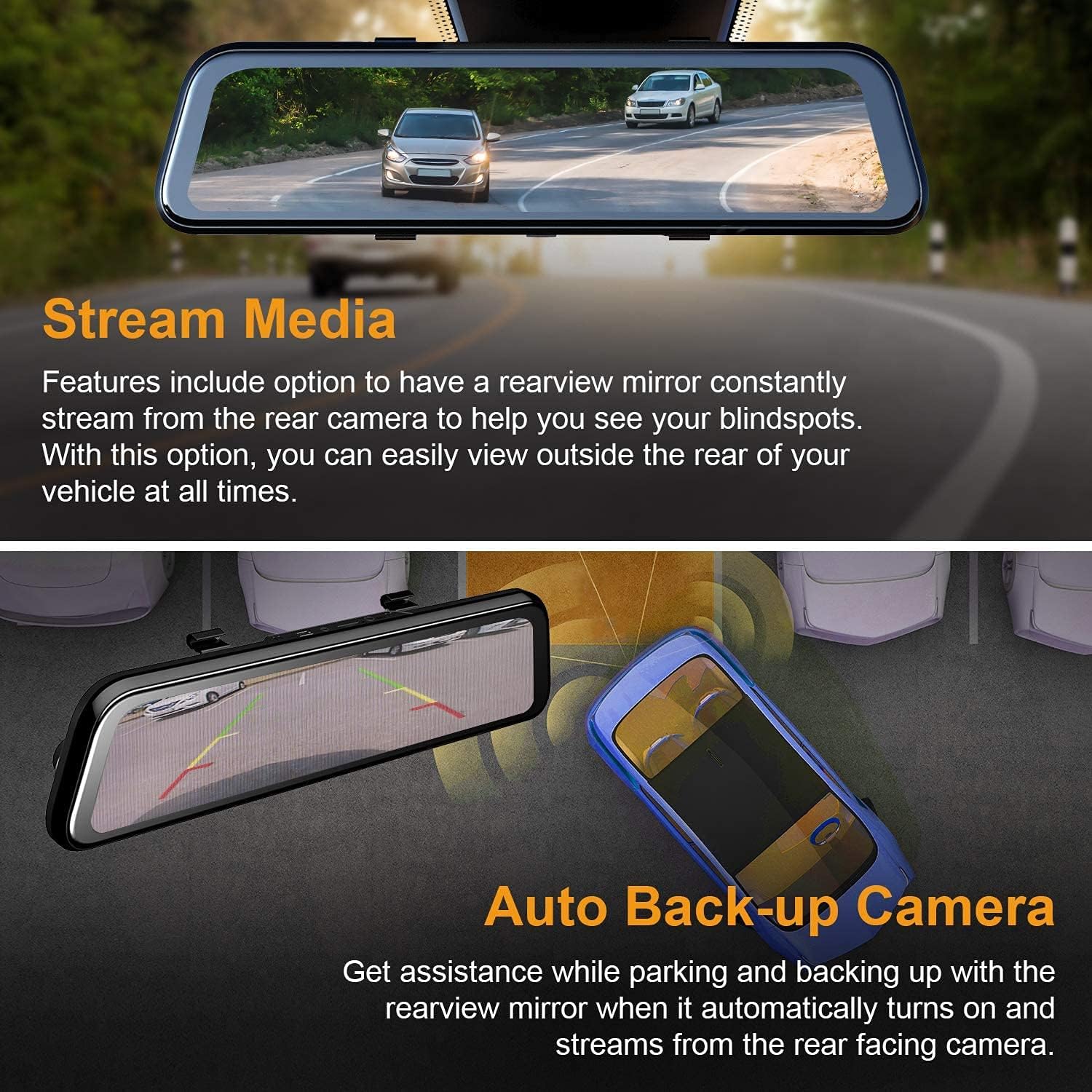
The REXING M2 dash cam's Stream Media function, allowing continuous rearview streaming, and its Auto Backup Camera feature, which automatically activates when reversing for enhanced safety.

The REXING M2 dash cam illustrating its Gravity Sensor for collision detection, Loop Recording for continuous footage, and 24-Hour Parking Monitor for vehicle surveillance.
พอร์ตและการควบคุม
- พอร์ตด้านบน: Includes connections for GPS, Micro SD card slot (requires user-provided card), AV input for the rear camera, and a Mini USB port for power.
- หลัง: Features a reset hole and four rubber anchor points for secure mounting. The front-facing camera is adjustable, allowing for pivot movement (up/down, side-to-side) to optimize the recording angle.
- ด้านล่าง: Contains a speaker grill, a power button (to turn the device on/off), and a microphone.
คู่มือการติดตั้ง
Follow these steps to properly install your REXING M2 Dash Cam in your vehicle.
- การติดตั้งกระจก: Use the provided rubber straps to securely attach the REXING M2 mirror dash cam over your vehicle's existing rearview mirror. Ensure the mirror is centered and stable.
- การเชื่อมต่อพลังงาน: Plug the power cable into the Mini USB port on top of the dash cam and connect the other end to your vehicle's 12V power outlet (cigarette lighter socket).
- การติดตั้งกล้องด้านหลัง:
- Connect the rear camera cable to the AV input port on the dash cam.
- Route the rear camera cable discreetly along the headliner and side panels to the rear of your vehicle. Use the provided cable management tool to tuck wires neatly.
- Mount the rear camera using the included screws or double-sided tape. For automatic reverse camera activation, connect the red wire from the rear camera cable to your vehicle's reverse light power source.
- Connecting the GPS Logger: Plug the GPS logger into its dedicated port on top of the dash cam. Mount the GPS unit on your windshield, ensuring it has a clear view ของท้องฟ้าเพื่อการรับสัญญาณที่ดีที่สุด
- ใส่การ์ดหน่วยความจำ: Insert a compatible Micro SD card (not included) into the designated slot on top of the dash cam. The device requires a memory card for recording.
Official REXING video demonstrating the installation process of the M2 BSD Dash Cam, including mounting the mirror, connecting cables, and setting up the rear camera.
คู่มือการใช้งาน
The REXING M2 features an intuitive 12-inch IPS touchscreen for easy navigation and control.
การควบคุมหน้าจอสัมผัส
- การสลับ Views: ปัดหน้าจอไปทางซ้ายหรือขวาเพื่อสลับระหว่างกล้องหน้าและกล้องหลัง view,กล้องหลัง view, or a split view แสดงทั้งสองอย่างพร้อมกัน
- การปรับมุมกล้อง: Swipe up or down on the left side of the screen (for front view) or right side (for rear view) to adjust the vertical viewมุมของกล้อง
- การปรับความสว่างหน้าจอ: Swipe up or down on the right side of the screen to adjust the display brightness.
- การเข้าถึงเมนู: Tap the screen to reveal the menu bar at the bottom.
ตัวเลือกเมนู
From the menu bar, you can access various settings and functions:
- การควบคุมการบันทึก: Start/stop recording, take photos, or manually lock current video footage.
- การเล่นซ้ำ: Swipe left from the main screen to access recorded files. You can play back front or rear videos, locked videos, and photos directly on the screen.
- การตั้งค่า (ไอคอนรูปเฟือง): Access advanced settings including:
- ความไวของ G-Sensor: Adjust sensitivity (Low, Medium, High, Off) for impact detection during driving and parking.
- การบันทึกแบบวนซ้ำ: Set video segment duration (1, 2, or 3 minutes).
- การตรวจสอบที่จอดรถ: Enable/disable and adjust sensitivity for 24/7 surveillance.
- การเข้ารหัสวิดีโอ: Choose between H.264 and H.265 for video compression.
- ภาษา: เลือกภาษาที่คุณต้องการ
- วันที่/เวลา: ตั้งวันที่และเวลาให้ถูกต้อง
- ฟอร์แมต SD: ฟอร์แมตการ์ด Micro SD
- หน่วยความเร็ว: Switch between MPH and KM/H.
- การจดจำเสียงพูด: Enable voice commands for hands-free operation (e.g., "Turn on screen," "Show front camera," "Lock the video").
การซ่อมบำรุง
การบำรุงรักษาอย่างสม่ำเสมอจะช่วยให้กล้องติดรถยนต์ของคุณมีอายุการใช้งานยาวนานและทำงานได้อย่างมีประสิทธิภาพสูงสุด
- การทำความสะอาด: Use the provided cleaning cloth to gently wipe the screen and camera lenses. Avoid abrasive materials or harsh chemicals.
- การจัดการการ์ด SD: Regularly format your Micro SD card (at least once a month) to prevent data corruption and ensure smooth recording. Replace the card if it shows signs of wear or error.
- อัพเดตเฟิร์มแวร์: Check the REXING webหมั่นตรวจสอบเว็บไซต์เป็นระยะเพื่ออัปเดตเฟิร์มแวร์ เพื่อให้แน่ใจว่าอุปกรณ์ของคุณมีฟีเจอร์ล่าสุดและการแก้ไขข้อบกพร่องต่างๆ
การแก้ไขปัญหา
If you encounter issues with your REXING M2 Dash Cam, refer to the following common solutions:
- Screen Glare at Night: Some users report glare from headlights at night. Adjust screen brightness or turn off the screen to use it as a normal mirror if visibility is affected.
- Poor Rear Camera Visibility in Rain: Ensure the rear camera lens is clean and free from water droplets. Consider repositioning the camera if it's frequently obstructed.
- กล้องติดรถยนต์ไม่บันทึกภาพ: Ensure a compatible Micro SD card is inserted and formatted. Check loop recording settings.
- GPS ไม่สามารถติดตามตำแหน่งได้: Verify the GPS logger is securely plugged in and mounted with a clear view ของท้องฟ้า
- อุปกรณ์ไม่ตอบสนอง: Use the reset hole on the back of the device to perform a factory reset.
ข้อมูลจำเพาะ
| ขนาดสินค้า | 12 x 2.75 x 0.75 นิ้ว |
| น้ำหนักสินค้า | 13.7 ออนซ์ |
| หมายเลขรุ่นสินค้า | M2 |
| ขนาดหน้าจอ | 12 นิ้ว |
| เทคโนโลยีการแสดงผล | จอแอลซีดี |
| เทคโนโลยีเซ็นเซอร์ออปติคัล | ซีมอส |
| มุมจริงของ View | 170 องศา |
| คุณสมบัติพิเศษ | G-Sensor, Loop Recording, Night Vision, Blind Spot Detection, ADAS, GPS |
| เทคโนโลยีการเชื่อมต่อ | ยูเอสบี |
| สี | สีดำ |
การรับประกันและการสนับสนุน
The REXING M2 Smart Dual Mirror Dash Cam comes with an รับประกัน 18 เดือน. For any assistance, technical support, or warranty claims, please contact REXING customer support directly.


