การแนะนำ
คู่มือนี้ให้คำแนะนำอย่างละเอียดสำหรับการใช้งานแท็บเล็ตอุตสาหกรรม SUNMI M2 MAX รุ่น TF700 อย่างปลอดภัยและมีประสิทธิภาพ โปรดอ่านคู่มือนี้อย่างละเอียดก่อนใช้งานอุปกรณ์ และเก็บรักษาไว้เพื่อใช้อ้างอิงในอนาคต

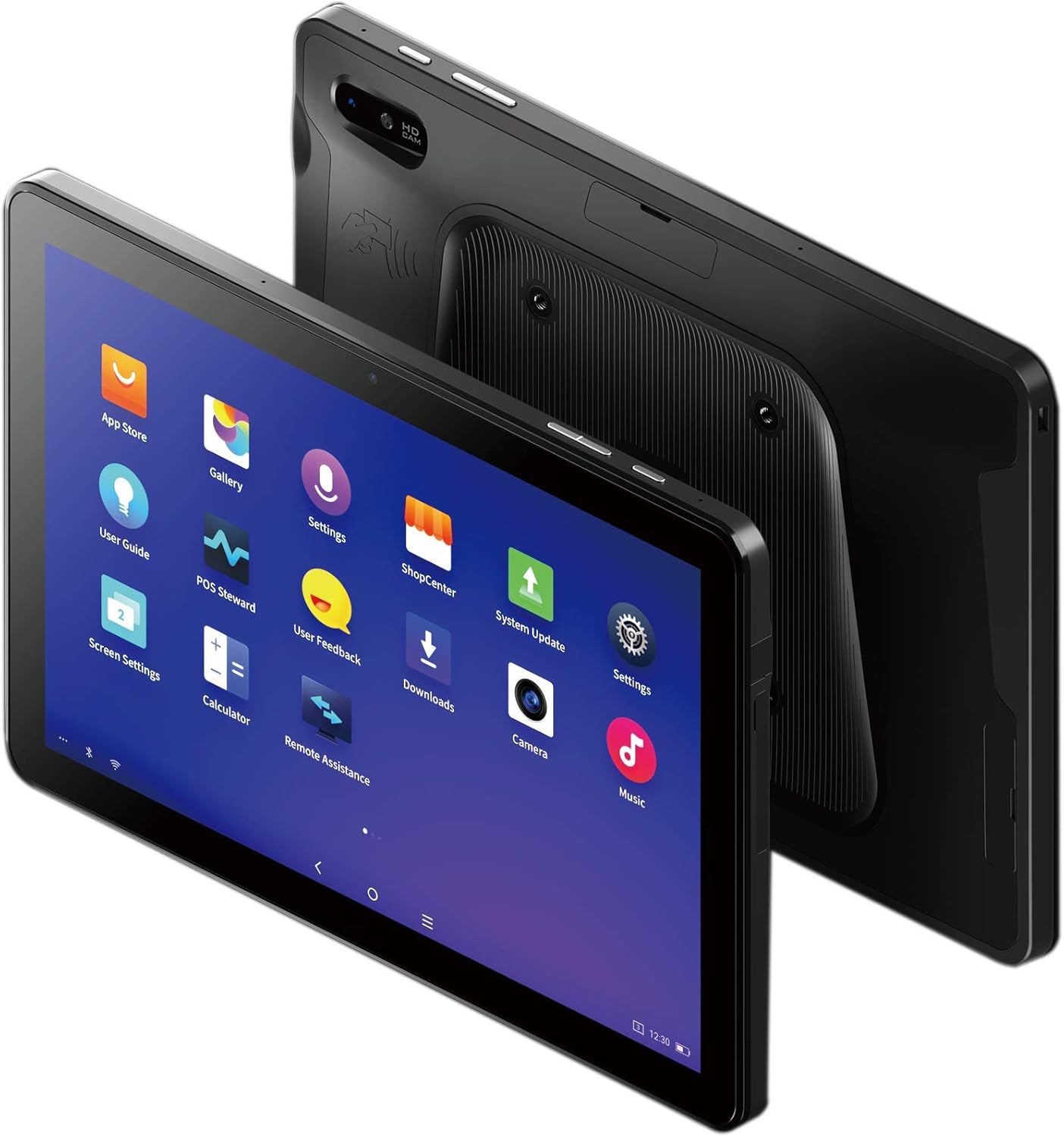
รูปที่ 1 : ด้านหน้า view ของแท็บเล็ตอุตสาหกรรม SUNMI M2 MAX แสดงหน้าจอพร้อมไอคอนแอปพลิเคชันต่างๆ
การตั้งค่า
1. การแกะกล่องและการตรวจสอบเบื้องต้น
นำส่วนประกอบทั้งหมดออกจากบรรจุภัณฑ์อย่างระมัดระวัง ตรวจสอบว่ารายการทั้งหมดที่ระบุไว้ด้านล่างยังคงอยู่ในสภาพสมบูรณ์และไม่เสียหาย:
- แท็บเล็ตอุตสาหกรรม SUNMI M2 MAX (TF700)
- อะแดปเตอร์แปลงไฟ
- สายเคเบิล USB Type-C
- สายคล้องมือ (เป็นอุปกรณ์เสริม หากมีมาให้ในรุ่นของคุณ)
2. การชาร์จอุปกรณ์
ก่อนใช้งานครั้งแรก โปรดชาร์จแท็บเล็ตให้เต็มก่อน เชื่อมต่อสาย USB Type-C เข้ากับพอร์ตชาร์จของแท็บเล็ต และอีกด้านหนึ่งเข้ากับอะแดปเตอร์แปลงไฟ เสียบอะแดปเตอร์แปลงไฟเข้ากับเต้ารับที่ผนัง ไฟแสดงสถานะการชาร์จจะสว่างขึ้น
แท็บเล็ตนี้มาพร้อมแบตเตอรี่ลิเธียมโพลิเมอร์แบบถอดไม่ได้ขนาด 8360 mAh การชาร์จเต็มหนึ่งครั้งสามารถใช้งานต่อเนื่องได้นานกว่า 12 ชั่วโมง
3. การติดตั้งซิมการ์ดและการ์ด MicroSD (ไม่บังคับ)
อุปกรณ์นี้รองรับซิมการ์ด MicroSIM หรือ NanoSIM (การตั้งค่า 1) และ eSIM (การตั้งค่า 2) นอกจากนี้ยังรองรับการ์ด MicroSD สูงสุด 128GB สำหรับเพิ่มพื้นที่จัดเก็บข้อมูล
- ค้นหาช่องใส่การ์ด SIM/MicroSD ที่ด้านข้างของแท็บเล็ต
- ใช้เครื่องมือถอดซิมที่ให้มา (ถ้ามี) หรือคลิปหนีบกระดาษขนาดเล็กเพื่อเปิดถาดใส่ซิม
- วางซิมการ์ดและ/หรือการ์ด MicroSD ลงในถาดอย่างระมัดระวัง โดยดูจากแผนภาพบนถาด
- ค่อยๆ ดันถาดกลับเข้าไปในช่องจนกระทั่งล็อคเข้าที่

รูปที่ 2: ด้านหลัง view โดยจะกล่าวถึงรายละเอียดของ SUNMI M2 MAX ซึ่งรวมถึงกล้อง อินเทอร์เฟซการชาร์จแบบ Pogo Pin และตำแหน่งของช่องใส่ซิมการ์ด/MicroSD
4. การติดสายคล้องมือ (ไม่จำเป็น)
หากแท็บเล็ตของคุณมีสายคล้องมือ ให้ติดสายคล้องมือเข้ากับจุดที่กำหนดไว้ด้านหลังแท็บเล็ต เพื่อให้สามารถจับถือได้อย่างมั่นคงขณะใช้งานแบบพกพา
รูปที่ 3: แท็บเล็ตอุตสาหกรรม SUNMI M2 MAX ที่ถือด้วยสายรัดมือเสริม แสดงให้เห็นถึงความสะดวกในการพกพาและการจับยึดที่มั่นคงยิ่งขึ้น
การใช้งานอุปกรณ์
1. เปิด/ปิดเครื่อง
- เปิดเครื่อง: กดปุ่มเปิด/ปิด (ด้านข้างเครื่อง) ค้างไว้จนกว่าโลโก้ SUNMI จะปรากฏบนหน้าจอ
- หมดแรง: กดปุ่มเปิด/ปิดค้างไว้จนกว่าเมนูปิดเครื่องจะปรากฏขึ้น เลือก "ปิดเครื่อง" และยืนยัน
- เริ่มต้นใหม่อีกครั้ง: จากเมนูปิดเครื่อง ให้เลือก "รีสตาร์ท" เพื่อรีบูตอุปกรณ์
2. การนำทางพื้นฐาน
SUNMI M2 MAX ใช้ระบบปฏิบัติการ Android การนำทางส่วนใหญ่ใช้ระบบสัมผัส:
- แตะ: เพื่อเลือกสินค้าหรือเปิดแอปพลิเคชัน
- ปัด: เพื่อเลื่อนดูรายการหรือสลับระหว่างหน้าจอ
- บีบเพื่อซูม: การซูมเข้าหรือออกจากภาพหรือ web หน้า
- ปุ่มโฮม: กลับไปที่หน้าจอหลัก
- ปุ่มย้อนกลับ: กลับไปยังหน้าจอที่แล้ว
- ปุ่มแอปล่าสุด: แสดงแอปพลิเคชันที่ใช้ล่าสุด
3. การเชื่อมต่อกับเครือข่าย
แท็บเล็ตนี้รองรับ Wi-Fi (2.4GHz/5GHz, 802.11 a/b/g/n/ac) และเครือข่ายโทรศัพท์มือถือ (2G, 3G, 4G)
- ไวไฟ : ไปที่ การตั้งค่า > เครือข่ายและอินเทอร์เน็ต > Wi-Fiเปิดใช้งาน Wi-Fi เลือกเครือข่ายที่ต้องการ และป้อนรหัสผ่านหากจำเป็น
- ข้อมูลเซลลูล่าร์: ตรวจสอบให้แน่ใจว่าได้ใส่ซิมการ์ดที่ใช้งานได้แล้ว ไปที่ การตั้งค่า > เครือข่ายและอินเทอร์เน็ต > เครือข่ายมือถือ เพื่อเปิดใช้งานข้อมูลมือถือและกำหนดค่าการตั้งค่า APN หากจำเป็น
- บลูทูธ: ไปที่ การตั้งค่า > อุปกรณ์ที่เชื่อมต่อ > บลูทูธ เพื่อเชื่อมต่อกับอุปกรณ์บลูทูธ (รองรับบลูทูธ 5.0)
4. การใช้ NFC
แท็บเล็ต SUNMI M2 MAX มาพร้อมกับ NFC (Near Field Communication) สำหรับการทำธุรกรรมและการแลกเปลี่ยนข้อมูลแบบไร้สัมผัส ในการใช้งาน NFC โปรดตรวจสอบให้แน่ใจว่าได้เปิดใช้งานในตั้งค่าแล้ว และนำแท็บเล็ตไปวางใกล้กับเครื่องอ่าน NFC หรืออุปกรณ์ที่รองรับ
5. การทำงานของกล้อง
แท็บเล็ตนี้มีกล้องหลังความละเอียด 13 MP พร้อมแฟลชและระบบโฟกัสอัตโนมัติ และกล้องหน้าความละเอียด 5 MP เปิดแอปพลิเคชัน "กล้อง" เพื่อถ่ายภาพหรือบันทึกวิดีโอ
การซ่อมบำรุง
1. การทำความสะอาดอุปกรณ์
ใช้ผ้านุ่มไม่เป็นขุยเช็ดเล็กน้อยampเช็ดทำความสะอาดหน้าจอและภายนอกด้วยน้ำหรือน้ำยาทำความสะอาดหน้าจอ หลีกเลี่ยงการใช้สารเคมีรุนแรง น้ำยาทำความสะอาดที่มีฤทธิ์กัดกร่อน หรือความชื้นมากเกินไป
2. การดูแลแบตเตอรี่
- ควรหลีกเลี่ยงการวางยาเม็ดไว้ในที่ที่มีอุณหภูมิสูงหรือต่ำเกินไป (ต่ำกว่า -20°C หรือสูงกว่า 70°C)
- อย่าปล่อยให้แบตเตอรี่หมดจนหมดบ่อยๆ
- ใช้เฉพาะอะแดปเตอร์แปลงไฟและสายไฟของแท้หรือที่ได้รับการรับรองว่าใช้งานร่วมกันได้เท่านั้น
3. การอัปเดตซอฟต์แวร์
ตรวจสอบและติดตั้งการอัปเดตระบบเป็นประจำเพื่อให้มั่นใจถึงประสิทธิภาพและความปลอดภัยที่เหมาะสมที่สุด ไปที่ การตั้งค่า > ระบบ > อัปเดตระบบ.
4. การปกป้องสิ่งแวดล้อม
SUNMI M2 MAX ได้รับการออกแบบให้มีมาตรฐานการป้องกัน IP68 และทนทานต่อการตกจากที่สูง 1 เมตร ทำให้เหมาะสำหรับสภาพแวดล้อมที่ต้องการความทนทานสูง อย่างไรก็ตาม ควรหลีกเลี่ยงการทำตกโดยเจตนาหรือการจุ่มน้ำเป็นเวลานาน
การแก้ไขปัญหา
| ปัญหา | สาเหตุที่เป็นไปได้ | สารละลาย |
|---|---|---|
| อุปกรณ์ไม่เปิดเครื่อง | แบตเตอรี่อ่อน ซอฟต์แวร์ขัดข้อง | ชาร์จอุปกรณ์อย่างน้อย 30 นาที กดปุ่มเปิด/ปิดค้างไว้ 10-15 วินาทีเพื่อบังคับให้รีสตาร์ท |
| ไม่สามารถเชื่อมต่อ Wi-Fi ได้ | รหัสผ่านไม่ถูกต้อง; Wi-Fi ถูกปิดใช้งาน; เราเตอร์มีปัญหา | ตรวจสอบรหัสผ่าน ตรวจสอบให้แน่ใจว่าได้เปิดใช้งาน Wi-Fi ในการตั้งค่าแล้ว รีสตาร์ทเราเตอร์ ลืมรหัสผ่านและเชื่อมต่อกับเครือข่ายอีกครั้ง |
| หน้าจอสัมผัสไม่ตอบสนอง | ซอฟต์แวร์มีปัญหาชั่วคราว | บังคับรีสตาร์ทอุปกรณ์โดยกดปุ่มเปิด/ปิดค้างไว้ |
| แอปพลิเคชันหยุดทำงานโดยไม่คาดคิด | หน่วยความจำ RAM ไม่เพียงพอ; แอปมีข้อผิดพลาด | ปิดแอปที่ทำงานอยู่เบื้องหลัง ล้างแคช/ข้อมูลของแอป (การตั้งค่า > แอป) อัปเดตแอป |
ข้อมูลจำเพาะ
ตารางต่อไปนี้แสดงรายละเอียดคุณสมบัติทางเทคนิคที่สำคัญของแท็บเล็ตอุตสาหกรรม SUNMI M2 MAX (รุ่น: TF700)

รูปที่ 4: ข้อมูลจำเพาะทางเทคนิคโดยละเอียดสำหรับแท็บเล็ตอุตสาหกรรม SUNMI M2 MAX
- แบบอย่าง: ทีเอฟ700
- ระบบปฏิบัติการ: แอนดรอยด์ 9.0 (SUNMI OS)
- โปรเซสเซอร์: Kryo-260, หน่วยประมวลผลแปดแกน 2.2GHz (Qualcomm)
- หน่วยความจำ: RAM 3GB + ROM 32GB (eMMC)
- แสดง: หน้าจอ FHD ขนาด 10.1 นิ้ว ความละเอียด 1920x1200 พิกเซล ระบบสัมผัสแบบ Capacitive ป้องกันด้วยกระจก Corning Gorilla Glass 3
- กล้องถ่ายรูป: กล้องหน้า: 5MP FF; กล้องหลัง: 13MP AF + ไฟฉาย รองรับการจดจำบาร์โค้ด 1D/2D
- NFC: บัตรประเภท A และ B, บัตร Mifare, บัตร Felica, เป็นไปตามมาตรฐาน ISO/IEC 14443 และ ISO/IEC 15693
- ลำโพง/ไมโครโฟน: ลำโพง 1 วัตต์, ไมโครโฟน 2 ตัว
- ช่องเสียบการ์ด PSAM: 1x PSAM
- ช่องใส่ซิมการ์ด: 1x MicroSD (TF), 1x MicroSIM หรือ 1x NanoSIM (TF700 รุ่น 1), eSIM (TF700 รุ่น 2)
- เครือข่าย: 2G, 3G และ 4G
- ไวไฟ : 2.4GHz/5GHz, 802.11 a/b/g/n/ac
- บลูทูธ: รองรับ Bluetooth 2.1/3.0/4.2/5.0 (BLE)
- จีพีเอส: รองรับ AGPS, GPS, GLONASS, Beidou (การตั้งค่า 2)
- เซ็นเซอร์: เซ็นเซอร์แรงโน้มถ่วง, เซ็นเซอร์แสง, เข็มทิศ, เซ็นเซอร์ฮอลล์
- ปุ่ม: 1x ปุ่มเปิด/ปิด (หน้าจอล็อก), 2x ปุ่มปรับระดับเสียง (+/-)
- พอร์ต: 1x พอร์ต Type-C (รองรับ OTG), 1x ช่องเสียบหูฟัง, 1x ช่องเสียบ MicroSD (เพิ่มความจุได้สูงสุด 128GB)
- แบตเตอรี่: แบตเตอรี่ลิเธียมโพลิเมอร์แบบถอดไม่ได้ ความจุ 8360 mAh
- อะแดปเตอร์ไฟฟ้า: อินพุต: ไฟฟ้ากระแสสลับ 100-240V, เอาต์พุต: ไฟฟ้ากระแสตรง 5V/2A
- ขนาด (กxยxส) : 249.8 x 160 x 9.9 มม. (0.39 x 6.3 x 9.84 นิ้ว)
- น้ำหนักรวม: 673g (1.48 ปอนด์)
- การป้องกัน: มาตรฐาน IP68 ทนทานต่อการตกกระแทกจากที่สูง 1 เมตร
- อุณหภูมิในการทำงาน: -20°C ถึง 55°C
- อุณหภูมิในการจัดเก็บ: -40°C ถึง 70°C
การรับประกันและการสนับสนุน
สำหรับข้อมูลการรับประกันและการสนับสนุนทางเทคนิค โปรดดูเอกสารที่แนบมากับสินค้าที่ซื้อ หรือเยี่ยมชมเว็บไซต์อย่างเป็นทางการของ SUNMI webไซต์นี้ โปรดเก็บหลักฐานการซื้อไว้เพื่อใช้ยืนยันการรับประกัน
SUNMI Official Webเว็บไซต์: www.sunmi.com


