1. บทนำ
This manual provides essential information for the safe and efficient operation of your iFFALCON 40F2A 40-inch Full HD Android Smart LED TV. Please read these instructions thoroughly before using the television and retain them for future reference.
The iFFALCON 40F2A is a 40-inch Full High Definition (1920x1080) Smart LED TV powered by Android, offering a rich entertainment experience with built-in Google Assistant, HDR10 support, and integrated streaming services.

ภาพ: ด้านหน้า view of the iFFALCON 40F2A 40-inch Full HD Android Smart LED TV.
2. การตั้งค่า
2.1 การแกะกล่องและเนื้อหาภายในบรรจุภัณฑ์
นำโทรทัศน์ออกจากบรรจุภัณฑ์อย่างระมัดระวัง ตรวจสอบให้แน่ใจว่ามีอุปกรณ์ครบทุกชิ้น:
- 1 x iFFALCON 40F2A LED TV
- ขาตั้งบนโต๊ะ 1 อัน
- 1 x คู่มือผู้ใช้ (เอกสารนี้)
- ใบรับประกัน 1 ใบ
- 1 x รีโมทคอนโทรล
- แบตเตอรี่ AAA 2 ก้อน
2.2 การติดตั้งขาตั้ง
If using the table-top stand:
- วางจอทีวีลงบนพื้นผิวที่นุ่มและเรียบเพื่อป้องกันความเสียหาย
- จัดวางขายึดขาตั้งให้ตรงกับรูสกรูที่ด้านล่างของทีวี
- ยึดขาตั้งโดยใช้สกรูที่ให้มา
- Carefully lift the TV to an upright position on a stable, level surface.
2.3 การติดตั้งบนผนัง (ทางเลือก)
For wall mounting, consult a professional installer and refer to the wall mount kit's instructions. Ensure the wall mount is compatible with the TV's VESA mounting pattern.
2.4 การเชื่อมต่ออุปกรณ์ภายนอก
Connect your external devices (e.g., set-top box, gaming console, Blu-ray player) to the TV's ports. The TV features HDMI, USB, VGA, and Headphone ports.
- ช่องต่อ HDMI: สำหรับเสียงและวิดีโอความคมชัดสูง
- ยูเอสบี: สำหรับเชื่อมต่ออุปกรณ์จัดเก็บข้อมูล USB
- อีเธอร์เน็ต: สำหรับการเชื่อมต่ออินเตอร์เน็ตแบบใช้สาย
- หูฟัง: For audio output to headphones.
2.5 การเชื่อมต่อแหล่งจ่ายไฟและการตั้งค่าเริ่มต้น
- ใส่แบตเตอรี่ AAA ที่ให้มาลงในรีโมทคอนโทรล
- เชื่อมต่อสายไฟเข้ากับทีวีแล้วจึงเสียบเข้ากับเต้ารับไฟฟ้า
- กดปุ่มเปิด/ปิดบนรีโมทคอนโทรลเพื่อเปิดทีวี
- ปฏิบัติตามคำแนะนำบนหน้าจอเพื่อทำการตั้งค่าเบื้องต้นให้เสร็จสมบูรณ์ รวมถึงการเลือกภาษา การเชื่อมต่อเครือข่าย (Wi-Fi หรืออีเทอร์เน็ต) และการลงชื่อเข้าใช้บัญชี Google
3. การใช้งานทีวี
3.1 ฟังก์ชั่นการควบคุมระยะไกล
The remote control provides access to all TV functions. It includes dedicated buttons for popular streaming services like Netflix, Amazon Prime Video, and Zee5, as well as a Google Assistant button for voice commands.

Image: The iFFALCON 40F2A Smart Remote Control, highlighting the Google Assistant and Netflix hotkey buttons.
3.2 อินเทอร์เฟซ Android TV
Navigate the Android TV interface using the remote's directional pad and OK button. The home screen displays recommended content, installed applications, and settings.

Image: The Android TV home screen on the iFFALCON 40F2A, showing various apps and features.
ผู้ช่วย Google 3.3 คน
กดปุ่ม Google Assistant บนรีโมทของคุณ แล้วพูดใส่ไมโครโฟนเพื่อควบคุมทีวี ค้นหาเนื้อหา รับคำตอบ และจัดการอุปกรณ์สมาร์ทโฮม
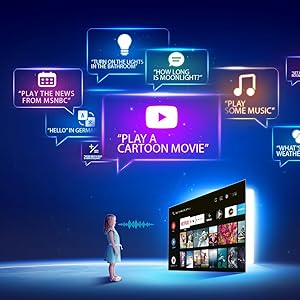
Image: Illustration of using Google Assistant voice commands with the TV.
3.4 แอปพลิเคชันสตรีมมิ่ง
Access a wide range of pre-installed streaming applications such as Netflix, Amazon Prime Video, YouTube, Disney+Hotstar, Zee5, and more. Additional apps can be downloaded from the Google Play Store.

Image: The iFFALCON 40F2A displaying various streaming application logos.
3.5 Chromecast ในตัว
Use the built-in Chromecast feature to cast content from your compatible smartphone, tablet, or computer directly to your TV screen.

Image: A smartphone casting content to the iFFALCON 40F2A TV via Chromecast.
4. คุณสมบัติ
4.1 Full HD Display with HDR10
Experience clear and vibrant visuals with Full HD (1920x1080) resolution. HDR10 support enhances contrast and color accuracy, providing a more dynamic picture.

Image: A side-by-side comparison of a scene without HDR10 and with HDR10, showing enhanced detail and color.
4.2 การหรี่แสงระดับไมโคร
Micro Dimming analyzes video content in hundreds of separate zones to adjust brightness and darkness independently, improving contrast and picture quality.

Image: A comparison showing a city skyline without Micro Dimming and with Micro Dimming, highlighting improved contrast.
4.3 iPQ Engine
The iPQ Engine intelligently processes image quality, optimizing brightness, color range, and other visual parameters for a superior viewการสร้างประสบการณ์

Image: Visual representation of the iPQ Engine's high brightness precision and intelligent color range control technologies.
4.4 ระบบเสียง Dolby
Enjoy immersive sound with Dolby Audio. The TV features 20 Watts speakers (10W + 10W) for clear and powerful audio output.

Image: Graphic illustrating the 10W + 10W Dolby Audio speakers for enhanced sound.
4.5 Slim Design
The iFFALCON 40F2A features a sleek and slim design, allowing it to blend seamlessly into any living space.

Image: A hand demonstrating the slim profile of the iFFALCON TV.
5. การบำรุงรักษา
5.1 การทำความสะอาดหน้าจอ
เช็ดหน้าจอเบาๆ ด้วยผ้านุ่มที่ไม่เป็นขุย สำหรับรอยฝังแน่น ให้เช็ดเบาๆampเช็ดผ้าด้วยน้ำหรือน้ำยาทำความสะอาดหน้าจอโดยเฉพาะ หลีกเลี่ยงการใช้สารเคมีรุนแรงหรือวัสดุที่มีฤทธิ์กัดกร่อน
5.2 การทำความสะอาดตัวเครื่องทีวี
Wipe the TV's frame and stand with a soft, dry cloth. Do not use liquid cleaners directly on the TV.
5.3 การดูแลทั่วไป
- ควรหลีกเลี่ยงการวางทีวีไว้ในที่ที่มีแสงแดดส่องโดยตรงหรือในอุณหภูมิที่สูงหรือต่ำเกินไป
- ควรมีการระบายอากาศรอบ ๆ ทีวีให้เพียงพอเพื่อป้องกันความร้อนสูงเกินไป
- ถอดปลั๊กทีวีในระหว่างที่มีพายุฝนฟ้าคะนองหรือเมื่อไม่ได้ใช้งานเป็นเวลานาน
6 การแก้ไขปัญหา
หากคุณประสบปัญหาเกี่ยวกับทีวี โปรดดูปัญหาทั่วไปและวิธีแก้ไขต่อไปนี้:
| ปัญหา | สาเหตุที่เป็นไปได้ | สารละลาย |
|---|---|---|
| ไม่มีไฟฟ้า | สายไฟหลุด; ปัญหาเต้ารับไฟฟ้า | Check power cord connection; Try a different outlet; Press power button on TV/remote |
| ไม่มีภาพแต่มีเสียง | แหล่งสัญญาณเข้าไม่ถูกต้อง; สาย HDMI/AV หลวม | Select correct input source; Reconnect cables securely |
| ไม่มีเสียงแต่มีภาพ | Volume muted or too low; Audio cable issue | Unmute or increase volume; Check audio settings; Reconnect audio cables |
| รีโมตคอนโทรลไม่ทำงาน | แบตเตอรี่หมด; สิ่งกีดขวาง; รีโมทไม่ได้จับคู่ | Replace batteries; Remove obstructions; Re-pair remote if necessary |
| ไม่สามารถเชื่อมต่อ Wi-Fi ได้ | รหัสผ่านไม่ถูกต้อง ปัญหาเราเตอร์ ทีวีอยู่ห่างจากเราเตอร์มากเกินไป | Verify password; Restart router; Move TV closer or use Ethernet |
| แอปทำงานช้าหรือค้าง | Insufficient memory; Network issue; App malfunction | Close unused apps; Check internet connection; Clear app cache/data or reinstall app |
หากปัญหายังคงมีอยู่หลังจากลองวิธีแก้ไขเหล่านี้แล้ว โปรดติดต่อฝ่ายสนับสนุนลูกค้า
7. ข้อมูลจำเพาะ
Detailed technical specifications for the iFFALCON 40F2A Smart LED TV:

Image: Diagram showing the dimensions of the iFFALCON 40F2A TV.
| คุณสมบัติ | ข้อมูลจำเพาะ |
|---|---|
| ยี่ห้อ | ไอฟัลคอน |
| แบบอย่าง | 40F2A |
| ขนาดหน้าจอ | 40 นิ้ว (102 ซม.) |
| เทคโนโลยีการแสดงผล | แผง LED เกรด A+ |
| ปณิธาน | Full HD (1920 x 1080 พิกเซล) |
| อัตราการรีเฟรช | 60 เฮิรตซ์ |
| เวลาตอบสนอง | 8.5 มิลลิวินาที |
| Viewอิงแองเกิล | 178 องศา |
| อัตราส่วนภาพ | 16:09 น. |
| อัตราส่วนความคมชัดของภาพ | 5000:1 น. |
| ระบบปฏิบัติการ | แอนดรอยด์ |
| ขนาดหน่วยความจำ RAM ที่ติดตั้ง | 1GB |
| ความจุในการเก็บข้อมูลแบบดิจิตอล | 8GB |
| โคโปรเซสเซอร์กราฟิก | Mali470x2 |
| เอาท์พุตเสียง | 20 Watts (Dolby Audio) |
| เทคโนโลยีการเชื่อมต่อ | Ethernet, HDMI, USB, Wi-Fi, Bluetooth |
| ฮาร์ดแวร์อินเตอร์เฟซ | HDMI, Headphone, USB, VGA |
| พอร์ต USB รวม | 1 |
| แหล่งพลังงาน | AC |
| วัดtage | 75 วัตต์ (การใช้พลังงานในโหมดเปิดใช้งาน) |
| ขนาดสินค้า (กxยxส) | 90.5 x 18.5 x 57.7 ซม. (พร้อมขาตั้ง) |
| น้ำหนักสินค้า | 6.1 กก. |
| แบตเตอรี่ | แบตเตอรี่ AAA 2 ก้อน (รวมอยู่ด้วยสำหรับรีโมท) |
8. การรับประกันและการสนับสนุน
8.1 ข้อมูลการรับประกัน
Your iFFALCON 40F2A TV comes with a รับประกัน 1 ปี from the date of purchase. Please refer to the included Warranty Card for detailed terms and conditions. Retain your purchase receipt as proof of purchase for warranty claims.
8.2 การสนับสนุนลูกค้า
For technical assistance, service requests, or any inquiries regarding your iFFALCON TV, please contact the manufacturer's customer support. Contact details can typically be found on the warranty card or the official iFFALCON webเว็บไซต์.


