การแนะนำ
The iTouch Air 3 Smartwatch is designed to help you track your health and fitness, stay connected, and manage your daily activities. This manual provides essential information for setting up, operating, and maintaining your device.

Image: iTouch Air 3 Smartwatch with rose gold case and mesh band, displaying time and fitness metrics.

Image: Promotional image introducing the iTouch Air 3 Smartwatch.
มีอะไรอยู่ในกล่อง
- 1 iTOUCH Air 3 Smartwatch
- 1 USB-Powered Charging Cable
- Warranty/Quick Start Guide
การตั้งค่า
1. การชาร์จสมาร์ทวอทช์ของคุณ
Before first use, fully charge your iTouch Air 3 Smartwatch. Connect the magnetic charging cable to the charging pins on the back of the watch and plug the USB end into a power source.

Image: The iTouch Air 3 Smartwatch connected to its magnetic charging cable.
2. Downloading the iTouch Wearables App
The iTouch Air 3 Smartwatch requires the iTouch Wearables app for full functionality. Download the app from the App Store (for iOS devices) or Google Play Store (for Android devices).

Image: A smartphone showing the iTouch Wearables app interface alongside the smartwatch.
3. การจับคู่กับโทรศัพท์ของคุณ
Open the iTouch Wearables app on your smartphone. Follow the on-screen instructions to pair your smartwatch via Bluetooth. Ensure Bluetooth is enabled on your phone. The app requires iOS 13 or higher for iPhones and Android 9 or higher for Android devices.
วิดีโอ: จบแล้วview of the iTouch Air 3 Smartwatch features, including connectivity and app integration.
การใช้งานสมาร์ทวอทช์ของคุณ
การนำทางพื้นฐาน
The iTouch Air 3 features a vibrant LCD display. Swipe left, right, up, or down to navigate through menus and access different features. Tap to select options.
การปรับแต่งหน้าปัดนาฬิกา
Personalize your smartwatch by choosing from a variety of built-in watch faces or accessing a larger library through the iTouch Wearables app. You can also create your own custom watch faces.

Image: A collage showing various digital watch faces available for the iTouch Air 3 Smartwatch.
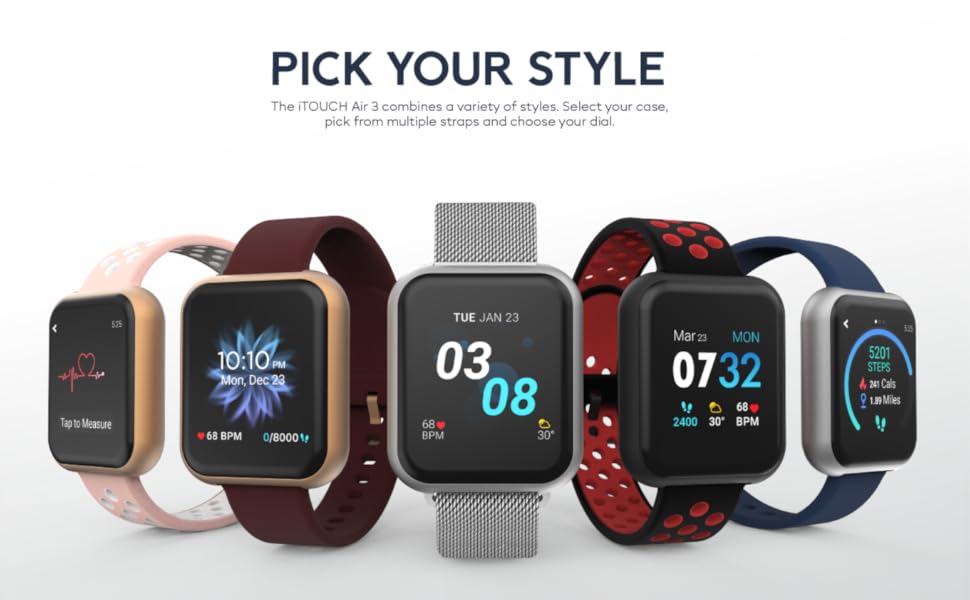
รูปภาพ: ภาพประกอบแสดงasing different styles and customizable options for the iTouch Air 3 Smartwatch.
การแจ้งเตือน
Receive notifications for calls, text messages, and social media alerts directly on your wrist. Configure notification settings within the iTouch Wearables app.

Image: Two iTouch Air 3 smartwatches showing incoming notifications from social media and messages.

Image: An illustration highlighting notifications and extended battery life features of the iTouch Air 3 Smartwatch.
Hygiene Reminders
Set reminders to wash your hands or move around if you've been sedentary for too long, promoting better health habits.
เชื่อมต่อ GPS
Utilize the connected GPS feature to track your routes and distance during outdoor activities by syncing with your phone's GPS.
Sports and Workout Modes
The iTouch Air 3 offers various sports and workout modes to accurately track your activity. Select the appropriate mode for your exercise to monitor calories burned, heart rate, and duration.
- โหมดกีฬา: Basketball, Baseball, Football, Soccer
- โหมดการออกกำลังกาย: Running, Elliptical, Cycling, Hiking
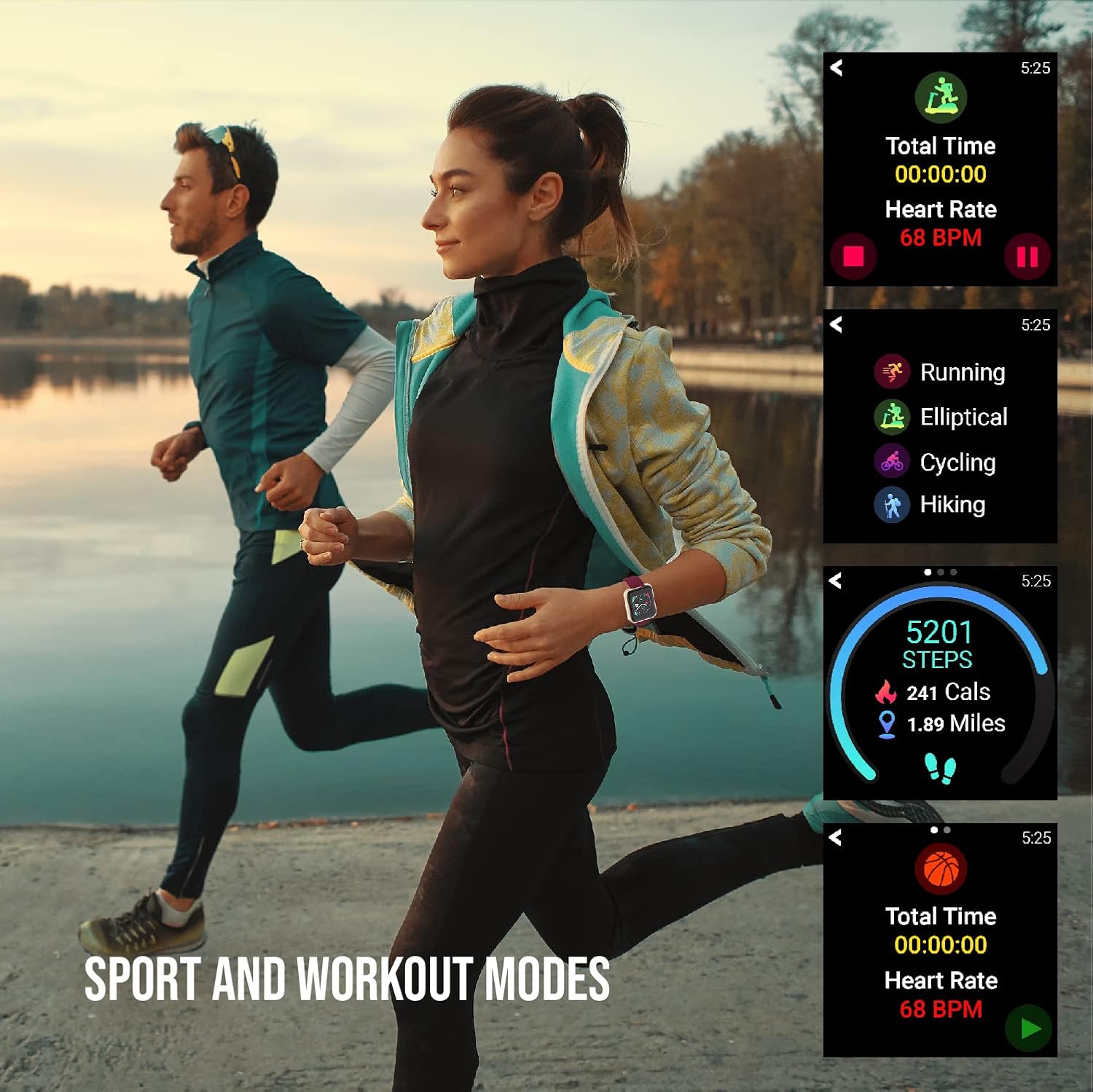
Image: Individuals engaged in physical activity, with the smartwatch interface showing various sport and workout tracking options.

Image: An illustration demonstrating the activity tracking features of the iTouch Air 3 Smartwatch, including steps, calories, and workout modes.
การตรวจวัดอัตราการเต้นของหัวใจ
The iTouch Air 3 features a 24/7 optical heart rate monitor. It automatically tracks your heart rate throughout the day. You can also manually measure your heart rate from the watch interface.

Image: The iTouch Air 3 Smartwatch showing continuous heart rate tracking and historical data.
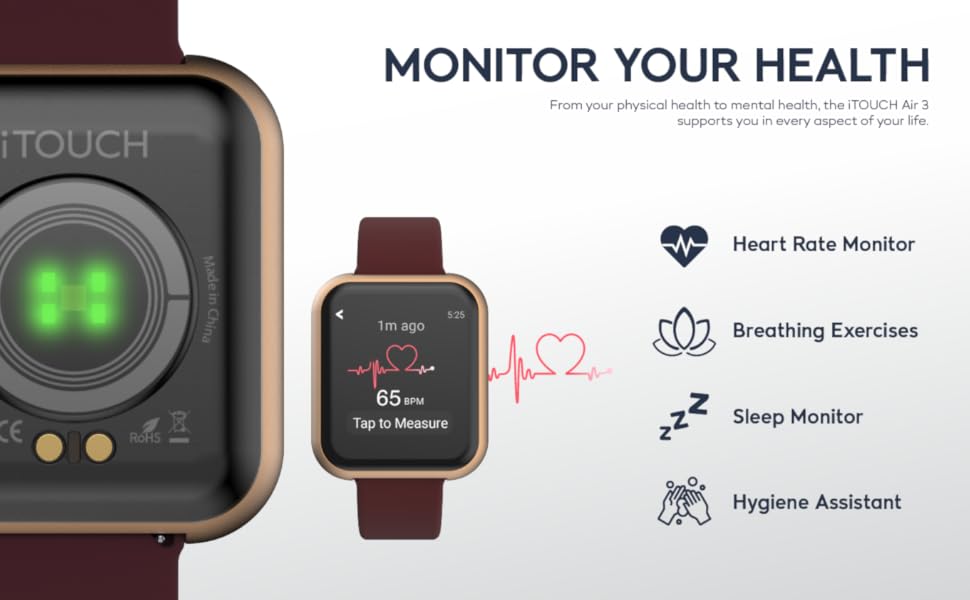
Image: An illustration detailing the health monitoring features of the iTouch Air 3 Smartwatch, including heart rate, breathing exercises, sleep, and hygiene assistance.
การตรวจสอบการนอนหลับ
The smartwatch automatically tracks your sleep patterns, providing insights into your light, deep, and awake sleep stagใช่ View detailed sleep data in the iTouch Wearables app.
การควบคุมเพลง
Control your phone's music playback directly from your smartwatch, allowing you to play, pause, skip tracks, and adjust volume without taking your phone out of your pocket.
รีโมทกล้อง
Use your iTouch Air 3 as a remote shutter button for your smartphone camera, making it easier to take photos from a distance.
การซ่อมบำรุง
ความต้านทานต่อน้ำ
The iTouch Air 3 is IP68-rated water resistant, meaning it can withstand immersion in water up to 1.5 meters for up to 30 minutes. It is suitable for daily use and light water exposure, but not recommended for swimming or diving.
การทำความสะอาด
ในการทำความสะอาดสมาร์ทวอทช์ ให้เช็ดด้วยผ้าเนื้อนุ่มและแห้งamp cloth. Avoid using harsh chemicals or abrasive materials. Ensure the charging pins are clean and dry before charging.
อายุการใช้งานแบตเตอรี่
The iTouch Air 3 offers up to 7 days of battery life on a single charge, depending on usage. To maximize battery life, reduce screen brightness and limit frequent notifications.

Image: A close-up of the iTouch Air 3 Smartwatch emphasizing its scratch-resistant glass, water resistance, and long battery life.
การแก้ไขปัญหา
If you encounter issues with your iTouch Air 3 Smartwatch, try the following steps:
- อุปกรณ์ไม่เปิด: ตรวจสอบให้แน่ใจว่าอุปกรณ์ชาร์จเต็มแล้ว เสียบสายชาร์จและแหล่งจ่ายไฟอย่างน้อย 30 นาที
- Not Pairing with Phone:
- ตรวจสอบให้แน่ใจว่าเปิดใช้งาน Bluetooth บนโทรศัพท์ของคุณแล้ว
- Make sure the iTouch Wearables app is open and running.
- รีสตาร์ททั้งโทรศัพท์และสมาร์ทวอทช์ของคุณ
- ตรวจสอบว่าระบบปฏิบัติการของโทรศัพท์ของคุณตรงตามข้อกำหนดขั้นต่ำหรือไม่ (iOS 13 ขึ้นไป หรือ Android 9 ขึ้นไป)
- Inaccurate Readings (Steps, Heart Rate):
- ตรวจสอบให้แน่ใจว่านาฬิกากระชับพอดีกับข้อมือของคุณ โดยอยู่เหนือกระดูกข้อมือประมาณหนึ่งนิ้ว
- ทำความสะอาดเซ็นเซอร์แสงที่ด้านหลังของนาฬิกา
- Sync the watch with the app regularly to ensure data transfer.
- การแจ้งเตือนไม่ปรากฏ:
- Check notification settings within the iTouch Wearables app.
- Ensure your phone's notification settings allow the iTouch Wearables app to send alerts.
- ตรวจสอบให้แน่ใจว่านาฬิกาเชื่อมต่อกับโทรศัพท์ของคุณผ่านบลูทูธแล้ว
ข้อมูลจำเพาะ
| คุณสมบัติ | รายละเอียด |
|---|---|
| ขนาดสินค้า | 4.8 x 2 x 3.23 นิ้ว |
| น้ำหนักสินค้า | 6.4 ออนซ์ |
| หมายเลขรุ่นสินค้า | แอร์ 3 |
| แบตเตอรี่ | ต้องใช้แบตเตอรี่ลิเธียมไอออน 1 ก้อน (รวมอยู่ด้วย) |
| ขนาดการแสดงผลหน้าจอยืน | 40 มิลลิเมตร |
| ระบบปฏิบัติการ | Android (Compatible with iOS 13+ and Android 9+) |
| คุณสมบัติพิเศษ | Calorie Tracker, GPS, Heart Rate Monitor, Pedometer, Sleep Monitor, Time Display |
| เทคโนโลยีการเชื่อมต่อ | บลูทูธ |
| รูปร่าง | สี่เหลี่ยม |
| ผู้ผลิต | ฉันสัมผัส |
| วันที่พร้อมใช้งานครั้งแรก | 5 พฤศจิกายน 2020 |
การรับประกันและการสนับสนุน
For warranty information and customer support, please refer to the documentation included in your product packaging or visit the official iTouch Wearables webไซต์ เก็บหลักฐานการซื้อของคุณไว้เพื่อใช้ในกรณีเรียกร้องการรับประกัน
คุณยังสามารถเยี่ยมชม iTouch Store on Amazon สำหรับข้อมูลเพิ่มเติมและการอัพเดตผลิตภัณฑ์


