การแนะนำ
Thank you for choosing the Syantek Wireless Remote Control Outlet Kit. This kit provides a convenient solution for controlling household appliances and lighting with ease. Designed for simplicity and expandability, it allows you to manage multiple devices from a distance, enhancing comfort and energy efficiency in your home. This manual will guide you through the setup, operation, and maintenance of your new remote control outlets.

Image: The Syantek Wireless Remote Control Outlet Kit, featuring five compact white plug-in outlets and two matching remote controls, ready for use.
เนื้อหาแพ็คเกจ
- 5 x Syantek Wireless Remote Control Outlets
- 2 x Syantek Remote Controls (with pre-installed 12V/23A batteries)
- 1 x คู่มือผู้ใช้ (เอกสารนี้)
คุณสมบัติผลิตภัณฑ์
- Programmable & Expandable: Easily activate multiple devices with one button or control one device with multiple remotes. Sync remote outlets together regardless of frequency differences.
- การออกแบบที่กะทัดรัด: Each remote control outlet occupies only one wall socket, being smaller than most indoor wireless outlets.
- High Quality & Strong Signal: ETL and FCC approved for safety and quality assurance. The strong RF signal operates through doors and walls up to 100 feet without interfering with other electronics.
- Convenient & Energy Saving: Turn off lights and appliances from anywhere in your home. Helps eliminate standby power and reduce energy consumption. Outlets remain off after a power interruption.
- เป็นมิตรกับผู้ใช้: Ideal for individuals with limited mobility, offering instant control over various devices with a simple button press.

Image: Visual representation of the product's programmable and expandable features, highlighting benefits like space-saving, customized control, 100-foot remote range, and energy efficiency.
คำแนะนำการตั้งค่า
- แกะ: นำส่วนประกอบทั้งหมดออกจากบรรจุภัณฑ์อย่างระมัดระวัง
- Insert Batteries (Remotes): The remote controls come with pre-installed 12V/23A batteries. If replacement is needed, refer to the Maintenance section.
- เสียบปลั๊กเข้ากับเต้ารับ: Plug each Syantek wireless receiver outlet into a standard 3-prong wall socket. Ensure the outlet is securely seated. The compact design allows for use in the top or bottom socket without blocking the other.
- เชื่อมต่อเครื่องใช้ไฟฟ้า: Plug your desired appliance or light into the Syantek receiver outlet.
- การทดสอบเบื้องต้น: The outlets are typically pre-programmed to the remotes. Press the 'ON' or 'OFF' button corresponding to the outlet number (1-5) on your remote to test functionality.
If an outlet does not respond, proceed to the 'Programming/Pairing' section.
คำแนะนำการใช้งาน
The Syantek Wireless Remote Control Outlet Kit offers straightforward operation for your connected devices.
- การเปิด/ปิด: Each remote control features numbered 'ON' and 'OFF' buttons (1-5). Press the 'ON' button corresponding to the desired outlet to turn on the connected device. Press the 'OFF' button to turn it off.
- พิสัย: The strong RF signal allows control from up to 100 feet away, even through walls and doors.
- พลัง Outage หน่วยความจำ: In the event of a power interruption, the outlets are designed to remain in their 'OFF' state when power is restored, preventing unexpected activation and saving energy.
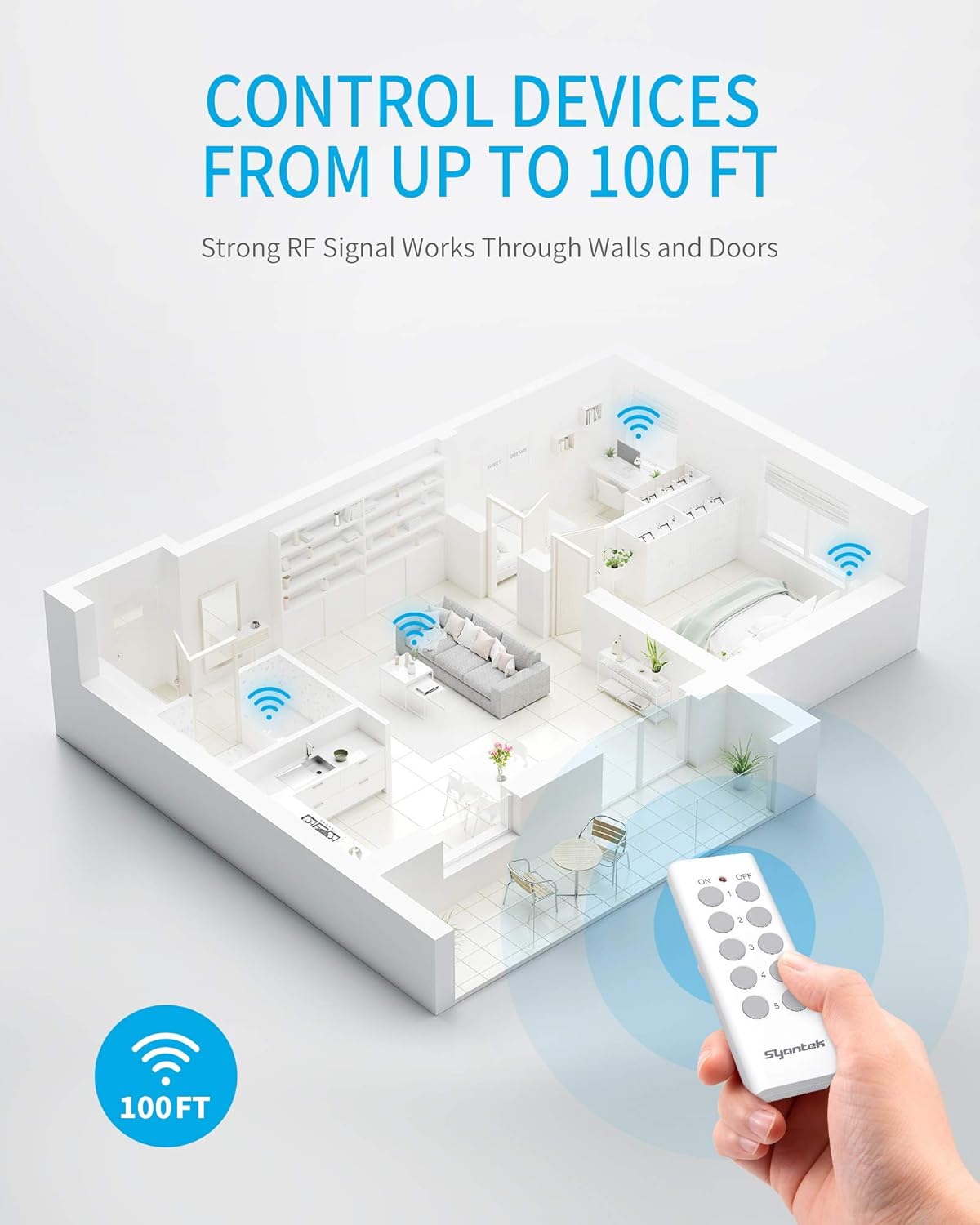
Image: An illustration demonstrating the 100-foot wireless control range of the Syantek remote, showing signals passing through walls to control devices in different rooms.
วิดีโอสาธิต
Video: A short demonstration showing the Syantek remote control being used to turn a Christmas tree's lights on and off, highlighting the ease of use and convenience.
Programming / Pairing Instructions
Your Syantek outlets and remotes are typically pre-programmed. However, if you need to re-program or pair additional remotes/outlets, follow these steps:
- Clear Existing Pairing (Optional): To clear an existing pairing, press and hold the 'Program Button' on the side of the receiver outlet for approximately 5 seconds until the indicator light flashes rapidly. Release the button.
- เข้าสู่โหมดจับคู่: Plug the receiver outlet into a wall socket. Press and hold the 'Program Button' on the side of the receiver outlet for about 3 seconds until the indicator light begins to flash slowly.
- จับคู่กับรีโมต: While the indicator light is flashing slowly, press the desired 'ON' or 'OFF' button (e.g., '1 ON' or '1 OFF') on the remote control. The indicator light on the receiver outlet will stop flashing and remain solid for a moment, then turn off, indicating successful pairing.
- ทดสอบ: Test the newly paired outlet by pressing its corresponding 'ON' and 'OFF' buttons on the remote.
You can pair multiple remotes to one outlet or one remote to multiple outlets, offering flexible control options.

Image: A visual guide to the programmable and expandable nature of the system, showing how a single remote can manage multiple outlets and how a single outlet can be controlled by multiple remotes.
ข้อมูลด้านความปลอดภัย
- สำหรับใช้ภายในอาคารเท่านั้น
- Do not exceed the maximum load rating of the device. Refer to specifications.
- ตรวจสอบให้แน่ใจว่ามีการต่อลงดินอย่างเหมาะสม
- ห้ามแช่น้ำหรือสัมผัสกับความชื้นมากเกินไป
- เก็บให้พ้นจากมือเด็ก
- ห้ามถอดแยกชิ้นส่วนหรือพยายามซ่อมแซมอุปกรณ์
การซ่อมบำรุง
- การทำความสะอาด: Wipe the outlets and remotes with a dry, soft cloth. Do not use liquid cleaners or solvents.
- การเปลี่ยนแบตเตอรี่ระยะไกล: The remote controls use 12V/23A batteries. If the remote's indicator light does not illuminate or the range decreases significantly, it may be time to replace the battery. To replace, open the battery compartment on the back of the remote, remove the old battery, and insert a new 12V/23A battery, ensuring correct polarity.
- พื้นที่จัดเก็บ: When not in use for extended periods, store the kit in a cool, dry place away from direct sunlight.
การแก้ไขปัญหา
| ปัญหา | สาเหตุที่เป็นไปได้ | สารละลาย |
|---|---|---|
| ปลั๊กไฟไม่ตอบสนองต่อรีโมท | Low remote battery, out of range, or pairing issue. | Replace remote battery. Ensure outlet is within 100 ft range. Re-program/pair the outlet and remote (refer to 'Programming/Pairing Instructions'). |
| Indicator light on remote does not light up. | แบตเตอรี่ระยะไกลหมดหรือติดตั้งไม่ถูกต้อง | Replace the 12V/23A battery, ensuring correct polarity. |
| Connected appliance does not turn on. | Appliance is not plugged in correctly, appliance switch is off, or outlet is not receiving power. | Ensure appliance is securely plugged into the wireless outlet. Check if the appliance's own power switch is in the 'ON' position. Verify the wall socket has power. |
| การรบกวนอุปกรณ์อื่น ๆ | Rare, but possible with other RF devices. | Move the outlet or the interfering device to a different location. The system is designed to minimize interference. |
ข้อมูลจำเพาะ
| คุณลักษณะ | รายละเอียด |
|---|---|
| หมายเลขรุ่น | BH9907U-5-2 |
| ขนาดสินค้า | 3.11 x 2.44 x 1.34 inches (per outlet) |
| น้ำหนัก | 1.26 ปอนด์ (น้ำหนักรวม) |
| เล่มที่tage | กระแสสลับ 120 โวลต์ |
| วัสดุ | โพลีคาร์บอเนต (พีซี) |
| ประเภทขั้วต่อ | ไร้สาย |
| ประเภทแบตเตอรี่ระยะไกล | 12V/23A |
| การรับรอง | FCC Certified, ETL Listed |

ภาพ: รายละเอียด view of the compact design, showing the dimensions of both the remote control and the plug-in outlet, along with labels for the program indicator, program button, and 3-prong plug.
การรับประกันและการสนับสนุน
For specific warranty information and details regarding product support, please refer to the official Syantek website or contact their customer service directly. Typically, warranty information is provided with your purchase documentation or available online.
หากคุณพบปัญหาใดๆ ที่ไม่ได้กล่าวถึงในคู่มือนี้ หรือต้องการความช่วยเหลือเพิ่มเติม โปรดไปที่ [ที่อยู่เว็บไซต์/หน้าติดต่อฝ่ายบริการลูกค้า/ฝ่ายบริการ] Syantek Store on Amazon หรือเจ้าหน้าที่ของผู้ผลิต webไซต์สำหรับข้อมูลติดต่อและแหล่งข้อมูลเพิ่มเติม


