1. บทนำ
This manual provides detailed instructions for the installation, operation, and maintenance of the SINOTIMER TM919A-2 LCD Digital Programmable Timer Switch. This device is designed for automatic control of electrical appliances based on programmed time schedules, offering daily and weekly programming options.
2. คุณสมบัติของผลิตภัณฑ์
- Weekly 7-day programmable digital time switch.
- หลายเล่มtage options (5V, 12V, 24V, 110V, 220V, 85-265V). This specific model is 220V.
- Detachable battery design for backup power.
- 35mm DIN rail mounting for easy installation.
- LCD display for clear time and program viewการไอเอ็นจี
- 16 ON/OFF programs per day or week.
- ฟังก์ชันควบคุมด้วยตนเอง
- High capacity 16A switching contact.
3. ข้อมูลด้านความปลอดภัย
WARNING: Risk of electric shock. Installation should only be performed by a qualified electrician or competent person.
- ตรวจสอบให้แน่ใจว่าได้ตัดกระแสไฟฟ้าออกก่อนการติดตั้งหรือการบำรุงรักษา
- Do not exceed the maximum load capacity of 16A.
- ตรวจสอบเล่มที่ถูกต้องtage supply for the specific model (220V for TM919A-2).
- ควรเก็บอุปกรณ์ให้ห่างจากความชื้นและอุณหภูมิที่สูงหรือต่ำเกินไป
4. สินค้าหมดview และส่วนประกอบ
The SINOTIMER TM919A-2 features an LCD display, control buttons, and wiring terminals for power input and load control.

รูปที่ 4.1: ด้านหน้า view of the SINOTIMER TM919A-2 Digital Timer Switch, showing the LCD display, control buttons (P, D+, H+, M+, RESET, MANUAL), and wiring terminals.

รูปที่ 4.2: The timer switch with its transparent protective cover opened, revealing the control buttons for programming and manual operation.
ปุ่มควบคุม:
- พี (โปรแกรม): เข้าสู่โหมดการตั้งค่าโปรแกรม
- ดี+ (กลางวัน): Adjusts day of the week or program day.
- H+ (ชั่วโมง): Adjusts hour or program hour.
- M+ (นาที): Adjusts minute or program minute.
- รีเซ็ต: รีเซ็ตการตั้งค่าทั้งหมดเป็นค่าเริ่มต้นจากโรงงาน
- คู่มือ: Toggles output ON/AUTO/OFF.
5. การตั้งค่าและการติดตั้ง
5.1 แผนผังการเดินสายไฟ
Refer to the wiring diagram on the side of the device and the illustration below for correct connection. Ensure all connections are secure.

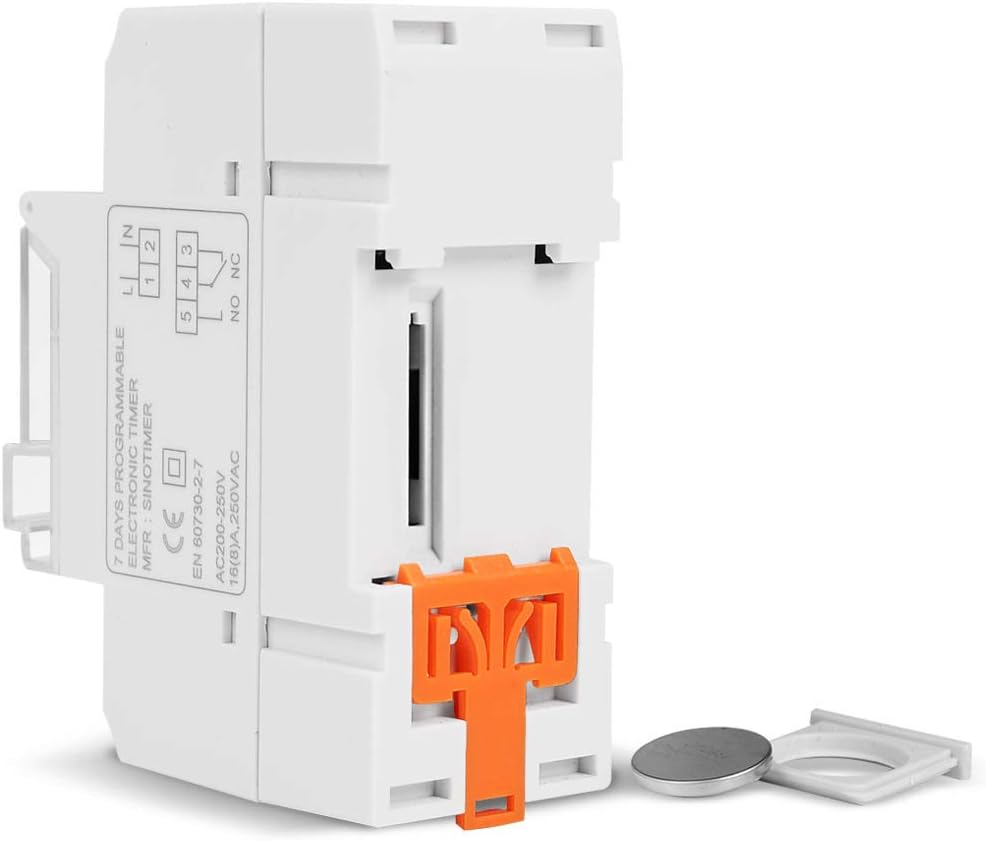
รูปที่ 5.1: ด้านข้าง view of the timer switch displaying the wiring diagram. Terminals 1 and 2 are for power input (L and N). Terminals 3, 4, and 5 are for the relay output (Common, Normally Open, Normally Closed).
- Terminals 1 & 2 (L, N): Connect to the main power supply (220V AC for this model).
- Terminal 3 (NO - Normally Open): Connects to the load when the timer is ON.
- เทอร์มินัล 4 (COM - Common): Connects to one side of the load and the power supply.
- Terminal 5 (NC - Normally Closed): Connects to the load when the timer is OFF (less common for typical applications).
5.2 Initial Power-up and Reset
Upon first power-up or after a long period without power, the LCD display may be blank. The internal battery provides backup for settings. If the display is unresponsive or shows garbled characters, press the รีเซ็ต button using a pointed object (e.g., a pen tip). This will clear all settings and restore the timer to its default state.
5.3 การตั้งเวลาและวันปัจจุบัน
- กดปุ่ม P button once. The display will show the current time setting.
- กด D+ เพื่อตั้งค่าวันปัจจุบันของสัปดาห์
- กด H+ เพื่อตั้งชั่วโมงปัจจุบัน
- กด M+ เพื่อตั้งนาทีปัจจุบัน
- กดปุ่ม P button again to exit time setting mode and return to normal operation.
6. คู่มือการใช้งาน
6.1 การตั้งโปรแกรมรอบการเปิด/ปิด
ตัวตั้งเวลาสามารถตั้งโปรแกรมเปิด/ปิดได้สูงสุด 16 โปรแกรม แต่ละโปรแกรมประกอบด้วยเวลาเปิดและเวลาปิด
- กดปุ่ม P button repeatedly until "1 ON" appears on the display. This is the first ON program.
- กด D+ to select the day(s) for this program. Options include individual days, weekdays, weekends, or all 7 days.
- กด H+ to set the desired hour for the "ON" event.
- กด M+ to set the desired minute for the "ON" event.
- กด P again. "1 OFF" will appear. This is the first OFF program.
- Repeat steps 2-4 to set the day(s), hour, and minute for the "OFF" event.
- กดต่อไป P to cycle through "2 ON", "2 OFF", up to "16 ON", "16 OFF". If you do not need all 16 programs, simply press P until the display returns to the current time.
- To save and exit programming mode, press the P button until the current time is displayed.
6.2 การแทนที่ด้วยตนเอง
การ คู่มือ ปุ่มนี้ช่วยให้คุณสามารถเปลี่ยนแปลงการตั้งค่าที่ตั้งโปรแกรมไว้ได้ชั่วคราวหรือถาวร
- กด คู่มือ once: Toggles between ON/AUTO/OFF modes.
- บน: The output is continuously ON, ignoring programs.
- ปิด: The output is continuously OFF, ignoring programs.
- อัตโนมัติ: ตัวตั้งเวลาจะทำงานตามรอบการเปิด/ปิดที่ตั้งโปรแกรมไว้ นี่คือโหมดการทำงานมาตรฐาน
7. การบำรุงรักษา
7.1 การเปลี่ยนแบตเตอรี่
The timer includes a detachable CR2032 lithium battery to maintain time and program settings during power outages. If the display becomes dim or resets frequently, the battery may need replacement.

รูปที่ 7.1: The timer switch shown with its battery compartment open and a CR2032 lithium battery, indicating the detachable battery design.
- Disconnect power to the timer before attempting battery replacement.
- หาช่องใส่แบตเตอรี่ ซึ่งโดยทั่วไปจะอยู่ด้านข้างหรือด้านหลังของตัวเครื่อง
- ถอดแบตเตอรี่ CR2032 เก่าออกอย่างระมัดระวัง
- ใส่แบตเตอรี่ CR2032 ใหม่ โดยตรวจสอบให้แน่ใจว่าขั้วถูกต้อง (ด้าน + ขึ้นด้านบน)
- ปิดช่องใส่แบตเตอรี่
- Reconnect power and reset the current time and day if necessary.
8 การแก้ไขปัญหา
- จอแสดงผลว่างเปล่า:
- Check power supply connections (Terminals 1 & 2).
- Ensure the internal battery is charged or replaced if old.
- กดปุ่ม รีเซ็ต ปุ่ม.
- โปรแกรมไม่ทำงาน:
- ตรวจสอบให้แน่ใจว่าตัวจับเวลาเปิดใช้งานอยู่ ออโต้ mode (check the display for "AUTO"). Press คู่มือ สู่โหมดวงจร
- ตรวจสอบว่าเวลาและวันปัจจุบันตั้งค่าถูกต้องแล้ว
- Check that the ON/OFF programs are correctly entered and enabled for the desired days.
- Confirm wiring to the load (Terminals 3, 4, 5) is correct.
- Timer resets unexpectedly:
- The internal battery may be low or depleted. Replace the CR2032 battery.
- Ensure stable power supply to the unit.
9. ข้อมูลจำเพาะ
| คุณสมบัติ | ข้อมูลจำเพาะ |
|---|---|
| แบบอย่าง | TM919A-2 |
| แหล่งจ่ายไฟ | 220V AC (as per model) |
| การใช้พลังงาน | 4.5 VA (สูงสุด) |
| ช่วงอุณหภูมิ | -20°C ถึง +50°C |
| แสดง | จอแอลซีดี |
| หน้าสัมผัสสวิตช์ | สวิตซ์เปลี่ยนตำแหน่ง 1 ตัว |
| โปรแกรม | 16 ON/OFF per day or week |
| ฮิสเทอรีซิส | 2 วินาทีต่อวัน (ที่อุณหภูมิ 25°C) |
| ความจุ | 16เอ |
| ช่วงเวลาการจับเวลา | 1 นาทีถึง 168 ชั่วโมง |
| ระยะเวลาขั้นต่ำ | 1 นาที |
| ความทรงจำที่มืดบอด | 60 days (with internal battery) |
| น้ำหนักสินค้า | 0.15 กก. (5.3 ออนซ์) |
| การติดตั้ง | ราง DIN 35 มม |
| ขนาดหน้าจอ | 1.2 นิ้ว |
รูปที่ 9.1: Dimensional drawing of the SINOTIMER TM919A-2, showing measurements in centimeters for height, width, and depth.
10. การรับประกันและการสนับสนุน
Specific warranty information for the SINOTIMER TM919A-2 is not provided in the product details. For warranty claims or technical support, please contact your retailer or the manufacturer directly. Keep your purchase receipt as proof of purchase.


