1. บทนำ
This manual provides detailed instructions for the SoundPEATS Q True Wireless Earbuds. Please read thoroughly to ensure proper use and optimal performance of your device.

Figure 1.1: SoundPEATS Q True Wireless Earbuds and Charging Case.
วิดีโอ 1.1: ผลิตภัณฑ์อย่างเป็นทางการเสร็จสิ้นview of SoundPEATS Q wireless earbuds.
2. อะไรอยู่ในกล่อง
- SoundPEATS Q True Wireless Earbuds
- เคสชาร์จไฟ
- สายชาร์จ USB-C
- คู่มือการใช้งาน
- จุกหูฟัง (ขนาด S/M/L)

Figure 2.1: Included components with the SoundPEATS Q Earbuds.
3. สินค้าหมดview
3.1 ส่วนประกอบของเอียร์บัด
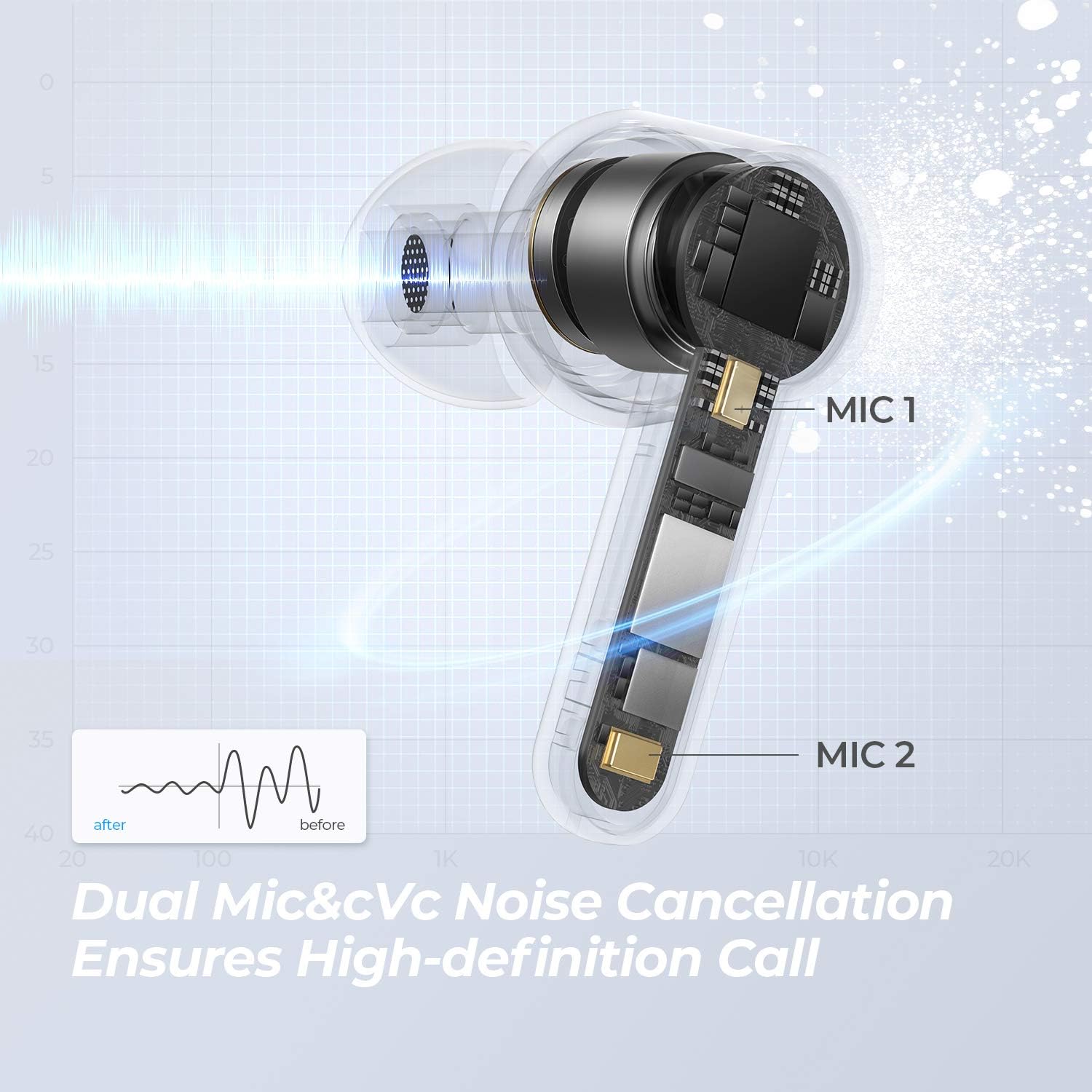
Figure 3.1: Internal structure of the SoundPEATS Q earbud, featuring a 10mm driver and dual microphones for clear audio and calls.
3.2 กล่องชาร์จ

Figure 3.2: Earbuds in their charging case, ready for connection.
4. การตั้งค่า
4.1 การจับคู่เริ่มต้น
- Open the charging case lid. Both earbuds will automatically enter TWS pairing mode. The LED on the main earbud will flash white and red, while the second earbud's LED will remain white.
- เปิดใช้งานบลูทูธบนอุปกรณ์ของคุณ (เช่น สมาร์ทโฟน แท็บเล็ต)
- Select "SOUNDPEATS Q" from the Bluetooth device list to connect.
Figure 4.1: Earbuds in pairing mode, ready to connect to a device via Bluetooth.
Video 4.1: Visual guide on how to pair the SoundPEATS Q earbuds with your device.
5. คู่มือการใช้งาน
5.1 ระบบควบคุมแบบสัมผัส
The SoundPEATS Q earbuds feature sensitive touch controls for convenient operation:
- เล่น/หยุดเพลง: Double tap the Multifunction Button on either earbud.
- Answer/Hang Up Phone Call: Double tap the Multifunction Button on either earbud.
- ลดระดับเสียง: Single tap the left Multifunction Button.
- เพิ่มปริมาณ: Single tap the right Multifunction Button.
- แทร็กก่อนหน้า: Long press the left Multifunction Button for 1.5 seconds.
- เพลงถัดไป: Long press the right Multifunction Button for 1.5 seconds.
- เปิดใช้งาน Voice Assistant: Triple tap the Multifunction Button on either earbud.

Figure 5.1: Touch control area on the earbud.
Video 5.1: Demonstrating touch controls for music playback, calls, and voice assistant.
5.2 โหมดเดี่ยว/คู่
The earbuds support both single and twin modes, allowing you to use either earbud independently or both together for a stereo experience. The latest Bluetooth 5.0 transmission and MC-Sync TrueWireless Mirroring technology ensure a stable connection.
6. การชาร์จไฟ
6.1 การชาร์จเคส
The charging case can be charged via USB-C cable or wirelessly:
- การชาร์จ USB-C: เชื่อมต่อสาย USB-C ที่ให้มากับพอร์ตชาร์จบนเคส
- การชาร์จแบบไร้สาย: Place the charging case on a compatible Qi wireless charging pad.
The LED indicator on the charging case will flash slowly while charging and will stay on white when fully charged.

Figure 6.1: Wireless charging of the SoundPEATS Q case.

Figure 6.2: USB-C charging port and total playtime indication.
6.2 Earbud Battery Life
A single charge provides approximately 7 hours of music playback. The charging case offers an additional two recharges, extending the total listening time to 21 hours.
Video 6.1: Visual guide on how to charge the SoundPEATS Q earbuds and case.
7. การบำรุงรักษา
7.1 ความต้านทานต่อน้ำ
The SoundPEATS Q earbuds are IPX5 water-resistant, meaning they can withstand splashes of water and sweat. They are suitable for workouts and outdoor activities but should not be submerged in water.
8 การแก้ไขปัญหา
8.1 รีเซ็ตเป็นค่าโรงงาน
If you experience pairing issues or other malfunctions, you can perform a factory reset:
- ใส่หูฟังเอียร์บัดทั้งสองกลับเข้าไปในกล่องชาร์จ
- Ensure the case lid is open and the earbuds are in the charging state.
- Clear the pairing record for "SOUNDPEATS Q" from your device's Bluetooth list.
- Long press the button inside the charging case for 10 seconds until the LED light of the charging case flashes white twice, indicating a successful reset.
Video 8.1: Visual guide on how to perform a factory reset for the SoundPEATS Q earbuds.
9. ข้อมูลจำเพาะ
| คุณสมบัติ | ข้อมูลจำเพาะ |
|---|---|
| ชื่อรุ่น | SoundPEATS Q |
| เวอร์ชันบลูทูธ | 5.2 |
| ขนาดไดร์เวอร์เสียง | 10มม. |
| ไมโครโฟน | 4-Mic (Dual Mic for each earbud) |
| เวลาเล่นทั้งหมด | สูงสุด 21 ชั่วโมง (พร้อมเคสชาร์จ) |
| เวลาเล่นหูฟัง | สูงสุด 7 ชั่วโมง (ชาร์จครั้งเดียว) |
| ประเภทการชาร์จ | USB-C, การชาร์จแบบไร้สาย |
| ความต้านทานต่อน้ำ | IPX5 |
| ประเภทการควบคุม | การควบคุมแบบสัมผัส |
| Single/Twin Mode | รองรับ |
| ขนาดสินค้า | 2.07 x 2.07 x 0.85 นิ้ว |
| น้ำหนักสินค้า | 1.6 ออนซ์ |
10. การรับประกันและการสนับสนุน
สำหรับข้อมูลการรับประกัน การสนับสนุนทางเทคนิค หรือความช่วยเหลือเพิ่มเติม โปรดดูที่เว็บไซต์อย่างเป็นทางการของ SoundPEATS webหรือติดต่อฝ่ายบริการลูกค้าโดยตรง รายละเอียดโดยทั่วไปจะอยู่ในคู่มือผู้ใช้ที่แนบมาหรือบนบรรจุภัณฑ์ของผลิตภัณฑ์


