1. บทนำ
This manual provides detailed instructions for the installation, operation, and maintenance of your Overmax Camspot 3.7 Full HD Wireless Indoor Camera. Please read this manual thoroughly before using the product to ensure proper function and safety. Keep this manual for future reference.
2. เนื้อหาบรรจุภัณฑ์
ตรวจสอบว่ามีส่วนประกอบทั้งหมดอยู่ในแพ็คเกจ:
- Overmax Camspot 3.7 Wireless Indoor Camera
- Power Cable with Adapter
- Mounting Kit (screws, wall plugs, bracket)
- คู่มือการใช้งาน (เอกสารนี้)
3. สินค้าหมดview
ทำความคุ้นเคยกับส่วนประกอบและอินเทอร์เฟซของกล้องให้ดี
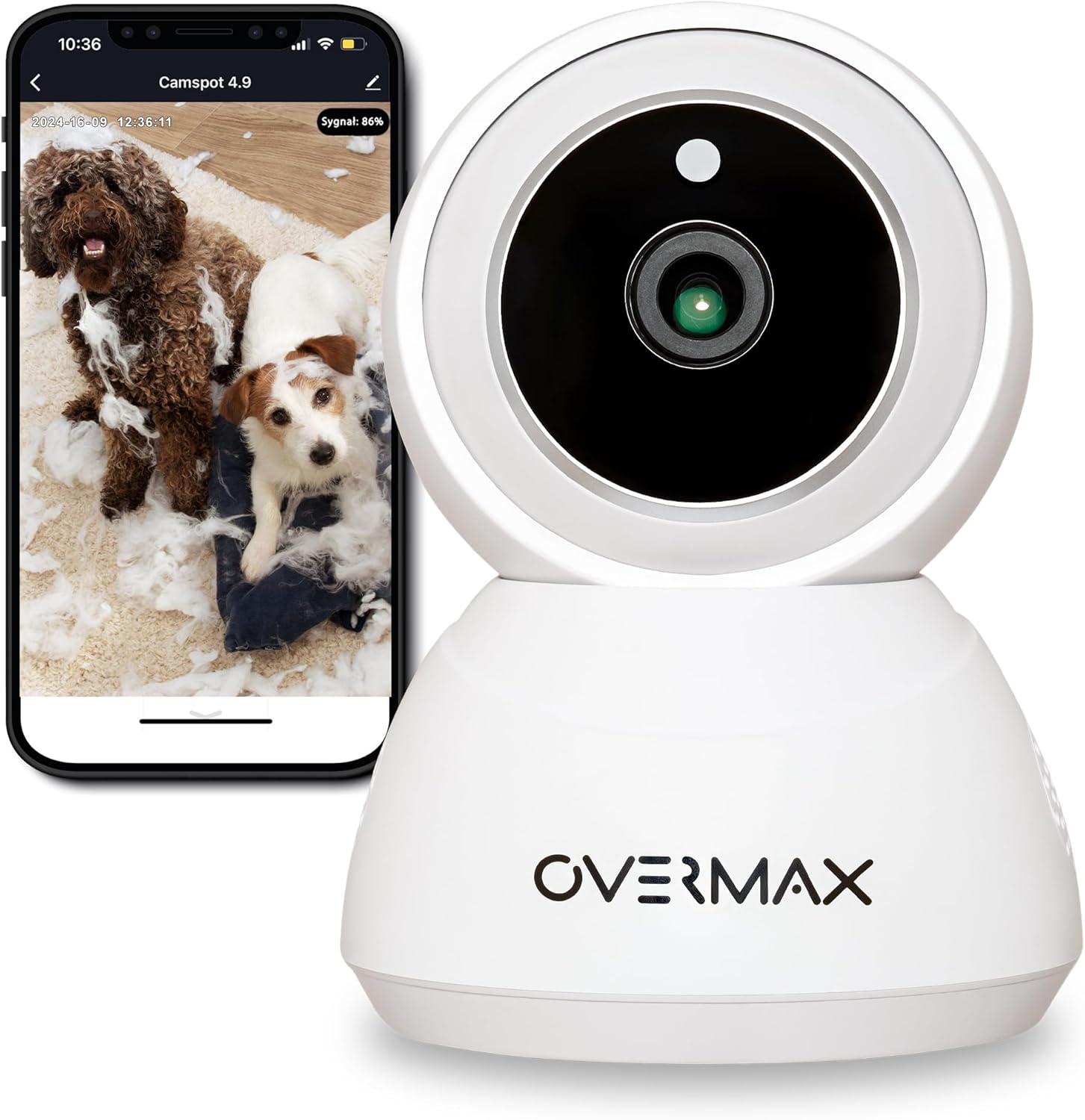
รูปที่ 3.1 : ด้านหน้า view of the Overmax Camspot 3.7 camera with a smartphone showing the live video feed.

รูปที่ 3.2: ด้านข้าง view of the Overmax Camspot 3.7 camera, showing its dome shape and speaker grille.

รูปที่ 3.3: ด้านหลัง view of the camera, highlighting the LAN port, Reset button, and DC 5V power input.

รูปที่ 3.4: View of the camera with the microSD card slot visible, located beneath the lens assembly.
4. การตั้งค่า
4.1 การติดตั้งทางกายภาพ
The Camspot 3.7 can be placed on a flat surface or mounted to a wall or ceiling.
- เลือกตำแหน่ง: เลือกตำแหน่งที่ให้ผลลัพธ์ที่ต้องการ viewing angle and is within range of your Wi-Fi network or an Ethernet connection.
- การติดตั้ง (ทางเลือก):
- Attach the mounting bracket to the desired surface using the provided screws and wall plugs.
- Secure the camera to the mounting bracket. Ensure it is firmly attached.

Figure 4.1: The Overmax Camspot 3.7 camera shown mounted on a wall bracket, illustrating a typical installation.
4.2 การติดตั้งแอปและการสร้างบัญชี
The Overmax Control app is required to operate the camera.
- ดาวน์โหลดแอป: ค้นหา "Overmax Control" in your smartphone's app store (iOS or Android) and download it.
- สร้างบัญชี: เปิดแอปพลิเคชันและทำตามคำแนะนำบนหน้าจอเพื่อสร้างบัญชีผู้ใช้ใหม่

Figure 4.2: The Overmax Camspot 3.7 camera alongside a smartphone displaying the 'CONTROL' app logo, indicating the required application for setup and operation.
4.3 การเปิดเครื่องและการเชื่อมต่อเครือข่าย
- เปิดเครื่อง: Connect the power cable to the camera's DC 5V port and plug the adapter into a power outlet. The camera will power on and initiate its startup sequence.
- การเชื่อมต่อเครือข่าย:
- ไวไฟ : ปฏิบัติตามคำแนะนำในแอปเพื่อเชื่อมต่อกล้องกับเครือข่าย Wi-Fi 2.4GHz ของคุณ
- อีเธอร์เน็ต (ตัวเลือกเสริม): Connect an Ethernet cable from your router to the camera's LAN port for a wired connection.
4.4 การจับคู่กล้อง
Once the camera is powered on and the app is installed, proceed with pairing:
- เพิ่มอุปกรณ์: In the Overmax Control app, tap the "Add Device" or "+" icon.
- เลือกประเภทกล้อง: Choose the appropriate camera model (Camspot 3.7).
- สแกนรหัส QR: The app will prompt you to scan a QR code. Position your smartphone's screen with the QR code approximately 15-20 cm in front of the camera lens. The camera will emit a sound upon successful scanning.
- ตั้งค่าให้เสร็จสมบูรณ์: Follow any remaining on-screen prompts in the app to finalize the pairing process.

Figure 4.3: The Overmax Camspot 3.7 camera positioned to scan a QR code displayed on a smartphone, a common method for device pairing.
5. คู่มือการใช้งาน
5.1 สด View
Access the live video feed from your camera through the Overmax Control app. This allows real-time monitoring of the camera's surroundings.
5.2 การควบคุมแพน/เอียง
The Camspot 3.7 features motorized pan and tilt capabilities.
- การหมุนในแนวนอน: 355 องศา
- การหมุนในแนวตั้ง: 120 องศา
Use the directional controls within the Overmax Control app to adjust the camera's viewมุมจากระยะไกล

Figure 5.1: Diagram illustrating the camera's extensive pan (355°) and tilt (120°) rotation range.
5.3 เสียงสองทาง
The camera is equipped with a microphone and speaker, enabling two-way communication. You can listen to the camera's environment and speak through the camera using the app.
5.4 การตรวจจับการเคลื่อนไหวและการติดตามอัตโนมัติ
The camera can detect moving objects and automatically track their movement within its field of view. Configure motion detection sensitivity and alerts in the app settings.
5.5 การมองเห็นตอนกลางคืน
The Camspot 3.7 features infrared technology for clear viewing in low-light or complete darkness, with a night vision range of up to 10 meters. The camera automatically switches to night mode when ambient light is insufficient.
5.6 การบันทึกและการเก็บรักษา
The camera supports two primary storage methods for video recordings:
- การ์ด MicroSD: Insert a microSD card (up to 128GB, not included) into the designated slot for local storage. This allows for continuous recording for up to 3 weeks.
- การเก็บข้อมูลบนคลาวด์: The camera supports real-time cloud storage for recordings. Refer to the app for subscription details and options.
5.7 การรวมระบบบ้านอัจฉริยะ
The Camspot 3.7 is compatible with Google Home and Amazon Alexa. Follow the instructions within the respective smart home apps to integrate your camera for voice control and automation.
5.8 Baby Monitor Function
Utilize the camera's features, including two-way audio and night vision, to monitor an infant. The app provides a comprehensive interface for this purpose.

Figure 5.2: The Overmax Camspot 3.7 camera shown with a smartphone displaying the app's control interface, including options for screenshot, speaking, recording, cloud storage, and direction control.
6. การบำรุงรักษา
- การทำความสะอาด: ใช้ผ้าแห้งเนื้อนุ่มเช็ดทำความสะอาดเลนส์และตัวกล้อง ห้ามใช้สารเคมีรุนแรงหรือน้ำยาทำความสะอาดที่มีฤทธิ์กัดกร่อน
- อัพเดตเฟิร์มแวร์: Regularly check the Overmax Control app for available firmware updates to ensure optimal performance and security.
- การจัดการพื้นที่เก็บข้อมูล: รีเป็นระยะๆview and manage recordings on your microSD card or cloud storage to free up space if needed.
7 การแก้ไขปัญหา
- กล้องไม่ได้เชื่อมต่อกับ Wi-Fi:
- โปรดตรวจสอบให้แน่ใจว่าเครือข่าย Wi-Fi ของคุณเป็น 2.4GHz กล้องไม่รองรับเครือข่าย 5GHz
- ตรวจสอบรหัสผ่าน Wi-Fi เพื่อความถูกต้อง
- ขยับกล้องให้ใกล้กับเราเตอร์มากขึ้น
- รีสตาร์ทกล้องและเราเตอร์ของคุณ
- ไม่มีสด View:
- Verify internet connection on your smartphone and the camera.
- Check if the camera is powered on and connected to the network.
- เริ่มต้นแอปใหม่อีกครั้ง
- การตรวจจับความเคลื่อนไหวไม่ทำงาน:
- โปรดตรวจสอบให้แน่ใจว่าได้เปิดใช้งานการตรวจจับการเคลื่อนไหวในการตั้งค่าแอปแล้ว
- ปรับการตั้งค่าความไว
- ตรวจสอบสิ่งกีดขวางในกล้อง view.
- การ์ด microSD ไม่สามารถบันทึกได้:
- โปรดตรวจสอบให้แน่ใจว่าได้เสียบการ์ด microSD อย่างถูกต้องแล้ว
- ฟอร์แมตการ์ด microSD ผ่านแอปพลิเคชัน
- Check if the card is full or corrupted.
- กล้องไม่ตอบสนอง:
- Press and hold the Reset button (located at the back) for approximately 5-10 seconds to factory reset the camera. You will need to re-pair it after a reset.
8. ข้อมูลจำเพาะ
| คุณสมบัติ | ข้อมูลจำเพาะ |
|---|---|
| ชื่อรุ่น | Overmax Camspot 3.7 |
| ความละเอียดวิดีโอ | ฟูลเอชดี (1080p) |
| เลนส์ | 3.6 มม. |
| เฟรมต่อวินาที (FPS) | 25-30 |
| การบีบอัดวิดีโอ | เอช.264 |
| การหมุนแนวนอน | 355° |
| การหมุนในแนวตั้ง | 120° |
| ช่วงการมองเห็นตอนกลางคืน | สูงสุด 10 เมตร (อินฟราเรด) |
| รองรับการ์ด microSD | สูงสุด 128GB |
| การเชื่อมต่อ | Wi-Fi (2.4GHz), อีเธอร์เน็ต |
| ระบบที่รองรับ | Windows XP/7/8/10, Android, iOS, Mac |
| ระบบเสียงสองทาง | Yes (Microphone, 1W Speaker) |
| การตรวจจับการเคลื่อนไหว | Yes (Automatic Detector) |
| แหล่งจ่ายไฟ | 12 Volts, 1 Watt |
| ขนาด (กว้าง x ยาว x สูง) | 8.5 x 8.2 x 10.5 ซม. |
| น้ำหนัก | 180 กรัม |
| วัสดุ | โลหะ |
| สี | สีขาว |
9. การรับประกันและการสนับสนุน
Overmax products are covered by a manufacturer's warranty. For specific warranty terms and conditions, please refer to the warranty card included in your package or visit the official Overmax webเว็บไซต์.
For technical support, troubleshooting assistance, or any product-related inquiries, please contact Overmax customer service through the contact information provided on the official website or within the Overmax Control application.


