1. คำแนะนำด้านความปลอดภัยที่สำคัญ
โปรดอ่านและทำความเข้าใจคำแนะนำทั้งหมดก่อนเริ่มการติดตั้ง การไม่ปฏิบัติตามคำแนะนำเหล่านี้อาจส่งผลให้เกิดไฟฟ้าช็อต ไฟไหม้ หรือการบาดเจ็บได้
- Always disconnect power at the main fuse box or circuit breaker before installing or servicing the fan.
- การเชื่อมต่อไฟฟ้าทั้งหมดต้องเป็นไปตามข้อกำหนดของท้องถิ่น เทศบัญญัติ หรือมาตรฐานไฟฟ้าแห่งชาติ หากคุณไม่คุ้นเคยกับการเดินสายไฟฟ้าที่ถูกต้อง โปรดปรึกษาช่างไฟฟ้าที่มีคุณสมบัติเหมาะสม
- Ensure the installation site allows the fan blades to rotate without obstruction. Maintain a minimum clearance of 7 feet from the floor to the blade trailing edge.
- The outlet box and support structure must be securely mounted and capable of reliably supporting a minimum of 35 lbs (15.9 kg). Use only UL Listed outlet boxes marked "FOR FAN SUPPORT."
- ห้ามใช้งานพัดลมหากสายไฟหรือปลั๊กชำรุด
- Avoid placing foreign objects between the rotating fan blades.
- เครื่องใช้ไฟฟ้าตัวนี้ไม่ได้มีวัตถุประสงค์เพื่อให้บุคคล (รวมทั้งเด็ก) ที่มีความบกพร่องทางร่างกาย ทางประสาทสัมผัส หรือทางจิตใจ หรือขาดประสบการณ์และความรู้ ใช้งาน เว้นแต่จะมีการดูแลหรือคำแนะนำเกี่ยวกับการใช้เครื่องใช้ไฟฟ้าโดยบุคคลที่รับผิดชอบด้านความปลอดภัยของบุคคลดังกล่าว
2. เนื้อหาบรรจุภัณฑ์
Carefully unpack your fan and check to ensure all contents are present and undamaged. If any parts are missing or damaged, contact Sofucor customer service immediately.
- 1 × DC motor
- 1 × lampร่มเงา
- 1 × light source
- 3 × down rods (5''/10''/24'')
- 3 × walnut wood blades

รูปที่ 2.1: ระเบิด view of Sofucor ceiling fan components.
3. คุณสมบัติของผลิตภัณฑ์
The Sofucor Low Profile Ceiling Fan is designed for optimal comfort and energy efficiency, featuring a modern aesthetic and advanced functionalities.
- มอเตอร์ DC แบบเงียบ: Equipped with a whisper-quiet, high-speed velocity DC motor, ensuring a noise level below 30dB for undisturbed comfort. Delivers up to 5800 CFM airflow.
- Bright Dimmable LED Lights: Integrated LED lights offer three color temperatures (3000K warm yellow, 4500K bright daylight, 6000K cool white) and are dimmable from 0% to 100%. Provides 2000 lumens of illumination.
- รีโมทคอนโทรล: A multi-functional remote allows easy control of 6 fan speeds, 3 sleep timer intervals (1/4/8H), and a reversible airflow option.
- ติดตั้งง่าย: Designed for straightforward installation with included down rods (5"/10"/24") suitable for various ceiling heights. Can be installed on ceilings with a max slope of 10 degrees.
- ประหยัดพลังงาน: DC motor technology is approximately 75% more energy-efficient than traditional AC fans, contributing to reduced electricity consumption.
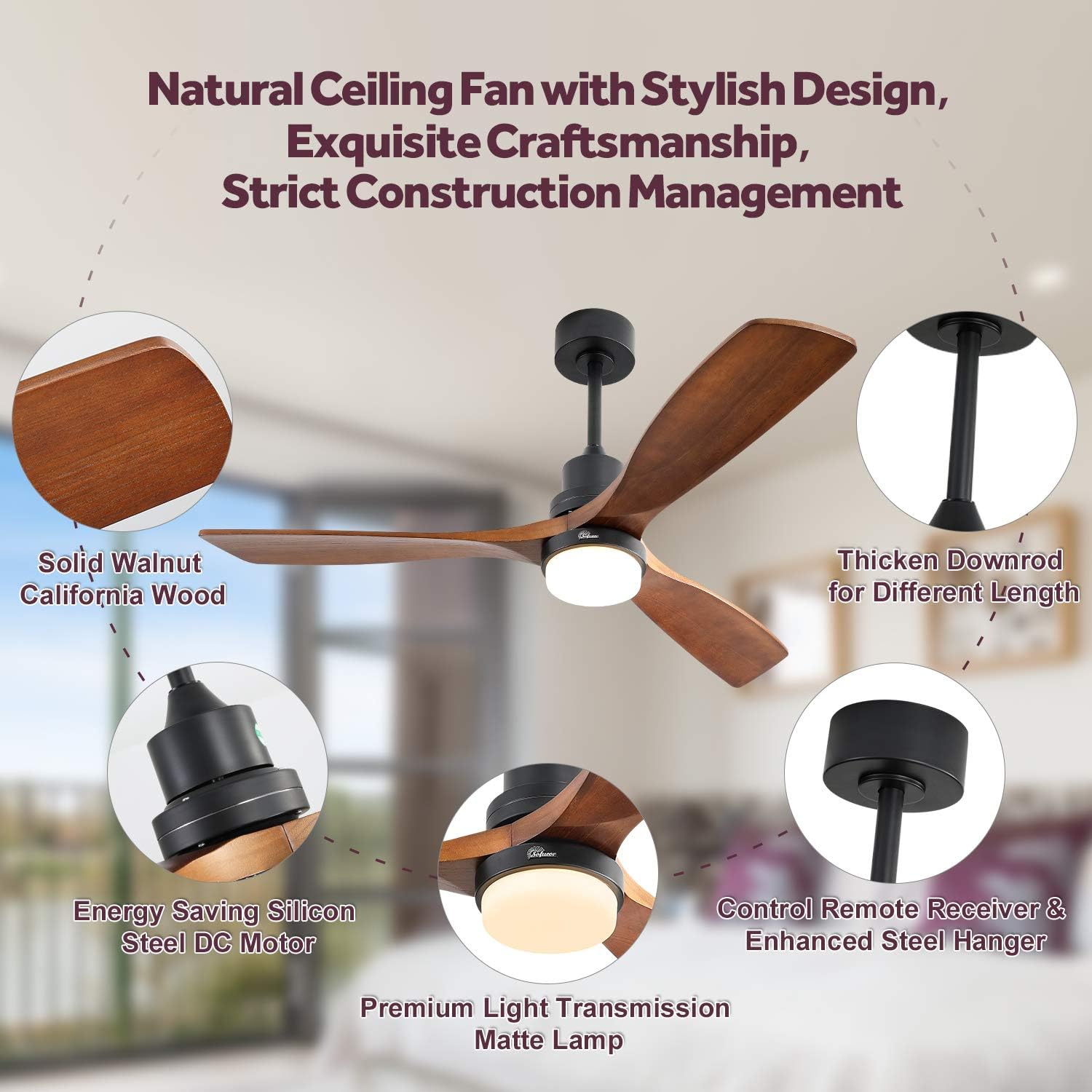
Figure 3.1: Summer Downdraft and Winter Updraft Modes.
4. ข้อมูลจำเพาะ
| คุณลักษณะ | ค่า |
|---|---|
| ยี่ห้อ | โซฟูคอร์ |
| ชื่อรุ่น | ceiling fan with light remote control |
| หมายเลขรุ่นสินค้า | KBS-5247-DC |
| ขนาด | 52 นิ้ว |
| ขนาดสินค้า | ลึก 52 นิ้ว x กว้าง 52 นิ้ว x สูง 16 นิ้ว |
| น้ำหนักสินค้า | 15.32 ปอนด์ |
| สี | 52 Inch with lights, walnut |
| จำนวนใบมีด | 3 |
| วัสดุใบมีด | wood fan blades |
| แหล่งพลังงาน | DC |
| เล่มที่tage | 120 โวลต์ (กระแสตรง) |
| วัดtage | 35 วัตต์ |
| ความจุการไหลของอากาศ | 5032 ซีซี / นาที |
| ระดับเสียง | 45 เดซิเบล |
| ประเภทไฟ | นำ |
| วิธีการควบคุม | ระยะไกล |
| การใช้งานภายใน/ภายนอกอาคาร | Indoor, Outdoor (Not exposed to direct rain) |
| จำเป็นต้องประกอบ | ใช่ |
| ต้องใช้แบตเตอรี่ (สำหรับรีโมท) | แบตเตอรี่ AAA จำนวน 2 ก้อน (ไม่รวม) |
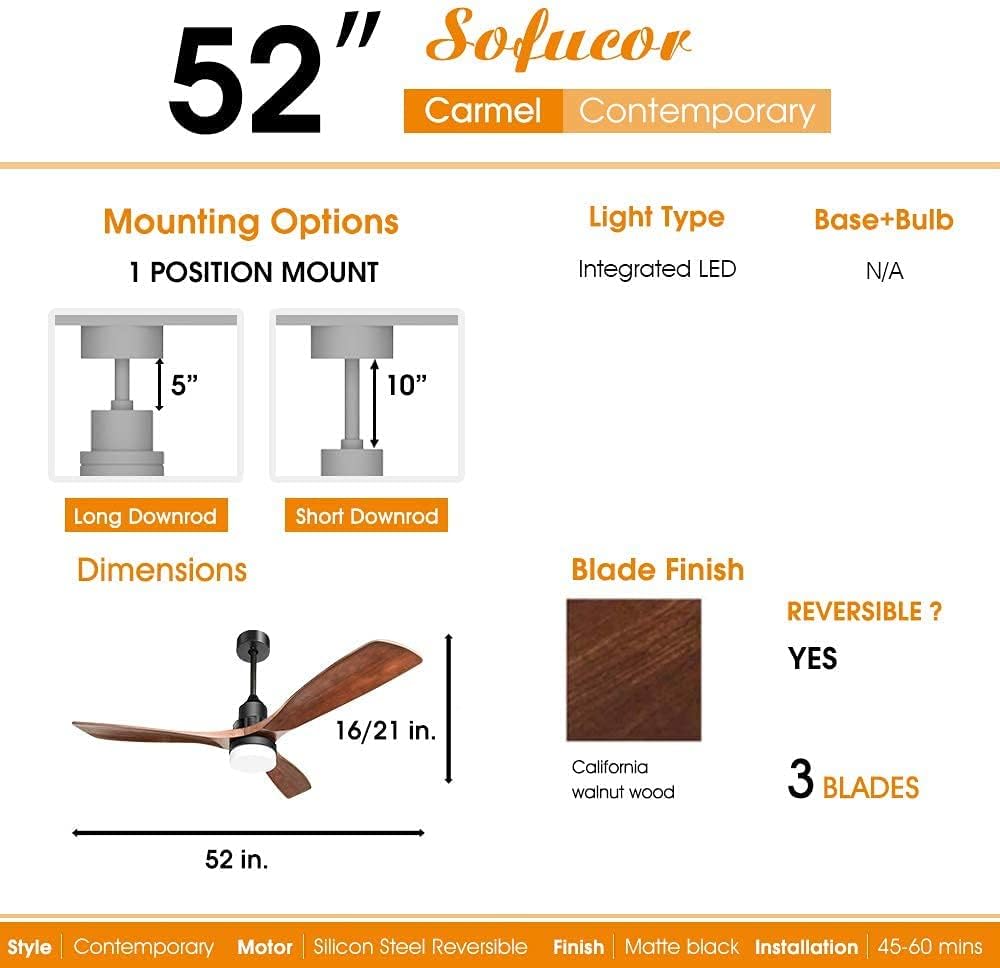
Figure 4.1: Key Product Specifications.
5. การตั้งค่าและการติดตั้ง
5.1 รายการตรวจสอบก่อนการติดตั้ง
- Ensure power is OFF at the circuit breaker before starting.
- Verify that the ceiling outlet box is securely mounted and rated for fan support.
- Gather all necessary tools: screwdriver, wire strippers, ladder, etc.
5.2 ตัวเลือกการติดตั้ง
The fan comes with three down rods (5", 10", 24") to accommodate various ceiling heights. It can be installed on ceilings with a maximum slope of 10 degrees.

Figure 5.1: Included Down Rod Lengths.
5.3 คำแนะนำในการเดินสายไฟ
Connect the fan's electrical wires to the household wiring according to the provided wiring diagram in the physical manual. Ensure all connections are secure and insulated with wire nuts. If you are unsure about wiring, consult a qualified electrician.
6. คู่มือการใช้งาน
The Sofucor ceiling fan is operated using the included multi-functional remote control. Ensure 2 AAA batteries are installed correctly in the remote.
6.1 ฟังก์ชั่นการควบคุมระยะไกล
- ปุ่มเปิด/ปิด: Turns the fan and light ON/OFF.
- การควบคุมความเร็วพัดลม: เลือกความเร็วพัดลมได้ 6 ระดับ (1-6) เพื่อปรับความแรงของลม
- การควบคุมแสง:
- เปิด/ปิดไฟ: เปิดหรือปิดไฟ
- การปรับอุณหภูมิสี: Cycle through 3000K (warm yellow), 4500K (bright daylight), and 6000K (cool white) light options.
- dimming: ปรับความสว่างของแสงได้ตั้งแต่ 0% ถึง 100%
- ฟังก์ชั่นจับเวลา: ตั้งค่าพัดลมให้ปิดอัตโนมัติหลังจาก 1, 4 หรือ 8 ชั่วโมง
- การไหลเวียนอากาศย้อนกลับ: Change the direction of the fan blades for seasonal use. In summer, downdraft mode creates a cooling breeze. In winter, updraft mode circulates warm air trapped near the ceiling.
Video 6.1: This video demonstrates the remote control functions, including changing light color and fan speed. (Note: This video is provided by a customer and is for illustrative purposes. For official installation guidance, please refer to the manual or manufacturer's webเว็บไซต์.)
7. การบำรุงรักษา
การบำรุงรักษาอย่างสม่ำเสมอจะช่วยให้พัดลมเพดานของคุณมีอายุการใช้งานยาวนานและทำงานได้อย่างมีประสิทธิภาพสูงสุด
- การทำความสะอาด: เพื่อป้องกันความเสียหายต่อพื้นผิว ให้ทำความสะอาดพัดลมด้วยผ้าเนื้อนุ่มและแห้งamp ผ้า ห้ามใช้สารทำความสะอาดที่มีฤทธิ์กัดกร่อนหรือตัวทำละลาย
- การดูแลใบมีด: Periodically check the fan blades for dust buildup. Dusting the blades regularly can help maintain airflow efficiency and prevent wobbling.
- ขันสกรูให้แน่น: Over time, some fasteners may become loose. Check all mounting screws and blade attachment screws at least once a year and tighten them as necessary.
8 การแก้ไขปัญหา
If you experience issues with your Sofucor ceiling fan, refer to the following common problems and solutions:
| ปัญหา | สาเหตุที่เป็นไปได้ | สารละลาย |
|---|---|---|
| พัดลมไม่เริ่มทำงาน | No power to the fan; Loose wire connections; Remote control battery low or incorrectly installed. | Check circuit breaker/fuse; Verify all wire connections are secure; Replace remote control batteries (2 AAA) and ensure correct polarity. |
| ไฟไม่ทำงานหรือกระพริบ | Loose wire connection to light kit; Faulty LED light source; Light setting on remote. | Check light kit wiring; Contact customer service for replacement if LED is faulty; Ensure light is turned on and brightness is adjusted via remote. |
| พัดลมสั่นมากเกินไป | สกรูยึดใบพัดหลวม; ใบพัดไม่สมดุล; ตัวยึดใบพัดหลวม | Tighten all blade screws; Check for bent blades and replace if necessary; Ensure mounting bracket is securely fastened to the ceiling box. |
| รีโมตคอนโทรลไม่ทำงาน | Low or dead batteries; Remote not paired with fan; Obstruction between remote and receiver. | Replace batteries; Refer to pairing instructions in the full manual; Ensure clear line of sight to the fan's receiver. |
| Light glows faintly when off | Residual current in wiring or dimmer incompatibility. | Ensure the fan is connected to a non-dimmable switch or consult an electrician to check for residual current. |
9. การรับประกันและการสนับสนุนลูกค้า
Sofucor products are manufactured to the highest quality standards. For specific warranty information, please refer to the warranty card included with your product or visit the official Sofucor webเว็บไซต์.
If you encounter any issues or have questions regarding your Sofucor ceiling fan, please do not hesitate to contact our customer support team. We are committed to ensuring your satisfaction.
หากต้องการความช่วยเหลือเพิ่มเติม โปรดไปที่ Sofucor Store on Amazon.


