การแนะนำ
This manual provides comprehensive instructions for the Elekpia Universal Remote Control, designed as a direct replacement for your original remote for all ONN Roku TVs. This remote offers seamless control of your television and features dedicated buttons for popular streaming services like Netflix, Sling, Hulu, and VUDU.
Please read this manual carefully to ensure proper setup and operation of your new remote control.
การตั้งค่า
1. การติดตั้งแบตเตอรี่
The Elekpia Universal Remote Control requires two (2) AAA alkaline batteries (not included) for operation. Follow these steps to install the batteries:
- ค้นหาช่องใส่แบตเตอรี่ที่ด้านหลังของรีโมทคอนโทรล
- เลื่อนฝาปิดช่องใส่แบตเตอรี่ลงด้านล่างเพื่อเปิด
- ใส่แบตเตอรี่ AAA สองก้อน โดยตรวจสอบให้แน่ใจว่าขั้วบวก (+) และขั้วลบ (-) ตรงกับเครื่องหมายภายในช่อง
- เลื่อนฝาปิดช่องใส่แบตเตอรี่กลับเข้าที่จนกระทั่งล็อคเข้าที่อย่างแน่นหนา
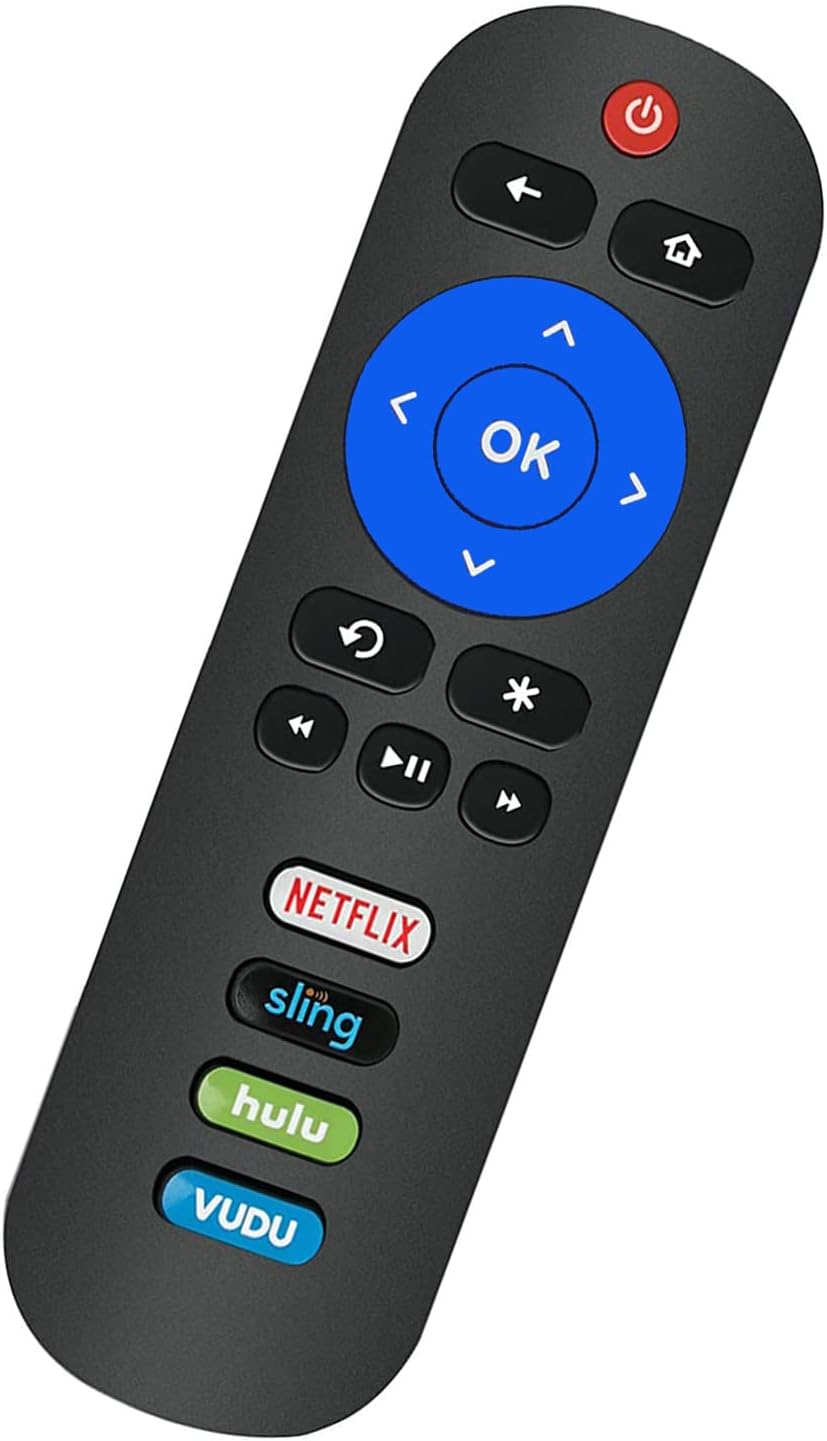
Image: Back of the remote control with the battery compartment visible.
2. Initial Use (No Programming Required)
This remote control is pre-programmed to work with all ONN Roku TVs. No programming or pairing is needed. Once the batteries are installed, the remote is ready for immediate use with your compatible ONN Roku TV.
หมายเหตุสำคัญ: This remote control operates via Infrared (IR) technology and is specifically designed for ONN Roku TVs. It ไม่ทำงาน with Roku sticks, Roku players, Roku boxes, or any other non-TV Roku devices. It also lacks a pairing button, voice function, and headphone jack.
คำแนะนำการใช้งาน
Familiarize yourself with the buttons on your Elekpia Universal Remote Control:

ภาพ: ด้านหน้า view of the Elekpia remote control, displaying all control buttons.
- ปุ่มเพาเวอร์ (⏻): Turns your ONN Roku TV on or off.
- ปุ่มย้อนกลับ (←): กลับไปที่หน้าจอหรือเมนูก่อนหน้า
- ปุ่มโฮม (⌂): นำทางไปยังหน้าจอหลักของ Roku
- ปุ่มควบคุมทิศทาง (ขึ้น, ลง, ซ้าย, ขวา): Used to navigate through menus and select options.
- ปุ่มตกลง: ยืนยันการเลือกหรือเปิดรายการ
- ปุ่มเล่นซ้ำทันที (↻): Replays the last few seconds of video.
- Asterisk Button (∗): Accesses options or settings within an app or menu.
- ย้อนกลับ (⏮), Play/Pause (⏸), Fast Forward (⏭): ปุ่มควบคุมการเล่นสื่อมาตรฐาน
- เพิ่ม/ลดระดับเสียง (🔊 / 🔉): ปรับระดับเสียงโทรทัศน์
- ปุ่มปิดเสียง (🔇): ปิดหรือเปิดเสียงโทรทัศน์
- Dedicated App Buttons (Netflix, Sling, Hulu, VUDU): Directly launch the corresponding streaming application.

ภาพ: ด้านข้าง view of the remote control, showing the volume and mute buttons located on the side.
การซ่อมบำรุง
- การเปลี่ยนแบตเตอรี่: Replace batteries when the remote's response becomes sluggish or stops working. Always replace both batteries at the same time with new AAA alkaline batteries. Do not mix old and new batteries, or different types of batteries.
- การทำความสะอาด: To clean the remote control, wipe it with a soft, dry cloth. Do not use liquid cleaners, sprays, or abrasive materials, as these may damage the remote's surface or internal components.
- พื้นที่จัดเก็บ: เก็บรีโมทคอนโทรลไว้ในที่แห้งและเย็น หลีกเลี่ยงแสงแดดโดยตรงและอุณหภูมิที่สูงหรือต่ำเกินไป หากไม่ได้ใช้งานรีโมทคอนโทรลเป็นเวลานาน ขอแนะนำให้ถอดแบตเตอรี่ออกเพื่อป้องกันการรั่วไหล
- การจัดการ: Avoid dropping the remote control or subjecting it to strong impacts, which can cause internal damage.
การแก้ไขปัญหา
| ปัญหา | สาเหตุที่เป็นไปได้ / วิธีแก้ไข |
|---|---|
| รีโมตไม่ตอบสนอง |
|
| การทำงานระยะไกลสำหรับบางฟังก์ชันแต่ไม่ใช่ทั้งหมด |
|
| Remote does not work with my Roku device. | This remote is specifically designed for ONN Roku TVs (televisions with Roku built-in). It is ไม่เข้ากัน with standalone Roku streaming sticks, Roku players, Roku boxes, or Roku gaming consoles. |
ข้อมูลจำเพาะ
- แบบอย่าง: Elekpia-ONN-RK
- ขนาดสินค้า : 5.5 x 1.5 x 0.6 นิ้ว (13.97 x 3.81 x 1.52 ซม.)
- น้ำหนักสินค้า: 1.76 ออนซ์ (50 กรัม)
- แหล่งจ่ายไฟ: แบตเตอรี่อัลคาไลน์ AAA 2 x 1.5V (ไม่รวม)
- เทคโนโลยีการเชื่อมต่อ: อินฟาเรด (IR)
- อุปกรณ์ที่รองรับ: All ONN Roku TVs (e.g., models 100012585, 100012584, 100012586, 100012587, 100012589, 100018971, 100012590, 100005844, 3226000855, 3226000858, 100007147, 100005395, 100005397, 100005396, 100012588)
- คุณสมบัติพิเศษ: Universal compatibility with ONN Roku TVs, dedicated streaming service buttons.
ข้อมูลการรับประกัน
Specific warranty details for the Elekpia Universal Remote Control are typically provided by the seller or manufacturer at the time of purchase. Please refer to your purchase documentation or contact the retailer from whom you purchased this product for information regarding warranty coverage and terms.
สนับสนุน
If you encounter any issues or have questions regarding your Elekpia Universal Remote Control that are not addressed in this manual, please contact the seller or the manufacturer directly for assistance. Provide your product model number (Elekpia-ONN-RK) and details of your issue for faster support.
For general inquiries, you may also refer to the product listing page where you purchased the item for additional resources or frequently asked questions.


