การแนะนำ
This manual provides essential information for the installation, operation, and maintenance of your Gecko in.xe Electronic Control System. The in.xe system is designed for spas and hot tubs, integrating a heat.wav heater and supporting various configurations including single pump, dual pump, pump and blower, or dual pump and blower systems. Please read this manual thoroughly before installation and use to ensure proper function and safety.

ภาพที่ 1: ด้านหน้า view of the Gecko in.xe Electronic Control System, showing the various connectors for pumps, blower, and other accessories, along with the integrated heat.wav heater at the bottom.
ข้อมูลด้านความปลอดภัย
Always follow local electrical codes and regulations. Installation should be performed by a qualified electrician or service technician. Disconnect power before servicing. Ensure proper grounding and bonding. This system is suitable for indoor use only when installed under a weatherproof enclosure.
- คำเตือน: Connect only to a circuit protected by a Ground Fault Circuit Interrupter (GFCI).
- คำเตือน: Do not connect to an ungrounded receptacle.
- คำเตือน: Suitable for indoor use only when installed under a weatherproof enclosure.
- คำเตือน: Refer to installation instructions for specific wiring diagrams.
การติดตั้งและการตั้งค่า
Proper installation is crucial for the safe and efficient operation of your in.xe control system. Refer to the detailed wiring diagrams provided with your unit for specific connections.
ส่วนประกอบมากกว่าview
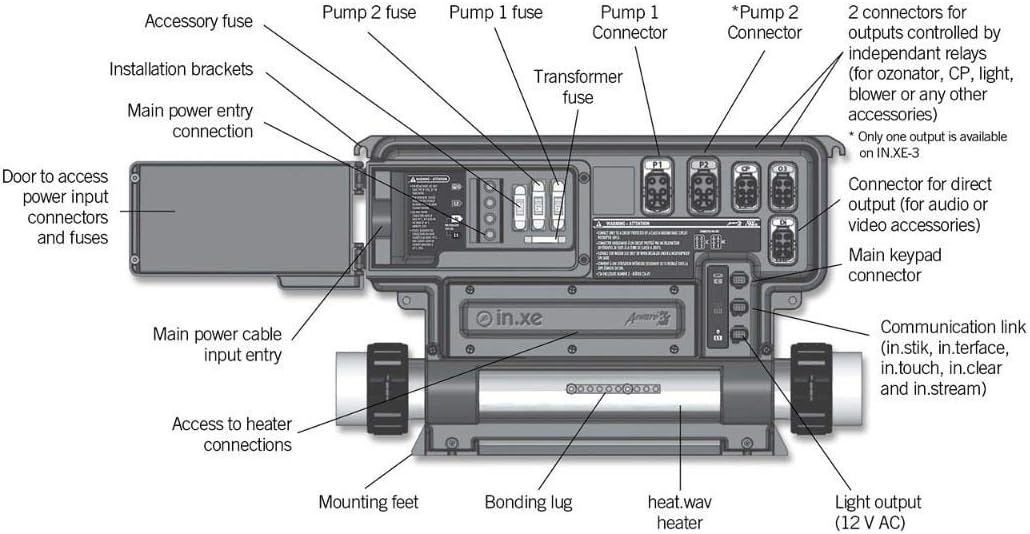
ภาพที่ 2: รายละเอียด view of the Gecko in.xe control system with labels indicating key components such as main power entry, pump connectors (P1, P2), blower connector, accessory fuses, transformer fuse, main keypad connector, communication link, heat.wav heater, bonding lug, and mounting feet.
- การติดตั้ง: Secure the control system using the provided installation brackets and mounting feet. Ensure it is in a location protected from direct weather exposure if installed outdoors, or in a suitable enclosure.
- การเชื่อมต่อไฟฟ้า: Connect the main power cable to the main power entry connection. The system supports 120V/240V (Neutral Required). Ensure the circuit is protected by a GFCI.
- Heater Connection: The heat.wav heater is integrated. Ensure proper water flow through the heater before powering on the system.
- การเชื่อมต่อปั๊ม: Connect Pump 1 (1-speed or 2-speed) to the P1 connector. If applicable, connect Pump 2 (2-speed) to the P2 connector.
- การเชื่อมต่อพัดลม: Connect the 1-speed blower to its designated connector.
- อุปกรณ์เสริมอื่นๆ: Connect circulation pump, ozone generator, or AV receptacles to the appropriate connectors as per your spa configuration.
- การเชื่อมต่อแป้นพิมพ์: Connect your compatible Gecko keypad (e.g., in.k600, in.k450, in.k200, K-85) to the main keypad connector.
- การเชื่อมติด: Ensure the system is properly bonded to the spa structure and other metallic components as required by local codes.
คำแนะนำการใช้งาน
The Gecko in.xe system operates in conjunction with a compatible keypad. Refer to your keypad's specific user manual for detailed navigation and function controls. General operations include:
- เปิด/ปิดเครื่อง: Use the main power switch to turn the system on or off.
- การปรับอุณหภูมิ: Set your desired water temperature using the keypad controls.
- การเปิดใช้งานปั๊ม: Activate Pump 1 and Pump 2 (if installed) for jets or circulation.
- การเปิดใช้งานโบลเวอร์: Turn the blower on or off for air jets.
- การควบคุมแสง: Operate the spa lights through the keypad.
- การเลือกโหมด: Select different operating modes (e.g., Standard, Economy, Sleep) to manage heating cycles and energy consumption.
บันทึก: The specific functions and their access methods will vary depending on the model of your Gecko keypad.
การซ่อมบำรุง
Regular maintenance ensures the longevity and optimal performance of your control system.
- การตัดการเชื่อมต่อไฟฟ้า: Always disconnect power to the spa before performing any maintenance or inspection.
- การตรวจสอบภาพ: Periodically inspect the control system for any signs of damage, corrosion, or loose connections.
- ตรวจสอบฟิวส์: If a component fails to operate, check the corresponding fuse inside the control box. Replace blown fuses with the exact same type and rating. Refer to Image 2 for fuse locations.
- ความสมบูรณ์ของโครงสร้าง: Ensure the control system enclosure remains sealed and free from moisture ingress.
- คุณภาพน้ำ: Maintain proper spa water chemistry to prevent scale buildup in the heater and other components.
การแก้ไขปัญหา
ส่วนนี้เสนอวิธีแก้ปัญหาทั่วไป สำหรับปัญหาที่ซับซ้อนกว่านั้น โปรดติดต่อช่างเทคนิคผู้เชี่ยวชาญ
| ปัญหา | สาเหตุที่เป็นไปได้ | สารละลาย |
|---|---|---|
| ระบบเปิดไม่ติด | No power supply, tripped GFCI, blown main fuse. | Check main power breaker and GFCI. Inspect and replace main fuse if blown (ensure correct rating). |
| Pump/Blower not working. | Blown component fuse, loose connection, motor issue. | Check the specific fuse for the pump/blower. Ensure connections are secure. If fuse is good, motor may require service. |
| Heater not heating. | Low water flow, air lock, heater element failure, thermostat issue. | Ensure pumps are running and water flow is adequate. Bleed air from the system. If problem persists, professional service is required. |
| ปุ่มกดไม่ตอบสนอง | Loose keypad cable, keypad malfunction. | Check keypad cable connection to the control system. If still unresponsive, the keypad may need replacement. |
ข้อมูลจำเพาะ
- แบบอย่าง: Gecko in.xe Electronic Control System (0602-221063-299)
- เล่มระบบtage: 120V/240V (Neutral Required)
- ฮีตเตอร์วัดtage: 1.0/4.0 กิโลวัตต์
- การกำหนดค่าส่วนประกอบ: Pump1 (1spd or 2spd) + Pump2 (2spd) + Blower (1spd) + Circ (1spd) + Ozone + AV Receptacle
- ขนาดตู้: 9.5" (W) x 11.75" (H) x 5.1" (D) (Plastic)
- Heater Style: Flow Thru (Fixed)
- Heater Measures: 2" x 15" long
- Compatible Keypads (Not Included): in.k600, in.k450, in.k200, K-85, and more.
- ผู้ผลิต: ตุ๊กแก
- ขนาดแพ็คเกจ: 20 x 12 x 6 นิ้ว
การรับประกันและการสนับสนุน
For warranty information, please refer to the documentation provided with your purchase or contact Gecko customer support directly. Keep your proof of purchase for warranty claims.
For technical support or service inquiries, please contact your authorized Gecko dealer or visit the official Gecko website. Ensure you have your model number (0602-221063-299) and serial number ready when contacting support.


