1. บทนำ
Thank you for choosing the FREESTYLE FH0955 LED Bluetooth Headphones. This manual provides essential information for the proper setup, operation, and maintenance of your new headphones. Please read it carefully before use to ensure optimal performance and longevity of the product.
2. สินค้าหมดview
The FREESTYLE FH0955 headphones offer a wireless audio experience with integrated features designed for convenience and style. Key features include Bluetooth 5.0 + EDR connectivity, a built-in microSD card slot for direct music playback, a foldable headband for portability, and subtle LED backlighting on the earcups.

ภาพที่ 2.1: ด้านหน้า view of the FREESTYLE FH0955 LED Bluetooth Headphones, showcasing the over-ear design and LED lighting.

ภาพที่ 2.2: ด้านข้างfile of the FREESTYLE FH0955 LED Bluetooth Headphones, highlighting the earcup and headband design.

Image 2.3: A person wearing the FREESTYLE FH0955 LED Bluetooth Headphones, demonstrating typical usage.
3. การตั้งค่า
3.1. การชาร์จหูฟัง
Before first use, fully charge the headphones. The FH0955LB model is equipped with a 400 mAh Lithium-ion battery.
- Connect the supplied MicroUSB charging cable to the charging port on the headphones.
- Connect the other end of the cable to a USB power source (e.g., computer USB port, USB wall adapter, or power bank).
- ไฟ LED จะสว่างขึ้นขณะชาร์จ และจะดับลงหรือเปลี่ยนสีเมื่อชาร์จเต็มแล้ว
- A full charge typically takes approximately 2 hours and provides up to 10 hours of continuous music playback.
3.2. การจับคู่บลูทู ธ
วิธีเชื่อมต่อหูฟังแบบไร้สายกับอุปกรณ์:
- ตรวจสอบให้แน่ใจว่าหูฟังได้รับการชาร์จและปิดเครื่องแล้ว
- กดปุ่มเปิด/ปิดบนหูฟังค้างไว้จนกว่าไฟ LED จะกะพริบ ซึ่งแสดงว่าเข้าสู่โหมดจับคู่แล้ว
- บนอุปกรณ์ของคุณ (สมาร์ทโฟน แท็บเล็ต คอมพิวเตอร์) เปิดใช้งาน Bluetooth และค้นหาอุปกรณ์ที่มีอยู่
- Select "FH0955" or a similar name from the list of found devices.
- Once connected, the LED indicator will stop flashing and remain solid or turn off, depending on the model.
- The Bluetooth 5.0 + EDR technology allows for a stable connection up to 10 meters.
3.3. การเล่นไฟล์จากการ์ด microSD
The headphones feature an integrated microSD card slot for direct music playback without a connected device.
- ใส่การ์ด microSD (ที่โหลดไฟล์เสียงไว้แล้ว) files) into the designated slot on the headphones.
- The headphones should automatically switch to microSD playback mode. If not, use the Mode button (if available) to switch.
- Use the playback controls on the headphones to manage your music.
3.4. การเชื่อมต่อแบบใช้สาย (แจ็คเสียง 3.5 มม.)
For devices without Bluetooth or when the battery is depleted, you can use the included 3.5mm audio cable.
- ต่อปลายด้านหนึ่งของสายสัญญาณเสียงขนาด 3.5 มม. เข้ากับแจ็คเสียบหูฟัง
- ต่อปลายอีกด้านหนึ่งเข้ากับช่องเสียบเสียง 3.5 มม. ของอุปกรณ์ของคุณ
- The headphones will operate in passive mode, and Bluetooth functionality will be disabled.
4. คู่มือการใช้งาน
4.1. เปิด/ปิดเครื่อง
- เปิดเครื่อง: กดปุ่มเปิด/ปิดค้างไว้ประมาณ 3 วินาที จนกว่าไฟแสดงสถานะ LED จะสว่างขึ้น
- หมดแรง: Press and hold the Power button for approximately 3-5 seconds until the LED indicator turns off.
4.2. การเล่นเพลง
- เล่น/หยุดชั่วคราว: กดปุ่มเล่น/หยุดชั่วคราวหนึ่งครั้ง
- เพลงถัดไป: Press the "Next" button (often Volume Up, long press).
- แทร็กก่อนหน้า: Press the "Previous" button (often Volume Down, long press).
- ปรับระดับเสียงขึ้น: กดปุ่มเพิ่มระดับเสียงสั้นๆ
- ลดเสียงลง: กดปุ่มลดระดับเสียงสั้นๆ
4.3. การจัดการการโทร
With the built-in microphone, you can manage phone calls when connected via Bluetooth.
- รับ/วางสาย: กดปุ่มเล่น/หยุดชั่วคราวหนึ่งครั้งระหว่างที่มีสายเรียกเข้า
- ปฏิเสธสาย: Press and hold the Play/Pause button for approximately 2 seconds during an incoming call.
- โทรซ้ำหมายเลขล่าสุด: กดปุ่มเล่น/หยุดชั่วคราวสองครั้ง
4.4. LED Backlighting
The headphones feature subtle LED backlighting. Refer to the specific controls on your device for toggling or changing LED modes, if available. This feature is primarily aesthetic.
5. การบำรุงรักษา
5.1. การทำความสะอาด
- Use a soft, dry cloth to clean the surface of the headphones.
- Do not use abrasive cleaners, alcohol, or chemical solvents, as these may damage the finish.
- Keep the charging port and audio jack free from dust and debris.
5.2. การจัดเก็บ
- เก็บหูฟังไว้ในที่แห้งและเย็น หลีกเลี่ยงแสงแดดโดยตรงและอุณหภูมิที่สูงหรือต่ำเกินไป
- When not in use for extended periods, charge the battery at least once every three months to maintain battery health.
- Utilize the foldable headband feature for compact storage and transport.
6 การแก้ไขปัญหา
| ปัญหา | สาเหตุที่เป็นไปได้ | สารละลาย |
|---|---|---|
| หูฟังไม่สามารถเปิดเครื่องได้ | แบตเตอรี่อ่อน | ชาร์จหูฟังให้เต็ม |
| ไม่สามารถจับคู่ผ่านบลูทูธได้ | หูฟังไม่ได้อยู่ในโหมดจับคู่ อุปกรณ์ Bluetooth ปิดอยู่ ห่างจากอุปกรณ์มากเกินไป | Ensure headphones are in pairing mode. Turn device Bluetooth off/on. Move closer to device (within 10m). |
| ไม่มีเสียง. | ระดับเสียงต่ำเกินไป แหล่งเสียงไม่ถูกต้อง ไม่ได้เชื่อมต่อหูฟัง | Increase volume on headphones and device. Check Bluetooth connection or 3.5mm cable. Ensure correct mode (Bluetooth/MicroSD). |
| การ์ด microSD ไม่สามารถเล่นได้ | เสียบการ์ดไม่ถูกต้อง ไม่รองรับ file format; card corrupted. | Reinsert card. Ensure audio files are in a supported format (e.g., MP3). Try a different microSD card. |
7. ข้อมูลจำเพาะ
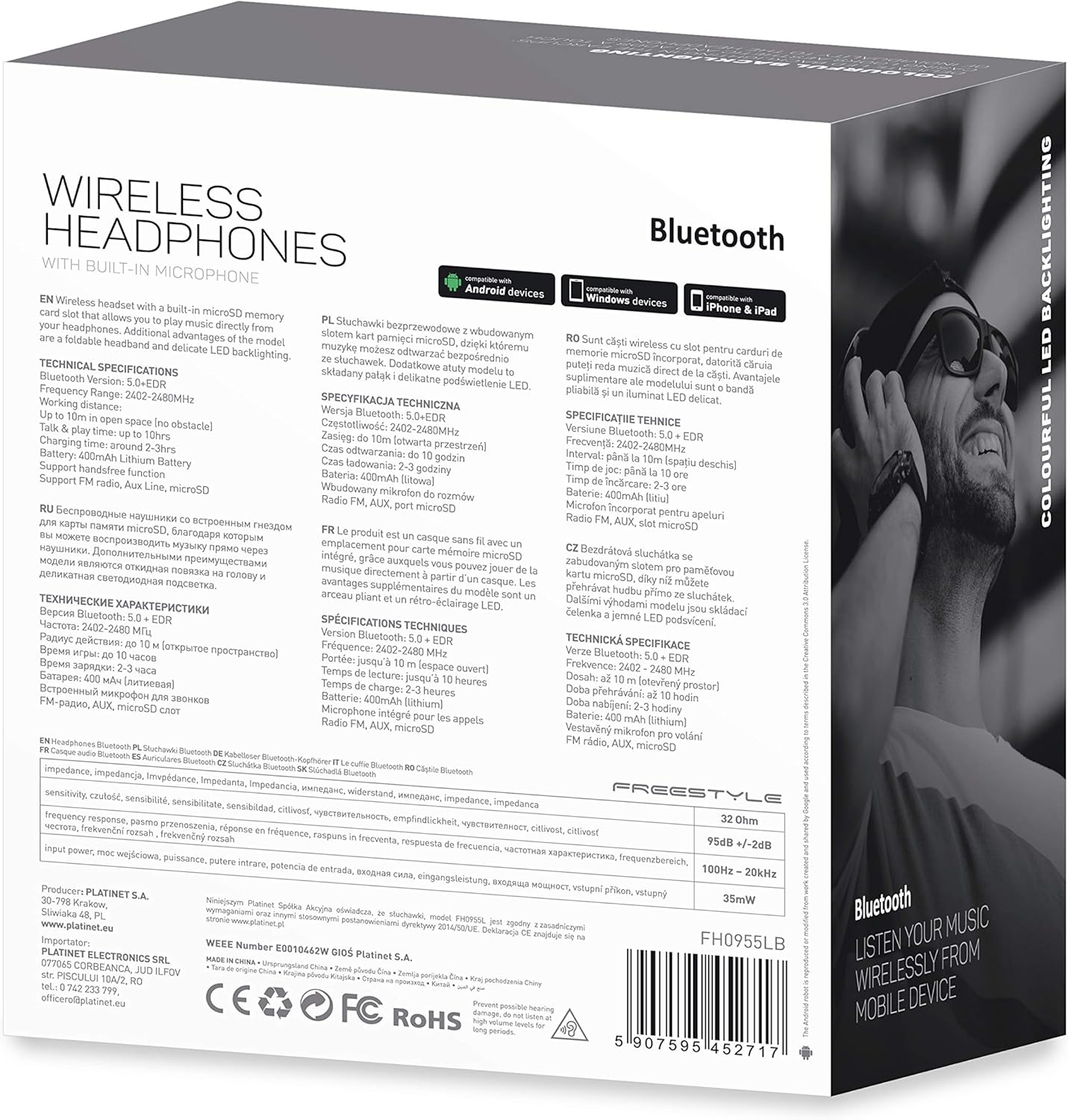
ภาพที่ 7.1: รายละเอียด view of the product packaging, showing technical specifications and compliance information.
| คุณสมบัติ | ข้อมูลจำเพาะ |
|---|---|
| หมายเลขรุ่น | FH0955LB |
| ยี่ห้อ | ฟรีสไตล์ |
| เทคโนโลยีการเชื่อมต่อ | Wireless (Bluetooth 5.0 + EDR) |
| ช่วงสาย | สูงสุด 10 เมตร |
| แจ็คเสียง | 3.5 มม. |
| ฟอร์มแฟกเตอร์ | หูฟังแบบครอบหู (Circum-Auricular) |
| คุณสมบัติพิเศษ | Noise Cancellation, LED Backlighting, MicroSD Card Slot |
| ประเภทแบตเตอรี่ | Integrated Lithium-ion (400 mAh) |
| เวลาการเล่น | นานถึง 10 ชั่วโมง |
| เวลาในการชาร์จ | ประมาณ 2 ชั่วโมง |
| พอร์ตชาร์จ | ไมโครยูเอสบี |
| สี | สีดำ |
| วัสดุ | Leather (earpads/headband) |
| ระดับความต้านทานต่อน้ำ | ทนน้ำ |
| ส่วนประกอบที่รวมอยู่ | หูฟัง 1 คู่ |
| ผู้ผลิต | แพลตติเน็ต |
8. การรับประกันและการสนับสนุน
โดยทั่วไป รายละเอียดการรับประกันเฉพาะจะระบุไว้ในเอกสารการซื้อหรือในเว็บไซต์อย่างเป็นทางการของผู้ผลิต webไซต์ โปรดเก็บหลักฐานการซื้อไว้เพื่อใช้ในกรณีเรียกร้องการรับประกันใดๆ
For technical support or inquiries, please refer to the contact information provided by your retailer or the manufacturer, Platinet.
9. ข้อมูลด้านความปลอดภัย
- อย่าให้หูฟังสัมผัสกับอุณหภูมิที่สูงหรือต่ำเกินไป ความชื้นสูง หรือของเหลว
- หลีกเลี่ยงการฟังในระดับเสียงสูงเป็นเวลานานเพื่อป้องกันความเสียหายต่อการได้ยิน
- ห้ามถอดประกอบหรือดัดแปลงหูฟัง เนื่องจากอาจทำให้การรับประกันเป็นโมฆะและก่อให้เกิดความเสียหายได้
- เก็บให้พ้นจากมือเด็ก
- Dispose of the product responsibly according to local electronic waste regulations.


