1. บทนำ
This manual provides detailed instructions for the setup, operation, and maintenance of your Epson PowerLite 982W LCD Projector. Designed for classroom and educational environments, this projector delivers bright, clear images and offers versatile connectivity options. Please read this manual thoroughly before using the projector to ensure optimal performance and safety.
2. อะไรอยู่ในกล่อง
ตรวจสอบว่ารายการทั้งหมดที่ระบุไว้ด้านล่างนี้รวมอยู่ในแพ็คเกจของคุณ:
- PowerLite 982W 3LCD WXGA Classroom Projector with Dual HDMI
- สายไฟ
- สายเคเบิล VGA
- รีโมทควบคุมโปรเจ็กเตอร์
- แบตเตอรี่
- ซีดีซอฟแวร์
- คู่มือการใช้งาน (เอกสารนี้)
- บัตรรับประกัน
3. สินค้าหมดview
Familiarize yourself with the physical components and controls of your Epson PowerLite 982W projector.

รูปที่ 3.1 : ด้านหน้า View. This image displays the front of the projector, highlighting the main projection lens and the large ventilation grille on the left side. The Epson logo is prominently featured above the lens.
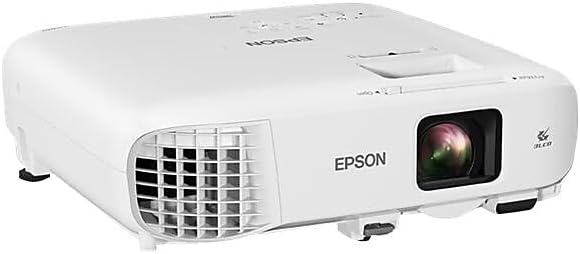
รูปที่ 3.2: มุม View. An angled perspective of the projector, providing a view of both the top panel and the front lens area. This view helps in understanding the overall compact design.

รูปที่ 3.3: แผงควบคุมด้านบน This image shows the top surface of the projector, featuring the control panel with various buttons for navigation, source selection, menu access, and power. The focus and zoom rings are also visible near the lens opening.

Figure 3.4: Rear Connectivity Panel. The rear panel of the projector is shown, detailing the comprehensive array of input and output ports, including HDMI, VGA, USB, Audio In/Out, Video, and LAN connections.
4. คำแนะนำในการตั้งค่า
Proper setup ensures optimal projection quality and longevity of your device.
4.1 การจัดวางและการติดตั้ง
The PowerLite 982W is designed for versatile placement, including ceiling mounting, as commonly seen in classroom installations. Ensure the projector is securely mounted and positioned to project onto your screen or wall without obstruction.
4.2 การเชื่อมต่ออุปกรณ์ของคุณ
โปรเจ็กเตอร์นี้มีตัวเลือกการเชื่อมต่อหลากหลายรูปแบบ:
- ช่องต่อ HDMI: Connect devices like laptops, Blu-ray players, or streaming devices using an HDMI cable to either HDMI1 or HDMI2 port.
- VGA (คอมพิวเตอร์): Use a VGA cable to connect to a computer's VGA output. There are two VGA input ports (Computer1, Computer2) and one VGA output port (Monitor Out).
- ยูเอสบี: Connect USB devices for display or control.
- LAN: สำหรับการเชื่อมต่อและควบคุมเครือข่าย
- เสียง: Separate audio input (Audio1, Audio2, Mic) and output ports are available for external audio systems.
ตรวจสอบให้แน่ใจว่าสายเคเบิลทั้งหมดเชื่อมต่อแน่นหนาเพื่อป้องกันการสูญเสียสัญญาณ
4.3 การเปิดเครื่อง
- เชื่อมต่อสายไฟเข้ากับโปรเจ็กเตอร์และเต้ารับไฟฟ้า
- Press the power button on the projector's control panel or the remote control. The projector will emit a beeping sound and begin its warm-up sequence.
- Wait for the projector to fully warm up and display the input source.
Video 4.1: Projector Installation and Basic Operation. This video demonstrates the Epson PowerLite 982W projector mounted in a classroom setting. It shows the physical controls on the projector, the various input ports, and the use of the remote control to power on the device and select input sources. The video also illustrates the projection quality on a screen with ambient lighting.
5. คู่มือการใช้งาน
Learn how to effectively use your projector for presentations and media display.
5.1 การเลือกแหล่งที่มา
การสลับระหว่างแหล่งอินพุต:
- Press the 'Source Search' button on the remote control or the 'Source' button on the projector's control panel.
- Use the arrow keys to navigate through the available sources (HDMI1, HDMI2, Computer1, Computer2, Video, USB Display, LAN).
- Press 'Enter' to select the desired source. The projector will search for a signal from the selected input.
5.2 การปรับภาพ
- จุดสนใจ: หมุนวงแหวนปรับโฟกัสรอบเลนส์เพื่อเพิ่มความคมชัดของภาพ
- ซูม: Adjust the zoom ring to enlarge or reduce the image size.
- การแก้ไขคีย์สโตน: Use the keystone correction buttons on the control panel or remote to correct trapezoidal distortion if the projector is not perfectly perpendicular to the screen.
- โหมดสี: Select different color modes (e.g., Dynamic, Presentation, Cinema) from the menu to optimize image quality for various content types and ambient lighting conditions.
คุณสมบัติขั้นสูง 5.3 ประการ
- Moderator Function: Connects up to 50 devices, allowing multiple users to share content from laptops or mobile devices.
- ความสามารถในการแยกหน้าจอ: Display content from two different sources side-by-side simultaneously.
- การฉายภาพแบบไร้สาย: Project wirelessly from compatible laptops and mobile devices (PC, Mac, Chromebook, iOS, Android).
6. คุณสมบัติหลัก
The Epson PowerLite 982W projector is equipped with several features to enhance your viewing and presentation experience:
- Utilizes 3 LCD panels and 4,200 lumens of color and white brightness for vivid images.
- Provides WXGA resolution (1280 x 800) for a bright, wide-screen experience.
- Features a long lamp life of up to 17,000 hours in ECO mode.
- Includes optical zoom for clear, sharp images without digital distortion.
- Supports connectivity for up to 50 devices to display a variety of content or compare students' work side-by-side.
7. การบำรุงรักษา
การบำรุงรักษาอย่างสม่ำเสมอจะช่วยให้โปรเจ็กเตอร์ของคุณมีอายุการใช้งานยาวนานและทำงานได้อย่างมีประสิทธิภาพสูงสุด
- การทำความสะอาดเลนส์: เช็ดเลนส์เบา ๆ ด้วยผ้าเนื้อนุ่มที่ไม่เป็นขุยซึ่งออกแบบมาสำหรับพื้นผิวเลนส์โดยเฉพาะ ห้ามใช้สารทำความสะอาดที่มีฤทธิ์กัดกร่อน
- การทำความสะอาดตัวกรองอากาศ: Periodically clean or replace the air filter to prevent dust buildup, which can affect cooling and image quality. Refer to the full user manual for specific instructions on filter access.
- Lamp การทดแทน: The projector features a long-life lamp. When replacement is necessary, a notification will appear. Always use genuine Epson replacement lamps.
- พื้นที่จัดเก็บ: เมื่อไม่ได้ใช้งานเป็นเวลานาน ควรเก็บโปรเจคเตอร์ไว้ในที่แห้งและเย็น ป้องกันจากฝุ่นละอองและอุณหภูมิที่สูงหรือต่ำเกินไป
8 การแก้ไขปัญหา
หากคุณพบปัญหาเกี่ยวกับโปรเจ็กเตอร์ โปรดดูวิธีแก้ไขปัญหาทั่วไปต่อไปนี้:
- ไม่มีภาพแสดง:
- โปรดตรวจสอบให้แน่ใจว่าโปรเจคเตอร์เปิดอยู่และเลือกแหล่งสัญญาณเข้าอย่างถูกต้องแล้ว
- Check all cable connections (HDMI, VGA) between the projector and the source device.
- Verify that the source device (e.g., laptop) is outputting a signal.
- ภาพไม่ชัด:
- ปรับวงแหวนปรับโฟกัสบนเลนส์โปรเจ็กเตอร์
- ตรวจสอบให้แน่ใจว่าพื้นผิวการฉายเรียบและโปรเจ็กเตอร์อยู่ในระยะห่างที่เหมาะสม
- Image is Distorted (Trapezoid Shape):
- Use the keystone correction function on the projector or remote control to adjust the image shape.
- ไม่มีเสียง:
- ตรวจสอบการตั้งค่าระดับเสียงทั้งบนโปรเจ็กเตอร์และอุปกรณ์แหล่งที่มา
- Ensure audio cables are correctly connected if using separate audio inputs.
- คำเตือนความร้อนสูงเกินไป:
- ตรวจสอบให้แน่ใจว่าช่องระบายอากาศของโปรเจ็กเตอร์ไม่ได้ถูกปิดกั้น
- ทำความสะอาดหรือเปลี่ยนแผ่นกรองอากาศหากสกปรก
For more complex issues, consult the full user manual or contact Epson support.
9. ข้อมูลจำเพาะ
| คุณสมบัติ | รายละเอียด |
|---|---|
| ขนาดสินค้า | 11.1 x 12.1 x 3.5 นิ้ว |
| น้ำหนักสินค้า | 6.83 ปอนด์ |
| หมายเลขรุ่นสินค้า | 982วัตต์ |
| ผู้ผลิต | บริษัท เอปสัน คอร์ปอเรชั่น |
| ความละเอียดการแสดงผล | 1280 x 800 (WXGA) |
| เทคโนโลยีการเชื่อมต่อ | HDMI, USB, VGA, LAN |
| การใช้ที่แนะนำ | ห้องเรียน การศึกษา |
| คุณสมบัติพิเศษ | UHE (Ultra High Efficiency lamp) |
| Lamp Life (ECO Mode) | นานถึง 17,000 ชั่วโมง |
10. การรับประกันและการสนับสนุน
Your Epson PowerLite 982W projector comes with a warranty. Please refer to the included Warranty Card in your product package for specific terms and conditions. For technical support, service, or additional information, please visit the official Epson support webเว็บไซต์หรือติดต่อฝ่ายบริการลูกค้าของพวกเขา


