การแนะนำ
This manual provides essential information for the proper use and care of your Heyday 6-ft Lightning to USB-A Braided Cable. This cable is designed for charging and syncing compatible Apple devices with a Lightning port to devices with a USB-A port.
The braided TPU cord and metal-wrapped connectors are engineered for durability and ease of use, providing a reliable connection for your daily charging and data transfer needs.
สินค้าเกินview

Image: The Heyday 6-ft Lightning to USB-A Braided Cable in Midnight Purple, displaying the USB-A connector on the left and the Lightning connector on the right. Both connectors are purple, and the braided cable is a mix of purple and black.
The Heyday 6-ft Lightning to USB-A Braided Cable features:
- Lightning to USB-A Connectivity: Enables charging and data synchronization for compatible devices.
- ความยาวที่ขยาย: A 6-foot (approximately 1.8 meters) cable provides flexibility for use at home, work, or while traveling.
- ได้รับการรับรอง MFI: Ensures compatibility and safe operation with Apple devices.
- โครงสร้างทนทาน: Features a braided nylon cord and metal-wrapped connectors for enhanced longevity and resistance to wear.
- ประสิทธิภาพสูง: รองรับสูงสุด 2.4 Amps for efficient charging and a data transfer rate of 480 Mbps.
การตั้งค่า
Setting up your Heyday Braided Cable is straightforward. No software installation is required.
- ระบุตัวเชื่อมต่อ: Locate the Lightning connector (smaller, reversible end) and the USB-A connector (larger, rectangular end).
- เชื่อมต่อกับแหล่งจ่ายไฟ/คอมพิวเตอร์: Insert the USB-A connector into a compatible USB-A port on a wall charger, power bank, computer, or other USB-A enabled device. Ensure the connection is firm.
- เชื่อมต่อกับอุปกรณ์: Insert the Lightning connector into the Lightning port of your compatible Apple device (e.g., iPhone, iPad, iPod). The Lightning connector is reversible, so it can be inserted in either orientation.
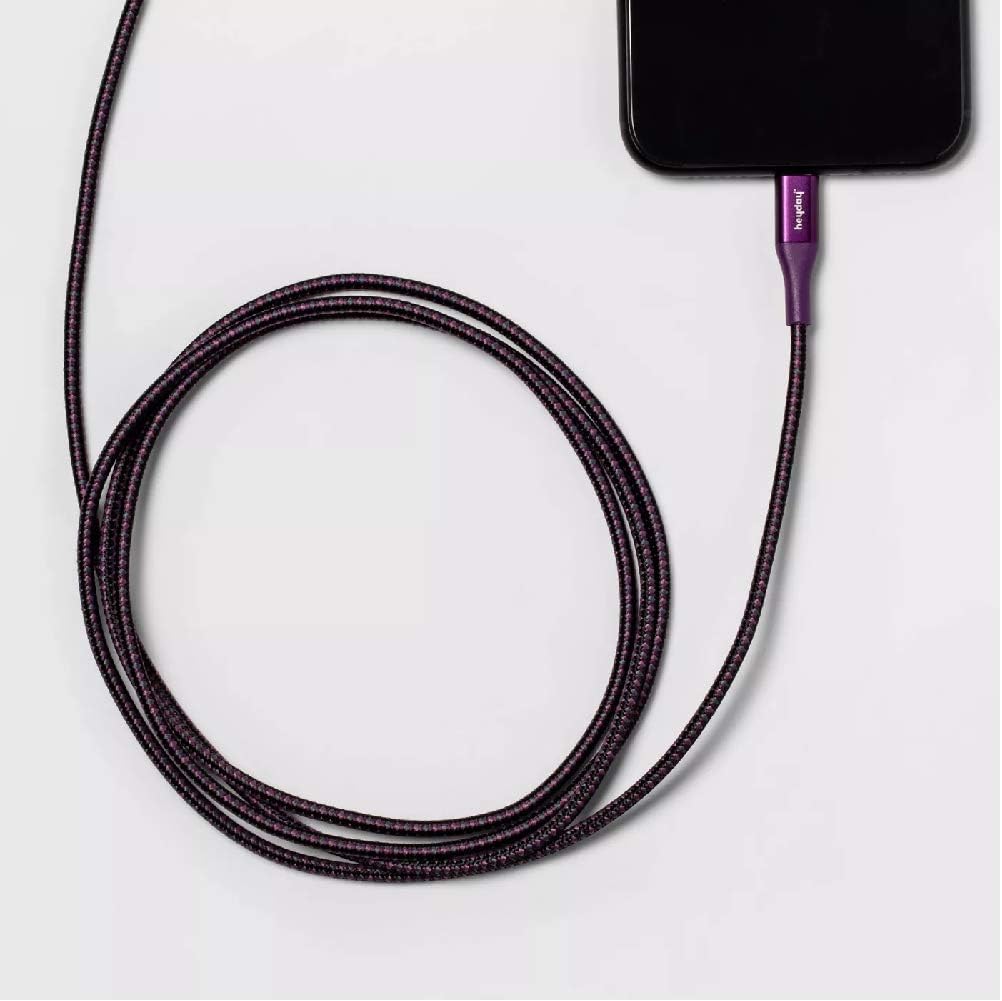
Image: The Heyday Lightning cable with its Lightning connector securely plugged into the charging port of a smartphone, demonstrating a typical connection for charging or data transfer.
คำแนะนำการใช้งาน
Once connected, the cable will facilitate charging or data transfer automatically, depending on the connected devices and their settings.
- การชาร์จ: When connected to a power source (e.g., wall adapter, power bank), your Apple device will begin charging. The charging indicator on your device will confirm this.
- Data Transfer/Syncing: When connected to a computer, your device may prompt you to "Trust This Computer." Follow the on-screen instructions to allow data transfer and syncing with applications like iTunes or Finder.
- ประสิทธิภาพที่เหมาะสมที่สุด: For best charging results, use with a power adapter that provides at least 2.4 Amps (e.g., 12W USB power adapter).
การซ่อมบำรุง
การดูแลรักษาอย่างถูกวิธีจะช่วยยืดอายุการใช้งานของสายเคเบิลของคุณได้
- พื้นที่จัดเก็บ: เมื่อไม่ใช้งาน ให้ม้วนสายเคเบิลอย่างหลวมๆ หลีกเลี่ยงการม้วนแน่นหรือการดัดงออย่างรุนแรง โดยเฉพาะบริเวณใกล้กับขั้วต่อ เพราะอาจทำให้สายไฟภายในเสียหายได้
- การทำความสะอาด: หากสายเคเบิลหรือขั้วต่อสกปรก ให้เช็ดเบาๆ ด้วยผ้าแห้งเนื้อนุ่มที่ไม่เป็นขุย ห้ามใช้สารเคมีรุนแรงหรือวัสดุที่มีฤทธิ์กัดกร่อน
- การจัดการ: Always grasp the connector housing when plugging or unplugging the cable. Do not pull directly on the cable itself, as this can strain the connection points.
- สภาพแวดล้อม : Avoid exposing the cable to extreme temperatures, direct sunlight for prolonged periods, or excessive moisture.

Image: The Heyday 6-ft Lightning to USB-A Braided Cable neatly coiled, demonstrating proper storage to prevent damage and tangling.
การแก้ไขปัญหา
If you encounter issues with your cable, try the following steps:
- Cable Not Charging/Syncing:
- ตรวจสอบให้แน่ใจว่าปลายสายเคเบิลทั้งสองด้านเสียบเข้ากับพอร์ตที่เกี่ยวข้องอย่างแน่นหนาและสนิท
- Try using a different USB-A port or power adapter.
- Test the cable with a different compatible device to rule out an issue with your device.
- Check the Lightning port on your device for any debris or lint that might be obstructing the connection.
- Restart your device and the connected computer/power source.
- การชาร์จช้า:
- Ensure you are using a power adapter that provides sufficient amperage (e.g., 2.4A or higher).
- Avoid using the device heavily while it is charging.
- ข้อความ "อุปกรณ์เสริมไม่รองรับ"
- This message can sometimes appear if the cable is not fully inserted or if there's debris in the port. Re-insert the cable firmly.
- ตรวจสอบให้แน่ใจว่าซอฟต์แวร์ของอุปกรณ์ของคุณได้รับการอัปเดตแล้ว
- As the cable is MFi certified, this message is less likely but can occur with very old or damaged devices.
If problems persist after trying these steps, the cable may be damaged or defective. Please refer to the warranty information if applicable.
ข้อมูลจำเพาะ
| ยี่ห้อ | สวัสดี |
| หมายเลขรุ่น | 0818009024695 |
| ประเภทสายเคเบิล | Lightning to USB-A |
| ความยาว | 6 ฟุต (ประมาณ 1.8 เมตร) |
| สี | Midnight Purple |
| อัตราการถ่ายโอนข้อมูล | 480 Mbps (0.48 Gigabits Per Second) |
| กระแสไฟชาร์จ | สูงถึง 2.4 Amps |
| คุณสมบัติพิเศษ | Braided, MFi Certified |
| รุ่นโทรศัพท์ที่รองรับ | iPhone 12, iPhone 12 Pro, iPhone 12 Pro Max, iPhone 12 mini, iPhone SE (2020), iPhone 11, iPhone 11 Pro, iPhone 11 Pro Max, iPhone XR, iPhone XS, iPhone XS Max, iPhone X, iPhone 8, iPhone 8 Plus |
| น้ำหนักสินค้า | 2.89 ออนซ์ |
การรับประกันและการสนับสนุน
Specific warranty details for this product are not provided in the available information. Please refer to the product packaging or the manufacturer's official webเว็บไซต์สำหรับข้อกำหนดและเงื่อนไขการรับประกัน
For further assistance or technical support, please contact Heyday customer service through their official channels, typically found on their webบรรจุภัณฑ์ไซต์หรือผลิตภัณฑ์


