การแนะนำ
The Amazon Echo Show 5 (2nd Gen, 2021 release) is a smart display designed to simplify your daily routines and enhance your connected home experience. This certified refurbished device has been tested and certified to function like new, offering all the features of a new unit.
With Alexa built-in, you can manage your day, stay entertained, and connect with others using just your voice. The compact 5.5-inch screen provides visual feedback for alarms, timers, news, video calls, and more.

Image: The Echo Show 5 on a nightstand, illustrating its use as a smart display for time and daily information.
การตั้งค่า
Setting up your Echo Show 5 is a straightforward process. The device is designed for simple setup, allowing you to connect to your Wi-Fi network with ease.
อะไรอยู่ในกล่อง:
- อุปกรณ์ Echo Show 5
- Glacier White power adapter (15W) with cable (4.9 ft.)
- คู่มือเริ่มต้นอย่างรวดเร็ว
ขั้นตอนการตั้งค่าเริ่มต้น:
- เสียบปลั๊ก: Connect the power adapter to your Echo Show 5 and plug it into a wall outlet.
- ปฏิบัติตามคำแนะนำบนหน้าจอ: The device will power on and guide you through the initial setup process on its touch screen.
- เชื่อมต่อกับ Wi-Fi: Select your Wi-Fi network from the list and enter the password. The Echo Show 5 supports dual-band 802.11a/b/g/n/ac Wi-Fi networks.
- เข้าสู่ระบบบัญชี Amazon: เข้าสู่ระบบด้วยข้อมูลประจำตัวบัญชี Amazon ของคุณ
- การตั้งค่าส่วนบุคคล: Customize settings such as time zone, device name, and privacy preferences.
- ดาวน์โหลดแอป Alexa: For full functionality and advanced controls, download the Alexa app on your Fire OS, Android, or iOS device. The app is also accessible via a web เบราว์เซอร์
Amazon's Wi-Fi simple setup technology helps streamline the connection process, making it easier to get your device up and running quickly.
การใช้งาน Echo Show 5 ของคุณ
The Echo Show 5 offers a wide range of functionalities, primarily controlled by voice commands to Alexa and through its interactive touch screen.
Daily Assistance:
- สัญญาณเตือนและตัวจับเวลา: Set alarms and timers with voice commands.
- Calendar & News: Check your calendar, get news updates, and view พยากรณ์อากาศ
- กิจวัตรประจำวัน: Create routines to automate actions, such as gradually turning on compatible lights in the morning.
การควบคุมบ้านอัจฉริยะ:
Manage compatible smart home devices using the interactive display, your voice, or motion detection.
- กล้องในตัว: Use the 2 MP camera to look in on your home when you're away.
- การควบคุมอุปกรณ์: Control lights, cameras, and other smart devices.

Image: A man carrying a laundry basket, with an Echo Show 5 in the foreground, demonstrating how the device can be used to control smart home devices, possibly through motion detection.
การสื่อสาร:
- วิดีโอคอล: Make video calls to friends and family who have the Alexa app or an Echo device with a screen using the 2 MP camera.
- ประกาศ: Send announcements to other compatible devices in your home.

Image: The Echo Show 5 displaying an active video call, highlighting its communication capabilities.
ความบันเทิง:
- สตรีมมิ่ง: Play TV shows and movies from services like Prime Video and Netflix on the 5.5-inch screen.
- เพลงและเสียง: Stream music from Amazon Music, Apple Music, Spotify, and others.
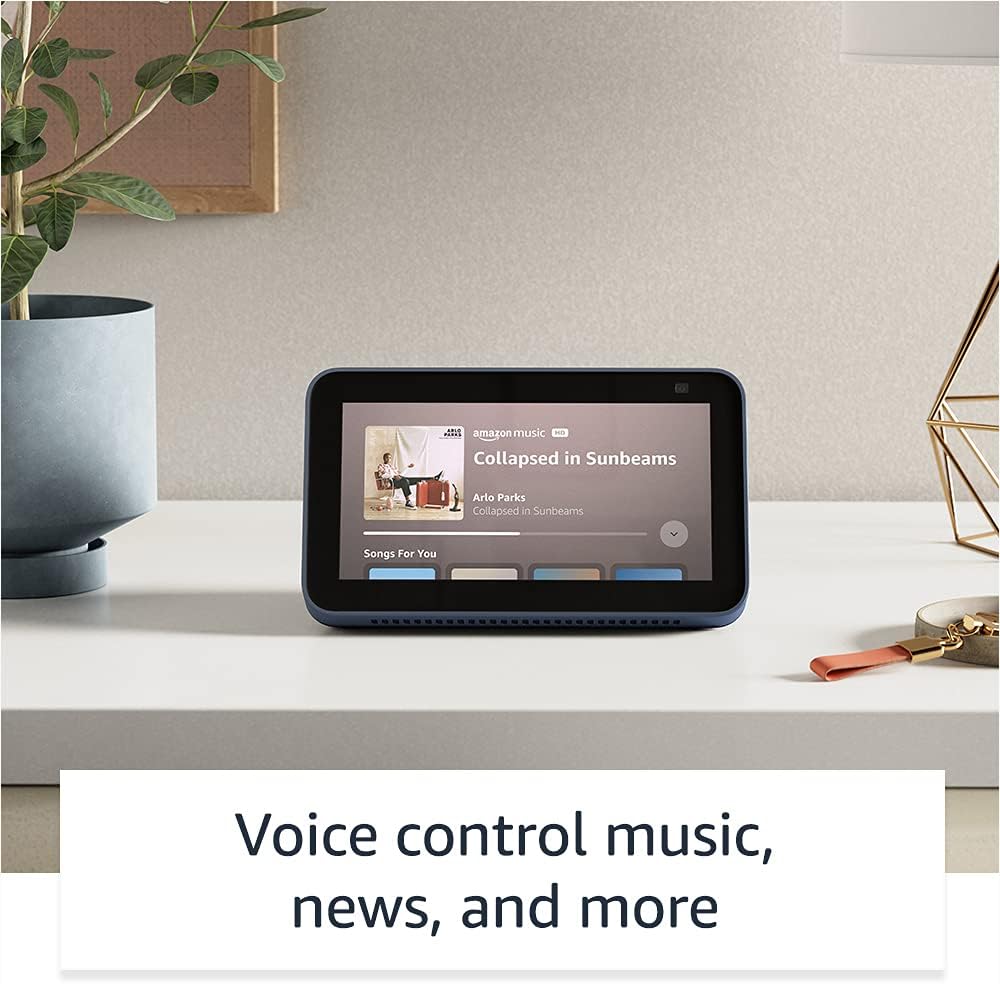
Image: The Echo Show 5 displaying a music playback screen, demonstrating its entertainment features.
การปรับแต่ง:
- Digital Photo Frame: Use Amazon Photos to turn your home screen into a digital photo frame.

Image: The Echo Show 5 displaying a personal photo, illustrating its use as a digital photo frame.
คุณสมบัติความเป็นส่วนตัว:
The Echo Show 5 is designed with multiple layers of privacy controls:
- Mic/Camera Off Button: ปุ่มทางกายภาพสำหรับตัดการเชื่อมต่อไมโครโฟนและกล้องด้วยระบบอิเล็กทรอนิกส์
- ชัตเตอร์กล้องในตัว: A physical shutter to cover the camera lens.
- Voice Recording Controls: ความสามารถในการ view และลบบันทึกเสียงของคุณ
- เทคโนโลยี Wake Word: The device only begins listening after detecting your chosen wake word.
- ตัวบ่งชี้การสตรีมมิ่ง: ตัวบ่งชี้ภาพจะแสดงเมื่อเสียงหรือวิดีโอกำลังถูกสตรีมไปยังคลาวด์

ภาพ: ภาพระยะใกล้ view of the Echo Show 5's top, highlighting the physical camera shutter button for privacy control.
คุณสมบัติการเข้าถึง:
Echo Show 5 มาพร้อมคุณสมบัติการเข้าถึงต่างๆ เพื่อปรับแต่ง Alexa ให้เหมาะกับความสามารถของคุณ คุณสมบัติเหล่านี้สามารถเข้าถึงได้ผ่านทาง การตั้งค่า → การเข้าถึง บนอุปกรณ์ของคุณ
- แตะเพื่อ Alexa: Interact with Alexa via touch through on-screen tiles or a keyboard.
- การฟังแบบปรับตัว: เพิ่มเวลาให้พูดจบก่อนที่ Alexa จะตอบกลับ
- อัตราการพูดที่ต้องการ: Control how fast or slow Alexa speaks.
- Captioning: Alexa Captioning, Call Captioning, and Closed Captioning provide text for supported content.
- แสดงและบอกเล่า: Helps identify products for users who are blind or visually impaired.
- เสียงView โปรแกรมอ่านหน้าจอ: Enables access for blind or visually impaired users.
- แว่นขยายหน้าจอ: ซูมเข้า/ออกและเลื่อนไปรอบๆ หน้าจอ
- แจ้งเตือนเมื่ออยู่ใกล้: เล่นเสียงแจ้งเตือนเมื่อตรวจพบอุปกรณ์อยู่ใกล้กับอุปกรณ์นั้น
- Kindle อ่านออกเสียง: Alexa สามารถอ่านหนังสือ Kindle ของคุณออกเสียงได้
- ข้อความเรียลไทม์: พิมพ์ข้อความแบบเรียลไทม์ระหว่างการสนทนาทางวิดีโอ
- Additional settings for Color Inversion, Color Correction, Request Sound, and more.
การซ่อมบำรุง
The Certified Refurbished Echo Show 5 has undergone rigorous testing and certification to ensure it looks and works like new. Regular maintenance is minimal.
- การทำความสะอาด: เช็ดหน้าจอและภายนอกตัวเครื่องเบาๆ ด้วยผ้าเนื้อนุ่มที่ไม่เป็นขุย หลีกเลี่ยงการใช้สารทำความสะอาดหรือสเปรย์ที่มีฤทธิ์กัดกร่อน
- การอัปเดตซอฟต์แวร์: Ensure your device is connected to Wi-Fi to receive automatic software security updates, which are guaranteed for at least four years after the device is last available for purchase as a new unit.
การแก้ไขปัญหา
หากคุณพบปัญหาเกี่ยวกับ Echo Show 5 โปรดลองทำตามขั้นตอนการแก้ไขปัญหาทั่วไปต่อไปนี้:
- วงจรไฟฟ้า: Unplug the device from the power outlet, wait for 30 seconds, and then plug it back in.
- ตรวจสอบการเชื่อมต่อ Wi-Fi: Ensure your Wi-Fi network is active and the device is connected. You can check network status in the device settings.
- Verify Internet Connectivity: Confirm your internet service is working by testing other devices on the same network.
- Check Microphone/Camera: Ensure the mic/camera off button is not activated and the camera shutter is open if you are trying to use these features.
- แอพอเล็กซ่า: Use the Alexa app on your smartphone or tablet to manage device settings, check for updates, and access further support resources.
- คำสั่งเสียง: พูดอย่างชัดเจนและตรวจสอบให้แน่ใจว่าคุณอยู่ในระยะของไมโครโฟนของอุปกรณ์
For more detailed troubleshooting or specific issues, refer to the help section within the Alexa app or visit the official Amazon support webเว็บไซต์.
ข้อมูลจำเพาะ
| คุณสมบัติ | รายละเอียด |
|---|---|
| ขนาด | 5.8” x 3.4” x 2.9” (148 มม. x 86 มม. x 73 มม.) |
| น้ำหนัก | 14.5 ออนซ์ (410 กรัม) |
| แสดง | หน้าจอสัมผัสขนาด 5.5” |
| กล้อง | กล้อง 2 ล้านพิกเซล พร้อมชัตเตอร์ในตัว |
| การเชื่อมต่อ WiFi | Dual-band wifi (802.11a/b/g/n/ac). Does not support ad-hoc networks. |
| การเชื่อมต่อบลูทูธ | A2DP support for audio streaming; AVRCP for voice control of connected mobile devices. PIN-code speakers not supported. |
| เสียง | ลำโพงในตัวขนาด 1.65 นิ้ว ครอบคลุมทุกย่านความถี่ |
| โปรเซสเซอร์ | มีเดียเทค เอ็มที 8163 |
| รุ่น | Echo Show 5 (2nd Gen) - 2021 release |
| ภาษา | Alexa พูดภาษาอังกฤษและภาษาสเปน |
การรับประกันและการสนับสนุน
Your Certified Refurbished Echo Show 5 comes with the same limited warranty as a new device. For specific details regarding your warranty, please refer to the documentation included with your device or visit the official Amazon website for Certified Refurbished Amazon devices.
For customer support, troubleshooting, and to manage your device settings, utilize the Alexa app on your compatible smartphone or tablet. You can also find extensive support resources and FAQs on the Amazon support webเว็บไซต์.
การอัปเดตความปลอดภัยของซอฟต์แวร์: This device receives guaranteed software security updates until at least four years after the device is last available for purchase as a new unit on Amazon's webเว็บไซต์
เอกสารที่เกี่ยวข้อง - Echo Show 5 (รุ่นที่ 2, รุ่น 2021)
 |
คู่มือเริ่มต้นใช้งานด่วนของ Amazon Echo Show 8 (รุ่นที่ 2) คำแนะนำในการเริ่มต้นใช้งาน Amazon Echo Show 8 (รุ่นที่ 2) ครอบคลุมการตั้งค่า คุณสมบัติ และความเป็นส่วนตัว |
 |
คู่มือผู้ใช้ Amazon Echo Show 8 (รุ่นที่ 2) คู่มือผู้ใช้ที่ครอบคลุมสำหรับ Amazon Echo Show 8 (รุ่นที่ 2) โดยมีรายละเอียดการตั้งค่า คุณสมบัติความเป็นส่วนตัว คำสั่งเสียง และเคล็ดลับในการใช้ Alexa |
 |
แนวทางการใช้งานแบรนด์ Amazon Echo และ Alexa สำหรับพันธมิตรภายนอก แนวทางอย่างเป็นทางการสำหรับพันธมิตรภายนอกเกี่ยวกับการใช้งานสินทรัพย์แบรนด์ Amazon Echo และ Alexa อย่างเหมาะสม ซึ่งรวมถึงโลโก้ ตัวอักษร สี และการนำเสนอในสื่อการตลาด รับรองความสอดคล้องและความสมบูรณ์ของแบรนด์ |
 |
คู่มือเริ่มต้นใช้งานด่วนของ Amazon Echo Show 8 (รุ่นที่ 2): การตั้งค่าและคุณสมบัติ เรียนรู้วิธีตั้งค่าและใช้งาน Amazon Echo Show 8 (รุ่นที่ 2) คู่มือนี้ครอบคลุมฟีเจอร์ของอุปกรณ์ การควบคุมความเป็นส่วนตัว และคำสั่ง Alexa ที่จำเป็นสำหรับงานประจำวัน |
 |
คู่มือเริ่มต้นใช้งานด่วนของ Amazon Echo Show 5 (รุ่นที่ 2) คู่มือเริ่มต้นใช้งานอย่างรวดเร็วสำหรับ Amazon Echo Show 5 (รุ่นที่ 2) ครอบคลุมการตั้งค่า คุณสมบัติความเป็นส่วนตัว และการใช้งานพื้นฐานกับ Alexa |
 |
คู่มือการตั้งค่าและผู้ใช้ Amazon Echo Show 8 (รุ่นที่ 3) คู่มือครอบคลุมในการตั้งค่าและใช้งาน Amazon Echo Show 8 (รุ่นที่ 3) รวมถึงคุณลักษณะ การควบคุมความเป็นส่วนตัว และการบูรณาการบ้านอัจฉริยะ |