1. บทนำ
This manual provides detailed instructions for the safe installation, operation, and maintenance of your Olucia Dico IP65 White Recessed Veranda Spotlights. Please read this manual thoroughly before installation and retain it for future reference. These spotlights are designed for both indoor and outdoor use, including bathrooms, thanks to their IP65 rating.
2. คำแนะนำด้านความปลอดภัย
- ความปลอดภัยทางไฟฟ้า: Installation must be performed by a qualified electrician or competent person in accordance with local electrical codes and regulations. Always disconnect power at the main circuit breaker before installation or maintenance.
- เล่มที่tage: ตรวจสอบแหล่งจ่ายไฟ voltage ตรงตามข้อกำหนดที่ระบุไว้บนฉลากผลิตภัณฑ์
- ระดับ IP65: The IP65 rating indicates protection against dust ingress and low-pressure water jets from any direction. While suitable for wet locations, avoid submerging the product in water.
- ความร้อน: Do not cover the spotlights with insulating material unless specifically designed for it. Ensure adequate ventilation around the fixtures.
- ความเสียหาย: Do not operate the product if any part is damaged. Contact customer support for replacement parts.
- การทำความสะอาด: ใช้ผ้าแห้งนุ่มๆ เช็ดทำความสะอาด ห้ามใช้สารทำความสะอาดที่มีฤทธิ์กัดกร่อนหรือตัวทำละลาย
3. เนื้อหาบรรจุภัณฑ์
ตรวจสอบว่าส่วนประกอบทั้งหมดมีอยู่ก่อนเริ่มการติดตั้ง:
- Recessed Spotlights (Quantity: 8)
- หน่วยจ่ายไฟ
- Connection Set (Splitter/Hub)
- รีโมทคอนโทรล
- คู่มือผู้ใช้ (เอกสารนี้)
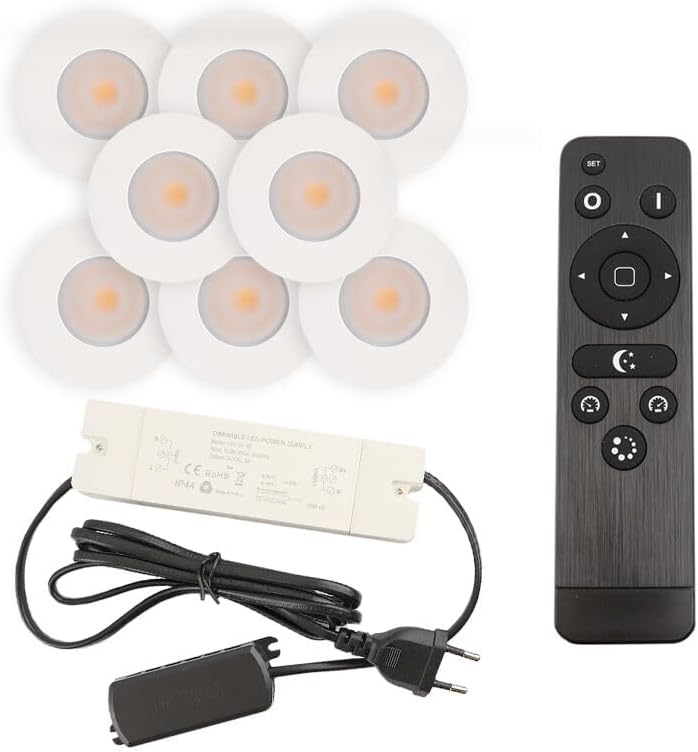
ภาพที่ 3.1: เกินview of the Olucia Dico IP65 spotlight set, including eight white recessed spotlights, a power supply unit, a connection hub, and a remote control.
4. การตั้งค่าและการติดตั้ง
Follow these steps for proper installation. Ensure power is disconnected before starting.
4.1 การเตรียมพื้นที่การติดตั้ง
- เลือกสถานที่: Select appropriate locations for each spotlight, ensuring sufficient space behind the mounting surface for the fixture and wiring.
- เจาะรู: Drill mounting holes of the specified diameter (refer to specifications for exact dimensions, typically around 30-32mm for a 36mm outer diameter spotlight) in the ceiling or veranda structure.
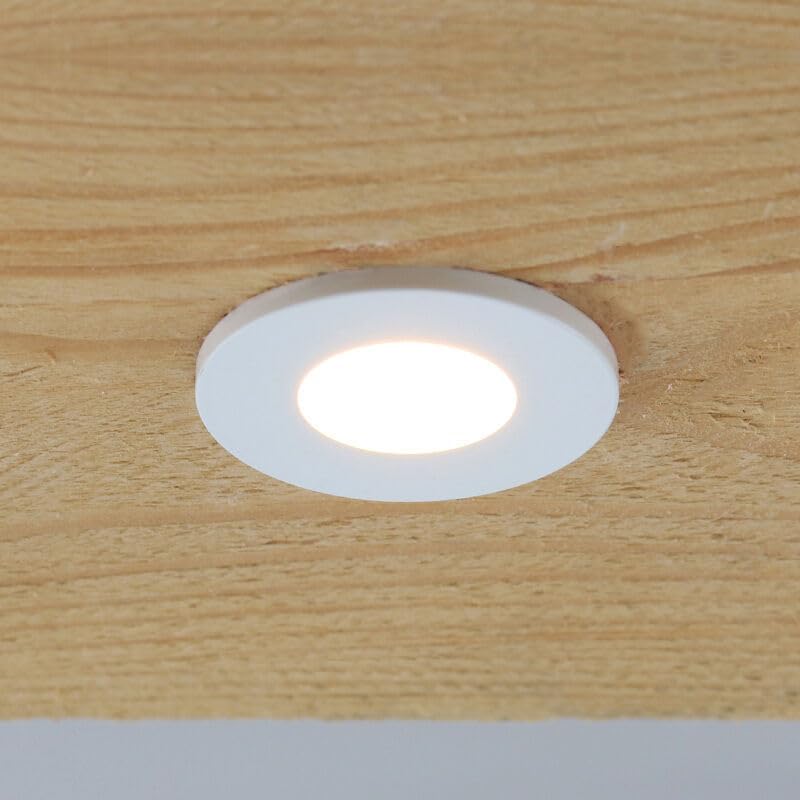
ภาพที่ 4.1: An Olucia Dico spotlight seamlessly integrated into a wooden ceiling panel, demonstrating a typical installed appearance.

ภาพที่ 4.2: รายละเอียด view of a single Olucia Dico recessed spotlight, highlighting its round, white design and integrated light source.
4.2 การเดินสายและการเชื่อมต่อ
- Connect Spotlights to Hub: Each spotlight has a small connector. Plug these connectors into the corresponding ports on the connection hub. Ensure a secure fit.
- Connect Hub to Power Supply: Connect the output cable from the connection hub to the input cable of the power supply unit.
- Connect Power Supply to Mains: เสียบปลั๊กเครื่องจ่ายไฟเข้ากับเต้ารับไฟฟ้ามาตรฐาน

ภาพที่ 4.3: The power supply unit and the multi-port connection hub, illustrating how the individual spotlights are connected to the main power source.
4.3 Installing the Spotlights
- ติดตั้งไฟสปอตไลท์: Gently push each spotlight into its drilled hole. The spring clips on the sides of the spotlight will hold it securely in place.
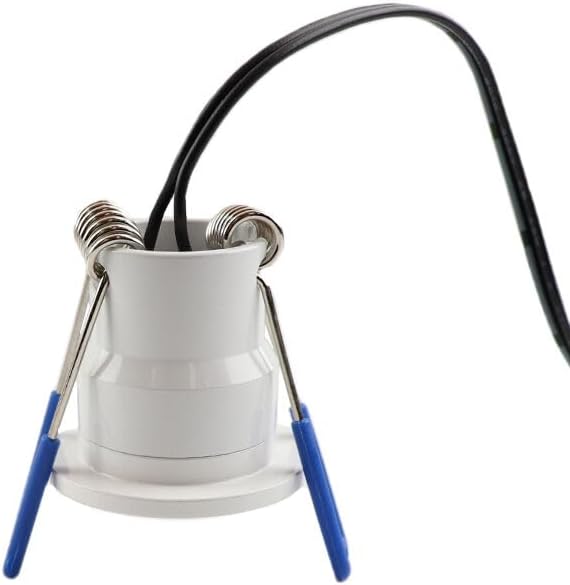
ภาพที่ 4.4: The back of an Olucia Dico spotlight, clearly showing the spring-loaded clips used for secure recessed installation.
Once all spotlights are installed and connected, restore power at the main circuit breaker.
5. คู่มือการใช้งาน
The Olucia Dico spotlights are controlled using the included remote control.
5.1 ฟังก์ชั่นการควบคุมระยะไกล

ภาพที่ 5.1: The remote control for the Olucia Dico spotlights, showing its various buttons and the battery compartment on the reverse side.
- ปุ่ม ตลท.: Used for pairing the remote with the spotlights (if not pre-paired) or for advanced settings. Refer to specific pairing instructions if lights do not respond.
- O (On) Button: Turns the spotlights ON.
- I (Off) Button: Turns the spotlights OFF.
- ปุ่มลูกศร (ขึ้น/ลง): Adjust brightness levels. Up increases brightness, Down decreases brightness.
- ปุ่มลูกศร (ซ้าย/ขวา): Adjust color temperature (if applicable, for models with tunable white light) or cycle through preset modes.
- Crescent Moon Button: Activates a low-light/night mode setting.
- Clock Buttons: May function as timer settings (e.g., 30 min, 60 min auto-off).
- Starburst/Mode Button: Cycles through different lighting scenes or effects.
การติดตั้งแบตเตอรี่: The remote control requires AAA batteries. Open the battery compartment on the back of the remote and insert batteries according to the polarity markings.
6. การบำรุงรักษา
- การทำความสะอาด: Ensure the power is off before cleaning. Wipe the spotlights with a soft, slightly damp ผ้า. ห้ามใช้สารเคมีรุนแรงหรือวัสดุกัดกร่อน
- การตรวจสอบ: Periodically inspect the wiring and fixtures for any signs of damage or wear. If damage is found, disconnect power and contact a qualified electrician or customer support.
- อายุการใช้งาน LED: The integrated LED light sources are designed for long life and are not user-replaceable.
7 การแก้ไขปัญหา
| ปัญหา | สาเหตุที่เป็นไปได้ | สารละลาย |
|---|---|---|
| ไฟไม่เปิด | No power supply; remote control batteries depleted; remote not paired; loose connection. | Check main power switch/circuit breaker. Replace remote batteries. Re-pair remote (refer to SET button instructions). Check all wiring connections. |
| ไฟกระพริบหรือหรี่ลงอย่างไม่คาดคิด | Unstable power supply; faulty connection; remote interference. | Ensure stable power. Check connections. Try operating from closer distance or away from other wireless devices. |
| รีโมทคอนโทรลไม่ตอบสนอง | Batteries depleted; remote not paired; obstruction between remote and receiver. | Replace batteries. Re-pair remote. Ensure clear line of sight to the receiver (usually integrated into the power supply or hub). |
8. ข้อมูลจำเพาะทางเทคนิค
| คุณสมบัติ | รายละเอียด |
|---|---|
| ยี่ห้อ | โอลูเซีย |
| หมายเลขรุ่น | SRC80000000C045 |
| Product Dimensions (per spotlight) | 1 x 3.6 x 3.5 cm (10L x 36B x 35H millimeter) |
| ระดับการป้องกันน้ำเข้า (IP) | มาตรฐาน IP65 (กันฝุ่น ป้องกันน้ำแรงดันต่ำ) |
| สี | สีขาว |
| รูปร่าง | กลม |
| จำนวนรายการ | 8 spotlights per set |
| ผู้ผลิต | โอลูเซีย |
9. ข้อมูลการรับประกัน
Olucia products are manufactured to high-quality standards. For specific warranty terms and conditions, please refer to the warranty card included with your purchase or visit the official Olucia webไซต์นี้ โปรดเก็บหลักฐานการซื้อไว้เพื่อใช้ยืนยันการรับประกัน
10. การสนับสนุนลูกค้า
If you encounter any issues or have questions regarding your Olucia Dico spotlights, please contact Olucia customer support through their official website or the retailer where the product was purchased. Please have your model number (SRC80000000C045) and proof of purchase ready when contacting support.


