1. บทนำ
This manual provides comprehensive instructions for the installation, operation, and maintenance of the Rice Lake 720i Universal Indicator. The 720i is a programmable weight indicator/controller designed for industrial applications requiring batch formulation, inventory management, and traceability. It features a robust NEMA Type 4X/IP66 stainless steel enclosure and a user-friendly operator keypad.
Please read this manual thoroughly before operating the device to ensure proper function and safety.
2. ข้อมูลด้านความปลอดภัย
ปฏิบัติตามข้อควรระวังเพื่อความปลอดภัยต่อไปนี้เสมอ:
- Ensure the power supply (85-260VAC) matches the device requirements.
- Do not open the enclosure unless instructed by qualified personnel.
- Protect the device from extreme temperatures and moisture beyond its NEMA Type 4X/IP66 rating.
- โปรดตัดกระแสไฟก่อนดำเนินการบำรุงรักษาหรือติดตั้งใดๆ
3. สินค้าหมดview และส่วนประกอบ
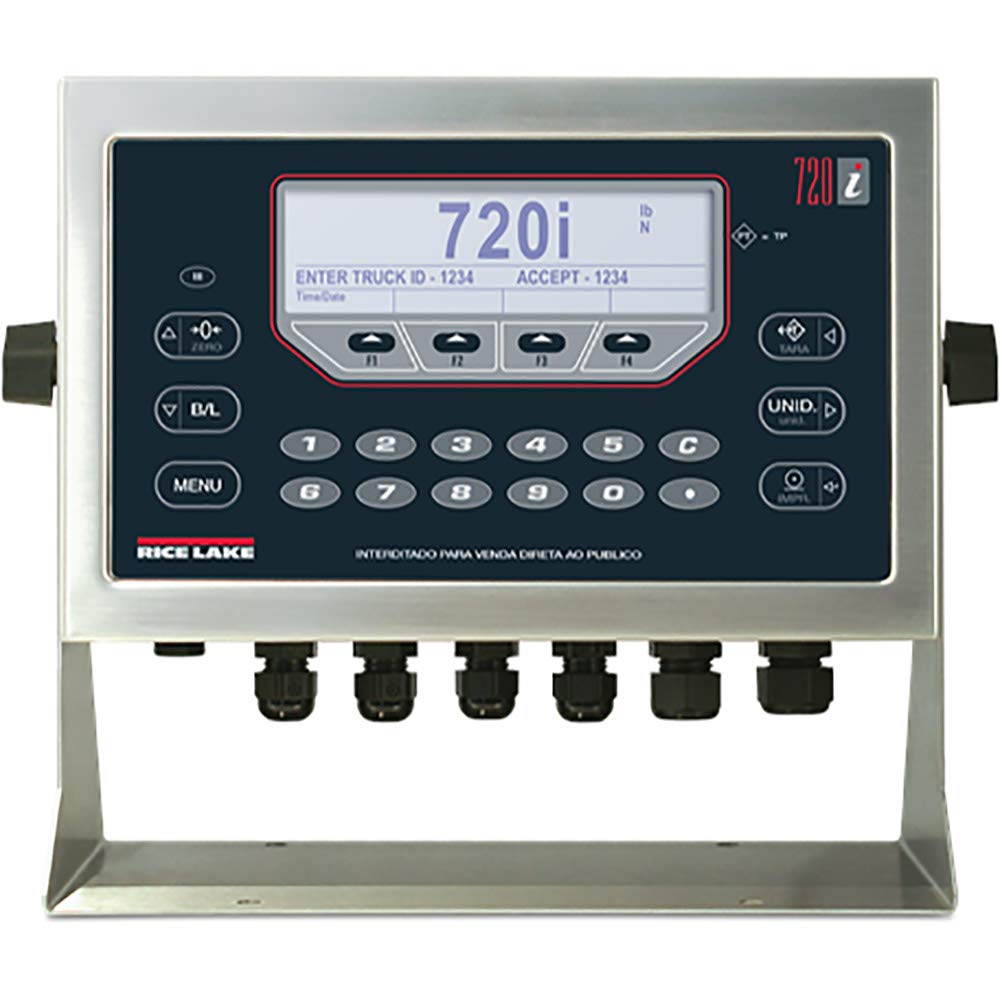
The Rice Lake 720i Universal Indicator is housed in a durable stainless steel enclosure, designed for harsh industrial environments. Key features include:
- แสดง: 5.3 in x 1.5 in LCD display for clear data visualization.
- ปุ่มกด: 22-key membrane panel with tactile feedback for precise input.
- การเชื่อมต่อ: Two full duplex serial ports for peripheral equipment integration.
- Internal Channels: Eight channels on the CPU board for versatile applications.
- เอกสารแนบ: NEMA Type 4X/IP66 rated stainless steel for protection against dust and water.
4. การตั้งค่าและการติดตั้ง
4.1 การแกะกล่อง
Carefully remove the 720i indicator from its packaging. Inspect for any signs of damage during transit. Retain all packaging materials for future transport or storage.
4.2 การติดตั้ง
The 720i indicator can be mounted in universal or panel-mount enclosure styles. Ensure the mounting surface is stable and capable of supporting the device's weight (approximately 9.5 pounds). Refer to the specific mounting kit instructions for detailed steps.
4.3 การเชื่อมต่อทางไฟฟ้า
- แหล่งจ่ายไฟ: Connect the indicator to an 85-260VAC power source. Ensure proper grounding.
- การเชื่อมต่อโหลดเซลล์: Connect load cells to the appropriate terminals. The 720i supports eight channels on its CPU board.
- พอร์ตอนุกรม: Utilize the two full duplex serial ports for connecting peripheral devices such as printers, remote displays, or computers.
คำเตือน: All electrical connections should be performed by a qualified technician to prevent damage to the unit or personal injury.
5. คู่มือการใช้งาน
The 720i indicator features a 22-key membrane keypad for operation. The LCD display provides real-time data and operator prompts.
5.1 การชั่งน้ำหนักพื้นฐาน
- เปิดเครื่อง: Turn on the indicator. The display will show a self-test sequence, then the current weight.
- การทำให้เป็นศูนย์: กดปุ่ม ศูนย์ button to set the display to zero when the scale is empty.
- ทาริ่ง: วางภาชนะเปล่าลงบนเครื่องชั่ง กดปุ่ม ทาร่า button to subtract the container's weight. The display will show zero.
- การชั่งน้ำหนัก: Place the item to be weighed on the scale. The display will show the net weight.
5.2 Batching Operations
The 720i supports configurable batch engine or ProAction software for batching. Refer to the software manual for detailed programming instructions.
- Use the numeric keypad (0-9) and C (Clear) button for data entry.
- Follow on-screen prompts for entering batch parameters, such as "ENTER TRUCK ID" or "ACCEPT".
- การ เมนู button provides access to advanced settings and batch configurations.
5.3 การสลับหน่วย
กดปุ่ม ยูนิด button to cycle through available weight units (e.g., pounds (lb), kilograms (kg), Newtons (N)).
6. การบำรุงรักษา
6.1 การทำความสะอาด
The stainless steel enclosure can be cleaned with a damp cloth and mild detergent. Avoid abrasive cleaners or solvents that could damage the display or keypad membrane.
6.2 การสอบเทียบ
Periodic calibration is essential for maintaining accuracy. Refer to the technical service manual or contact authorized service personnel for calibration procedures.
6.3 การตรวจสอบ
Regularly inspect all cables and connections for wear or damage. Ensure the enclosure seals are intact to maintain the NEMA Type 4X/IP66 rating.
7 การแก้ไขปัญหา
| ปัญหา | สาเหตุที่เป็นไปได้ | สารละลาย |
|---|---|---|
| Indicator does not power on. | ไม่มีแหล่งจ่ายไฟหรือการเชื่อมต่อผิดพลาด | Check power cable and source. Ensure correct voltage (85-260VAC). |
| การอ่านค่าน้ำหนักไม่แม่นยำ | Needs calibration, damaged load cell, or unstable environment. | Perform calibration. Inspect load cells and connections. Ensure stable operating conditions. |
| ปุ่มกดไม่ตอบสนอง | Keypad membrane damage or internal fault. | Clean keypad surface. If problem persists, contact technical support. |
| หน้าจอแสดงข้อความแสดงข้อผิดพลาด | System error or overload. | Refer to the specific error code in the technical manual. Remove any overload. |
For issues not listed here, please contact Rice Lake technical support.
8. ข้อมูลจำเพาะ
- แบบอย่าง: 720ไอ
- หมายเลขชิ้นส่วน: 115448
- เอกสารแนบ: NEMA Type 4X/IP66, Stainless Steel
- แสดง: 5.3 in x 1.5 in LCD
- ปุ่มกด: แผงเมมเบรน 22 ปุ่ม สัมผัสได้
- พอร์ตอนุกรม: 2 ฟูลดูเพล็กซ์
- CPU Board Channels: 8
- กำลังไฟเข้า: 85-260VAC
- ขนาดสินค้า : 10.5 x 5.25 x 9.66 นิ้ว
- น้ำหนักสินค้า: 9.5 ปอนด์
- การปฏิบัติตาม: ROHS Compliant, NTEP
9. การรับประกันและการสนับสนุน
For warranty information, please refer to the documentation provided with your purchase or visit the official Rice Lake website. Technical support can be reached through the contact information available on the Rice Lake webเว็บไซต์.
ระบบชั่งน้ำหนักข้าวทะเลสาบ
www.ricelake.com


