การแนะนำ
This manual provides essential information for setting up, operating, maintaining, and troubleshooting your HP 240 G7 Laptop, Model 1S5F1PA#ACJ. Please read this guide thoroughly to ensure proper use and to maximize the lifespan of your device.

ภาพ: ด้านหน้า view of the HP 240 G7 Laptop with the screen displaying the Windows operating system desktop.
เนื้อหาแพ็คเกจ
โปรดตรวจสอบให้แน่ใจว่ามีสิ่งของต่อไปนี้อยู่ในบรรจุภัณฑ์ของผลิตภัณฑ์ของคุณ:
- HP 240 G7 Laptop (Model 1S5F1PA#ACJ)
- อะแดปเตอร์ไฟ AC และสายไฟ
- เอกสารประกอบ (คู่มือเริ่มต้นใช้งานฉบับย่อ, ข้อมูลการรับประกัน)
สินค้าเกินview
Familiarize yourself with the physical features and ports of your HP 240 G7 Laptop.
ส่วนประกอบด้านซ้าย

Image: Left side of the laptop, illustrating the various ports and connectors.
- ขั้วต่อไฟ AC: สำหรับการเชื่อมต่ออะแดปเตอร์ไฟฟ้า
- พอร์ต RJ-45 (อีเธอร์เน็ต): สำหรับการเชื่อมต่อเครือข่ายแบบมีสาย
- พอร์ต HDMI 1.4b: สำหรับเชื่อมต่อกับจอแสดงผลภายนอกหรือโปรเจ็กเตอร์
- พอร์ต USB 3.1 Gen 1 (x2): สำหรับเชื่อมต่ออุปกรณ์ USB ความเร็วสูง
- แจ็คคอมโบหูฟัง/ไมโครโฟน: For connecting a headset or external audio devices.
ส่วนประกอบด้านขวา
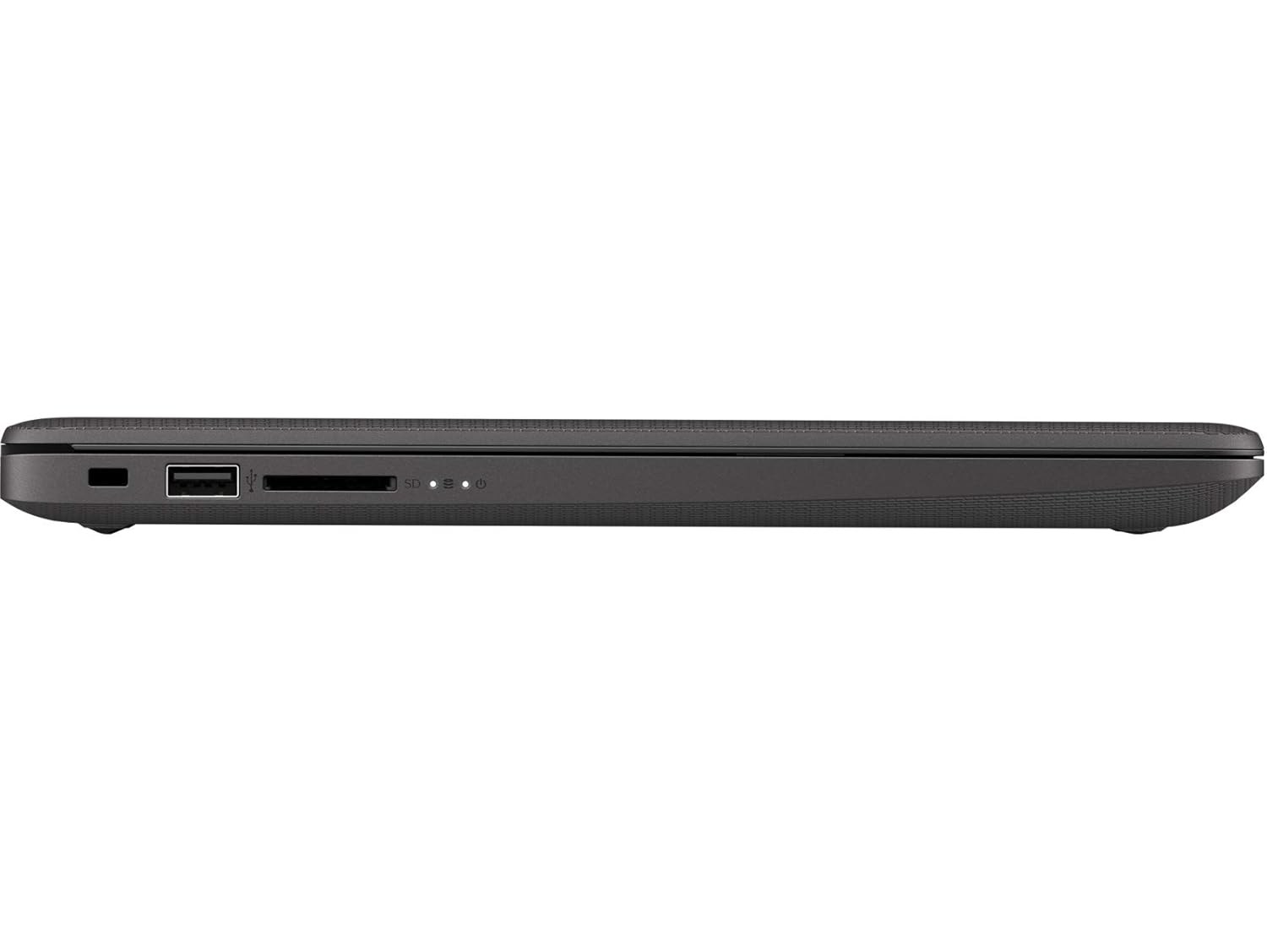
Image: Right side of the laptop, illustrating the USB port and media card reader.
- ช่องล็อคเพื่อความปลอดภัย: สำหรับติดสายกล้องวงจรปิด
- พอร์ต USB 2.0: สำหรับเชื่อมต่ออุปกรณ์ USB มาตรฐาน
- Multi-Format Digital Media Reader: รองรับการ์ดหน่วยความจำ SD, SDHC และ SDXC
ด้านบนและด้านหลัง Views

ภาพ: จากบนลงล่าง view of the laptop with the lid closed, showing the HP logo.

ภาพ: มุมเอียง view of the laptop's back, highlighting the textured finish and HP logo.
The top cover features the HP logo. The back of the laptop is designed for durability and aesthetics.
การตั้งค่า
- เชื่อมต่อพลังงาน: Plug the AC power adapter into the laptop's AC power connector and then into a wall outlet.
- เปิดเครื่องครั้งแรก: Open the laptop lid and press the power button. The laptop will begin its initial boot sequence.
- การตั้งค่าระบบปฏิบัติการ: ปฏิบัติตามคำแนะนำบนหน้าจอเพื่อดำเนินการติดตั้ง Windows 10 Pro ให้เสร็จสิ้น รวมถึงการเลือกภาษา การเชื่อมต่อเครือข่าย และการสร้างบัญชีผู้ใช้
การดำเนินงาน
การจัดการพลังงาน
- เปิดเครื่อง: กดปุ่มเปิด/ปิดที่อยู่บนแผงแป้นพิมพ์
- ปิดระบบ: คลิกปุ่มเริ่ม จากนั้นคลิกเปิด/ปิดเครื่อง > ปิดเครื่อง
- โหมดสลีป: คลิกปุ่ม Start จากนั้นเลือก Power > Sleep หรือปิดฝาแล็ปท็อป
คีย์บอร์ดและทัชแพด
- แป้นพิมพ์: Use the integrated keyboard for typing. Function keys (F1-F12) provide shortcuts for various system functions when pressed with the Fn key.
- ทัชแพด: ทัชแพดรองรับการใช้งานมัลติทัชสำหรับการนำทาง การเลื่อน และการซูม โปรดดูการตั้งค่าของ Windows สำหรับการปรับแต่งเพิ่มเติม
การเชื่อมต่อ
- ไวไฟ : Connect to wireless networks via the Realtek RTL8822CE 802.11a/b/g/n/ac (2x2) Wi-Fi adapter. Access Wi-Fi settings through the Windows taskbar.
- บลูทูธ: Pair Bluetooth 5 compatible devices such as headphones or mice. Manage Bluetooth devices in Windows settings.
- จอแสดงผลภายนอก: Connect an external monitor or projector using the HDMI 1.4b port. Press ปุ่ม Windows + P to manage display modes.
การซ่อมบำรุง
- การทำความสะอาด: ใช้ผ้านุ่มไม่เป็นขุยเช็ดเล็กน้อยampened with water or a screen cleaner to clean the display and exterior surfaces. Avoid harsh chemicals.
- การดูแลแบตเตอรี่ To prolong battery life, avoid extreme temperatures. Periodically allow the battery to discharge partially before recharging.
- การอัปเดตซอฟต์แวร์: Regularly check for and install Windows updates and HP driver updates to ensure optimal performance and security.
- การสำรองข้อมูล: สำรองข้อมูลสำคัญไปยังไดรฟ์ภายนอกหรือที่เก็บข้อมูลบนคลาวด์เป็นประจำเพื่อป้องกันการสูญหายของข้อมูล
การแก้ไขปัญหา
This section addresses common issues you might encounter with your HP 240 G7 Laptop.
ปัญหาประสิทธิภาพของระบบ
- ประสิทธิภาพการทำงานช้า: If the system feels slow, check for background applications consuming resources. Ensure sufficient free space on the hard drive. Consider upgrading RAM if performance remains an issue for your usage.
- Laptop Not Booting: Ensure the power adapter is securely connected and the battery has sufficient charge. Try performing a hard reset by holding the power button for 15 seconds. If the issue persists, contact HP Support.
จอภาพและกราฟิก
- Whitish/Dull Screen: Adjust display brightness and contrast settings in Windows. Ensure display drivers are up to date. Note that the display resolution is 1366 x 768, which may appear less sharp compared to higher-resolution screens.
- ไม่มีจอแสดงผล: If the screen is black, try connecting an external monitor to verify if the issue is with the laptop's internal display. Restart the laptop.
ความร้อนสูงเกินไป
- ความร้อนสูงเกินไป: Ensure the laptop's vents are not obstructed. Use the laptop on a hard, flat surface to allow for proper airflow. Avoid operating in direct sunlight or hot environments. If a specific area, like the palm rest, feels excessively hot, this could indicate internal component heat. Ensure all system drivers and BIOS are updated.
หากต้องการความช่วยเหลือเพิ่มเติม โปรดติดต่อฝ่ายสนับสนุนของ HP webเว็บไซต์หรือติดต่อฝ่ายบริการลูกค้าของพวกเขา
ข้อมูลจำเพาะ
| คุณสมบัติ | รายละเอียด |
|---|---|
| ชื่อรุ่น | เอชพี 240 จี 7 |
| หมายเลขรุ่นสินค้า | 1S5F1PA#ACJ |
| โปรเซสเซอร์ | Intel Core i3-1005G1 (1.2 GHz base, up to 3.4 GHz with Intel Turbo Boost, 4 MB L3 Cache, 2 Cores) |
| แรม | 4 GB DDR4-2666 SDRAM (1 x 4 GB) |
| พื้นที่จัดเก็บ | 1 TB 5400 RPM SATA HDD |
| แสดง | 14-inch Diagonal, HD (1366 x 768), Anti-glare, 220 Nits, 45% NTSC |
| กราฟฟิก | กราฟิก Intel UHD |
| ระบบปฏิบัติการ | วินโดวส์ 10 โปร |
| การเชื่อมต่อแบบไร้สาย | Realtek RTL8822CE 802.11a/b/g/n/ac (2x2) Wi-Fi and Bluetooth 5 Combo |
| พอร์ต | 2x USB 3.1 Gen 1, 1x USB 2.0, 1x HDMI 1.4b, 1x RJ-45, 1x Headphone/Microphone Combo, 1x AC Power, 1x Multi-Format Digital Media Reader |
| ขนาด (กว้าง x ลึก x สูง) | 33.5 x 23.4 x 1.99 ซม. |
| น้ำหนัก | 1.52 กก. |
| แบตเตอรี่ | Lithium Battery, 4.9 Watt Hours |
การรับประกันและการสนับสนุน
Your HP 240 G7 Laptop comes with a standard manufacturer's warranty. Please refer to the warranty documentation included in your package for specific terms and conditions.
For technical support, driver downloads, or service inquiries, please visit the official HP support website or contact HP customer service. You can find more information and resources on the ร้าน HP บน Amazon หรือ HP หลัก webเว็บไซต์.