การแนะนำ
The SANWA Multi Device Bluetooth Keyboard with Touchpad (Model GSKBBT066) is designed for versatile use across various operating systems and devices. This compact, rechargeable keyboard features a built-in touchpad, multi-device switching capabilities, and convenient shortcut keys, enhancing productivity and entertainment experiences.
การตั้งค่า
1. การชาร์จคีย์บอร์ด
Before initial use, fully charge the keyboard. Connect the provided USB charging cable to the keyboard's charging port and a USB power source. A full charge typically takes approximately 2 hours and provides up to 30 hours of constant use.

Image: The SANWA Bluetooth keyboard connected via USB cable to a wall adapter for charging.
2. การจับคู่กับอุปกรณ์
The keyboard supports connection to up to three Bluetooth devices simultaneously. Use the dedicated pairing buttons to switch between connected devices.
- ตรวจสอบให้แน่ใจว่าคีย์บอร์ดได้รับการชาร์จและเปิดอยู่
- กดปุ่ม Fn key and one of the device selection keys (1, 2, หรือ 3) simultaneously to select a channel. The corresponding LED will blink.
- กดปุ่ม แท็บ key labeled 'Pairing' to enter pairing mode. The selected channel's LED will blink rapidly.
- บนอุปกรณ์ของคุณ (แล็ปท็อป แท็บเล็ต สมาร์ทโฟน) เปิดใช้งานบลูทูธและค้นหาอุปกรณ์ที่ใช้งานได้
- Select 'SANWA GSKBBT066' from the list of found devices.
- ปฏิบัติตามคำแนะนำบนหน้าจอเพื่อดำเนินการจับคู่ให้เสร็จสมบูรณ์
- หากต้องการสลับระหว่างอุปกรณ์ที่จับคู่ เพียงกด Fn + 1, Fn + 2, หรือ Fn + 3.

Image: A close-up of the keyboard showing the 'Fn' key, 'Tab' (Pairing) key, and the device selection LEDs (1, 2, 3).
Video: An instructional video demonstrating the features and usage of the SANWA Bluetooth Rechargeable Keyboard with Touchpad.
คำแนะนำการใช้งาน
Keyboard Layout and Typing
The keyboard features a standard QWERTY layout with comfortable pantograph scissor-structure keys, designed for sensitive response and reduced typing noise. The layout is optimized for efficient typing.

ภาพ: จากบนลงล่าง view of the SANWA Bluetooth keyboard, showcasing รูปแบบเต็มของมัน

Image: Close-up of the keyboard keys, illustrating the pantograph scissor-structure for comfortable typing.
ปุ่มลัด
The keyboard includes 20 practical shortcut keys for quick access to various functions and media controls. These keys are typically activated by pressing the Fn key in combination with the corresponding function key (F1-F12) or dedicated media keys.
- F1: ลดความสว่าง
- F2: เพิ่มความสว่าง
- F3: ฟังก์ชั่นการค้นหา
- F4: งาน View
- F5: Switch to Desktop
- F6: สลับแอปพลิเคชัน
- F7: ปิดเสียง
- F8: ปริมาณ -
- F9: เล่ม +
- F10: เพลงก่อนหน้า
- F11: เล่น/หยุดชั่วคราว
- F12: เพลงต่อไป
- Dedicated keys for Virtual Keyboard, Input Language Switch, and Open Browser.
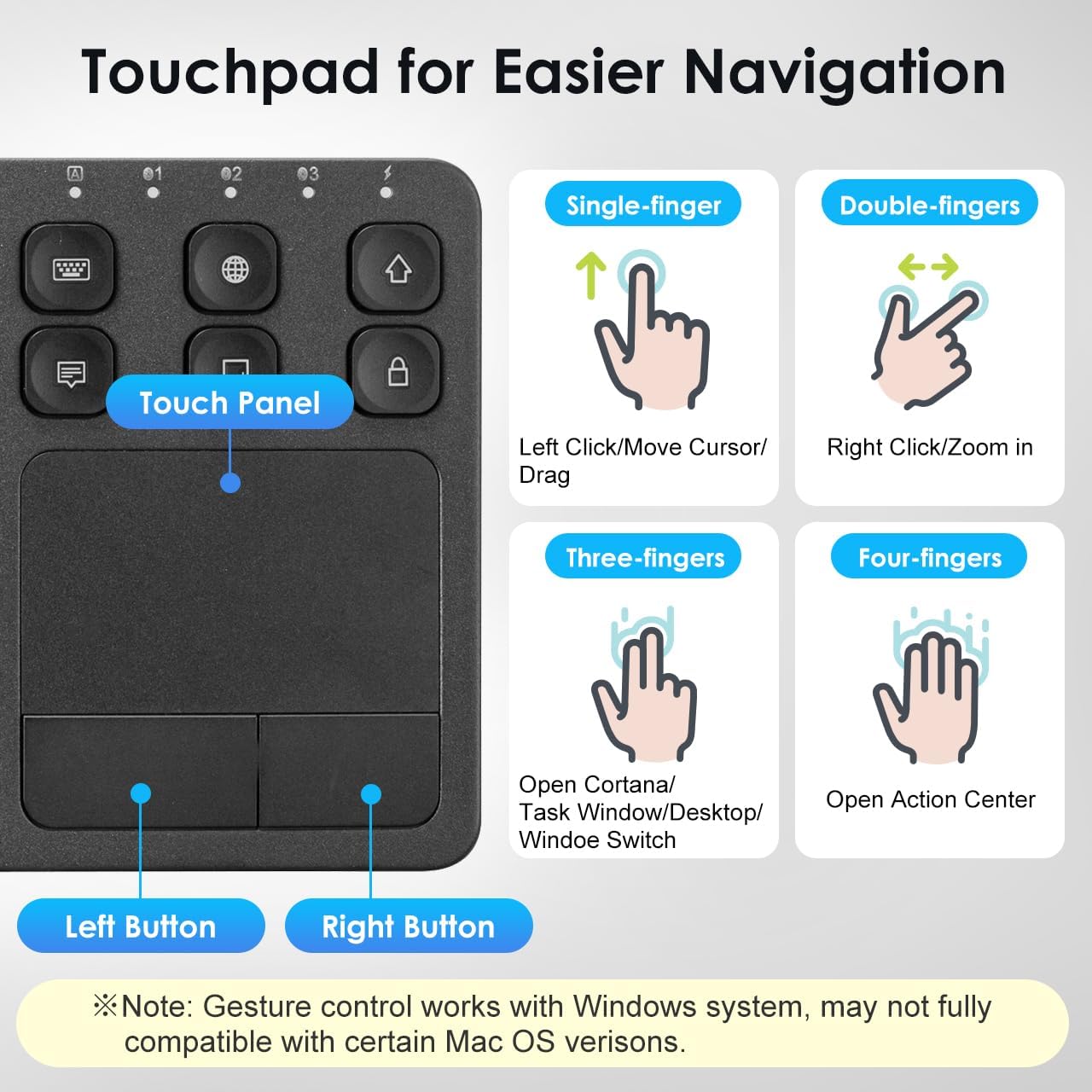
Image: The keyboard layout with icons indicating the functions of the shortcut keys.
Touchpad Functionality and Gestures (Windows System)
The integrated multi-touch touchpad provides effortless navigation. It supports various finger gestures, primarily optimized for Windows systems. Note that gesture compatibility may vary with certain macOS versions.

ภาพ: รายละเอียด view of the touchpad and its gesture guide.
| ท่าทาง | การทำงาน |
|---|---|
| Single-finger tap/drag | Left Click / Move Cursor / Drag |
| แตะด้วยสองนิ้ว | คลิกขวา |
| การบีบด้วยสองนิ้ว | ซูมเข้า / ซูมออก |
| เลื่อนโดยใช้สองนิ้ว | เลื่อนหน้าขึ้น / เลื่อนหน้าลง |
| แตะสามนิ้ว | Open Cortana / Task Window / Desktop / Window Switch |
| แตะสี่นิ้ว | เปิดศูนย์ปฏิบัติการ |
ความเข้ากันได้
The SANWA Bluetooth Keyboard with Touchpad is broadly compatible with a range of operating systems and devices, making it a versatile tool for various computing needs.
- ระบบปฏิบัติการ: Windows 13/11/10/8.1/8/7/XP/Vista/98/2000/Me, macOS 10.12-10.15, Android 7.0-10, iPad OS13, iOS13 and later versions.
- อุปกรณ์ที่รองรับ: Desktop computers, laptops, cell phones, tablets, Mac, iPad, iPhone, Android TV BOX, Smart TVs, HTPC.
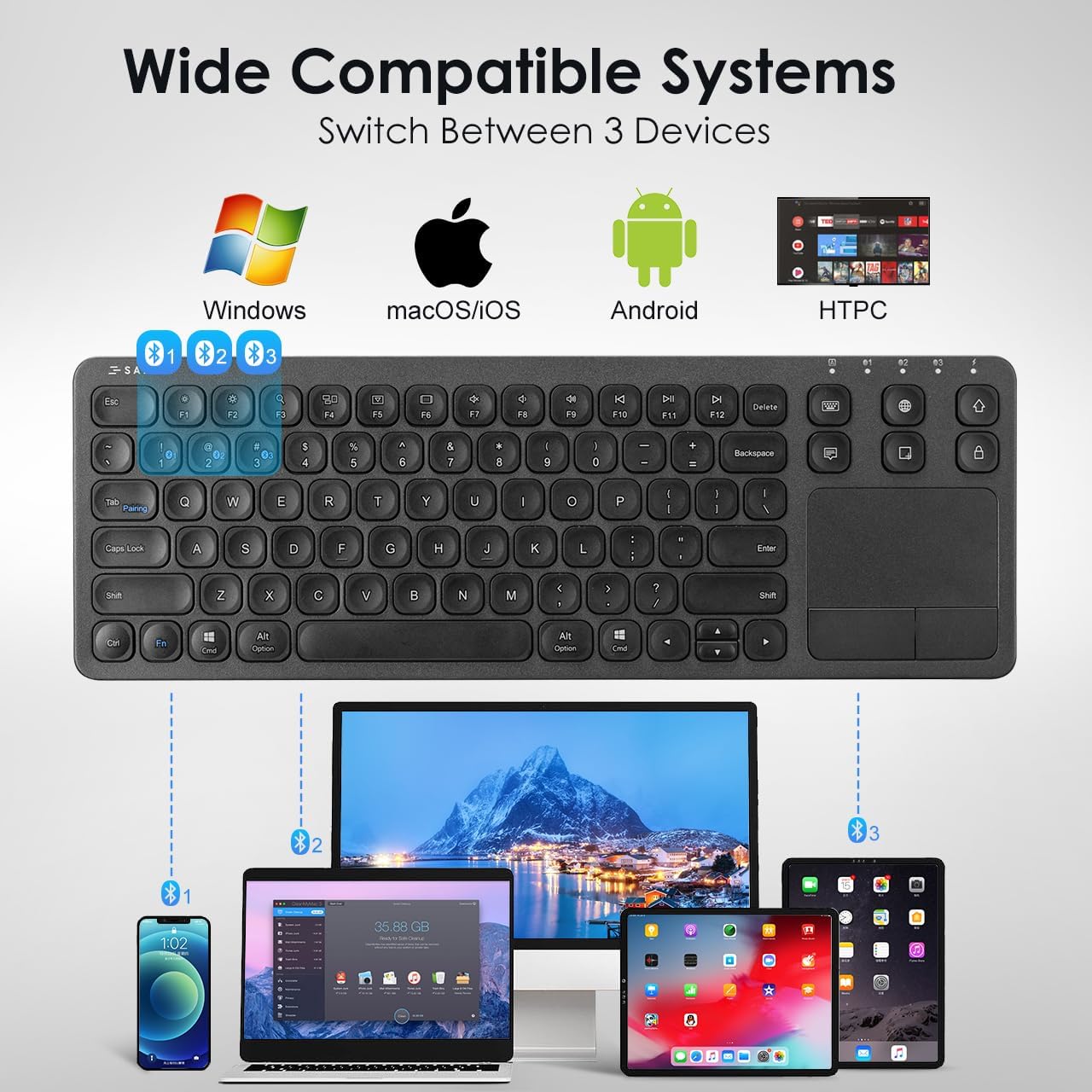
Image: The keyboard shown connected to a smartphone, laptop, and tablet, demonstrating multi-device compatibility.
ข้อมูลการชาร์จและแบตเตอรี่
The keyboard is equipped with a built-in rechargeable Lithium Polymer battery. To ensure optimal performance and longevity, adhere to the following guidelines:
- เวลาในการชาร์จ: ประมาณ 2 ชั่วโมงสำหรับการชาร์จเต็ม
- เวลาทำงาน: Up to 30 constant hours on a full charge.
- ประหยัดพลังงาน: The keyboard features an auto-sleep function after a period of inactivity to conserve battery. Press any key to wake it up.
- ไฟแสดงสถานะการชาร์จ: Refer to the keyboard's LED indicators for charging status.
Image: The SANWA Bluetooth keyboard connected via USB cable to a wall adapter for charging, with text indicating 30 hours work time and 2 hours full charge.
การดูแลรักษา
To maintain the performance and appearance of your SANWA keyboard, follow these simple care instructions:
- การทำความสะอาด: Use a soft, dry, lint-free cloth to clean the keyboard and touchpad. For stubborn dirt, slightly dampชุบผ้าด้วยน้ำหรือน้ำยาทำความสะอาดอ่อนๆ หลีกเลี่ยงสารเคมีรุนแรงหรือสารกัดกร่อน
- พื้นที่จัดเก็บ: เก็บแป้นพิมพ์ไว้ในที่แห้งและเย็น หลีกเลี่ยงแสงแดดโดยตรงและอุณหภูมิที่สูงหรือต่ำเกินไป
- หลีกเลี่ยงของเหลว: Do not expose the keyboard to liquids. In case of accidental spills, power off the keyboard immediately and allow it to dry completely before reuse.
- จัดการด้วยความระมัดระวัง: หลีกเลี่ยงการทำแป้นพิมพ์ตกหรือได้รับแรงกระแทกรุนแรง
การแก้ไขปัญหา
If you encounter issues with your SANWA Bluetooth Keyboard, refer to the following common problems and solutions:
| ปัญหา | สารละลาย |
|---|---|
| Keyboard does not connect or pair. | Ensure the keyboard is charged and powered on. Verify Bluetooth is enabled on your device. Re-enter pairing mode on the keyboard and try pairing again. Ensure no other devices are interfering with the Bluetooth signal. |
| Typing is unresponsive or delayed. | Check battery level and charge if necessary. Ensure the keyboard is within the effective Bluetooth range (up to 32.8ft). Reconnect the Bluetooth connection. |
| Touchpad is not working correctly. | Ensure your device's operating system fully supports touchpad gestures. Some macOS versions may have limited gesture compatibility. Clean the touchpad surface. Restart the keyboard and device. |
| Keyboard frequently disconnects or goes to sleep. | The keyboard has an auto-sleep function to save power. Press any key to wake it up. Ensure the keyboard is not too far from the connected device. Some users report that the sleep function cannot be disabled, which is a design characteristic. |
| Two-finger scrolling is jumpy or unpredictable. | This can be a known characteristic for some users, especially with certain iPadOS versions. Consider using the arrow keys for navigation if scrolling is inconsistent. |
ข้อมูลจำเพาะผลิตภัณฑ์
| คุณสมบัติ | รายละเอียด |
|---|---|
| ยี่ห้อ | ซันวา |
| หมายเลขรุ่น | GSKBBT066 |
| เทคโนโลยีการเชื่อมต่อ | บลูทูธ |
| คำอธิบายแป้นพิมพ์ | มัลติฟังก์ชั่น |
| คุณสมบัติพิเศษ | Touchpad, shortcuts, ultra-thin |
| สี | สีดำ |
| ขนาดสินค้า | 14.72"ยาว x 5.08"กว้าง x 0.69"สูง (37.39 x 12.90 x 1.75 ซม.) |
| น้ำหนักสินค้า | 15.4 ออนซ์ (436.54 กรัม) |
| แบตเตอรี่ | แบตเตอรี่ลิเธียมโพลิเมอร์ 1 ก้อน (รวมอยู่ด้วย) |
| ผู้ผลิต | ซันวา ซัพพลาย |

Image: A diagram illustrating the length, width, and thickness of the ultra-slim keyboard.
การรับประกันและการสนับสนุน
For warranty information, technical support, or customer service inquiries, please refer to the official SANWA webหรือติดต่อผู้ค้าปลีกของคุณ เก็บใบเสร็จรับเงินไว้เพื่อใช้ในการเคลมประกัน


