การแนะนำ
The UMAX Air Mouse M1 is a versatile wireless controller designed to enhance your interaction with various devices. Featuring a built-in gyroscope for precise air mouse functionality, a full QWERTY keyboard for easy text input, and voice control capabilities, it offers a comprehensive solution for navigation and command. Its ergonomic design ensures comfortable handling, and the integrated Li-Ion battery provides extended usage time. This manual will guide you through the setup, operation, and maintenance of your Air Mouse M1.

รูปที่ 1 : ด้านหน้า view of the UMAX Air Mouse M1, showing the directional pad, OK button, volume controls, and voice button.
เนื้อหาแพ็คเกจ
โปรดตรวจสอบให้แน่ใจว่ามีสินค้าทั้งหมดอยู่ในแพ็คเกจ:
- UMAX Air Mouse M1
- ตัวรับสัญญาณ USB
- สายชาร์จ
- คู่มือการใช้งาน (เอกสารนี้)
การตั้งค่า
1. การชาร์จอุปกรณ์
The UMAX Air Mouse M1 comes with a built-in Li-Ion battery. Before first use, it is recommended to fully charge the device. Connect the charging cable to the charging port on the Air Mouse and the other end to a standard USB power source (e.g., computer USB port, USB wall adapter).
2. การเชื่อมต่อตัวรับสัญญาณ USB
The Air Mouse M1 connects wirelessly via a USB receiver. Locate the USB receiver, typically stored within the battery compartment or a dedicated slot on the device itself. Insert the USB receiver into an available USB port on your target device (e.g., Smart TV, PC, Android TV Box).
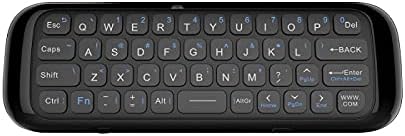
รูปที่ 2: ย้อนกลับ view of the UMAX Air Mouse M1, showing the full QWERTY keyboard.
3. Initial Pairing (Automatic)
Once the USB receiver is plugged in, the Air Mouse M1 should automatically pair with your device. No manual pairing steps are typically required. The device should be ready for use within a few seconds.
คำแนะนำการใช้งาน
1. ฟังก์ชันเมาส์ไร้สาย
The Air Mouse M1 utilizes a gyroscope for cursor control. Hold the remote in your hand and move your wrist to control the on-screen cursor. The cursor will follow your hand movements. Press the OK ปุ่มสำหรับคลิก
2. การป้อนข้อมูลด้วยแป้นพิมพ์
Flip the Air Mouse M1 over to access the full QWERTY keyboard. Use the keys to type text as you would on a standard keyboard.
3. การควบคุมด้วยเสียง
Press and hold the dedicated เสียง button (often indicated by a microphone icon) to activate voice input. Speak clearly into the microphone located on the device. Release the button when you have finished speaking. This feature requires compatible software or operating system support on your connected device.
4. ปุ่มฟังก์ชัน
- ปุ่มเปิด/ปิด: Turns the device on/off or puts it into sleep mode.
- ปุ่มตกลง: Confirms selection, acts as left-click.
- แผ่นทิศทาง: นำทางเมนูและการเลือก
- Volume Buttons (V+/V-): ปรับระดับเสียง
- ปุ่มโฮม: Returns to the home screen of the connected device.
- ปุ่มย้อนกลับ: ใช้สำหรับย้อนกลับไปยังเมนูหรือแอปพลิเคชันก่อนหน้า
- ปุ่มเมนู: เปิดเมนูตามบริบท
การซ่อมบำรุง
1. การดูแลแบตเตอรี่
The UMAX Air Mouse M1 is equipped with a rechargeable Li-Ion battery. To prolong battery life:
- หลีกเลี่ยงการปล่อยแบตเตอรี่จนหมดบ่อยครั้ง
- Charge the device when the low battery indicator appears.
- ควรเก็บอุปกรณ์ไว้ในที่แห้งและเย็นหากไม่ได้ใช้งานเป็นเวลานาน
2. การทำความสะอาด
ในการทำความสะอาดอุปกรณ์ ให้ใช้ผ้าแห้งนุ่มๆ เช็ด สำหรับคราบสกปรกฝังแน่น ให้ใช้ผ้าชุบน้ำหมาดๆ เช็ดเบาๆamp cloth can be used, but ensure no moisture enters the device's ports or openings. Do not use harsh chemicals or abrasive cleaners.
การแก้ไขปัญหา
| ปัญหา | สาเหตุที่เป็นไปได้ | สารละลาย |
|---|---|---|
| อุปกรณ์ไม่ตอบสนอง | Low battery; USB receiver not connected; Device not paired. | Charge the device; Ensure USB receiver is securely plugged in; Re-insert USB receiver to re-establish connection. |
| เคอร์เซอร์ไม่แน่นอนหรือเคลื่อนไหวไม่ราบรื่น | สัญญาณรบกวน; แบตเตอรี่เหลือน้อย | Move closer to the USB receiver; Ensure no strong electromagnetic interference; Charge the device. |
| Keyboard not typing | Device in air mouse mode; Low battery. | Ensure the device is flipped to the keyboard side; Charge the device. |
| การควบคุมด้วยเสียงไม่ทำงาน | Microphone blocked; No internet connection on host device; Host device does not support voice input. | Ensure microphone is clear; Check host device's internet connection; Verify host device's compatibility with voice input. |
ข้อมูลจำเพาะ
- แบบอย่าง: UMAX Air Mouse M1 (laishutin)
- เทคโนโลยีการตรวจจับการเคลื่อนไหว: ระบบป้องกันภาพสั่นไหวแบบไจโรสโคปิก
- การเชื่อมต่อ: ไร้สาย (ตัวรับสัญญาณ USB)
- แบตเตอรี่: แบตเตอรี่ลิเธียมไอออน 1 ก้อน (รวมอยู่ด้วย)
- สี: ส้ม (Note: Product images show a black device, but specifications list 'Orange'.)
- น้ำหนักสินค้า: 7 ออนซ์ (0.2 กิโลกรัม)
- ขนาดแพ็คเกจ: 7.09 x 3.94 x 0.79 นิ้ว
- ระบบปฏิบัติการที่รองรับ: แอนดรอยด์, วินโดวส์, ลินุกซ์
การสนับสนุนและการรับประกัน
For technical support or inquiries regarding your UMAX Air Mouse M1, please refer to the official UMAX website or contact their customer service. Specific warranty details may vary by region and retailer. Please retain your proof of purchase for warranty claims.
หากต้องการข้อมูลเพิ่มเติม โปรดเยี่ยมชม: UMAX Official Webเว็บไซต์


