การแนะนำ
Welcome and thank you for choosing the Umax Webcam W5. This manual provides essential information for setting up, operating, maintaining, and troubleshooting your webcam. Please read it carefully before use to ensure proper functionality and longevity of your device.
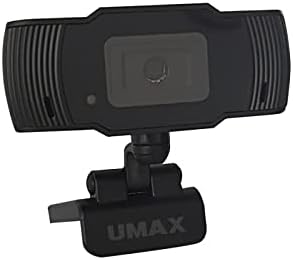
ภาพ: ด้านหน้า view of the Umax W5 Webcam. This image displays the main unit of the webcam, highlighting its lens and overall design.
1. การตั้งค่า
1.1 เนื้อหาบรรจุภัณฑ์
- Umax W5 Webลูกเบี้ยว
- กระจกเงา
1.2 ข้อกำหนดของระบบ
ยูแม็กซ์ W5 Webcam is compatible with most operating systems that support standard USB webcams, including Windows, macOS, and Linux distributions.
1.3 การเชื่อมต่อ Webลูกเบี้ยว
- กางออก webcam's integrated clip/stand.
- วาง webcam securely on top of your monitor, laptop screen, or a flat surface.
- เชื่อมต่อสาย USB จาก webกล้องไปยังพอร์ต USB ที่มีอยู่ในคอมพิวเตอร์ของคุณ
- การ webcam should be automatically recognized by your operating system. No additional drivers are typically required for basic functionality.
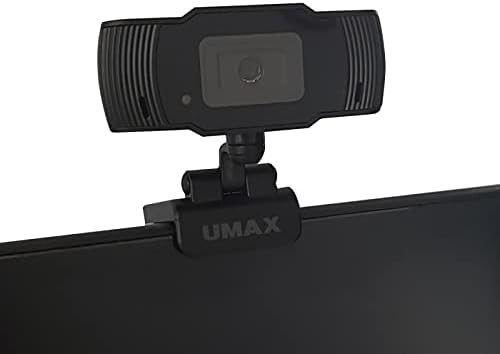
Image: Umax W5 Webcam mounted on top of a computer monitor. This image shows the webcam securely positioned on the upper edge of a computer monitor, demonstrating its typical mounting configuration.
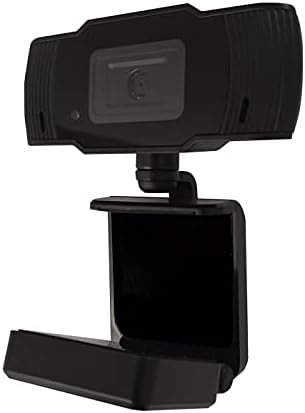
Image: Umax W5 Webcam with its adjustable clip/stand unfolded. This image displays the webcam with its integrated clip fully extended, illustrating how it can be adjusted to fit various monitor thicknesses or stand independently on a flat surface.
2. การดำเนินงาน Webลูกเบี้ยว
2.1 ฟังก์ชั่นพื้นฐาน
Once connected, the Umax W5 Webcam is ready for use with various video conferencing applications, streaming software, and other programs that utilize a webลูกเบี้ยว.
2.2 การใช้งานร่วมกับแอปพลิเคชัน
- Open your desired application (e.g., Zoom, Skype, OBS Studio).
- Navigate to the application's settings or preferences menu.
- Select "Umax W5 Webcam" as your primary video input device.
- Adjust video settings such as resolution or frame rate within the application if these options are available.
2.3 การโฟกัสแบบแมนนวล
ยูแม็กซ์ W5 Webcam features manual focus. To adjust the focus, gently rotate the lens ring located around the camera lens until the image displayed on your screen appears clear and sharp.
3. การบำรุงรักษา
3.1 การทำความสะอาดเลนส์
To ensure optimal image quality, periodically clean the webเลนส์แคม
- Use a soft, lint-free cloth specifically designed for optical surfaces.
- Avoid abrasive materials or harsh chemical cleaners, as these can damage the lens coating.
- ค่อยๆ เช็ดเลนส์เป็นวงกลมเพื่อขจัดฝุ่นหรือรอยเปื้อน
3.2 พื้นที่จัดเก็บ
เมื่อไม่ใช้งาน ให้เก็บ webcam in a clean, dry place away from extreme temperatures, high humidity, and direct sunlight to prevent damage.
4 การแก้ไขปัญหา
4.1 Webไม่พบกล้อง
- ตรวจสอบให้แน่ใจว่าสาย USB เชื่อมต่ออย่างแน่นหนากับทั้งสอง webกล้องและพอร์ต USB ที่ใช้งานได้บนคอมพิวเตอร์ของคุณ
- ลองเชื่อมต่อดู webเสียบกล้องเข้ากับพอร์ต USB อื่นบนคอมพิวเตอร์ของคุณ
- รีสตาร์ทเครื่องคอมพิวเตอร์ของคุณ
- ตรวจสอบใน Device Manager (Windows) หรือ System Information (macOS) ของระบบปฏิบัติการของคุณ เพื่อดูว่า... webมีรายการแคมอยู่
4.2 คุณภาพของภาพไม่ดี
- Adjust the manual focus ring on the webcam until the image is clear.
- Ensure adequate lighting in your environment. Poor lighting can significantly affect image quality.
- ทำความสะอาด webเลนส์กล้องตามที่อธิบายไว้ในส่วนการบำรุงรักษา
- Check the video settings within your application (e.g., resolution, frame rate) to ensure they are set appropriately.
5. ข้อมูลจำเพาะ
| คุณสมบัติ | รายละเอียด |
|---|---|
| ยี่ห้อ | ยูแม็กซ์ |
| ชื่อรุ่น | W5 |
| หมายเลขรุ่นสินค้า | W5 |
| สี | สีดำ |
| ขนาดแพ็คเกจ | 6.18 x 3.43 x 1.89 นิ้ว |
| น้ำหนักสินค้า | 5.6 ออนซ์ |
| ประเภทเลนส์ | ซูม |
| ประเภทโฟกัส | โฟกัสแบบแมนนวล |
| ระบบป้องกันภาพสั่นไหว | เลขที่ |
| แบตเตอรี่ | ต้องใช้แบตเตอรี่ AA 2 ก้อน (รวมอยู่ด้วย) |
| ส่วนประกอบที่รวมอยู่ | กระจกเงา |
| วันที่พร้อมใช้งานครั้งแรก | วันที่ 14 กันยายน 2020 |
| ผู้ผลิต | ยูแม็กซ์ |
6. การรับประกันและการสนับสนุน
For warranty information and technical support, please refer to the official Umax webโปรดตรวจสอบเว็บไซต์หรือติดต่อฝ่ายบริการลูกค้าโดยตรง แนะนำให้เก็บใบเสร็จรับเงินไว้เป็นหลักฐานการซื้อสำหรับกรณีที่มีการเรียกร้องการรับประกัน
ผู้ผลิต: ยูแม็กซ์
วันที่เข้าใช้งานครั้งแรก: วันที่ 14 กันยายน 2020


