1. บทนำ
This manual provides detailed instructions for the setup, operation, and maintenance of your Gain Express Digital Weather Station with three wireless indoor/outdoor sensors. Please read this manual thoroughly before using the device to ensure proper function and longevity.

Image 1: The main display unit and three wireless sensors of the weather station.
2. คุณสมบัติของผลิตภัณฑ์
- Expansive LCD screen for clear readability from various angles.
- Displays indoor and outdoor temperature (°C/°F) and humidity.
- Integrated calendar (month/year) and time display.
- Supports up to 3 external wireless sensors for monitoring multiple locations.
- Alarm clock function with snooze.
- Touch control for temperature unit selection (°C or °F).
- Records maximum and minimum temperature and humidity readings.
3. เนื้อหาบรรจุภัณฑ์
แพ็คเกจประกอบด้วยรายการต่อไปนี้:
- 1 x Digital Weather Station Main Unit
- 3 x Wireless Sensors
- 1 x คู่มือผู้ใช้

Image 2: The weather station main unit, three wireless sensors, and product packaging.
4. คู่มือการติดตั้ง
4.1 การติดตั้งแบตเตอรี่
- เปิดช่องใส่แบตเตอรี่ที่ด้านหลังของเซ็นเซอร์ไร้สายแต่ละตัว
- Insert 2 AAA batteries into each sensor, observing the correct polarity (+/-).
- ปิดช่องใส่แบตเตอรี่ให้แน่น
- Open the battery compartment on the back of the main weather station unit.
- Insert 2 AAA batteries into the main unit, observing the correct polarity (+/-).
- ปิดช่องใส่แบตเตอรี่ให้แน่น
4.2 Sensor Pairing and Channel Assignment
It is recommended to set all sensors and their respective channels before powering on the main unit for the first time.
- For each wireless sensor, locate the 'CH' button inside the battery compartment.
- Press the 'CH' button to assign a unique channel (1, 2, or 3) to each sensor. The channel number will appear on the sensor's small display. Ensure each of your three sensors is assigned a different channel.
- Once channels are assigned, power on the main unit. The main unit will automatically search for and connect to the sensors. This process may take up to three minutes for initial warm-up and data synchronization. During this time, initial readings may not be accurate.

Image 3: The three wireless sensors, ready for channel assignment and placement.
4.3 การวางตำแหน่งเซ็นเซอร์
Place the wireless sensors in desired locations to monitor temperature and humidity. Common placements include:
- กลางแจ้ง: Under an eave or in a protected area to shield from direct rain and sunlight.
- ในร่ม: In a kitchen, wine cellar, greenhouse, or other rooms where monitoring is desired.
Ensure sensors are within the effective transmission range of the main unit and away from large metal objects that could interfere with the signal.
Video 1: An instructional video demonstrating the setup and features of the Digital Weather Station.
5. คู่มือการใช้งาน
5.1 แสดงผลเกินview
The main unit's LCD screen displays various information:
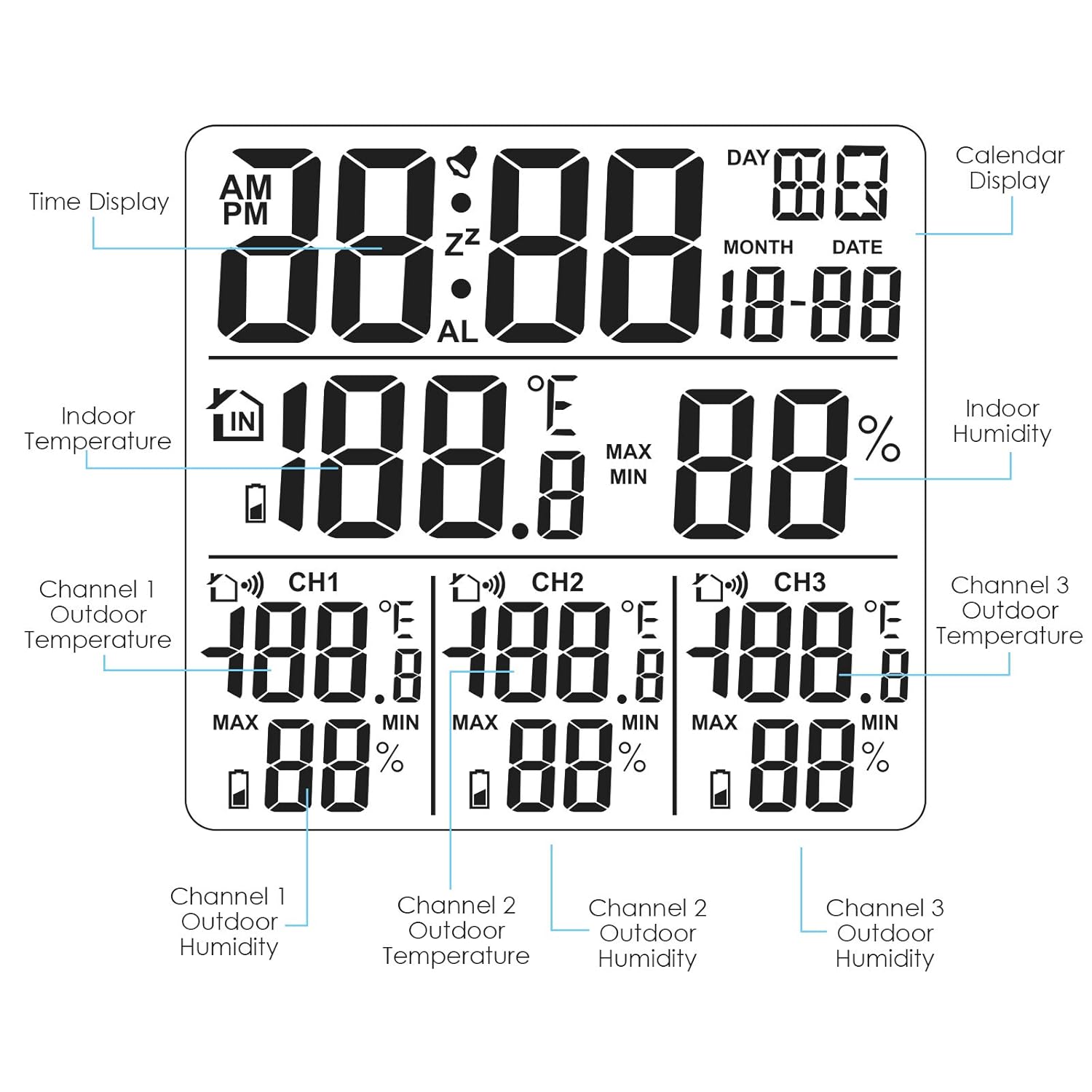
ภาพที่ 4: รายละเอียด view of the weather station's LCD display with labels for each information segment.
- การแสดงเวลา: Shows current time (AM/PM).
- การแสดงปฏิทิน: Shows day, month, and date.
- อุณหภูมิและความชื้นภายในอาคาร: เอกสารประกอบการอ่านจากหน่วยหลัก
- Channel 1/2/3 Outdoor Temperature & Humidity: Readings from the respective wireless sensors.
5.2 ฟังก์ชันปุ่ม
The main unit features several buttons on its back for configuration and control:

Image 5: The back panel of the weather station, highlighting the function of each button.
- SET: Enters setup mode for time, date, and alarm settings.
- เตือน: เปิด/ปิดระบบเตือนภัย และเข้าสู่โหมดตั้งค่าระบบเตือนภัย
- UP / MEM: Adjusts values upwards in setup mode; displays MAX/MIN records.
- ลดอุณหภูมิ / °C/°F: Adjusts values downwards in setup mode; switches temperature unit between Celsius and Fahrenheit.
- ช: Cycles through sensor channels (1, 2, 3) or displays all channels.
- SNZ / LIGHT: Activates snooze function when alarm sounds; turns on backlight.
5.3 การตั้งเวลาและวันที่
- กดปุ่ม ชุด button to enter time/date setting mode.
- ใช้ UP / MEM และ ลดลง / °C/°F ปุ่มสำหรับปรับค่าการกระพริบ
- กด ชุด again to confirm and move to the next setting (e.g., hour, minute, year, month, day).
- Repeat until all settings are configured.
5.4 การตั้งปลุก
- กดปุ่ม เตือน ปุ่มเพื่อเข้าสู่โหมดการตั้งค่าการเตือน
- ใช้ UP / MEM และ ลดลง / °C/°F ปุ่มสำหรับตั้งเวลาปลุกที่ต้องการ
- กด เตือน เพื่อยืนยันอีกครั้ง
- หากต้องการเปิด/ปิดสัญญาณเตือน ให้กดปุ่ม เตือน กดปุ่มนอกโหมดการตั้งค่า ไอคอนแจ้งเตือนจะปรากฏ/หายไปบนหน้าจอแสดงผล
- เมื่อเสียงปลุกดัง ให้กด SNZ / ไลท์ button to activate the snooze function for an additional 5 minutes.
5.5 Viewบันทึกค่าสูงสุด/ต่ำสุด
กดปุ่ม UP / MEM button to cycle through the maximum and minimum recorded temperature and humidity values for indoor and each outdoor channel. The display will show 'MAX' or 'MIN' indicators.
6. การบำรุงรักษา
- Clean the device and sensors with a soft, dry cloth. Do not use abrasive cleaners or solvents.
- Avoid exposing the main unit to direct sunlight, extreme temperatures, or high humidity.
- Ensure outdoor sensors are protected from direct rain and snow to prolong their lifespan.
- Replace batteries when the low battery indicator appears on the display to ensure continuous operation and accurate readings.
7 การแก้ไขปัญหา
- ไม่มีหน้าจอแสดงผลบนตัวเครื่องหลัก: ตรวจสอบขั้วแบตเตอรี่และให้แน่ใจว่าแบตเตอรี่ยังสดอยู่
- No outdoor sensor readings: Ensure sensors have fresh batteries and are assigned unique channels (1, 2, or 3). Verify sensors are within range of the main unit. Re-sync by removing and reinserting batteries in both the sensor and main unit.
- การอ่านค่าที่ไม่ถูกต้อง: Allow up to 3 minutes for sensors to warm up and stabilize after battery installation or power cycle. Ensure sensors are not exposed to direct heat sources or extreme cold beyond their operating range.
- Signal loss from outdoor sensor: This can occur if the sensor is placed too far from the main unit, or if there are significant obstructions (e.g., thick walls, large metal objects). Try relocating the sensor closer to the main unit or in a clearer line of sight. Extreme cold (below freezing) can also temporarily affect signal transmission.
8. ข้อมูลจำเพาะ
| คุณสมบัติ | รายละเอียด |
|---|---|
| ขนาดสินค้า | 4.72 x 4.33 x 1.18 นิ้ว |
| หมายเลขรุ่นสินค้า | WEA-46 |
| แบตเตอรี่ที่จำเป็น | 2 AAA batteries (main unit), 2 AAA batteries (each sensor) |
| วันที่พร้อมใช้งานครั้งแรก | วันที่ 11 กันยายน 2020 |
| ผู้ผลิต | บริษัท เกน เอ็กซ์เพรส โฮลดิ้งส์ จำกัด |
| แหล่งพลังงาน | ใช้พลังงานจากแบตเตอรี่ |
| คุณสมบัติพิเศษ | Indoor main unit can be placed on the table with a stand |
| วัสดุ | อะคริโลไนไตรล์ บิวทาไดอีน สไตรีน (ABS) |
| ช่วงอุณหภูมิในร่ม | 0-50 องศาเซลเซียส (32-122 องศาฟาเรนไฮต์) |
| ช่วงอุณหภูมิกลางแจ้ง | -40-70 องศาเซลเซียส (-40-158 องศาฟาเรนไฮต์) |
| Indoor/Outdoor Humidity Range | ความชื้นสัมพัทธ์ 20-95% |

Image 6: Display indicating the temperature and humidity measurement ranges for the main unit and outdoor sensors.

Image 7: The main unit with its dimensions (110mm x 110mm x 20mm) indicated.
9. การรับประกันและการสนับสนุน
Specific warranty details and direct support contact information are not provided within the available product data. Please refer to the product packaging or the manufacturer's official website for warranty claims and customer support inquiries.


