1. บทนำ
Welcome to the user manual for your Behringer RHYTHM DESIGNER RD-6 Analog Drum Machine. This device is designed to provide authentic analog drum sounds with modern connectivity and sequencing capabilities. The RD-6 features true analog circuitry, 8 distinct drum voices, a 16-step sequencer, and a built-in distortion effect. Please read this manual thoroughly to ensure proper setup, operation, and maintenance, allowing you to fully explore its creative potential.
2. คำแนะนำด้านความปลอดภัยที่สำคัญ
- อ่านคำแนะนำเหล่านี้
- เก็บคำแนะนำเหล่านี้ไว้
- จงใส่ใจคำเตือนทั้งหมด
- ปฏิบัติตามคำแนะนำทั้งหมด
- ห้ามใช้อุปกรณ์นี้ใกล้น้ำ
- ทำความสะอาดด้วยผ้าแห้งเท่านั้น
- ห้ามปิดกั้นช่องระบายอากาศ ควรติดตั้งตามคำแนะนำของผู้ผลิต
- ห้ามติดตั้งใกล้แหล่งความร้อน เช่น หม้อน้ำ เครื่องทำความร้อน เตา หรืออุปกรณ์อื่น ๆ (รวมถึง ampเครื่องให้ความร้อน) ที่ผลิตความร้อน
- อย่าละเลยจุดประสงค์ด้านความปลอดภัยของปลั๊กแบบมีขั้วหรือแบบมีสายดิน ปลั๊กแบบมีขั้วจะมีใบมีด 2 ใบ โดยใบหนึ่งจะกว้างกว่าอีกใบ ปลั๊กแบบมีสายดินจะมีใบมีด 2 ใบและขาต่อสายดินที่สาม ขาที่กว้างหรือขาต่อสายดินที่สามนั้นมีไว้เพื่อความปลอดภัยของคุณ หากปลั๊กที่ให้มาไม่พอดีกับเต้ารับของคุณ ให้ปรึกษาช่างไฟฟ้าเพื่อขอเปลี่ยนเต้ารับที่ล้าสมัย
- ปกป้องสายไฟไม่ให้ถูกเหยียบหรือถูกหนีบ โดยเฉพาะที่ปลั๊ก เต้ารับไฟฟ้า และจุดที่สายไฟออกจากเครื่อง
- ใช้เฉพาะอุปกรณ์เสริม/สิ่งที่แนบตามที่ผู้ผลิตกำหนดเท่านั้น
- ใช้ได้เฉพาะกับรถเข็น ขาตั้ง ขาตั้งกล้อง ขายึด หรือโต๊ะที่ผู้ผลิตกำหนด หรือจำหน่ายพร้อมกับอุปกรณ์เท่านั้น เมื่อใช้รถเข็น ควรใช้ความระมัดระวังในการเคลื่อนย้ายรถเข็น/อุปกรณ์รวมกันเพื่อหลีกเลี่ยงการบาดเจ็บจากการล้ม
- ถอดปลั๊กอุปกรณ์นี้ในระหว่างพายุฝนฟ้าคะนองหรือเมื่อไม่ได้ใช้งานเป็นเวลานาน
- แจ้งบริการทั้งหมดให้ช่างที่ผ่านการรับรองทราบ จำเป็นต้องให้บริการเมื่ออุปกรณ์ได้รับความเสียหายในลักษณะใดก็ตาม เช่น สายไฟหรือปลั๊กชำรุด ของเหลวหกหรือมีวัตถุตกลงไปในอุปกรณ์ อุปกรณ์โดนฝนหรือความชื้น ไม่สามารถทำงานได้ตามปกติ หรือตกหล่น
3. อะไรอยู่ในกล่อง
- Behringer RHYTHM DESIGNER RD-6 Analog Drum Machine
- อะแดปเตอร์แปลงไฟ
- สาย USB
- คู่มือเริ่มต้นอย่างรวดเร็ว
4. Controls and Connectors Overview
The Behringer RD-6 features an intuitive layout for easy access to all its functions, designed for both performance and studio integration.
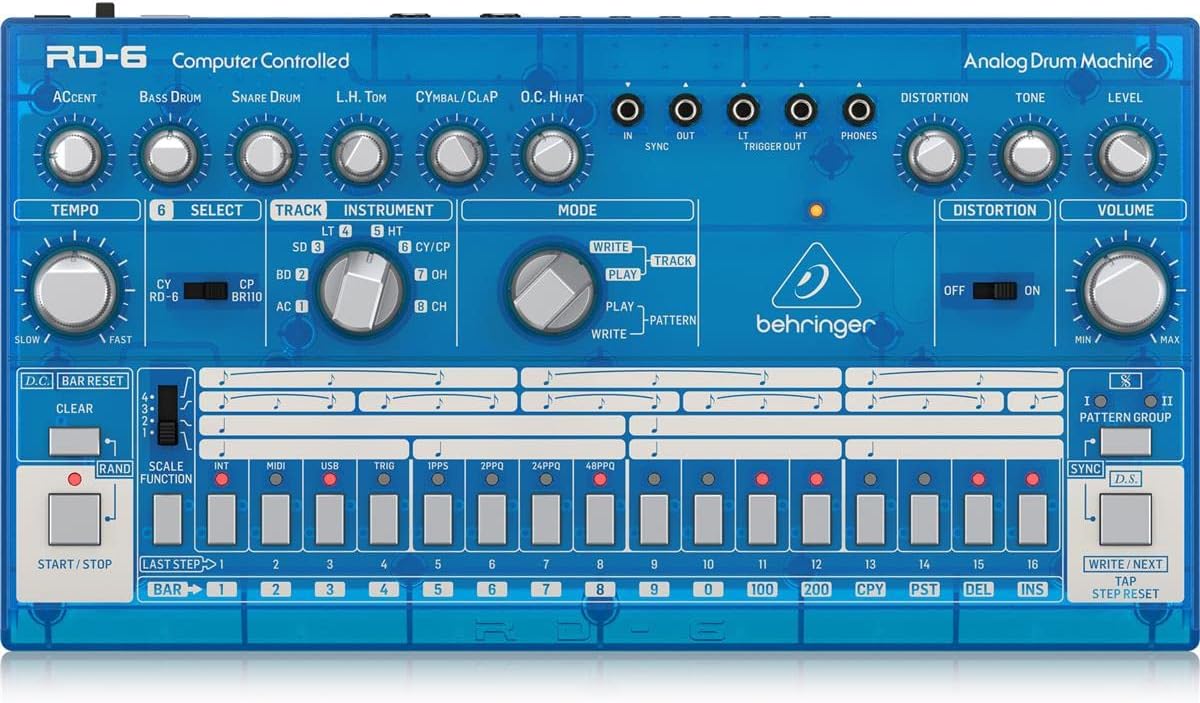
4.1 แผงควบคุมด้านหน้า

ภาพ: จากบนลงล่าง view of the Behringer RD-6 front panel, showing various knobs, buttons, and the 16-step sequencer.
- จังหวะ: Adjusts the playback speed of patterns.
- สำเนียง: Controls the intensity of accented steps.
- BASS DRUM, SNARE DRUM, L.H. TOM, CYMBAL/CLAP, O.C. HI HAT: Individual controls for tone, decay, and level of each drum voice.
- การบิดเบือน: Activates the built-in distortion effect.
- TONE/LEVEL (Distortion): Adjusts the character and intensity of the distortion.
- ปริมาณ: ควบคุมระดับเสียงเอาท์พุตหลัก
- เลือก: Used to select various functions or parameters.
- TRACK/INSTRUMENT: Selects the current track or instrument for editing.
- โหมด (เขียน/เล่น/รูปแบบ): Switches between pattern writing, playback, and pattern selection modes.
- 16 STEP BUTTONS: Used to program steps in a pattern or select patterns.
- เริ่มหยุด: เริ่มหรือหยุดการเล่นแพทเทิร์น
- ชัดเจน: Erases patterns or steps.
- SCALE FUNCTION: Adjusts the timing scale for patterns.
- ซิงค์: Selects the synchronization source (Internal, MIDI, USB, Clock).
- เขียน/ถัดไป: Saves patterns or advances to the next step/pattern.
- TAP/STEP RESET: Used for tap tempo or resetting the step sequencer.
4.2 ขั้วต่อแผงด้านหลัง
ภาพ: ด้านหลัง view of the Behringer RD-6, highlighting the various audio outputs, MIDI ports, USB port, and power input.
- VOICE OUT (OH/CH, CP, CY, LT/HT, SD, BD): Individual 3.5 mm TS outputs for each drum voice, allowing for external processing.
- ผสมออก: 6.35 mm TS output for the main stereo mix.
- เริ่มหยุด: 3.5 mm TS input for external start/stop control.
- MIDI IN/OUT/THRU: 5-pin DIN connectors for MIDI communication with other devices.
- ยูเอสบี: USB-B port for MIDI over USB and firmware updates.
- POWER DC INPUT: การเชื่อมต่อสำหรับอะแดปเตอร์ไฟ 9V DC ที่ให้มา
5. การตั้งค่าเริ่มต้น
5.1 การเชื่อมต่อสายไฟ
เชื่อมต่ออะแดปเตอร์แปลงไฟ 9V DC ที่ให้มากับตัวเครื่องเข้ากับ... ไฟฟ้ากระแสตรงอินพุต on the rear panel. Plug the adapter into a suitable power outlet. Ensure the พลัง switch is in the OFF position before connecting the power supply.
5.2 การเชื่อมต่อเสียง
For a combined stereo mix, connect the ผสมออก (6.35 mm TS) to your mixer or audio interface. For individual drum sound processing and recording, use the dedicated VOICE OUT jacks (3.5 mm TS) for each drum voice (OH/CH, CP, CY, LT/HT, SD, BD).
5.3 การเชื่อมต่อ USB/MIDI
เชื่อมต่อ ยูเอสบี port to your computer for MIDI control and firmware updates. Use the MIDI IN/OUT/THRU ports for connecting to other MIDI devices such as synthesizers, sequencers, or MIDI interfaces.
6. การทำงานพื้นฐาน
6.1 การเปิด/ปิดเครื่อง
พลิกกลับ พลัง switch on the rear panel to the ON position. The unit will power up and be ready for use. To power off, flip the switch back to OFF.
6.2 Creating a Pattern
- Select a pattern bank (I or II) using the กลุ่มรูปแบบ ปุ่ม
- กดปุ่ม เขียน button to enter pattern write mode. The เขียน ไฟ LED จะสว่างขึ้น
- Select an instrument (e.g., Bass Drum, Snare Drum) using the อุปกรณ์ ปุ่มเลือก
- ใช้ 16 step buttons to program your rhythm. Pressing a button will activate or deactivate a step for the selected instrument. Illuminated buttons indicate active steps.
- Adjust parameters like สำเนียง, จังหวะ, and individual drum sound controls (e.g., Tone, Decay) as desired to shape your sound.
- กด เล่น to hear your pattern.
- กด เขียน again to exit write mode and save the pattern.
6.3 Real-time Recording
ในขณะที่อยู่ใน เล่น โหมดกดปุ่ม เขียน button to enable real-time recording. The เขียน LED will flash. Play the drum sounds using the step buttons or an external MIDI controller. The notes will be recorded into the current pattern. Press เขียน again to stop real-time recording.
6.4 Using Distortion
มีส่วนร่วม การบิดเบือน switch to activate the built-in distortion effect. Adjust the โทนเสียง และ ระดับ knobs to shape the distortion character and intensity to add grit and aggression to your drum sounds.
7. การเชื่อมต่อ MIDI และ USB
7.1 การควบคุม MIDI
The RD-6 supports MIDI In, Out, and Thru via its 5-pin DIN connectors. Connect to other MIDI devices to synchronize tempo, trigger sounds, or control parameters. The MIDI THRU port allows you to daisy-chain multiple MIDI devices. Refer to the full MIDI implementation chart in the comprehensive manual for detailed CC messages and settings.
7.2 USB Audio/MIDI
The USB port provides class-compliant MIDI connectivity to your computer. This allows the RD-6 to be used as a MIDI controller or to receive MIDI data from your Digital Audio Workstation (DAW) for seamless integration into your production environment.
8. การบำรุงรักษา
8.1 การทำความสะอาด
Keep the unit clean using a soft, dry cloth. Avoid abrasive cleaners, solvents, or waxes, as these can damage the finish and internal components.
8.2 พื้นที่จัดเก็บ
Protect the RD-6 from dust, moisture, and extreme temperatures. When not in use for extended periods, store it in a cool, dry place, preferably in its original packaging or a protective case.
8.3 การบริการ
Do not attempt to service the unit yourself. Refer all servicing to qualified service personnel to prevent electric shock or damage to the device.
9 การแก้ไขปัญหา
9.1 ไม่มีเสียงออก
- Check that the power adapter is securely connected and the unit is powered ON.
- Verify all audio cables are correctly connected to the ผสมออก or individual VOICE OUT ports and to your audio system.
- Ensure the master ปริมาณ knob and individual instrument level knobs are turned up.
- Confirm that a pattern is playing and that the selected instrument has active steps.
9.2 MIDI Not Responding
- Verify MIDI cables are correctly connected to the MIDI เข้า / ออก ports of the RD-6 and your external device.
- Check that the MIDI channel settings on both the RD-6 and your external device match.
- Ensure the RD-6 is in the correct sync mode (e.g., MIDI Sync, USB Sync) if synchronizing with an external clock.
9.3 พฤติกรรมที่ไม่คาดคิด
If the unit exhibits unexpected behavior, try powering it off and on again. If the issue persists, a factory reset may resolve it. Refer to the comprehensive manual for instructions on how to perform a factory reset.
10. ข้อมูลจำเพาะทางเทคนิค
| คุณสมบัติ | รายละเอียด |
|---|---|
| ชื่อรุ่น | RD-6 |
| ยี่ห้อ | เบห์ริงเกอร์ |
| น้ำหนักสินค้า | 1.98 ปอนด์ (900 กรัม) |
| ขนาดสินค้า | 17.2 x 8.95 x 3.8 นิ้ว |
| วัสดุตัวเครื่อง | Coal Fiber |
| วัสดุ | สแตนเลส |
| สี | สีฟ้า |
| ประเภทขั้วต่อ | ยูเอสบี |
| เล่มที่tage | 230 โวลต์ |
| หมายเลขรุ่นสินค้า | 000-EE204-00010 |
| ยูพีซี | 644216639205 |
| ผู้ผลิต | มิวสิค ไทรบ์ ยูเอส |
10.1 คุณสมบัติหลัก
- True analog circuitry for authentic sound reproduction.
- 8 original drum sounds, including Bass Drum, Snare Drum, Low Tom, High Tom, Cymbal, Clap, Open Hi-Hat, and Closed Hi-Hat.
- 16-step sequencer with 256 patterns for complex rhythm creation.
- Built-in distortion effect with Tone and Level controls.
- USB/MIDI connectivity for seamless integration with modern DAWs and external MIDI devices.
- 7 independent analog outputs for flexible mixing and individual drum sound processing.
- Multiple sync options: USB, MIDI, Clock, and Internal.
11. การรับประกันและการสนับสนุน
สำหรับข้อมูลการรับประกันโดยละเอียด การลงทะเบียนผลิตภัณฑ์ และการสนับสนุนทางเทคนิค โปรดเยี่ยมชมเว็บไซต์อย่างเป็นทางการของ Behringer website or contact your local distributor. It is recommended to keep your proof of purchase for any warranty claims.