การแนะนำ
This manual provides essential information for the proper installation, operation, and maintenance of your Lixada Wireless Bicycle Computer. Please read these instructions carefully before use to ensure optimal performance and longevity of the device. This bicycle computer is designed to track various cycling metrics, offering a clear display and robust construction for diverse riding conditions.
คุณสมบัติหลัก
- Lightweight and Easy Installation: Compact design for convenient setup and use.
- 2.8-inch HD LCD Backlit Screen: Provides clear data readability in various lighting conditions, including night.
- Comprehensive Data Tracking: Records current speed, maximum speed, average speed, distance, total distance, temperature, calories burned, stopwatch, and cycling time.
- ระดับการกันน้ำ IPX6: Designed to withstand rain, ensuring functionality in wet weather. Avoid prolonged exposure to heavy rain.
- เข้ากันได้สากล: Suitable for all types of bicycles, including road bikes, mountain bikes, and folding bikes.


รวมส่วนประกอบ
แพ็คเกจประกอบด้วยรายการต่อไปนี้:
- 1 x Bicycle Computer Unit
- 1 x Extension Bracket
- 1 x อ่อนนุช
- 1 x Base for mounting
- 1 x Wireless Transmitter
- 1 x Magnetic Screw (for wheel spoke)
- 4 x Zip Ties for secure attachment
- 1 x Rubber Pad for mounting

การติดตั้งและการตั้งค่า
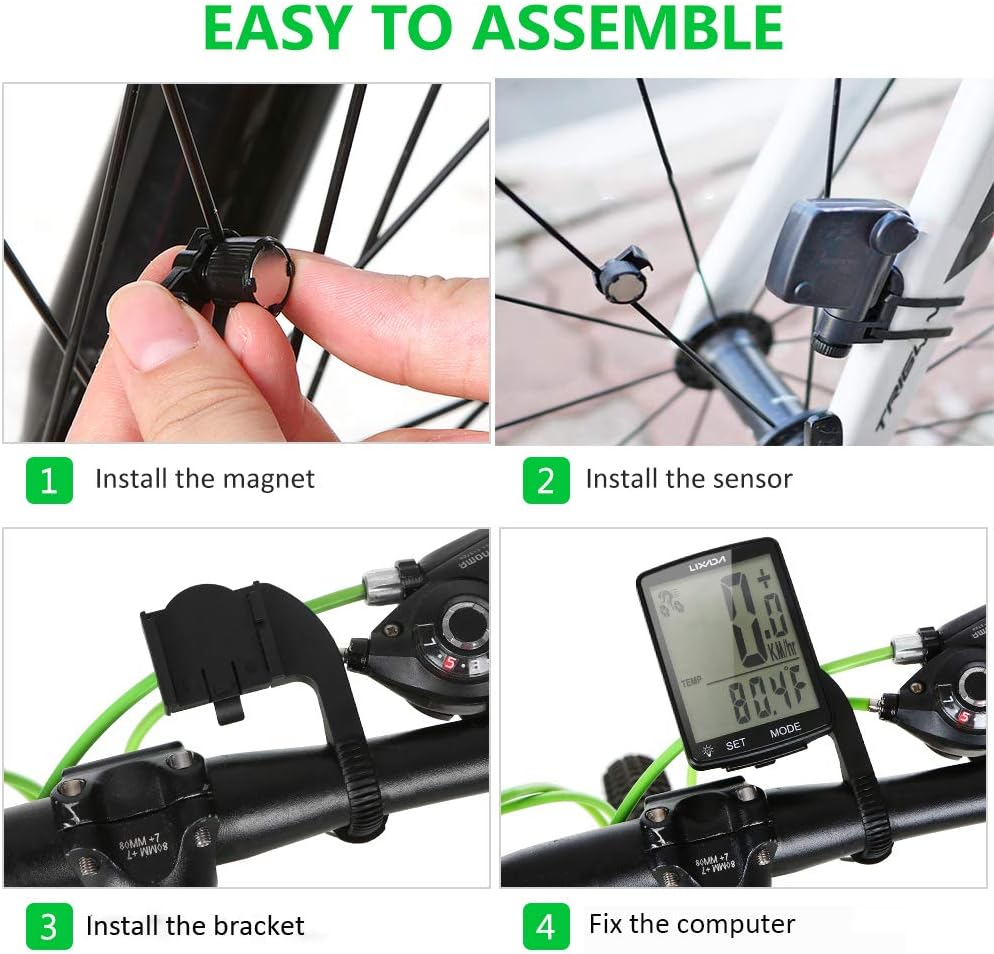
Follow these steps to correctly install your bicycle computer:
- ติดตั้งแม่เหล็ก: Securely attach the magnetic screw to a spoke on your bicycle's front wheel. Ensure it is positioned to pass closely by the sensor.
- ติดตั้งเซ็นเซอร์: Mount the wireless transmitter (sensor) on the front fork of your bicycle. Adjust its position so that the magnet passes within 3mm of the sensor when the wheel rotates.
- ติดตั้งวงเล็บ: Attach the extension bracket to your bicycle's handlebar. Use the provided zip ties and rubber pad to ensure a firm and stable mount.
- Fix the Computer: Slide the bicycle computer unit onto the installed bracket until it clicks into place. Ensure it is securely fastened and facing the rider for easy viewการไอเอ็นจี

คำแนะนำการใช้งาน
Your Lixada Wireless Bicycle Computer features a user-friendly interface with two main buttons: ชุด และ โหมด.
ฟังก์ชั่นพื้นฐาน
- เปิด/ปิดเครื่อง: The device typically powers on automatically when motion is detected or a button is pressed. It will enter sleep mode after a period of inactivity to conserve battery.
- ปุ่มโหมด: Press the MODE button to cycle through different display modes and view various cycling data (e.g., current speed, distance, time, temperature).
- ปุ่ม ตลท.: Use the SET button to enter settings menus or confirm selections. Refer to the detailed manual for specific setting adjustments like wheel circumference.
Viewอิงข้อมูล
The computer allows for quick switching between 24 cycling data points. Simply press the โหมด button to navigate through the available metrics.

การซ่อมบำรุง
การทำความสะอาด
Wipe the computer's screen and body with a soft, damp เช็ดด้วยผ้า หลีกเลี่ยงการใช้น้ำยาทำความสะอาดที่มีฤทธิ์กัดกร่อนหรือตัวทำละลาย เพราะอาจทำให้หน้าจอหรือตัวเครื่องเสียหายได้asing.
ความต้านทานต่อน้ำ
The device has an IPX6 waterproof rating, meaning it is protected against powerful water jets. It can be used in rainy conditions. However, it is not designed for submersion. Avoid exposing it to heavy rain for extended periods or submerging it in water.

การเปลี่ยนแบตเตอรี่
The bicycle computer uses a lithium button battery. When the display becomes dim or unresponsive, it may be time to replace the battery. Refer to the specific instructions in the included detailed manual for battery compartment access and replacement procedures.
การแก้ไขปัญหา
- ไม่มีจอแสดงผล/หน้าจอว่าง:
- ตรวจสอบว่าแบตเตอรี่จำเป็นต้องเปลี่ยนหรือไม่
- Ensure the computer is securely seated in its bracket.
- การอ่านค่าความเร็ว/ระยะทางที่ไม่แม่นยำ:
- Verify that the magnet and sensor are correctly aligned and the gap is within 3mm.
- Ensure the wheel circumference setting is accurate for your bicycle.
- Check for any obstructions or interference between the sensor and the computer.
- ปุ่มไม่ตอบสนอง:
- Ensure the device is not in a locked mode (if applicable).
- ลองถอดและใส่แบตเตอรี่กลับเข้าไปใหม่เพื่อรีเซ็ตอุปกรณ์
If you encounter issues not covered here, please refer to the comprehensive manual included with your product or contact customer support.
ข้อมูลจำเพาะ
| คุณสมบัติ | รายละเอียด |
|---|---|
| หมายเลขรุ่น | OVS6258358204085VR |
| ยี่ห้อ | ลิซาดา |
| ขนาดจอแสดงผล | 2.8 นิ้ว |
| ประเภทจอภาพ | จอแอลซีดี |
| ระดับการกันน้ำ | IPX6 |
| ขนาด (กว้าง x ยาว x สูง) | 13 x 8 x 4.4 ซม. |
| น้ำหนัก | 65 กรัม |
| องค์ประกอบของแบตเตอรี่ | Lithium (Button Battery) |
| เทคโนโลยีการเชื่อมต่อ | Wireless (ANT, Bluetooth for sensor communication) |
การรับประกันและการสนับสนุน
For warranty information or technical support, please refer to the specific warranty card included with your product or contact the manufacturer directly. Keep your purchase receipt as proof of purchase for any warranty claims.


