การแนะนำ
The Proster VC837 is a true-RMS digital multimeter designed for accurate measurement of AC/DC voltage, AC/DC current, resistance, capacitance, frequency, temperature, duty cycle, diode, and continuity. It features a large backlit LCD display, non-contact voltage (NCV) detection, and a magnetic hanger strap for convenient use.
ข้อมูลด้านความปลอดภัย
คำเตือน: To avoid electric shock or personal injury, read all safety information before using this product. Use the meter only as specified in this manual; otherwise, the protection provided by the meter may be impaired.
- This device is CE rated for safety, 600V CAT IV and 1000V CAT III.
- Always ensure the test leads are correctly connected and the function switch is set to the appropriate range before making any measurements.
- ห้ามใช้เกินปริมาณที่กำหนดtage ตามเครื่องหมายบนมิเตอร์ ระหว่างขั้วหรือระหว่างขั้วใดๆ กับกราวด์
- ตรวจสอบสายทดสอบว่ามีฉนวนชำรุดหรือมีโลหะเปลือยหรือไม่ หากชำรุดให้เปลี่ยนใหม่
- ห้ามใช้งานมิเตอร์หากพบว่าชำรุดเสียหาย หรือหากฝาครอบเปิดอยู่
- ใช้ความระมัดระวังอย่างยิ่งเมื่อทำงานกับ voltages สูงกว่า 30V AC RMS, 42V peak หรือ 60V DC ปริมาตรเหล่านี้tagอาจทำให้เกิดอันตรายจากการช็อตได้
- ทุกครั้งให้ตัดกระแสไฟของวงจรและปล่อยประจุไฟฟ้าแรงสูงทั้งหมดออกtagตัวเก็บประจุอีก่อนการทดสอบความต้านทาน ความต่อเนื่อง ไดโอด หรือความจุ
- The meter features double fuse protection and overload protection on all ranges.
เนื้อหาแพ็คเกจ
- Proster VC837 Digital Multimeter
- สายทดสอบ (สีแดงและสีดำ)
- K-Type Thermocouple Temperature Probe
- Multimeter Magnetic Hanger Strap
- กระเป๋าใส่ของพกพา
- คู่มือการใช้งาน (เอกสารนี้)

สินค้าเกินview
Familiarize yourself with the components of your Proster VC837 Multimeter.

- จอแสดงผล LCD: Large backlit display for reading measurements.
- ปุ่มฟังก์ชั่น:
- SELECT/ID: Toggles between functions on a single rotary switch position (e.g., AC/DC voltage, ไดโอด/ความต่อเนื่อง)
- ช่วง/ระดับ: Manual range selection or relative measurement.
- HOLD/* : Data hold function or backlight activation.
- สวิตช์โรตารี่: เลือกฟังก์ชั่นการวัดที่ต้องการ
- แจ็คอินพุต:
- 10 ก: ช่องรับสัญญาณสำหรับการวัดกระแสไฟฟ้าสูง (สูงสุด 10A)
- คอม: อินพุตทั่วไป (เชิงลบ) สำหรับการวัดทั้งหมด
- วีΩmA: อินพุตสำหรับ voltage, resistance, capacitance, frequency, temperature, diode, continuity, and low current measurements.
- Protective Case & Stand: Soft non-slip orange rubber sleeve for protection; built-in stand for hands-free viewการไอเอ็นจี
- Test Probes Slot: การจัดเก็บสายทดสอบที่สะดวก
การตั้งค่า
1. การติดตั้งแบตเตอรี่
มัลติมิเตอร์ต้องใช้แบตเตอรี่ในการทำงาน วิธีการติดตั้งหรือเปลี่ยนแบตเตอรี่:
- ตรวจสอบให้แน่ใจว่ามัลติมิเตอร์ปิดอยู่
- ค้นหาฝาครอบช่องใส่แบตเตอรี่ที่ด้านหลังของเครื่อง
- คลายสกรูยึดออก แล้วถอดฝาครอบออก
- ใส่แบตเตอรี่ใหม่ โดยสังเกตขั้วให้ถูกต้อง (+ และ -)
- ปิดฝาครอบและขันสกรูให้แน่น
2. การเชื่อมต่อสายทดสอบ
เชื่อมต่อสายทดสอบสีดำเข้ากับ... เสมอ คอม เชื่อมต่อสายวัดสีแดงเข้ากับช่องเสียบที่เหมาะสมตามประเภทการวัด:
- สำหรับเล่มtage, resistance, capacitance, frequency, temperature, diode, and continuity measurements, connect the red lead to the VΩmA แจ็ค.
- For current measurements up to 600mA, connect the red lead to the VΩmA แจ็ค.
- For high current measurements (up to 10A), connect the red lead to the 10เอ แจ็ค.
คำแนะนำการใช้งาน
การดำเนินงานทั่วไป
- หมุนสวิตช์แบบหมุนไปยังฟังก์ชันการวัดที่ต้องการ
- If the function has multiple modes (e.g., AC/DC voltage) กดปุ่ม SELECT/ID ปุ่มสำหรับสลับระหว่างโหมดต่างๆ
- เชื่อมต่อสายวัดทดสอบเข้ากับวงจรหรือชิ้นส่วนที่ต้องการทดสอบ
- อ่านการวัดบนจอ LCD
- To turn off the multimeter, rotate the switch to the ปิด position. The multimeter also features an Auto Power Off (APO) function to conserve battery life.
Specific Measurement Functions
1. ฉบับtagการวัด (AC/DC)
- ตั้งสวิตช์โรตารี่ไปที่ V~ (AC เล่มtagจ) หรือ V= (DC เล่มtagจ).
- เชื่อมต่อสายทดสอบสีแดงเข้ากับ VΩmA jack and the black lead to the คอม แจ็ค.
- ต่อสายวัดทดสอบแบบขนานเข้ากับส่วนประกอบหรือวงจรที่ต้องการวัด
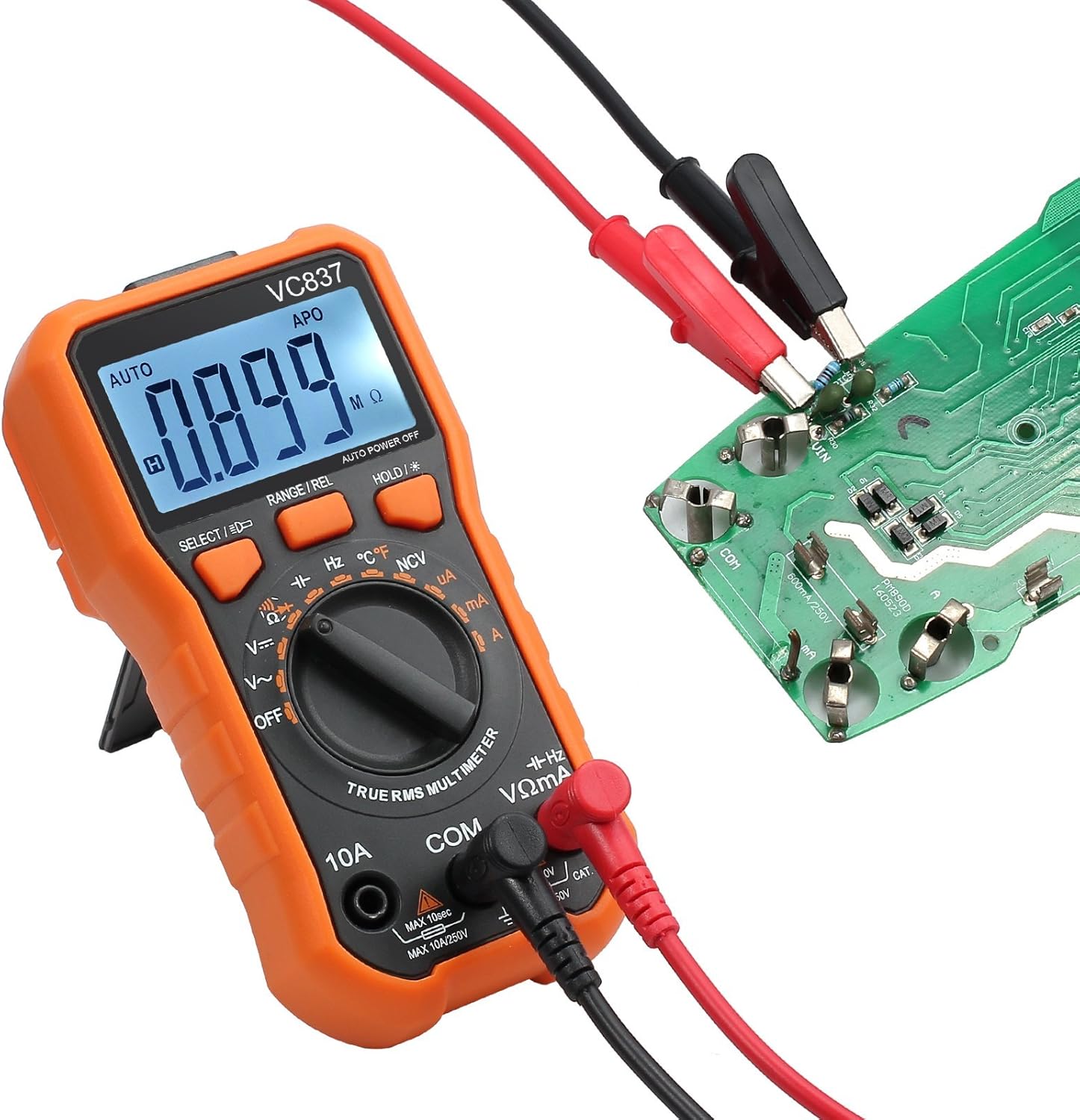
2. การวัดความต้านทาน (Ω)
- ตั้งสวิตช์โรตารี่ไปที่ Ω.
- เชื่อมต่อสายทดสอบสีแดงเข้ากับ VΩmA jack and the black lead to the คอม แจ็ค.
- ตรวจสอบให้แน่ใจว่าวงจรไม่มีกระแสไฟก่อนทำการวัดความต้านทาน ต่อสายวัดทดสอบเข้ากับชิ้นส่วนนั้น
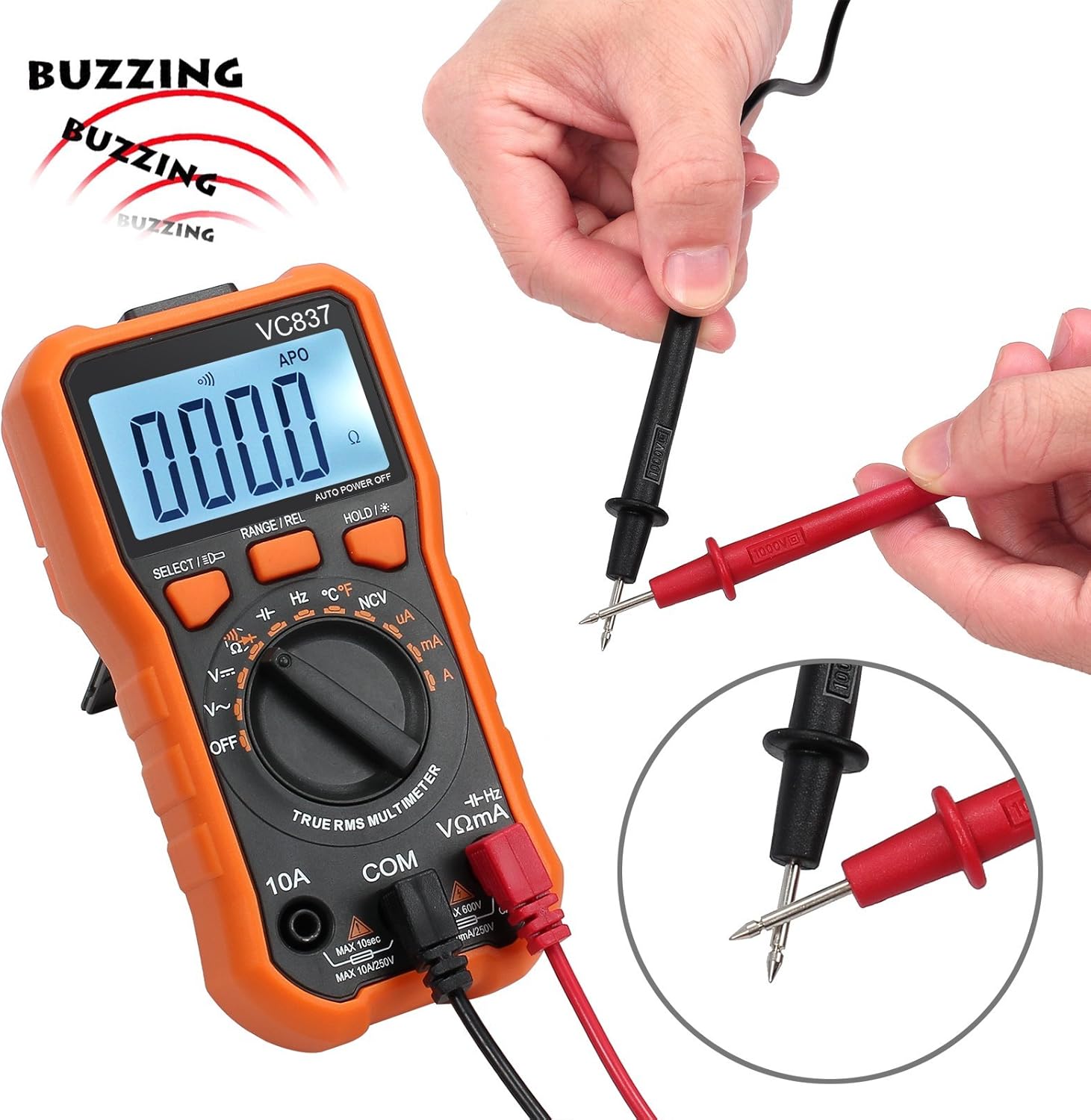
3. การทดสอบความต่อเนื่อง (-)
- ตั้งสวิตช์โรตารี่ไปที่ -. กด SELECT/ID if necessary to select continuity mode.
- เชื่อมต่อสายทดสอบสีแดงเข้ากับ VΩmA jack and the black lead to the คอม แจ็ค.
- Touch the test leads to the two points of the circuit to be tested. A continuous beep indicates a complete circuit (low resistance).

4. การวัดอุณหภูมิ (°C/°F)
- ตั้งสวิตช์โรตารี่ไปที่ ° C / ° F.
- Connect the K-type thermocouple to the VΩmA และ คอม แจ็คสังเกตขั้ว
- วางปลายเทอร์โมคัปเปิลลงบนหรือในวัตถุที่ต้องการวัดอุณหภูมิ
- กด SELECT/ID เพื่อสลับระหว่างเซลเซียสและฟาเรนไฮต์


5. ไม่สัมผัส Voltagการตรวจจับ e (NCV)
- ตั้งสวิตช์โรตารี่ไปที่ เอ็นซีวี.
- Move the top end of the multimeter near a live conductor. The meter will beep and the NCV indicator will light up if AC voltagอีถูกตรวจพบ
6. Other Functions (Current, Capacitance, Frequency, Diode, Duty Cycle)
Refer to the markings on the rotary switch and use the SELECT/ID button to access these functions. Always ensure correct lead connection and circuit conditions for accurate and safe measurements.
Using the Magnetic Hanger Strap
The included magnetic hanger strap allows for hands-free operation of your multimeter, attaching it to metal surfaces.
- Locate the loop attachment point on the back of your multimeter (if available) or use the existing stand slot.
- Attach the strap's loop to this point.
- The strong magnet on the strap can then be affixed to any ferrous metal surface, such as electrical panels or metal beams, holding the multimeter securely.

การซ่อมบำรุง
การทำความสะอาด
เช็ดเคสด้วยโฆษณาamp ผ้าและผงซักฟอกอ่อนๆ ห้ามใช้สารกัดกร่อนหรือตัวทำละลาย ควรทำความสะอาดขั้วอินพุตให้ปราศจากสิ่งสกปรกและความชื้น
การเปลี่ยนแบตเตอรี่
When the battery indicator appears on the LCD, replace the batteries immediately to ensure accurate readings. Follow the battery installation steps in the "Setup" section.
การเปลี่ยนฟิวส์
หากฟังก์ชันการวัดกระแสไฟฟ้าล้มเหลว อาจจำเป็นต้องเปลี่ยนฟิวส์ โปรดดูข้อมูลจำเพาะสำหรับประเภทและพิกัดฟิวส์ที่ถูกต้อง การเปลี่ยนฟิวส์ควรดำเนินการโดยบุคลากรที่มีคุณสมบัติเหมาะสมเท่านั้น
การแก้ไขปัญหา
- ไม่มีจอแสดงผลหรือจอแสดงผลจางๆ: ตรวจสอบระดับแบตเตอรี่ เปลี่ยนแบตเตอรี่หากระดับแบตเตอรี่ต่ำ
- การอ่านค่าที่ไม่ถูกต้อง:
- ตรวจสอบให้แน่ใจว่าสายทดสอบเชื่อมต่อกับแจ็คอินพุตที่เหมาะสมอย่างถูกต้อง
- ตรวจสอบให้แน่ใจว่าสวิตช์หมุนตั้งค่าไว้ที่ฟังก์ชันและช่วงที่ถูกต้องแล้ว
- ตรวจสอบสายวัดทดสอบว่าชำรุดหรือไม่
- ตรวจสอบให้แน่ใจว่าวงจรไม่มีกระแสไฟไหลผ่านก่อนทำการทดสอบความต้านทาน ความต่อเนื่อง และไดโอด
- การวัดกระแสไฟฟ้าไม่ทำงาน: ตรวจสอบฟิวส์.
- มัลติมิเตอร์ปิดตัวเองโดยไม่คาดคิด: Auto Power Off (APO) function is active. This is normal. If it turns off too quickly, check battery charge.
ข้อมูลจำเพาะ
| คุณสมบัติ | รายละเอียด |
|---|---|
| แสดง | 6000 นับ, จอ LCD มีไฟพื้นหลัง |
| ประเภทการวัด | ทรู RMS |
| ระดับความปลอดภัย | CE Rated, 600V CAT IV, 1000V CAT III |
| ระบบป้องกันการโอเวอร์โหลด | All ranges, Double Fuse |
| ฟังก์ชั่น | กระแสสลับ/กระแสตรง โวลtage, AC/DC Current, Resistance, Capacitance, Frequency, Temperature, Duty Cycle, Diode, Continuity, NCV |
| คุณสมบัติพิเศษ | Data Hold, Auto Power Off, Backlight, Built-in Stand, Test Probes Slot |
| แหล่งพลังงาน | ใช้พลังงานจากแบตเตอรี่ |
| Magnetic Hanger Strap | 14-inch, Universal loop attachment |
| Carrying Bag Size | 20*14*5cm (approx. 7.9 x 5.5 x 2 inches) |
การสนับสนุนและการรับประกัน
For technical support or warranty inquiries, please contact Proster customer service through the retailer where the product was purchased or visit the official Proster webเว็บไซต์.
โปรดเก็บหลักฐานการซื้อของคุณไว้เพื่อเรียกร้องการรับประกัน


